
What is a Shear Connection?
A shear connection is a joint that transfers shear force between two members without transferring meaningful moment. If a beam carries internal shear force, that force passes through the connection into the supporting column as axial force. Shear connections behave as a pin (FFFFFR in SkyCiv Structural 3D), unlike moment connections, which hold the end rotation.
In AISC 360-16 terms this is a simple connection (B3.4): it is assumed to rotate freely and to carry negligible moment. AS 4100:2020 calls the equivalent arrangement simple construction. A semi-rigid joint is a third case, with real but partial rotational stiffness, and it has to be modelled that way rather than treated as simple.
A plate or angle carries the force between the two members. In the example above, any downward load on the beam passes into the supporting member through the angle. Because nothing restrains the beam flanges, the joint can rotate, which is what makes it a shear connection rather than a moment connection.
Shear connections are the most common connection in steel framing. Where a frame is braced, the bracing provides the lateral stability, so moment connections are needed only where the frame relies on frame action. That is why most designers reach for a shear connection wherever the analysis allows: they are simpler to fabricate and cheaper to erect.
Shear connection design comes down to following the beam reaction from the beam web, through the bolts, plate or angle and welds, into the support, and checking every part it passes through. This page sets out that procedure with the AISC 360-16 equations, and links to five fully worked AISC calc sheet examples that apply it to real connections.
SkyCiv Connection Design checks shear connections to AISC 360-16 in both ASD and LRFD, and to AS 4100:2020.
Types of Shear Connections
Shear connections are named after the component that carries the load and where it sits. Which ones are available depends on the design code and on what the beam frames into, so the lists below are split that way.
Beam to I-section column, or beam to beam (AISC 360-16)
Six configurations, each available framing to the column flange, to the column web, or beam-to-beam through the web:
- Single Angle. One L-shaped bracket between the beam web and the support. The lightest option, and the most flexible, so it suits light loads. The reaction sits off the support-side bolt line, so those bolts carry an eccentricity (worked example).
- Double Angle. Angles on both faces of the beam web. The extra angle puts the beam-side bolts in double shear and makes the connection more forgiving during erection, which is why it is the workhorse for heavier beams (worked example).
- Single Plate. The shear tab. One plate, shop-welded to the support and bolted to the beam web. Usually the cheapest of the group, because there is one weld line and one bolt group (worked example). When the plate has to reach past the column flanges into a column web, it becomes an extended single plate, which is designed differently (worked example).
- Double Plate. Plates on both faces of the web, used where a single plate cannot carry the shear or fit the required bolt group.
- End Plate. A plate welded to the beam end and bolted to the support. It needs the beam cut to length accurately, since the plate leaves no adjustment (worked example).
- Directly Welded Web. The beam web welded straight to the support, with no intermediate plate or angle. There are no bolts to check, but it needs field welding and gives up the erection tolerance a bolted detail provides.
Beam to HSS column (AISC 360-16)
Framing into a hollow section changes what fits, because there is no flange to bolt to and no access to the far side for a wrench. Five configurations are available:
- Single Angle and Double Angle
- Single Plate
- Single WT. A tee cut from a wide flange, its stem welded or bolted to the beam web and its flange to the column face.
- Seat Angle. An angle under the bottom flange carrying the beam in bearing, normally with a top clip for stability. Unlike the web-connected types, this one works off the flange.
AS 4100:2020
The Australian code covers beam-to-I-column and beam-to-beam framing, with four configurations:
- Web Side Plate, the AS 4100 name for the shear tab.
- Flexible End Plate
- Single Angle and Double Angle
AS 4100 coverage is shear only, and does not extend to HSS columns, channels, bracing or splices. Those are AISC 360-16.
How to design a shear connection to AISC 360-16
Every shear connection is designed the same way: take the factored beam end reaction, [mathin] R_{u} [mathin] (or [mathin] R_{a} [mathin] for ASD), and check each part of the load path against it. The reaction leaves the beam web, passes through the beam-side bolts or welds into the plate or angles, and then through the support-side bolts or welds into the column or girder. A failure anywhere along that path is a failure of the connection.
The equations below are the LRFD forms from AISC 360-16 and the AISC Manual 15th Edition. For ASD, replace [mathin] \phi R_{n} [mathin] with [mathin] R_{n} / \Omega [mathin], using the [mathin] \Omega [mathin] given in the same clause ([mathin] \Omega = 2.00 [mathin] where [mathin] \phi = 0.75 [mathin], and [mathin] \Omega = 1.50 [mathin] where [mathin] \phi = 1.00 [mathin]).
1. Detailing limits (J3.3, J3.4)
Before any strength check, the geometry has to be buildable and match the assumptions behind the strength equations. Bolts need a minimum spacing and edge distance, a wrench needs room to turn, and the plate or angle should be at least half the beam’s T dimension deep so the beam end stays stable. The minimum bolt spacing is:
[math] s_{min} = 2\tfrac{2}{3}\, d_{b} \qquad (3\, d_{b}\ \text{preferred}) [math]
Minimum edge distances come from Table J3.4, with an increment from Table J3.5 when the edge is measured across a slotted hole. In the worked examples a detailing limit is often the highest ratio in the whole connection. That is normal: designers lay the bolts out at the limits to keep the plate small.
2. Bolt shear and eccentricity (J3.6, Manual Part 7)
The strength of one bolt in shear is:
[math] \phi r_{v} = \phi\, F_{nv}\, A_{b}\, N_{s} = \phi\, F_{nv}\, \frac{\pi}{4} d_{b}^{2}\, N_{s}, \qquad \phi = 0.75 [math]
where [mathin] F_{nv} [mathin] comes from Table J3.2 (54 ksi for A325-N and 68 ksi for A490-N, grades within ASTM F3125) and [mathin] N_{s} [mathin] is the number of shear planes. The bolts in a double angle beam-side group are in double shear, [mathin] N_{s} = 2 [mathin].
The reaction rarely acts on the bolt line. When it sits a distance e away, the bolts carry a moment [mathin] R_{u}\, e [mathin] as well as the shear, and the group delivers fewer than n bolts’ worth of strength. The instantaneous center of rotation (ICOR) method finds that reduced count, the coefficient C, from the load-deformation curve of each bolt (Manual Eq. 7-1):
[math] R = R_{ult} \left( 1 – e^{-10\Delta} \right)^{0.55} [math]
[math] \phi R_{n} = C\, \phi r_{v} [math]
How much eccentricity to design for depends on the connection type, and this is where the five worked examples differ most:
| Connection | Design eccentricity | Effect in the worked example |
|---|---|---|
| Single plate (conventional) | [mathin] e = a/2 [mathin] from Manual Table 10-9 | 2 in to the bolt line becomes e = 1 in; three bolts give C = 2.71 |
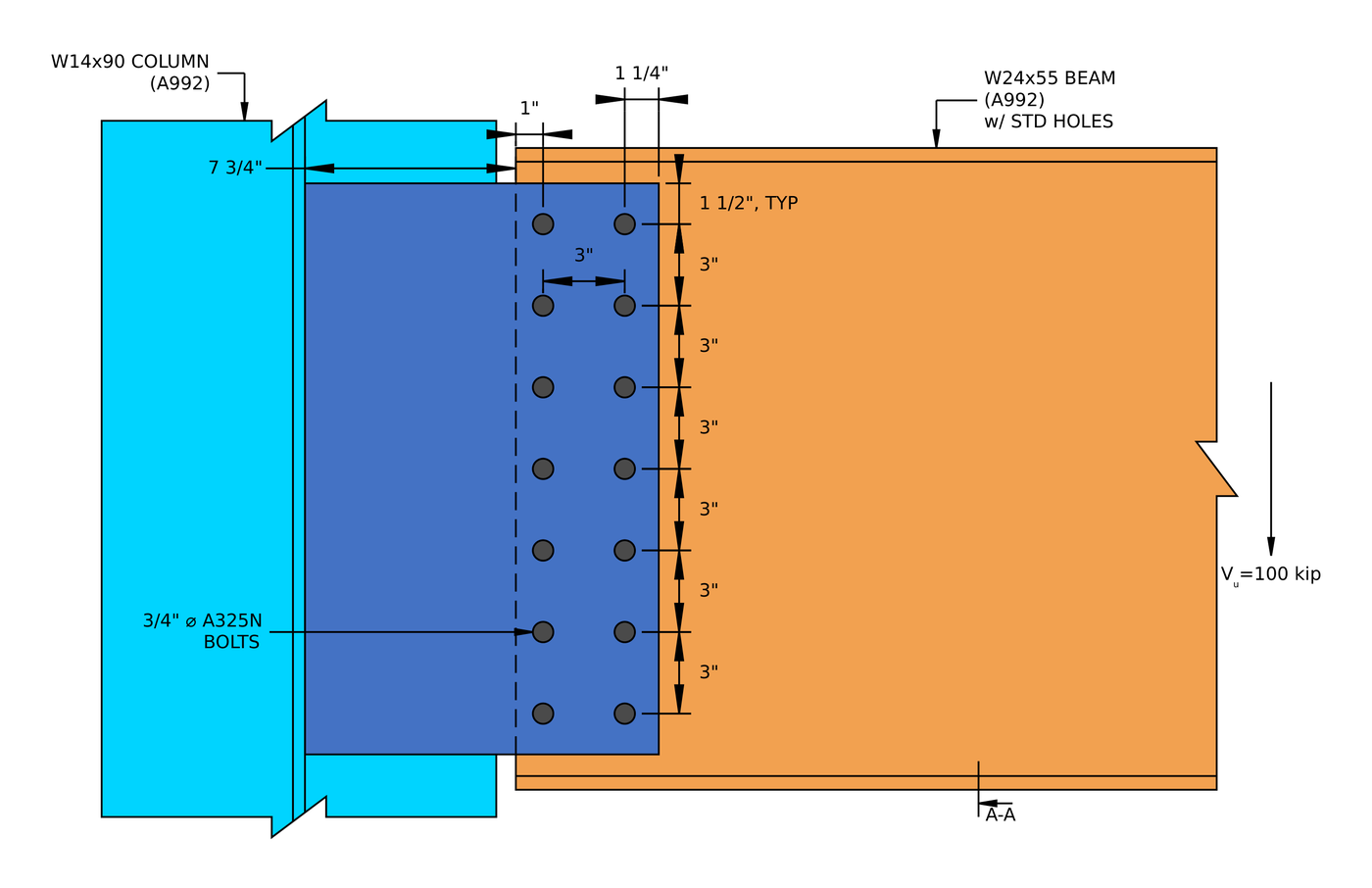
| Extended single plate | Full distance from the weld to the bolt group | e = 10.25 in cuts 14 bolts to 6.29 effective bolts |
| Single angle, support side | [mathin] e = g + t_{w}/2 [mathin], from the support bolt line to the middle of the beam web | e = 1.85 in cuts 2 bolts to 1.24 bolts’ worth |
| Double angle, beam side | Neglected (Manual Part 10) | The bolt group is treated as concentric |
For the iteration itself, see bolt group calculation using ICOR, or run a bolt group in the bolt calculator.
3. Bolt bearing and tear-out (J3.10)
Each bolt pushes on the edge of its hole. The ply either crushes locally around the hole (bearing) or tears a strip out to the next hole or the edge (tear-out). With deformation at service load a design consideration:
[math] \phi r_{n} = \phi\, \min\left( 1.2\, l_{c}\, t\, F_{u},\ 2.4\, d_{b}\, t\, F_{u} \right), \qquad \phi = 0.75 [math]
[math] l_{c1} = L_{e} – \frac{d_{h}}{2} \qquad l_{c2} = s – d_{h} [math]
The edge bolt has the short clear distance [mathin] l_{c1} [mathin], so tear-out usually limits it, while the inner bolts reach the 2.4 d t Fu bearing cap. Check every ply: the plate or angles, and the beam web. A thin beam web is often the weak ply, because the angles or plate are sized independently. In the double angle example the two 1/4 in angles give 0.5 in of steel against the bolts, but the 1/4 in beam web has only one ply, and bearing on the web is the highest strength ratio, at 0.760.
Each bolt then delivers the least of its shear, bearing and tear-out strengths, and the group strength is the sum (J3.6 Commentary):
[math] \phi R_{n,eff} = \frac{C}{n} \sum_{i=1}^{n} \min\left( \phi r_{v},\ \phi r_{n,plate,i},\ \phi r_{n,web,i} \right) [math]
4. Block shear (J4.3)
A block of the plate, angle or coped beam web can tear out around the bolt group: shear along the line of holes plus tension across to the free edge, usually an L-shaped block.
[math] \phi R_{n} = \phi \left( 0.6\, F_{u} A_{nv} + U_{bs} F_{u} A_{nt} \right) \le \phi \left( 0.6\, F_{y} A_{gv} + U_{bs} F_{u} A_{nt} \right), \qquad \phi = 0.75 [math]
[mathin] U_{bs} = 1 [mathin] when the tension stress is uniform, which is the case for a single line of bolts. The net areas deduct each hole at [mathin] d_{h} + 1/16\,in [mathin] for damage during punching (B4.3). In the shear end plate example, block shear of the plate is the second highest ratio, at 0.920.
5. Shear yielding and shear rupture (J4.2)
The plate or angles carry the whole reaction in shear, across the gross section (yielding) and across the net section through the holes (rupture):
[math] \phi R_{n} = \phi\, 0.6\, F_{y}\, A_{gv}, \qquad \phi = 1.00 [math]
[math] \phi R_{n} = \phi\, 0.6\, F_{u}\, A_{nv}, \qquad \phi = 0.75 [math]
In the single plate example, shear rupture of the 1/2 in plate is the highest load check, at 0.629.
6. Plate flexure and the shear-flexure interaction
The reaction acts at a distance from the support, so a single plate is a short cantilever. SkyCiv checks it with the Manual’s double-coped beam procedure, which treats the plate like a beam web coped top and bottom, and checks flexural rupture on the net section through the holes. Because the same section carries shear and moment, the two combine:
[math] \left( \frac{V_{u}}{\phi V_{n}} \right)^{2} + \left( \frac{V_{u}}{\phi R_{n}} \right)^{2} \le 1.0 [math]
This check grows with the eccentricity. In the conventional shear tab it is minor, but in the extended single plate example the rupture interaction governs the connection at 0.938.
7. Ductility: the maximum plate thickness (Manual Part 10)
A shear connection is assumed to rotate. If the plate is stronger in bending than the bolts are in shear, the bolts break before the plate yields, which is a brittle failure and contradicts the simple connection assumption. The Manual caps the plate thickness so the plate yields first:
[math] M_{max} = \frac{F_{nv}}{0.90}\, \frac{\pi}{4} d_{b}^{2}\, C’ [math]
[math] t_{max} = \frac{6\, M_{max}}{F_{y}\, d_{p}^{2}} [math]
C’ is the bolt group coefficient for moment alone. This is the one check that a thicker plate makes worse. In the single plate example a 1/2 in plate sits at 0.966 of its limit.
8. Weld strength and the base metal limit (J2.4, Manual Part 9)
The fillet welds that join the plate or angles to the support (or the end plate to the beam web) carry the reaction along their length:
[math] \phi R_{n} = \phi\, 0.6\, F_{EXX}\, \frac{\sqrt{2}}{2}\, w\, L_{w} \left( 1 + 0.5\, \sin^{1.5}\theta \right), \qquad \phi = 0.75 [math]
For a vertical reaction on vertical welds, [mathin] \theta = 0 [mathin] and the directional factor is 1.0. The steel either side of the weld also limits how much of the weld size counts. For welds on both faces of a plate of thickness t, the usable size in sixteenths is:
[math] D_{max} = \frac{ \frac{t}{2}\, F_{u} }{3.09\,kip/in} [math]
So a bigger weld does not always help. In the shear end plate example the 0.355 in beam web limits the usable weld to about 0.233 in, and the weld governs the connection at 0.995. For a single plate, the Manual also asks for fillets of [mathin] \frac{5}{8}\, t_{p} [mathin] on both sides, so that the weld can develop the plate if it yields. Try sizes in the weld calculator.
9. The supporting and supported members
The connection is only as good as the steel it attaches to. A coped beam has a reduced section at the cope, which needs its own block shear, shear and flexure checks; the single angle example works these through for a W12x14 coped at the top flange. Where the beam frames into a girder web or a thin column web, check bearing and tear-out on that web too.
Shear connection design examples (AISC 360-16 LRFD)
Each example below is a full AISC calc sheet from SkyCiv Connection Design, written out step by step with every equation, substituted value and DCR. They show how the governing check moves from one connection type to the next.
| Example | Members and load | Connection | Governing load check |
|---|---|---|---|
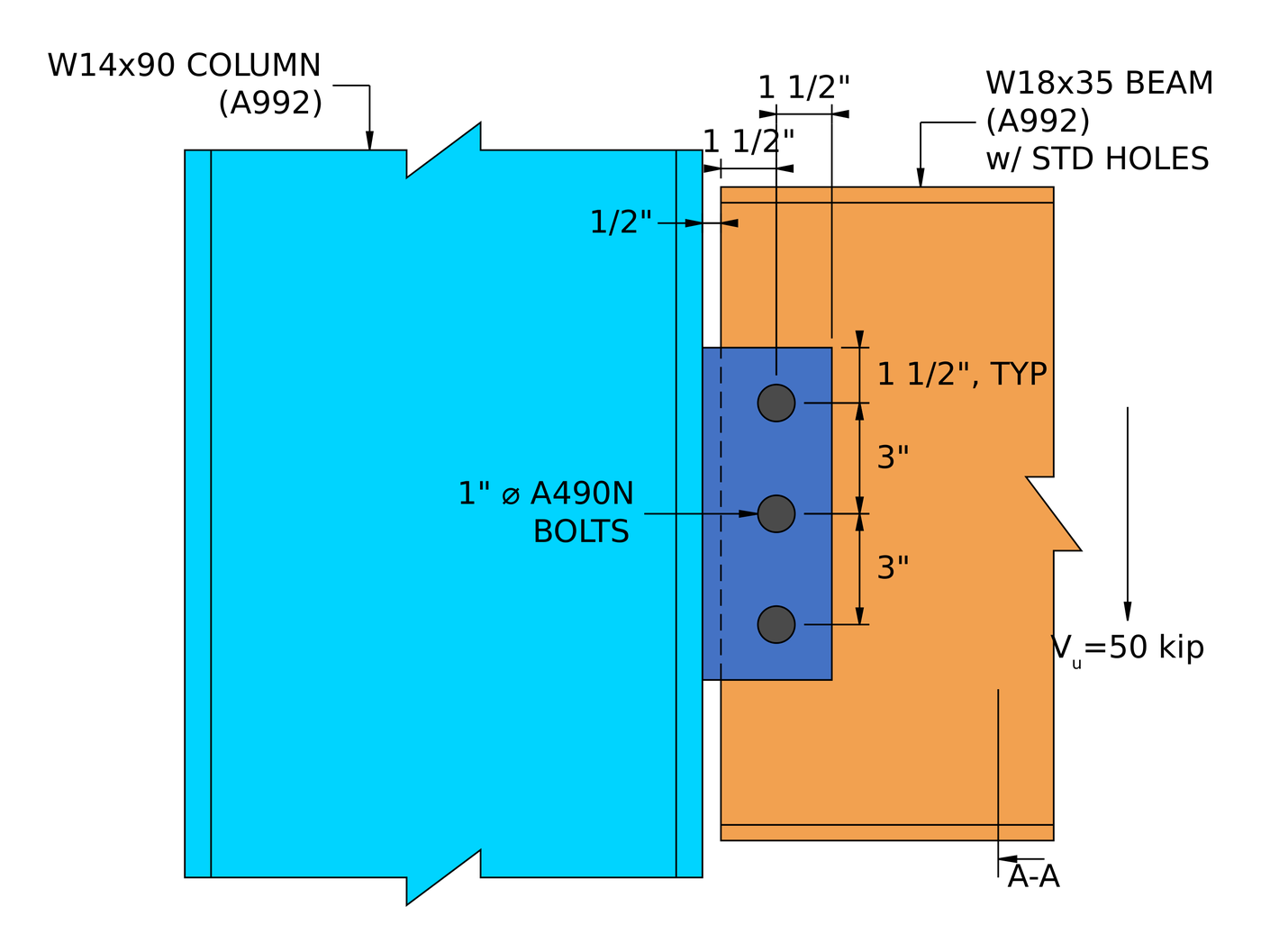
| Single plate (shear tab) | W18x35 beam to W14x90 column flange, 50 kip | 1/2 in plate, three 1 in A490-N bolts | Plate shear rupture, 0.629 |
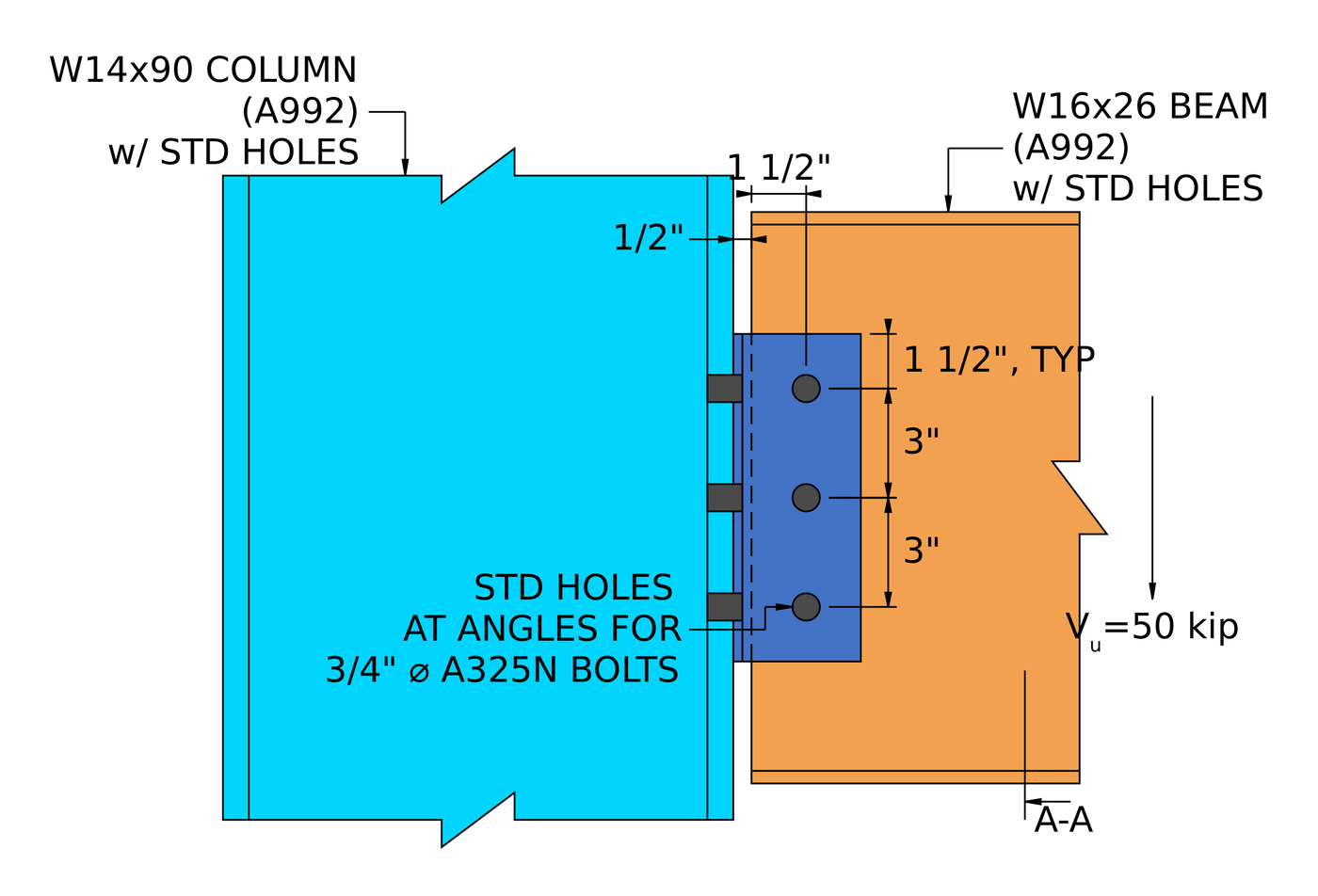
| Double angle | W16x26 beam to W14x90 column flange, 50 kip | 2L4x3-1/2×1/4, three rows of 3/4 in A325-N each side | Bolt bearing on the beam web, 0.760 |
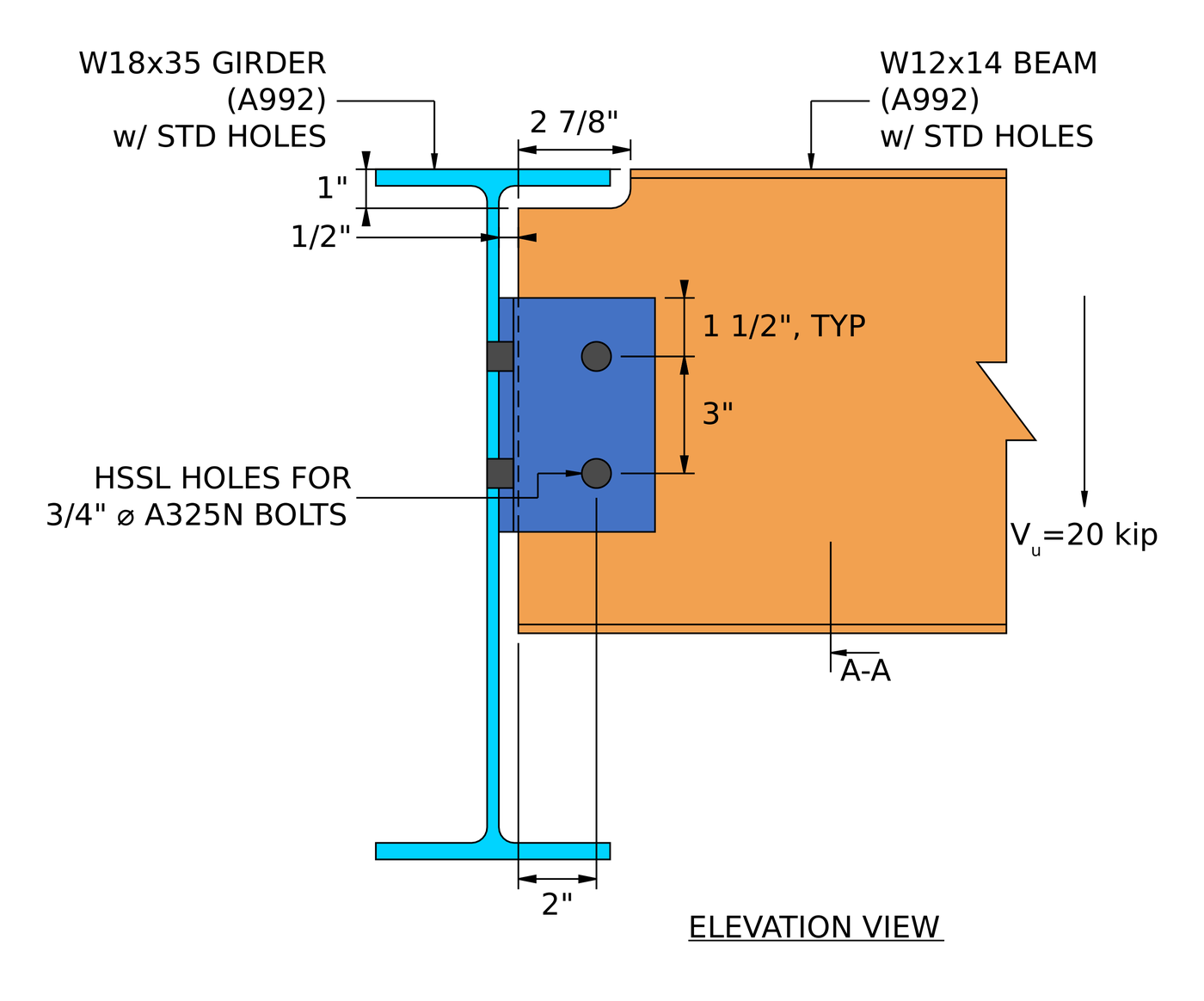
| Single angle | Coped W12x14 beam to W18x35 girder web, 20 kip | L4x3x3/8, two rows of 3/4 in A325-N each leg | Bolt shear at the girder, 0.901 |
| Extended single plate | W24x55 beam to W14x90 column web, 100 kip | 3/8 x 13 x 21 in A36 plate, fourteen 3/4 in A325-N | Shear and flexure interaction (rupture), 0.938 |
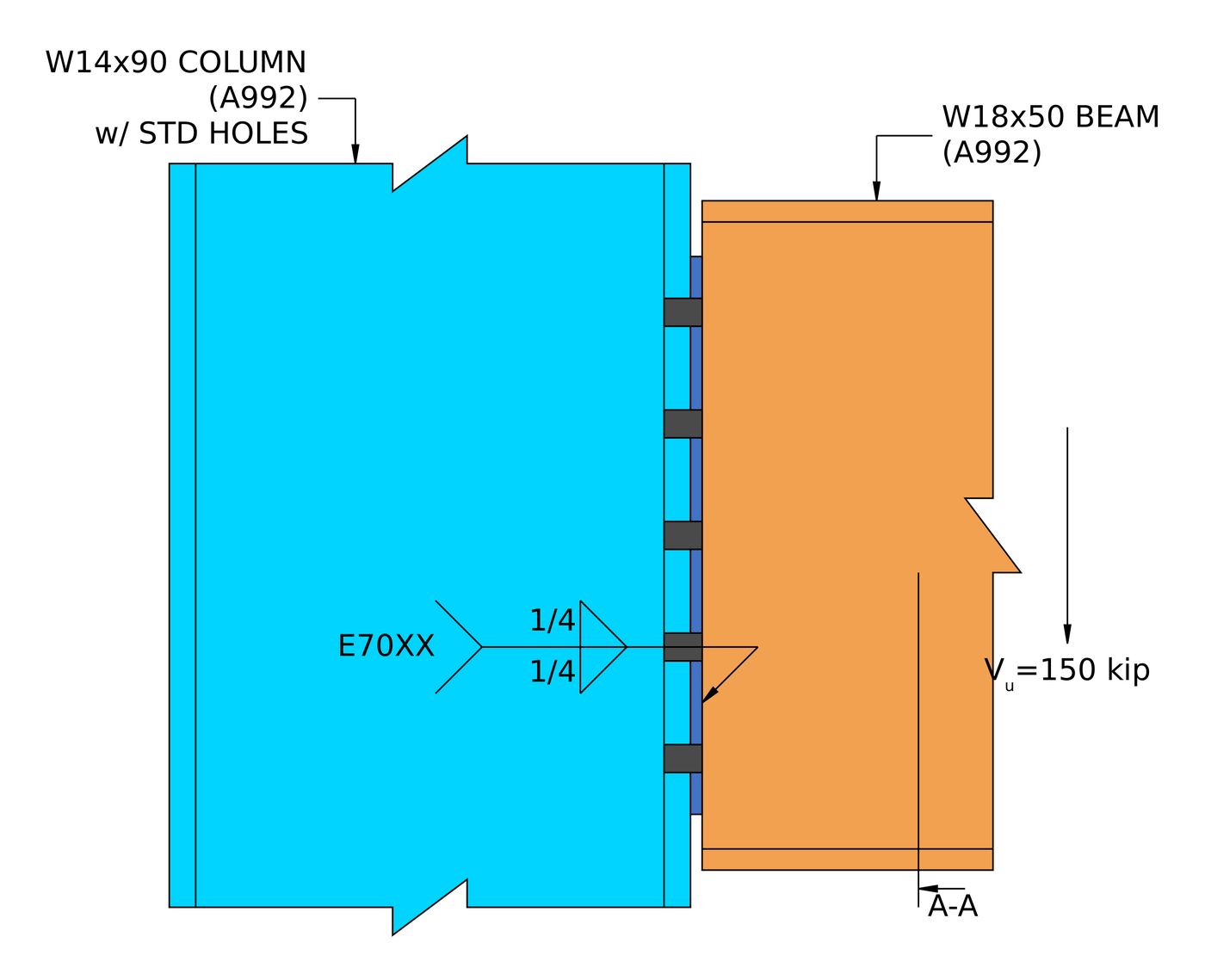
| Shear end plate | W18x50 beam to W14x90 column flange, 150 kip | 5/16 x 8 1/2 x 15 in A36 plate, ten 3/4 in A325-N, 1/4 in fillets | Weld at the beam web, 0.995 |
The pattern is worth knowing. A short, conventional shear tab is rarely close to its limit. Once the reaction moves away from the bolts, as in the single angle and the extended plate, the eccentricity drives the design. And in a welded connection like the end plate, the thinnest piece of base metal decides the weld.
For the theory behind all five, see design of steel connections using AISC 360-16.
Which shear connection should you use?
| Connection | Best for | Watch for |
|---|---|---|
| Single plate (shear tab) | Most beam-to-column and beam-to-girder framing. One shop weld, one field bolt group | Plate ductility (tmax), and the Table 10-9 limits on the conventional configuration |
| Extended single plate | Framing into a column web between the flanges, without coping the beam | Full eccentricity, plate flexure and the shear-flexure interaction |
| Double angle | Heavier reactions, and erection where the beam needs to be dropped in between supports | Bearing on a thin beam web, and two bolt groups to detail |
| Single angle | Light reactions, and access from one side only | Eccentricity at the support bolts, which cuts the group strength |
| Shear end plate | Shop-welded beams with fast, all-bolted field erection | Accurate beam length, and the weld limited by the beam web thickness |
What does the software check?
For a shear connection, the design runs both a detailing pass and a strength pass.
Detailing runs first and catches the geometry: bolt edge distances, bolt spacing (pitch and gage), tool clearances, and minimum and maximum plate dimensions, plus clash detection between plates, bolts and welds. A connection that fails here never reaches the solve. That is usually what you want, because the numbers do not matter if the detail cannot be built.
The strength checks then cover every limit state in the procedure above: bolt shear by ICOR, bolt bearing and tear-out, block shear rupture, shear yielding and rupture, plate flexure and its interaction with shear, ductility, and weld strength with the base metal limit, plus the checks on coped beams and the supporting member. The calculation report shows every formula, design check and code reference in full, with the clause numbers from AISC 360-16 or AS 4100:2020, so you can follow the calculation rather than take it on trust. The worked examples above are written from those reports.
For the fastener side of this, see the documentation on bolts and welds.
What’s the difference between a Shear and Moment Connection?
A shear connection transfers shear only. A moment connection also transfers bending. Think of it as a hinge: a shear connection lets the beam end rotate, a moment connection holds it.
The distinction is a decision about the analysis model, not only about the detail. A shear tab designed as simple has to be flexible enough to actually rotate, which is what the ductility check enforces, and a moment connection has to be stiff enough to justify the fixity the frame model assumed.
| Shear Connection | Moment Connection | |
|---|---|---|
| Forces Transferred | Shear Only | Shear and Moment |
| Alternative names | Pinned, Hinge, Simple | Rigid, Fixed, Moment-resisting |
| AISC 360-16 term | Simple connection | FR or PR moment connection |
| Rotation | Allows Rotation | Restrains Rotation |
| Software Fixity Code | FFFFFR | FFFFFF |
Frequently asked questions
How do you calculate the capacity of a shear connection?
Work out the strength of every limit state along the load path (bolt shear with the eccentricity, bearing and tear-out on each ply, block shear, shear yielding and rupture, plate flexure, ductility and the welds) and take the lowest. That lowest value is the connection capacity, and the check that gives it is the governing limit state.
Is a shear connection the same as a pinned connection?
Yes, for analysis. A shear connection is modelled as a pin, free to rotate and carrying no moment. In practice it does carry a small moment, which is why AISC 360-16 B3.4 asks that a simple connection have enough rotation capacity to accommodate the beam end rotation. The ductility limit on plate thickness is one way the design makes sure of that.
What is the eccentricity in a shear tab, and why is it a/2?
AISC Manual Table 10-9 sets the design eccentricity for a conventional single plate connection. For many bolt counts and hole types it is half the distance from the weld line to the bolt line, a/2, because the point of zero moment sits between the weld and the bolts. Outside the conventional limits, such as a plate extended into a column web, the full distance is used and the bolt group loses much more strength.
Which check usually governs a shear connection?
It depends on the type. In the five worked examples the governing load check was plate shear rupture (single plate), bearing on the beam web (double angle), bolt shear with eccentricity (single angle), the shear-flexure interaction (extended single plate) and the weld (shear end plate). Thin beam webs and eccentricity are the two things to look at first.
Should the bolts be bearing type or slip-critical?
Most shear connections use snug-tight bearing-type bolts (A325-N, A490-N), which is what all five worked examples use. Slip-critical bolts are needed where slip would be a problem, such as oversized or slotted holes parallel to the load, or joints subject to fatigue or load reversal.
Can I design a shear connection with ASD instead of LRFD?
Yes. The limit states are identical. Replace [mathin] \phi R_{n} [mathin] with [mathin] R_{n} / \Omega [mathin] and compare against the ASD reaction. SkyCiv Connection Design runs both, and switching between them is one setting.
Do the examples follow the AISC 15th or 16th edition Manual?
They follow AISC 360-16 and the AISC Manual 15th Edition, which is written around that Specification. The 16th Edition Manual pairs with AISC 360-22. The shear connection limit states are much the same, but clause and table references move, so check them against the edition your project uses.
SkyCiv Connection Design Software
The models and checks above are from SkyCiv Connection Design. It covers over 80+ pre-configured connection types, designs to AISC 360-16 (LRFD & ASD) and AS 4100:2020, and shows every formula, design check and code reference in full.
You can model the connection in 3D, swap bolts, welds or plates without losing your load data, produce 2D detail drawing sheets in CloudCAD, and export the 3D geometry to IFC for coordination in Revit, Tekla or Navisworks.
It runs entirely in the browser, with no downloads, updates or IT setup.
The full module adds the step-by-step calculation report, like the worked examples above, with every capacity and DCR.
References
- AISC 360-16, Specification for Structural Steel Buildings: B3.4, B4.3, J2.4 (Eq. J2-4), J3.2 (Table J3.2), J3.3, J3.4 (Table J3.4), J3.5 (Table J3.5), J3.6 (Eq. J3-1) and Commentary, J3.10 (Eq. J3-6a, J3-6c), J4.2 (Eq. J4-3, J4-4), J4.3 (Eq. J4-5).
- AISC Steel Construction Manual, 15th Edition: Part 7 (Eq. 7-1, instantaneous center of rotation); Part 9 (base metal limit on weld size, coped beam flexure); Part 10 (simple shear connections, Table 10-9, Eq. 10-3 and 10-4).
- AS 4100:2020, Steel Structures.

Harold Munalem
Product Manager, Connection Design
10+ years in steel connection design
LinkedIn

