
Easy to use, online, cheaper and integrated CAD, for Structural Engineers
What is CloudCAD? How is it different?
CloudCAD is a cloud-based 2D CAD software built by SkyCiv, with the purpose of being a powerful CAD software tailored for structural engineers. The software works as any drafting, documentation program would – with the ability to create points, lines, texts, markups and other common features found on engineering and architectural drawings.
Built to be different, CloudCAD is focused on the following benefits:
| Integrated | 2-way integration with Analysis Software, purpose built for Structural Engineers. |
| Cheaper | It’s more cost-effective, half the price of traditional CAD |
| Live Share/Collaboration | Share via live links, no installation needed, comment and collaborate easily! |
| Cloud-Based | It’s completely cloud-based, no software installation required |
| AI-Powered | AI-capabilities, prompt based building and editing of your CAD files (coming soon) |
| Customizable | Create your own customised shortcuts for faster modelling |
| Open JSON Format | Supports API and AI Automations |
| Continued Development | Continuing to build new features |
Video Demo
Watch this quick walkthrough of SkyCiv CloudCAD and some of it’s key capabilities:
User Interface
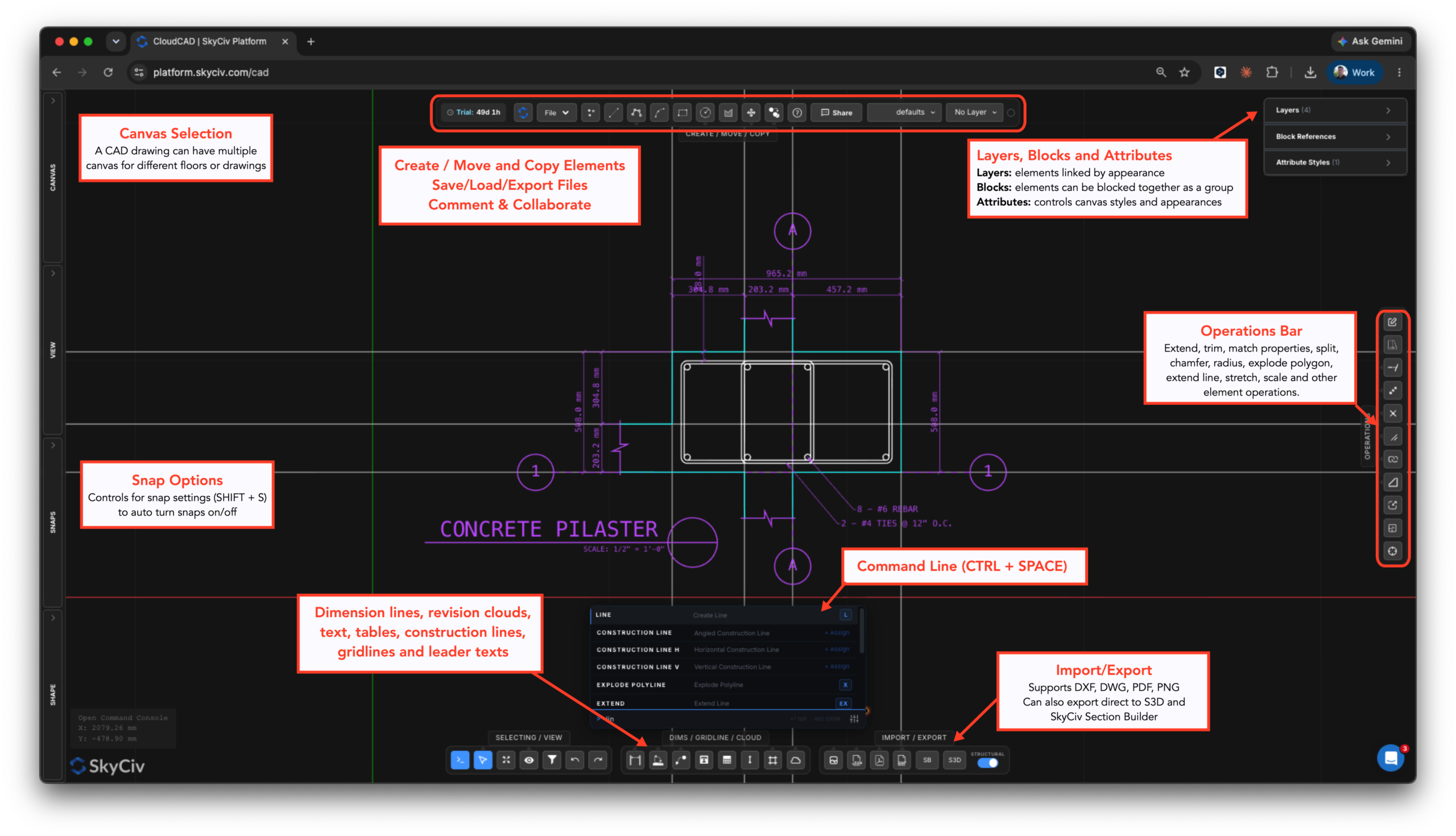
The user interface is designed to be easy to use and easy to find your way around. Here are the main components of the CloudCAD interface:
What can CloudCAD do?
CloudCAD allows users to model, comment, dimension and export drawings to DXF, PDF. Currently, CloudCAD supports the following element types:
- Points
- Lines:
- Basic Lines
- Rectangles
- Circles
- Polylines (circles)
- Arcs
- Splines
- Gridlines
- Construction Lines
- Dimensions:
- Linear Fimensions
- Angled Dimensions
- Radius Dimensions
- Text
- Leader Texts
- Multi-leader Texts
- Tables
- Revision Clouds
- Hatches
- Blocks
- Images
What file formats does CloudCAD support?
CloudCAD supports the following importing and exporting capabilities:
Importing
- DWG – AutoDesk native format
- DXF – basic lines and points data
- Images – for tracing
- PDF (imports as an image for tracing)
- JSON (SkyCiv file format, use this for API and automation)
Exporting
- DXF
- Structural 3D – export your plans into an analysis model
- Section Builder – export any hatch shapes directly into Section Builder (includes holes and cutouts)
How can I get access to CloudCAD?
CloudCAD is available to launch from your SkyCiv Dashboard once you have logged in. From there you will either need to start your free 30 or 60 Day Trial or have a subscription that includes CloudCAD.
