分析タイプ
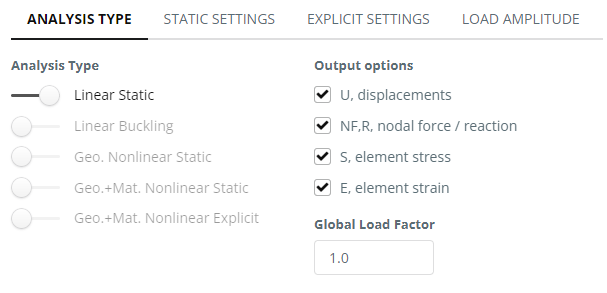
線形静的 – 静的解析, 弾性材料の特性を考慮します
線形座屈 – 選択した数の固有モードの線形安定性解析.
幾何学非線形静的 – 反復解析, 弾性材料の特性と形状の非線形性を考慮します (大きな変位)
ジオメトリ + 材料の非線形静的 – 反復静的解析では、材料と形状の非線形性が考慮されます。 (大きな変位)
ジオメトリ + 材料非線形動的 – 反復動的解析では、材料と形状の非線形性が考慮されます。 (大きな変位)
静的設定
グローバル負荷係数 – この係数は、解析のためにモデル内のすべての負荷値に乗算されます。
期間と時間増分 – 反復分析の設定. ほとんどの分析ケースに対するこれらの設定は適切に設定されており、デフォルトで使用できます。.
動的設定
期間と時間増分 – 反復分析の設定.
結果出力手順 – 分析中の結果記録用
ダンピング – レイリー減衰, 比例減衰とも呼ばれます, 要素全体に割り当てられた粘性減衰のバリエーションを表します. このアプローチでは、減衰マトリックスを構築します。, として示される , 質量マトリックスの線形融合による そして剛性マトリックス
負荷振幅
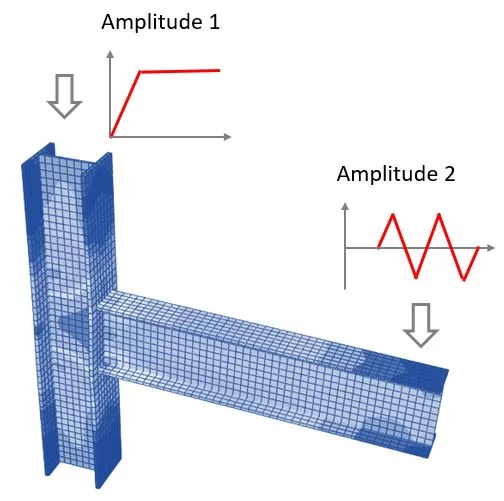
非線形有限要素解析では, 負荷時間関数は、時間の経過とともに負荷がどのように適用されるかを定義する重要な機能です。. このソフトウェアは、さまざまなインスタンスでさまざまな負荷強度を割り当てる機能を提供します。, これは、負荷が一定ではない現実の状況をシミュレートする場合に特に役立ちます.
この機能を強化するには, ソフトウェアでは、負荷に対して 2 つの振幅オプションを定義できます。. これらの振幅オプションを使用すると、解析中に変化する荷重値のパターンまたはシーケンスを指定できます。.
最初の振幅オプションでは、負荷の初期増加を定義できます。, ゼロから最大負荷値まで徐々に増加させることができます。, 構造に対する力や圧力のより現実的な適用を反映します。. 2 番目の振幅オプションでは、後続の位相を記述することができます。, 持ち方パターンなど, 循環ロード, または負荷の除去をシミュレートするための減少.
単一の負荷振幅のみを処理する必要がある場合, ここで、適用されるすべての荷重は同じ関数に従います, 「振幅 1」を使用します’ 例として. プログラムは 2 番目の振幅が使用されていない場合は無視します。.