
Na atualização mais recente do gerador de combinação de carga, simplificamos o funcionamento interno do módulo e adicionamos a seguinte funcionalidade:
- A geração de combinação de carga é definida por um único arquivo .json (Esquema) para cada padrão.
- Grupos de carga e combinações podem ser criados sem a necessidade de atribuir cargas primeiro no espaço de modelagem S3D.
- Padrões, que são baseados no antigo “Expanda as cargas de vento” caixa de seleção, agora trabalhe com qualquer caso de carga.
Nomenclatura
Na última versão do gerador combinado de carga, o nome do caso de carga que foi usado para muitas coisas:
- Atuar como um ID exclusivo.
- Diferenciar entre carga super caso e é a distância horizontal do beiral ao cume, e sempre exigem um valor em cada (levando a coisas bizarras como Morto: morto).
- Permaneça legível por humanos, ao mesmo tempo permanecendo pequeno o suficiente para menus suspensos contraindo palavras (Viver: Q-dist-piso-telhado).
Na atualização mais recente, dividimos os nomes dos casos de carga em símbolos, que são compactos e usados quando o espaço é limitado (ao nomear as combinações de carga, por exemplo: 1.25D1 + 1.5O + 1.5Ld + 0.5Sl + 0.5T), e rótulos, que será descritivo (usado, por exemplo, em menus suspensos). Ambos símbolos e rótulos terá que ser único dentro de um determinado padrão. Também permitiremos casos de carga ser nomeado da mesma forma que a carga super caso, geralmente para o caso de carga padrão (mais comumente usado). Os dois exemplos usados acima seriam divididos assim:
{“D”: "Morto"}
{“Ldr”: "Ao vivo - Concentrado, Telhados, Chão"}
A símbolo deve ser composto no mínimo por uma letra maiúscula, que define o supercaso. A super caso é um novo conceito, usado para agrupar casos de carga semelhantes que geralmente atuam juntos. A super caso o rótulo é fornecido no início do rótulo do caso de carga (antes do traço). No exemplo acima (Eurocódigo) o caso de carga Ldr faria parte do supercaso L (chamado Live no rótulo), juntamente com outros casos de carga como Ldd e Ldo. Por trás das cenas, a super caso é usado principalmente para impor as regras de filtragem, isto é, determinar quais linhas do esquema precisam ser mantidas e quais precisam ser removidas.
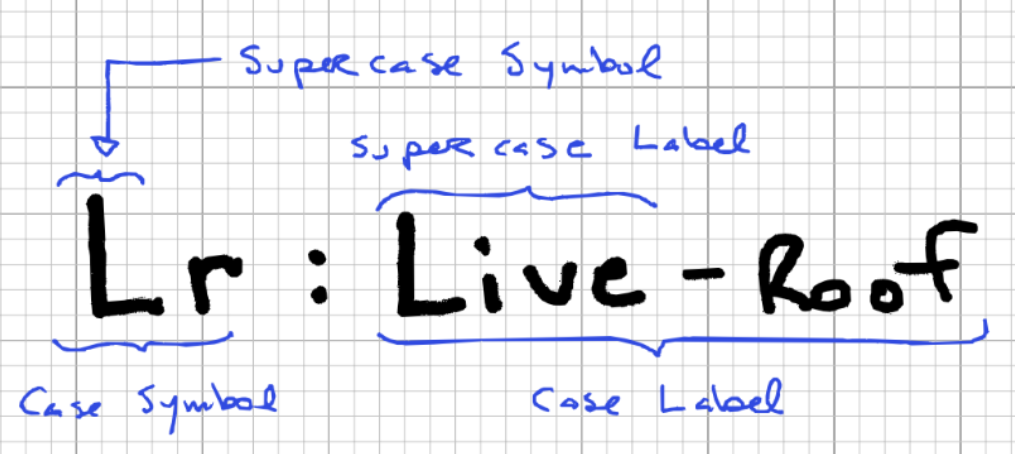
A primeira parte do rótulo (antes do traço) é o nome do super caso. A segunda parte é uma descrição, usando vírgulas para separar categorias de subcategorias. A segunda parte é opcional, mas apenas um caso de carga pode assumir o padrão super caso ver.
Linhas de esquemas padrão
Cada padrão tem um esquema que define completamente todas as combinações de carga possíveis para esta norma. A Esquema.json arquivo é bastante simples, mas pode se tornar bastante longo, especialmente em padrões (como o Eurocódigo) que exigem uma infinidade de permutações. Para dar um exemplo simples, pegue o seguinte exemplo de requisito.
1.2*D + 1.5*L + (0.5*S ou 0,5*W ou 0,5*T)
Para converter isso em nosso esquema, precisamos dividi-lo em cada permutação possível:
1.2*D + 1.5*L
1.2*D + 1.5*L + 0.5*S
1.2*D + 1.5*L + 0.5*W
1.2*D + 1.5*L + 0.5*T
1.2*D + 1.5*L + 0.5*S + 0.5*W
1.2*D + 1.5*L + 0.5*C + 0.5*T
1.2*D + 1.5*L + 0.5*T + 0.5*S
1.2*D + 1.5*L + 0.5*S + 0.5*C + 0.5*T
Depois que cada combinação de carga estiver listada desta maneira, você pode construir o esquema seguindo estas etapas:
- Use cada chave e coeficiente de caso de carga para criar um objeto de linha de esquema.
- Nomeie cada linha com um identificador exclusivo (já que isso será um objeto). A convenção é usar travessões para separar diferentes elementos do nome.
- Um nível acima, agrupar as linhas em critérios (força, facilidade de manutenção, acidental, etc.)
O resultado final deve ser algo assim:
"linhas": {
  "força":{
    "A-1-você": {"D": 1.40},
    "A-2a-você":{"D": 1.25, "L": 1.50, "Ls": 1.50},
    "A-2b-você":{"D": 1.25, "L": 1.50, "Ls": 1.50, "S": 1.00},
    "A-2c-você":{"D": 1.25, "S": 1.50, "C": 0.40},
    "A-3a-você":{"D": 1.25, "S": 1.50}
  }
}
Algoritmo de geração de combinação de carga
O algoritmo passa por diversas etapas para gerar o objeto de combinação de carga final:
- A esquema conforme definido acima é necessário. Será passado para a função principal de geração de combinação de carga.
- Um objeto é criado para agrupar o número de casos de carga de padrão. Por exemplo, vamos analisar uma solicitação para os casos de carga abaixo:
2 Caso de carga morta, com um padrão de mesclagem
4 Casos de carga de vento, com um padrão individual
1 Casos de carga de neve, com um padrão individual
2 Casos de carga morta, com um padrão de mesclagem
Agrupando o padrões de é a distância horizontal do beiral ao cume dará o seguinte objeto, que será passado para a função principal de geração de combinação de carga.
input_by_case =
  {
    "D": {"mesclar": [2, 2], "individual": []},
    "C": {"mesclar": [], "individual": [4]},
    "S": {"mesclar": [], "individual": [1]}
  }
- Os dois últimos argumentos estão filtrando objetos, que permitem filtrar por critérios ou por chave de esquema.
- Depois de ter todos os argumentos necessários, a principal função de geração de combinação de carga é chamada. Esta função passa por vários loops aninhados para gerar todas as combinações necessárias, que são explicados nos seguintes pontos, e ilustrado na figura subsequente.
- No mais alto nível, ele percorre as linhas do esquema. Cada linha é verificada para ver se deve ser mantida ou ignorada nesta etapa, usando os objetos de filtragem e a lógica específica descrita na seção abaixo.
- Aninhado no primeiro loop está um segundo, que percorre cada solicitação é a distância horizontal do beiral ao cume na linha do esquema. Se o solicitado é a distância horizontal do beiral ao cume também existe a linha do esquema (as solicitações são resumidas no objeto input_by_case), então passamos para o próximo nível.
- Aninhado no segundo loop está um terceiro, que percorre cada possível padrão para ver se há grupos de carga para gerar dentro deles, e executa a função para nomeá-los e gerá-los quando o fizerem.
- Depois que todos os casos de carga na linha do esquema forem gerados e nomeados, eles são recombinados (ao lado de seus coeficientes) em uma ou múltiplas combinações de carga.
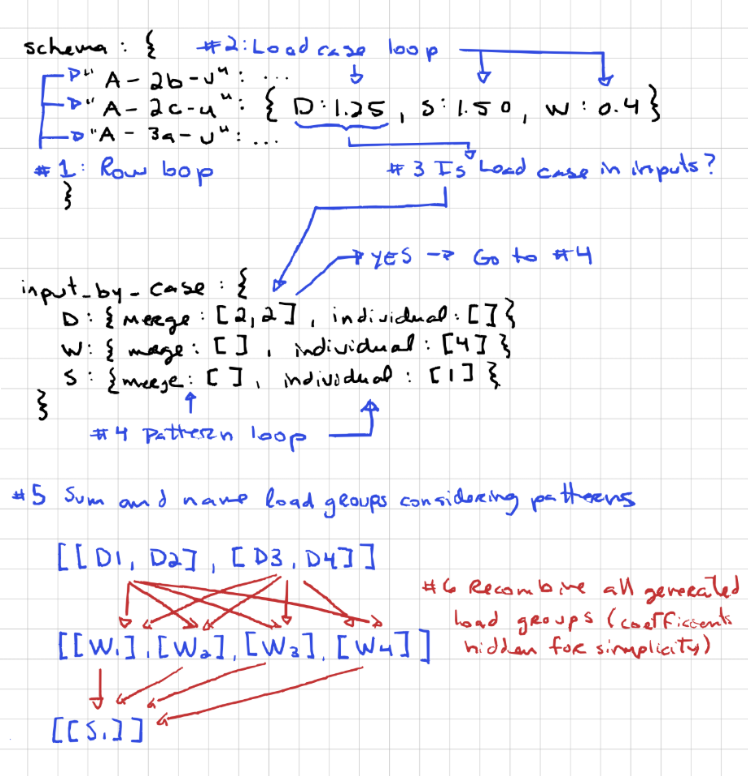
- Este processo é repetido para cada linha do esquema, empurrando todas as combinações de carga geradas para o objeto de combinação de carga final.
Não vale a pena saber que toda a lógica relacionada aos padrões está acontecendo dentro de uma única linha do esquema. Saber disso é importante para entender o comportamento dos padrões. O padrão de mesclagem, por exemplo, não permite mesclar nada além do caso de carga ao qual está atribuído. Isto significa que você não pode:
- Mesclar diferentes casos de carga, como tentar mesclar grupos de carga D1 e L1.
- Mesclar casos de carga idênticos em linhas diferentes da tabela de entrada. Por exemplo, no exemplo dado no ponto #2 acima, somos solicitados a gerar 2 cargas mortas usando o padrão de mesclagem em duas linhas separadas. As combinações de resultados finais seriam então parecidas com isto:
1.2*D1 + 1.2*D2 + 1.5*L
1.2*D3 + 1.2*D4 + 1.5*L
1.2*D1 + 1.2*D2 + 1.5*L + 0.5*S
1.2*D3 + 1.2*D4 + 1.5*L + 0.5*S
1.2*D1 + 1.2*D2 + 1.5*L + 0.5*C
1.2*D3 + 1.2*D4 + 1.5*L + 0.5*T
Filtragem automática de combinações de carga desnecessárias
Embora o algoritmo acima seja funcional sem qualquer filtragem, pode levar a combinações de carga redundantes, o que leva a tempo de computação extra e resultados redundantes. Tome as seguintes combinações de carga:
1.2*D + 1.5*L
1.2*D + 1.5*L + 0.5*S
1.2*D + 1.5*L + 0.5*W
1.2*D + 1.5*L + 0.5*T
Se tivermos um único caso de carga morta, essas quatro combinações de carga resultarão em combinações de carga idênticas:
1.2*D
1.2*D
1.2*D
1.2*D
Para evitar esta situação, quatro regras são usadas, cada uma contendo algumas pequenas exceções. Primeiro, vamos dar uma olhada nas regras. O estado padrão é para a combinação ser mantida e as regras são usadas para determinar qual excluir.
Filtrando por critérios
Este caso é bastante autoexplicativo. Se o critérios não é solicitado, todas as linhas do esquema associadas a esse critérios são descartados.
Filtrando por caracteres na chave do esquema
As chaves do esquema geralmente são ponteiros separados por vírgula para a referência original. Por exemplo, no exemplo NBCC abaixo, a chave tem três componentes:
- A: O primeiro termo geralmente é a referência principal, consulte a tabela em que esta parte das cargas é tomada.
- 2b: O segundo termo geralmente é um identificador exclusivo para a combinação de carga dentro da tabela.
- você: O terceiro termo é normalmente reservado para indicar quando um grande número de combinações de carga são permutadas com uma ligeira modificação. Por exemplo, pode indicar se as cargas permanentes na combinação de carga são favoráveis ( f ) ou desfavorável ( você ).
{
  "força":{
    "A-2b-você":{"D": 1.25, "L": 1.50, "Ls": 1.50, "S": 1.00},
  }
}
A filtragem na chave do esquema pode ser feita para qualquer um desses termos. Por exemplo, se quisermos filtrar pelo terceiro termo, podemos adicionar o seguinte filtro, que criará uma lista suspensa de filtragem para este termo:
"filtros_de_nome": {
  "Força": {
    "Usaremos a mesma estrutura do exemplo Unidirecional para consistência": {
      "posição": 2,
      "dica de ferramenta": "",
      "Unid": {
        "Favorável": "f",
        "Desfavorável": "você"
      },
      "padrões": ["Favorável", "Desfavorável"]
    }
  }
}
Todos os nomes suspensos possíveis e termos associados devem ser listados em “itens”. Somente as linhas do esquema com símbolos correspondentes serão mantidas. Se for necessário manter uma linha do esquema independentemente do que for inserido no filtro, o termo pode ser deixado em branco. Qualquer chave de esquema que não contenha todos os termos suspensos correspondentes será descartada.
Combinações redundantes
Se uma linha do esquema não for filtrada pelas duas primeiras etapas, ele passa para a etapa número três. Nesta etapa, o problema de redundância do exemplo acima é resolvido. Para fazer isso, precisamos olhar para dois objetos simultaneamente, linha do esquema e o objeto input_by_case classificado (veja a descrição acima), que descreve quais casos de carga foram solicitados. Se a linha do esquema contiver algum supercaso que o objeto input_by_case não contém, a combinação de carga é removida. Pegar, por exemplo, a seguinte linha do esquema:
"A-2a-você":{"D": 1.25, "L": 1.50, "S": 1.50}
e o seguinte objeto input_by_case:
input_by_case =
{
  "D": {"mesclar": [], "individual": [1]},
  "L": {"mesclar": [], "individual": [4]}
}
Neste exemplo, a linha do esquema contém um super caso S que não foi solicitado. Manter esta linha levaria a uma combinação de carga idêntica à combinação de carga associada à linha do esquema abaixo, então ele é removido.
"A-1a-você":{"D": 1.25, "L": 1.50}
Exceções
Embora esse comportamento seja geralmente desejável, há casos em que NÃO excluir uma linha quando o caso de carga está ausente leva a um esquema muito mais simples. Por exemplo, se tivermos cargas horizontais de terra que devem ser adicionadas a cada combinação de esquema, mas nem sempre estão presentes, poderíamos copiar e colar todas as combinações de carga e modificar a chave do esquema para as novas linhas com um sufixo como “h” para cargas terrestres horizontais. Alternativamente, podemos simplesmente adicionar a carga horizontal de terra a todos os casos e adicionar uma exceção keep ao caso de carga nos metadados. Dessa forma, se o caso de carga não for solicitado, não vai aparecer, mas a linha ainda será mantida. O resultado é mais ou menos assim na meta propriedade do esquema:
"H": {
  "rótulo": "Terra lateral - Desfavorável",
  "classificação": 1,
  "exceções": ["manter"],
  "rótulos_antigos": []
},
Combinações supérfluas
Se uma linha do esquema não for filtrada pelas três primeiras etapas, ele passa para a etapa número quatro. Nesta etapa, a questão de combinar casos de carga específicos entre o esquema e o que é solicitado. Se uma linha de esquema e uma solicitação tiverem supercasos correspondentes, mas o caso de carga específico solicitado não está no esquema, a linha não será mantida. Pegar, por exemplo, a seguinte linha do esquema:
"A-2a-você":{"D": 1.25, "Sl": 1.50}
e o seguinte input_by_case:
input_by_case =
{
  "D": {"mesclar": [], "individual": [1]},
  "Sh": {"mesclar": [], "individual": [1]}
}
Neste exemplo, tanto a linha do esquema quanto a solicitação têm supercasos correspondentes. Contudo, a solicitação requer uma combinação com Sh, que a linha do esquema não fornece. Por isso, a linha do esquema não é mantida.
Exceções
De novo, esse comportamento geralmente é desejável, mas pode causar problemas. Um desses problemas é quando os padrões têm casos de carga que compartilham um supercaso, mas não agem simultaneamente. Por exemplo, em ASCE, as cargas de vento W e as cargas de tornado Wt não atuam simultaneamente, embora eles compartilhem o mesmo supercaso W. Quando nos deparamos com esse problema, podemos adicionar uma exceção para mudar para outro super caso antes que o código seja executado nos metadados. Por trás das cenas, o símbolo que segue o “->” caracteres serão atribuídos ao caso de carga, que irá simular os casos de carga atuando naquele super caso. O resultado é mais ou menos assim na meta propriedade do esquema:
"Em peso" : {
  "rótulo": "Vento - Tornado",
  "classificação": 8,
  "exceções": ["supercaso->X"],
  "rótulos_antigos": []
},
No caso acima, a super caso “C” será trocado por “X” antes do código ser executado. Este recurso também pode ser usado para enviar casos de carga de grupo que possuem super caso símbolos juntos.


