This page explains how to apply a moment load (a concentrated moment) to a node or to any point along a member in SkyCiv Structural 3D. A moment is the product of a force and its distance from a point, and causes rotation. In both cases you specify the location of the moment and its magnitude about the global X, Y and Z axes, so a moment about an inclined axis is entered as its X, Componentes Y e Z.
To add a moment, abrir Momentos under the loads section of the left menu. At the top of the form, use o Nó e Membro toggle to choose where the moment is applied, fill in the fields below, então clique Aplicar.
Moments follow the sign convention of the right-hand grip rule: point the thumb of your right hand along the positive direction of the axis, and your fingers curl in the positive direction of the moment. Looking down the axis, with its positive end pointing towards you:
- Positivo (+): Counter-clockwise
- Negativo (-): Sentido horário
In the model, the moment is drawn as a curved arrow in the direction of rotation, with its magnitude as the label.
Momentos aplicados aos nós
Com Nó selecionado, specify values for:
- Moment ID – The numerical ID used to identify each moment. Pick an existing ID from the list to edit that moment.
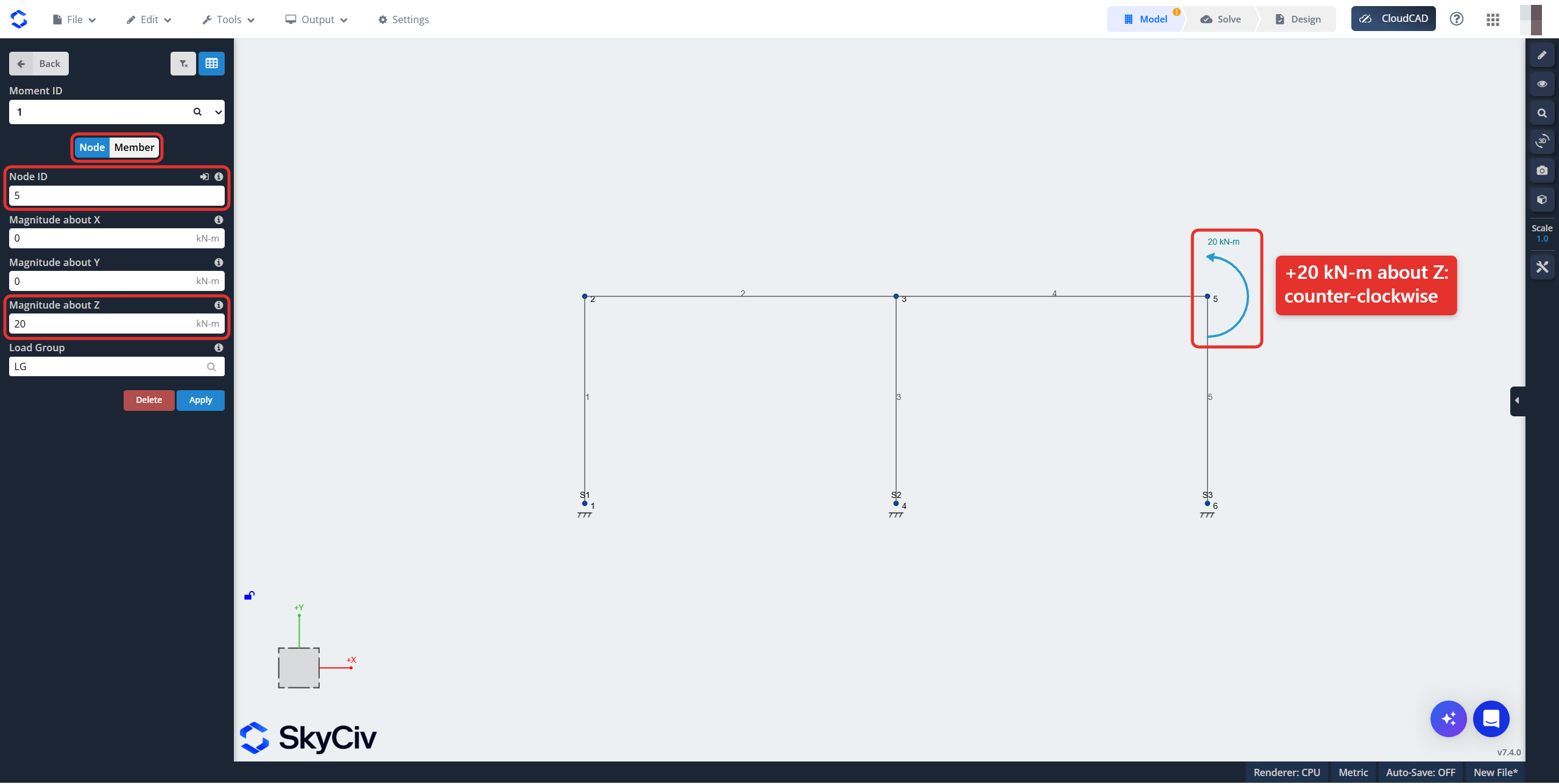
- ID do nó – O nó onde o momento é aplicado. You can enter several nodes at once (por exemplo 1,2,3, 1-3 ou tudo), or highlight nodes in the model and double-click to fill in the field.
- Magnitude sobre X – The moment about the global X-axis. Use negatives for a clockwise moment.
- Magnitude sobre Y – The moment about the global Y-axis. Use negatives for a clockwise moment.
- Magnitude sobre Z – The moment about the global Z-axis. Use negatives for a clockwise moment.
- Grupo de carga – The name of the load group the moment belongs to (LG by default). Load groups are assigned to load cases and can then be multiplied by a factor in load combinations.
Here is what a 20 kN-m moment about the Z-axis applied to an end node looks like:
Momentos aplicados aos membros
Com Membro selecionado, specify values for:
- Moment ID – The numerical ID used to identify each moment.
- ID de membro – The member where the moment is applied. Like the Node ID, it accepts several members at once (1,2,3, 1-3 ou tudo) and highlighted members.
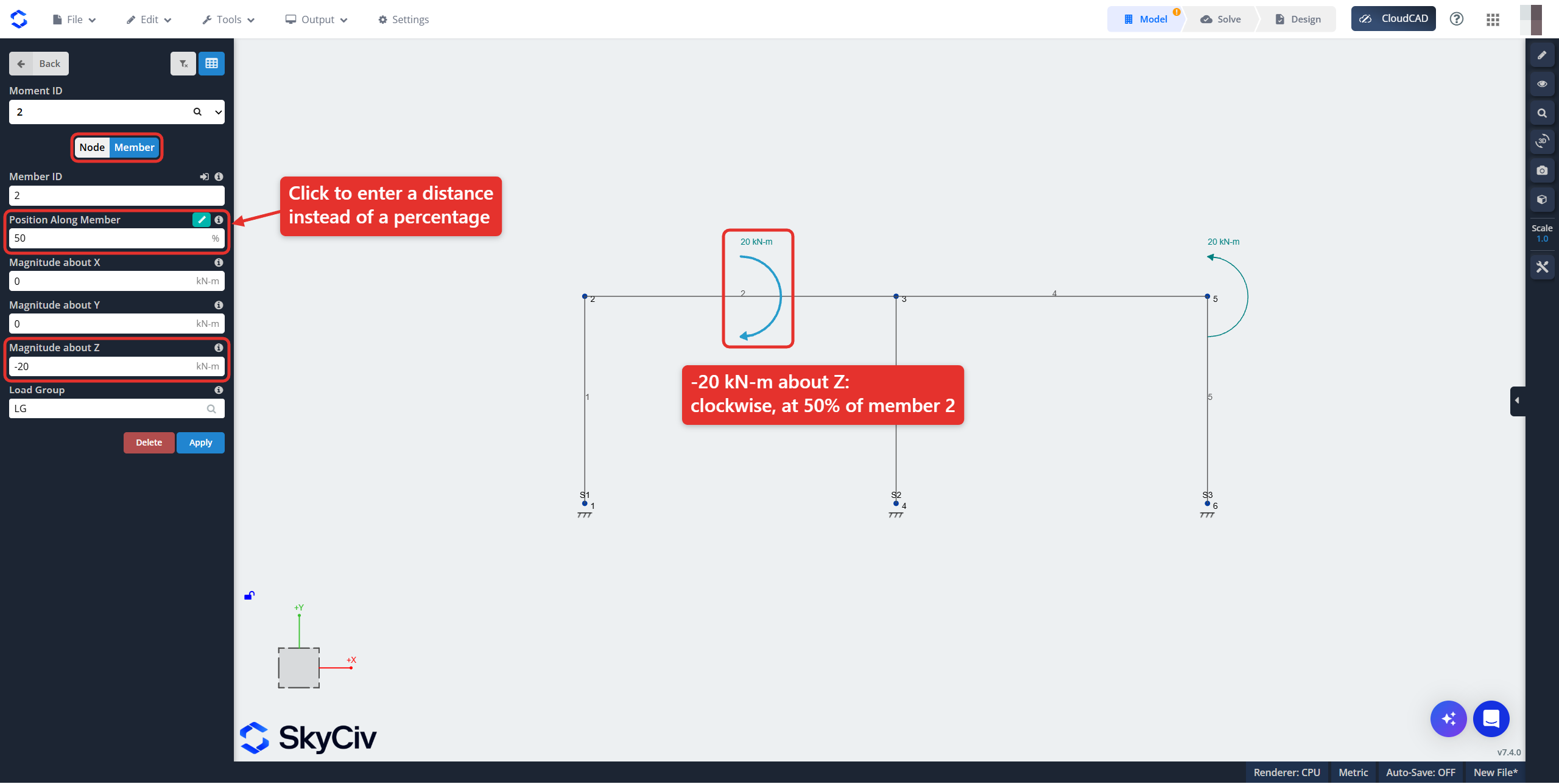
- Posição ao longo do membro – The position of the moment along the member, as a percentage of its length from node A (0%) to node B (100%). To enter a distance instead, click the small button next to the field label (Enter a distance rather than a percentage): a Enter Distance box asks for a distance from node A and converts it to a percentage, as for cargas pontuais.
- Magnitude sobre X – The moment about the global X-axis. Use negatives for a clockwise moment.
- Magnitude sobre Y – The moment about the global Y-axis. Use negatives for a clockwise moment.
- Magnitude sobre Z – The moment about the global Z-axis. Use negatives for a clockwise moment.
- Grupo de carga – The name of the load group the moment belongs to. Load groups can then be multiplied by a factor in load combinations.
Here is what a clockwise 20 kN-m moment (-20 kN-m about the Z-axis) applied to the middle of a member looks like: