
En la actualización más reciente del generador de combinación de carga, Hemos simplificado el funcionamiento interno del módulo y agregado la siguiente funcionalidad.:
- La generación de combinación de carga está definida por un único archivo .json (Esquema) para cada estándar.
- Se pueden crear grupos y combinaciones de cargas sin tener que asignar cargas primero en el espacio de modelado S3D..
- Patrones, que se basan en el antiguo “Ampliar cargas de viento” caja, ahora trabaja con cualquier caso de carga.
Nomenclatura
En la última versión del generador de combinación de carga., el nombre del caso de carga que se usó para muchas cosas:
- Actuar como una identificación única.
- Diferenciar entre carga súper caso y caso de carga, y siempre requiere un valor en cada (conduciendo a cosas extrañas como Muerto: muerto).
- Sigue siendo legible por humanos, todo ello siendo lo suficientemente pequeño para menús desplegables contrayendo palabras (En Vivo: Q-dist-piso-techo).
En la actualización más reciente, Hemos dividido los nombres de los casos de carga en simbolos, que son compactos y se utilizan cuando el espacio es limitado (al nombrar las combinaciones de carga, por ejemplo: 1.25D1 + 1.5La + 1.5Ld + 0.5Sl + 0.5T), y etiquetas, que será descriptivo (utilizado por ejemplo en menús desplegables). Ambas cosas simbolos y etiquetas tendrá que ser único dentro de un estándar determinado. También permitiremos casos de carga tener el mismo nombre que la carga súper caso, generalmente para el caso de carga predeterminado (más comúnmente utilizado). Los dos ejemplos utilizados anteriormente se dividirían así:
{"D": "Muerto"}
{“Ldr”: "Vivir - Concentrado, Techos, Piso"}
El símbolo debe estar compuesto como mínimo por una letra mayúscula, que define el super caso. El súper caso es un nuevo concepto, Se utiliza para agrupar casos de carga similares que generalmente actúan juntos.. El súper caso La etiqueta se encuentra al inicio de la etiqueta del caso de carga. (antes del guión). En el ejemplo anterior (Eurocódigo) el caso de carga Ldr sería parte del supercaso L (llamado Live en la etiqueta), junto con otros casos de carga como Ldd y Ldo. Entre bastidores, la súper caso se utiliza principalmente para hacer cumplir las reglas de filtrado, es decir, para determinar qué filas del esquema deben conservarse y cuáles deben eliminarse.
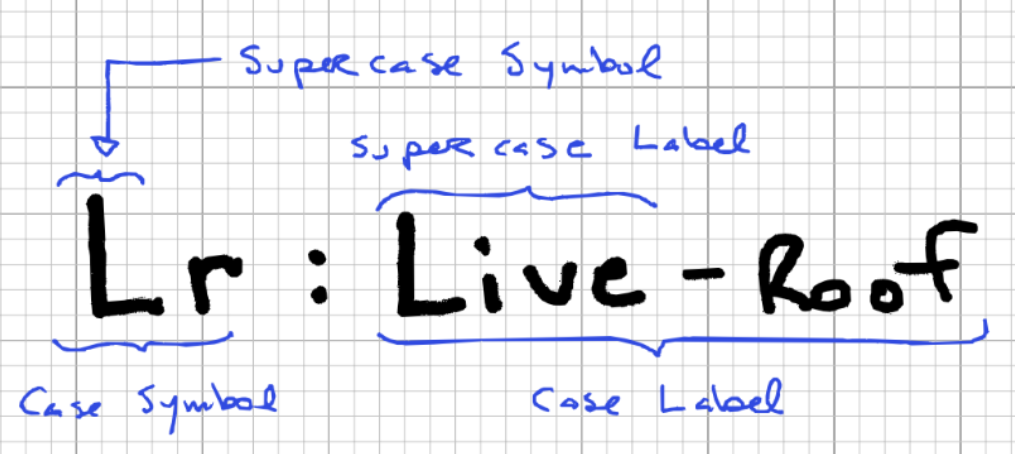
La primera parte de la etiqueta. (antes del guión) es el nombre del súper caso. La segunda parte es una descripción., usar comas para separar categorías de subcategorías. La segunda parte es opcional., pero sólo un caso de carga puede tomar el valor predeterminado súper caso lugar.
Filas de esquemas estándar
Cada estándar tiene un esquema que define completamente todas las combinaciones de carga posibles para esta norma. El esquema.json El archivo es bastante sencillo., pero puede llegar a ser bastante largo, especialmente en estándares (como el eurocódigo) que requieren una multitud de permutaciones. Para tomar un ejemplo simple, Tome el siguiente requisito de ejemplo.
1.2*re + 1.5*L + (0.5*S o 0,5*W o 0,5*T)
Para convertir esto en nuestro esquema, Necesitamos dividirlo en cada permutación posible.:
1.2*re + 1.5*L
1.2*D + 1.5*L + 0.5*S
1.2*D + 1.5*L + 0.5*W
1.2*D + 1.5*L + 0.5*T
1.2*D + 1.5*L + 0.5*S + 0.5*W
1.2*D + 1.5*L + 0.5*W + 0.5*T
1.2*D + 1.5*L + 0.5*T + 0.5*S
1.2*D + 1.5*L + 0.5*S + 0.5*W + 0.5*T
Una vez que cada combinación de carga esté enumerada de esta manera, Puedes construir el esquema siguiendo estos pasos.:
- Utilice cada clave y coeficiente de caso de carga para crear un objeto de fila de esquema.
- Nombra cada fila con un identificador único (ya que este va a ser un objeto). La convención es utilizar guiones para separar diferentes elementos del nombre..
- Un nivel arriba, agrupar las filas en criterios (fuerza, utilidad, accidental, etc.)
El resultado final debería verse así:
"filas": {
  "fuerza":{
    "A-1-u": {"re": 1.40},
    "A-2a-u":{"re": 1.25, "L": 1.50, "ls": 1.50},
    "A-2b-u":{"re": 1.25, "L": 1.50, "ls": 1.50, "S": 1.00},
    "A-2c-u":{"re": 1.25, "S": 1.50, "W": 0.40},
    "A-3a-u":{"re": 1.25, "S": 1.50}
  }
}
Algoritmo de generación de combinación de carga
El algoritmo pasa por varios pasos para generar el objeto de combinación de carga final.:
- El esquema como se define arriba es necesario. Se pasará a la función de generación de combinación de carga principal..
- Se crea un objeto para agrupar el número de casos de carga por patrón. Por ejemplo, Analicemos una solicitud para los casos de carga a continuación.:
2 Caso de carga muerta, con un patrón de fusión
4 Casos de carga de viento, con un patrón individual
1 Casos de carga de nieve, con un patrón individual
2 Casos de carga muerta, con un patrón de fusión
Agrupando los patrones por caso de carga dará el siguiente objeto, que se pasará a la función de generación de combinación de carga principal.
entrada_por_caso =
  {
    "re": {"unir": [2, 2], "individual": []},
    "W": {"unir": [], "individual": [4]},
    "S": {"unir": [], "individual": [1]}
  }
- Los dos últimos argumentos son objetos de filtrado., que permiten filtrar por criterios o por clave de esquema.
- Una vez que tenga todos los argumentos requeridos, la función de generación de combinación de carga principal se llama. Esta función pasa por múltiples bucles anidados para generar cada combinación requerida, que se explican en los siguientes puntos, e ilustrado en la siguiente figura.
- Al más alto nivel, recorre las filas del esquema. Se verifica cada fila para ver si se debe conservar o omitir en este paso., utilizando los objetos de filtrado y la lógica específica que se describe en la siguiente sección.
- Anidado en el primer bucle hay un segundo., que recorre cada pedido caso de carga en la fila del esquema. si lo solicitado caso de carga También existe la fila del esquema. (las solicitudes se resumen en el objeto input_by_case), luego pasamos al siguiente nivel.
- Anidado en el segundo bucle hay un tercero., que recorre cada posible patrón para ver si hay grupos de carga para generar dentro de ellos, y ejecuta la función para nombrarlos y generarlos cuando lo hacen.
- Una vez que se hayan generado y nombrado todos los casos de carga en la fila del esquema, se recombinan (junto con sus coeficientes) en una o múltiples combinaciones de carga.
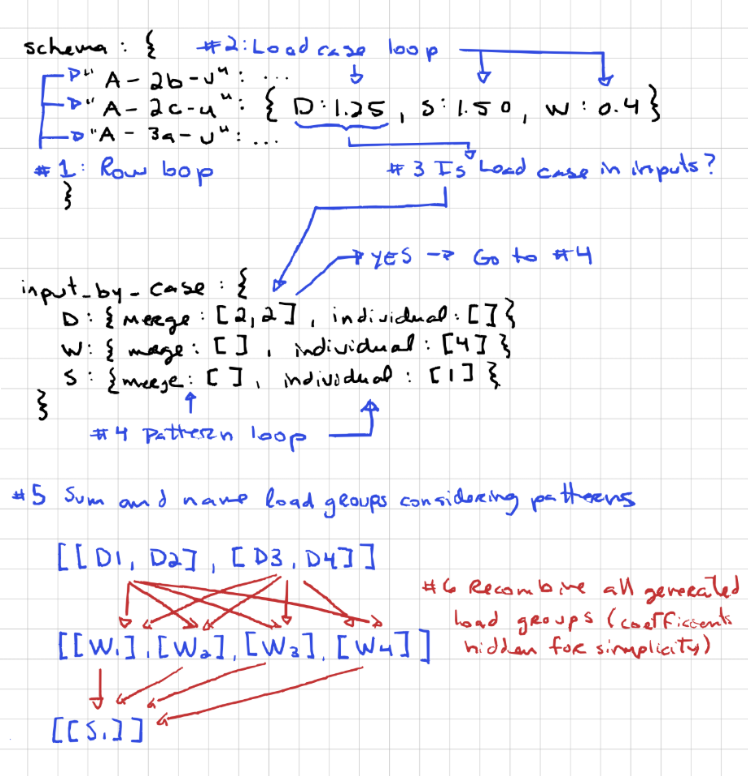
- Este proceso se repite para cada fila del esquema., empujar todas las combinaciones de carga generadas al objeto de combinación de carga final.
No vale la pena que toda la lógica relacionada con los patrones ocurra dentro de una sola fila del esquema.. Saber esto es importante para comprender el comportamiento de los patrones.. El patrón de fusión, por ejemplo, no permite fusionar nada más que el caso de carga al que está asignado. Esto significa que no puedes:
- Fusionar diferentes casos de carga juntos, como intentar fusionar grupos de carga D1 y L1.
- Fusionar casos de carga idénticos en diferentes filas de la tabla de entrada. Por ejemplo, en el ejemplo dado en el punto #2 encima, se nos pide que generemos 2 cargas muertas usando el patrón de combinación en dos filas separadas. Las combinaciones de resultados finales se verían así:
1.2*D1 + 1.2*D2 + 1.5*L
1.2*D3 + 1.2*D4 + 1.5*L
1.2*D1 + 1.2*D2 + 1.5*L + 0.5*S
1.2*D3 + 1.2*D4 + 1.5*L + 0.5*S
1.2*D1 + 1.2*D2 + 1.5*L + 0.5*W
1.2*D3 + 1.2*D4 + 1.5*L + 0.5*T
Filtrado automático de combinaciones de carga innecesarias
Si bien el algoritmo anterior es funcional sin ningún filtrado, puede conducir a combinaciones de carga redundantes, lo que genera tiempo de cálculo adicional y resultados redundantes. Tome las siguientes combinaciones de carga:
1.2*re + 1.5*L
1.2*D + 1.5*L + 0.5*S
1.2*D + 1.5*L + 0.5*W
1.2*D + 1.5*L + 0.5*T
Si tenemos un solo caso de carga muerta, Estas cuatro combinaciones de carga darán como resultado combinaciones de carga idénticas.:
1.2*D
1.2*D
1.2*D
1.2*D
Para evitar esta situación, Se utilizan cuatro reglas, cada una de las cuales contiene algunas pequeñas excepciones.. primero, echemos un vistazo a las reglas. El estado predeterminado es que la combinación se mantenga y las reglas se utilizan para determinar cuál excluir..
Filtrar por criterios
Este caso se explica por sí mismo.. Si el criterios no se solicita, todas las filas del esquema asociadas con eso criterios son descartados.
Filtrar por caracteres en la clave del esquema
Las claves de esquema suelen ser punteros separados por comas a la referencia original.. Por ejemplo, en el ejemplo de NBCC a continuación, la clave tiene tres componentes:
- A: El primer término suele ser la referencia principal., Consulte la tabla en la que se toman esta parte de las cargas..
- 2b: El segundo término suele ser un identificador único para la combinación de carga dentro de la tabla..
- tu: El tercer término suele reservarse para indicar cuando se permuta un gran número de combinaciones de carga con una ligera modificación.. Por ejemplo, Puede indicar si las cargas muertas en la combinación de carga son favorables. ( F ) o desfavorable ( tu ).
{
  "fuerza":{
    "A-2b-u":{"re": 1.25, "L": 1.50, "ls": 1.50, "S": 1.00},
  }
}
Se puede filtrar la clave del esquema para cualquiera de estos términos.. Por ejemplo, si queremos filtrar por el tercer término, podemos agregar el siguiente filtro, lo que creará un menú desplegable de filtrado para este término:
"filtros_nombre": {
  "Fuerza": {
    "Peso muerto": {
      "posición": 2,
      "información sobre herramientas": "",
      "elementos": {
        "Favorable": "F",
        "Desfavorable": "tu"
      },
      "valores predeterminados": ["Favorable", "Desfavorable"]
    }
  }
}
Todos los posibles nombres de menús desplegables y términos asociados deben aparecer en "elementos". Solo se conservarán las filas del esquema con símbolos coincidentes.. Si se requiere mantener una fila del esquema independientemente de lo que se ingresa en el filtro, el término se puede dejar en blanco. Se descartará cualquier clave de esquema que no contenga todos los términos desplegables coincidentes..
Combinaciones redundantes
Si una fila de esquema no se filtra en los dos primeros pasos, pasa al paso número tres. en este paso, Se aborda el problema de redundancia del ejemplo anterior.. Para hacer esto, Necesitamos mirar dos objetos simultáneamente., fila de esquema y el objeto input_by_case ordenado (ver descripción arriba), que describe qué casos de carga se han solicitado. Si la fila del esquema contiene algún supercaso que el objeto input_by_case no contiene, se elimina la combinación de carga. Llevar, por ejemplo, la siguiente fila del esquema:
"A-2a-u":{"re": 1.25, "L": 1.50, "S": 1.50}
y el siguiente objeto input_by_case:
entrada_por_caso =
{
  "re": {"unir": [], "individual": [1]},
  "L": {"unir": [], "individual": [4]}
}
En este ejemplo, la fila del esquema contiene un súper caso S que no ha sido solicitado. Mantener esta fila daría lugar a una combinación de carga que sería idéntica a la combinación de carga asociada con la fila del esquema siguiente, entonces se elimina.
"A-1a-u":{"re": 1.25, "L": 1.50}
Excepciones
Si bien este comportamiento suele ser deseable, Hay casos en los que NO eliminar una fila cuando el caso de carga está ausente conduce a un esquema mucho más simple.. Por ejemplo, si tenemos cargas de tierra horizontales que deben agregarse a cada combinación de esquema, pero no siempre están presentes, Podríamos copiar y pegar todas las combinaciones de carga y modificar la clave del esquema para las nuevas filas con un sufijo como "h" para cargas de tierra horizontales.. Alternativamente, simplemente podemos agregar la carga de tierra horizontal a todos los casos y agregar una excepción de mantenimiento al caso de carga en los metadatos.. De esa manera, si el caso de carga no se solicita, no aparecerá, pero la fila aún se mantendrá. El resultado se parece a esto en la metapropiedad del esquema.:
"H": {
  "etiqueta": "tierra lateral - Desfavorable",
  "rango": 1,
  "excepciones": ["mantener"],
  "etiquetas_antiguas": []
},
Combinaciones superfluas
Si una fila de esquema no se filtra en los primeros tres pasos, pasa al paso número cuatro. en este paso, la cuestión de hacer coincidir casos de carga específicos entre el esquema y lo que se solicita. Si una fila de esquema y una solicitud tienen supercasos coincidentes, pero el caso de carga específico solicitado no está en el esquema, la fila no se mantendrá. Llevar, por ejemplo, la siguiente fila del esquema:
"A-2a-u":{"re": 1.25, "Sl": 1.50}
y el siguiente input_by_case:
entrada_por_caso =
{
  "re": {"unir": [], "individual": [1]},
  "sh": {"unir": [], "individual": [1]}
}
En este ejemplo, Tanto la fila del esquema como la solicitud tienen supercasos coincidentes.. sin embargo, la solicitud requiere una combinación con Sh, que la fila del esquema no proporciona. Así, la fila del esquema no se mantiene.
Excepciones
Una vez más, este comportamiento suele ser deseable, pero puede causar problemas. Uno de esos problemas es cuando los estándares tienen casos de carga que comparten un supercaso., pero no actúes simultáneamente. Por ejemplo, en ASCE, las cargas de viento W y las cargas de tornado Wt no actúan simultáneamente, aunque comparten el mismo súper caso W. Cuando nos topamos con este problema, podemos agregar una excepción para cambiar a otra súper caso antes de que el código se ejecute en los metadatos. Entre bastidores, el símbolo que sigue a “->” Los caracteres se atribuirán al caso de carga., que simulará los casos de carga que actúan en ese súper caso. El resultado se parece a esto en la metapropiedad del esquema.:
"Wt" : {
  "etiqueta": "Viento - Tornado",
  "rango": 8,
  "excepciones": ["supercase->X"],
  "etiquetas_antiguas": []
},
En el caso anterior, la súper caso “W” será cambiado a “X” antes de que se ejecute el código. Esta función también se puede utilizar para enviar casos de carga grupales que tengan características únicas. súper caso simbolos juntos.


