
SkyCiv Base Plate Design comprueba el connection between a steel column and its concrete foundation, incluyendo el placa base, barras de anclaje, welds and concrete. You enter the column, placa base, grout, hormigón, cast-in anchors, welds and factored loads, and the software runs the design checks of the selected design code. Each check shows its demand, capacity and utilization ratio, and you can generate a informe de cálculo y un detail drawing from the same model.
El software runs in the browser, entonces no hay nada que instalar, y el free version needs no sign-up. The inputs are on the left and a 3D view of the connection is on the right, which updates as you change the model.
What You Can Model
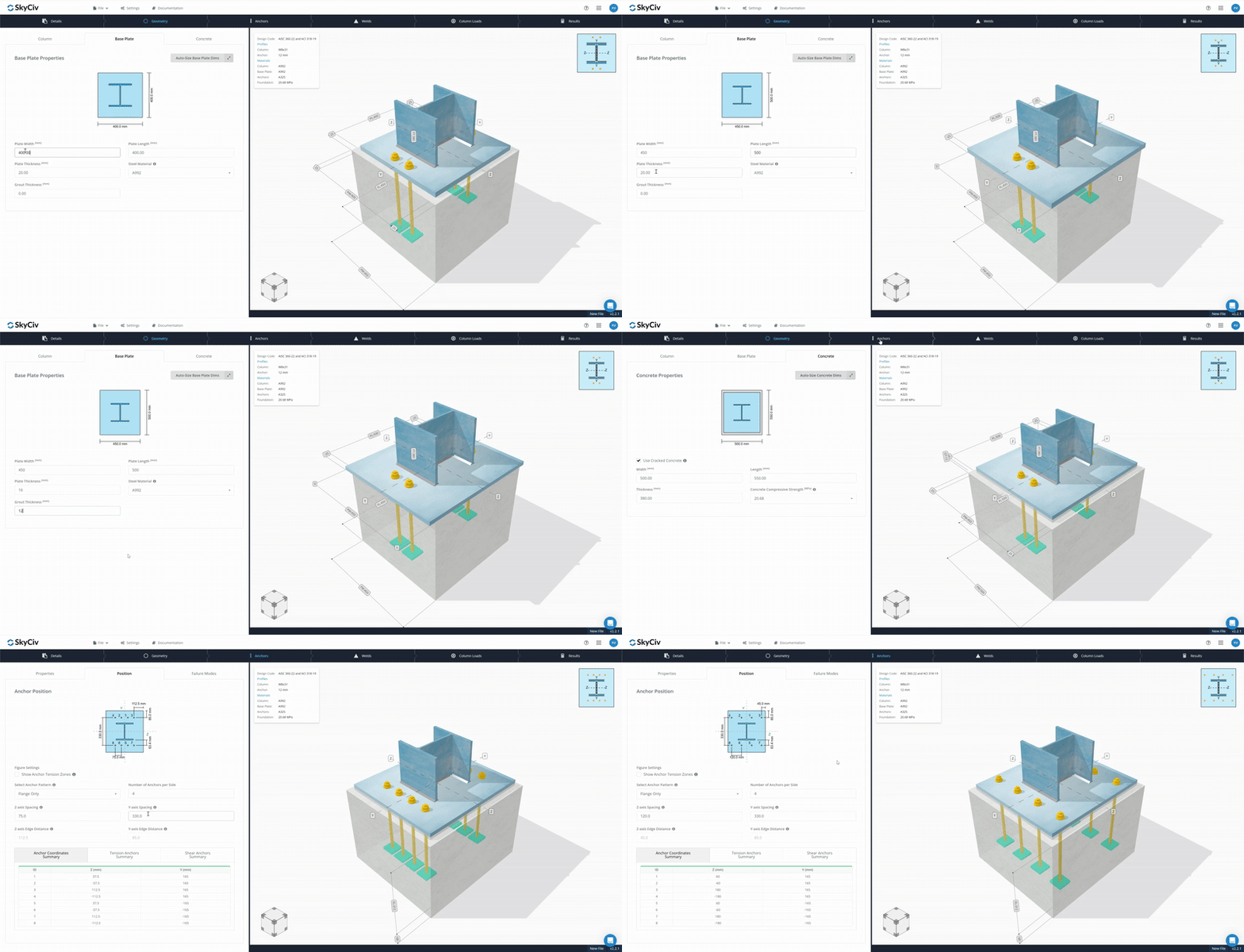
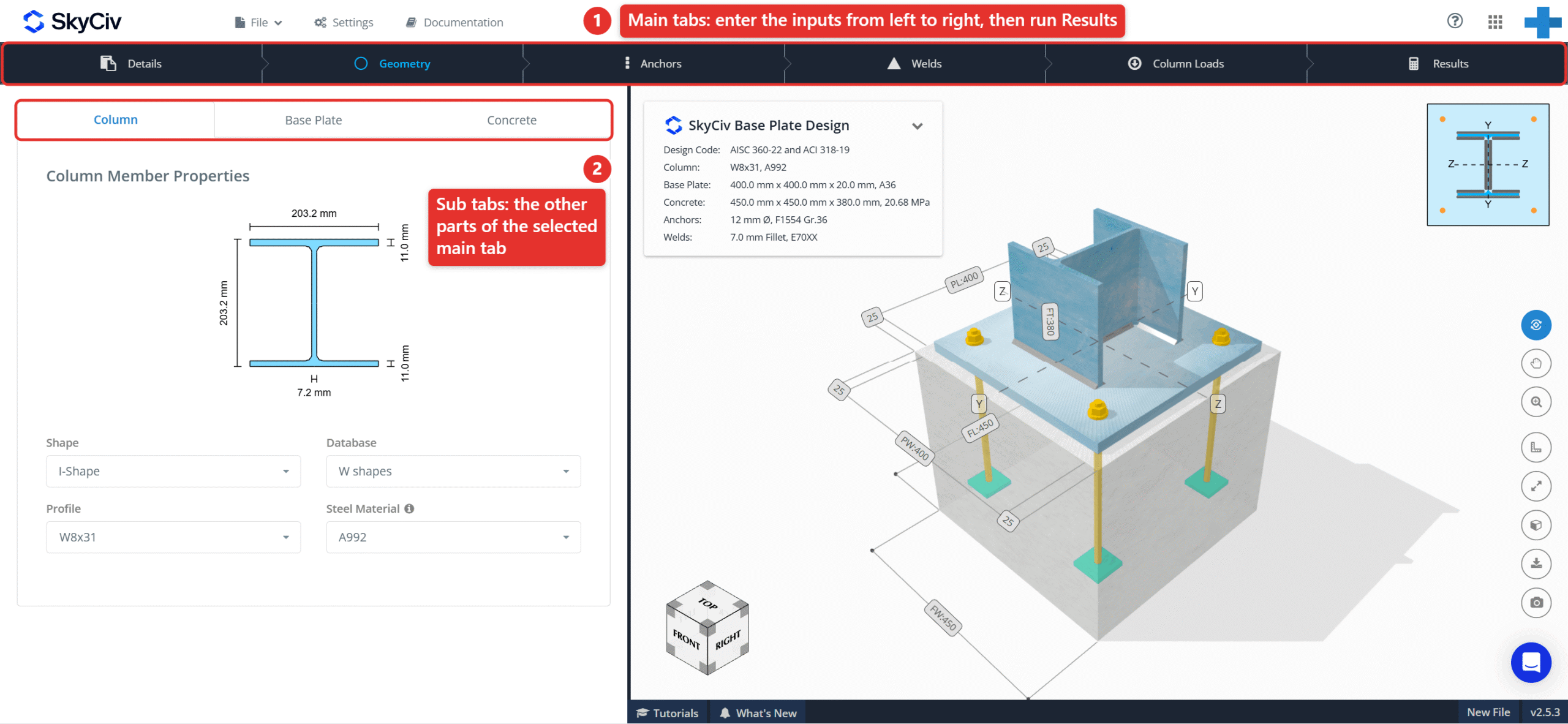
You build the model in the main tabs along the top of the screen, de izquierda a derecha: Detalles, Geometría, Anclajes, Welds and Column Loads, then Results. Some tabs are split into sub tabs for the other inputs they need. Por ejemplo, Geometry has a Column, a Base Plate and a Concrete sub tab.
The support is either Articulado, which takes axial and shear loads, o Empotrado, which also takes a strong-axis or a weak-axis moment. A fixed support needs a moment. Biaxial bending isn’t supported, so a single load combination can have a strong-axis moment or a weak-axis moment, not both.
Loads are entered as factored load combinations, one per row of the load table, and there is no limit on the number of combinations in a model. You can paste combinations from a spreadsheet. Para AISC, CSA y AS, each combination with a moment is labelled as a low or large moment caso, siguiente Guía de diseño AISC 1. For Eurocode, it shows the T-stub forces instead, and each combination has a design situation (persistent and transient, or accidental) that sets the partial factors.
Columna
The column shape is I-Shaped, Rectangular or Square Hollow Sections, y Secciones Huecas Circulares, and the section comes from the section database of the selected design code. The section list is the same one used in SkyCiv Section Builder. For Eurocode, you can choose between the European and British section databases. You can pick the steel material from the list or enter custom strengths.
Base Plate and Grout
You set the plate dimensions, thickness and steel material, with custom strengths if needed, and the grout thickness. Auto-Size Base Plate Dims sizes the plate from the column with a margin.
Concrete Foundation
You set the concrete dimensions and compressive strength, and choose whether the concrete is cracked. Auto-Size Concrete sizes the foundation from the base plate.
Anchor Rods
Anchors are cast-in. You set the diameter, profundidad de empotramiento, material and ending (derecho, placa rectangular, circular plate, or hooked except in EN and AS), then place the anchors with one of the anchor patterns for the column shape (for example Corners, Flange Only or Web Only for an I-shape). You can then adjust the number of anchors, spacing and edge distances that the pattern allows. El Guide to SkyCiv Anchor Patterns shows each pattern.
The Anchors tab also shows which anchors are in tension and in shear, how they are grouped for fugarse, blowout and pryout, y un Failure Modes guide that illustrates each concrete failure mode for your layout.
Soldaduras
The welds between the column and the base plate can be soldaduras de filete o complete joint penetration (CJP) soldaduras. In the Eurocode and Australian versions these are called full penetration butt welds, and the Australian version calls the fillet option a continuous fillet weld.
Each input tab also has a 2D drawing of that part: the column section, the base plate plan, the concrete plan, and the anchor plan and elevation. Each input is described in Primeros pasos.
Viewing the Model
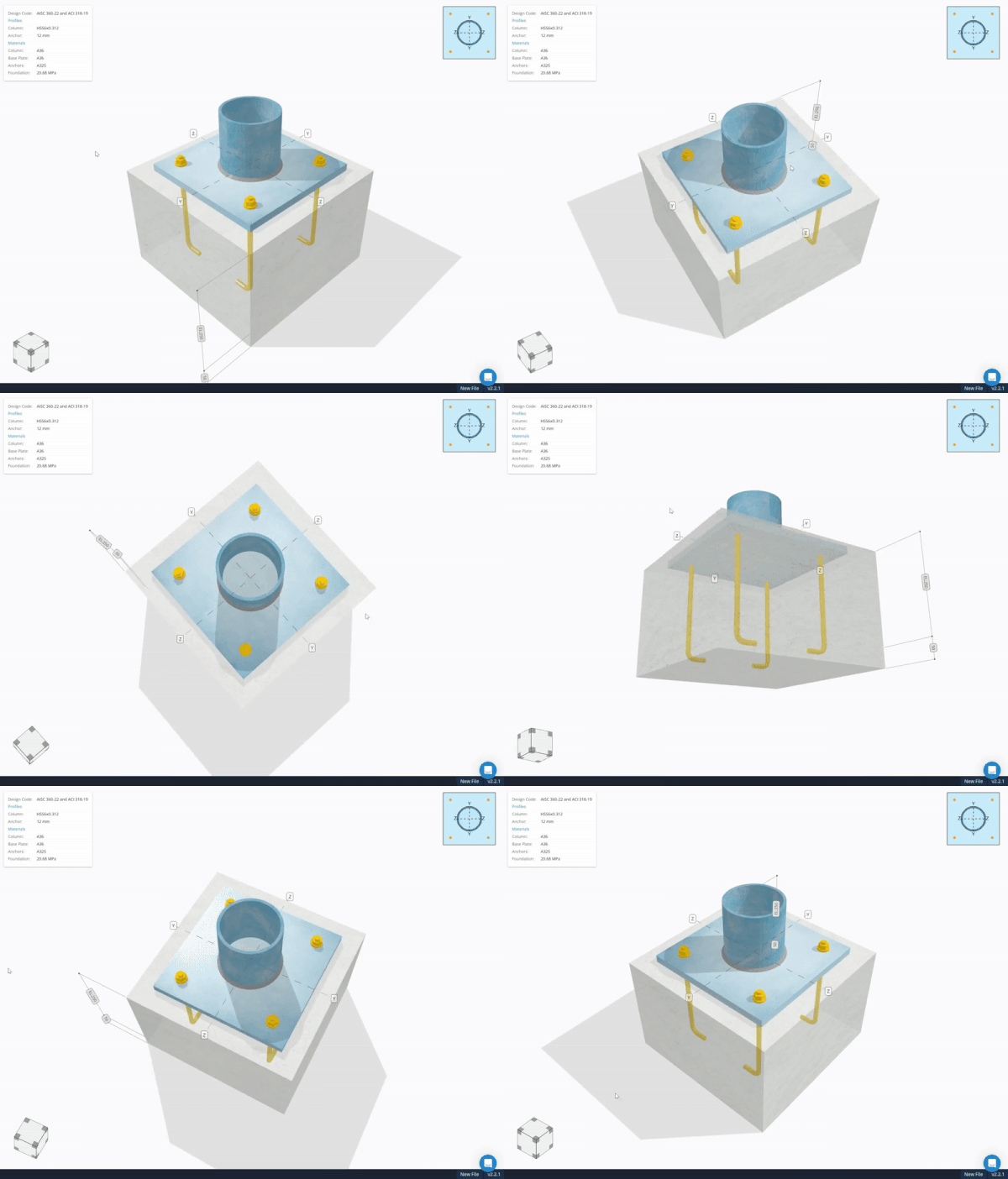
The 3D view shows the column, placa base, grout, hormigón, anchors and welds, with dimensions and the load arrows of the selected load combination. A 2D plan of the base plate sits in the top-right corner, and the info legend in the top-left corner summarises the design code, columna, placa, hormigón, anchors and welds.
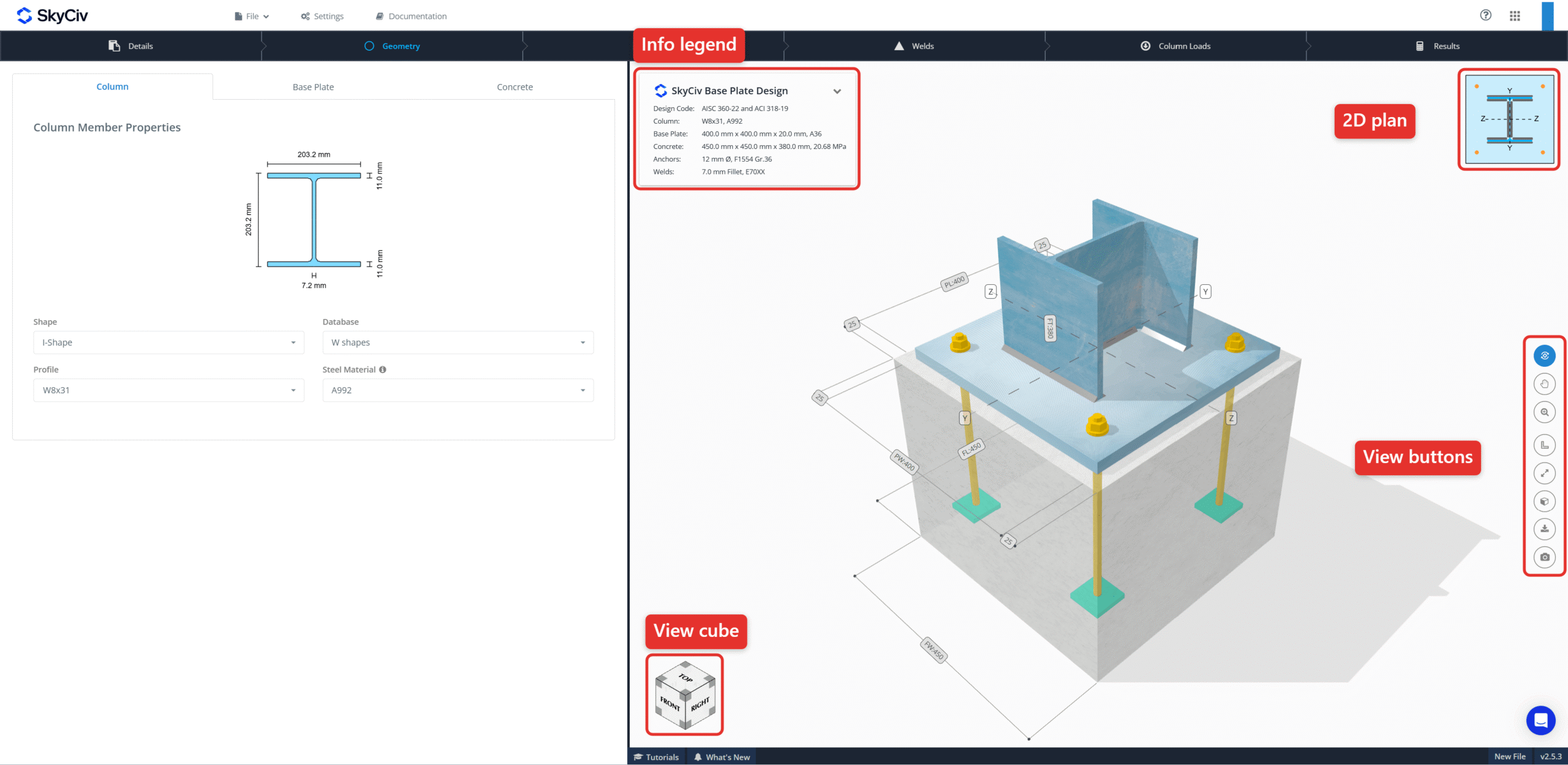
The buttons on the right edge of the viewer control the view:
- Girar, Pan and Zoom set what a left-click drag does.
- Hide dimensions shows or hides the dimensions.
- Fit model to view frames the whole model.
- Switch to orthographic view toggles between perspective and orthographic views and keeps the current angle.
- Download the 3D model (IFC) exports the model as an IFC4 file for BIM software.
- Download an image of the model saves a PNG of the current view, including the info legend.
The view cube in the corner snaps the view to a face: superior, inferior, frente, espalda, izquierda o derecha.
Base Plate and Anchorage Design Checks
The checks on the Results tab depend on the design code and on the loads. For each load combination, the software picks the checks from the axial load, the moment and the shear in that combination. A check that runs but doesn’t apply to your model stays in the list with a ratio of N/A. Por ejemplo, side-face blowout shows N/A for an anchor without a plate ending. The names below are the ones shown on the Results tab, and they fall into four groups.
Columna, placa base, weld and concrete
- Capacidad de soldadura. It runs for every load combination.
- Column Bearing Capacity. It applies to AISC, CSA and NSCP only.
- Concrete Bearing Capacity. En ES, it is combined with the plate check as Concrete Bearing Capacity and Base Plate Yield Capacity (Compression Load).
- Base Plate Yield Capacity (Compression Load) y (Tension Load). En ES, the compression check is part of the combined check above.
- Base Plate Yield Capacity (Bearing Interface) y (Tension Interface). These apply to moments, in AISC, CSA and AS only.
- Base Plate Bearing Capacity (Vy cizalla) y (Cizalla Vz). These apply to EN only.
Anchors in tension
These checks run when the anchors are in tension, either from an axial tension load or from a moment large enough to lift one side of the plate.
- Anchor Rod Tensile Capacity
- Anchor Pullout Capacity
- Concrete Breakout Capacity (Tension Load)
- Concrete Side-Face Blowout Capacity (Dirección Y) y (Dirección Z)
- Embed Plate Flexural Capacity, for anchors with a rectangular or circular plate ending, only applicable to AISC, CSA y NSCP
Anchors in shear
These checks run when the combination has a shear load.
- Capacidad de corte de la varilla de anclaje. It includes anchor rod bending from the lever arm where it applies.
- Concrete Breakout Capacity (Vy cizalla) y (Cizalla Vz)
- Concrete Pryout Capacity. In AISC and CSA, it is split into (Vy cizalla) y (Cizalla Vz) cuando Allow Shear Distribution to All Anchors is switched off.
When the anchors take tension and shear together, the software adds two interaction checks, named after the code:
- AISC: Anchor Rod Capacity (AISC Tension and Shear) and Interaction Check (ACI)
- CSA: Anchor Rod Shear and Tension Capacity (CSA S16) and Interaction Check (CSA A23.3)
- AS y EN: Anchor Steel Failure (Interacción) and Other Anchor Failures (Interacción)
Some checks can be excluded in the Design tab of Settings, with Neglect Concrete Breakout Check for Tension, Neglect Concrete Breakout Check for Shear and Neglect Shear Pryout Check if Anchor is Slender (hef > 12d). An excluded check stays in the list, greyed out, with a note that it was left out based on your settings. The resistance factors (o, for Eurocode, the partial factors) can be edited in the Factors & Other Inputs tab of Settings.
Detallando
The detailing checks cover minimum and maximum dimensions and clashes between components. The Detailing tab of Settings lists them, including Weld Size Requirement, Anchor Clearance, Base Plate Edge Distance, Concrete Splitting Check for Anchors in Tension and Minimum Number of Anchors. Design Layout (Requerido) always runs. The other detailing checks can be switched on or off there.
For Eurocode designs with a fixed support, the Results tab also has a Rotational Stiffness Summary. For each load combination with both an axial load and a moment, it gives the initial rotational stiffness of the column base and classifies the joint as rigid, semi-rigid or flexible. The calculation needs the column height. A combination without an axial load or a moment shows N/A.
Comprobaciones de anclaje ACI para principiantes explains the anchor failure modes and how to fix a failing check.

Resultados, Calculation Reports and Detail Drawings
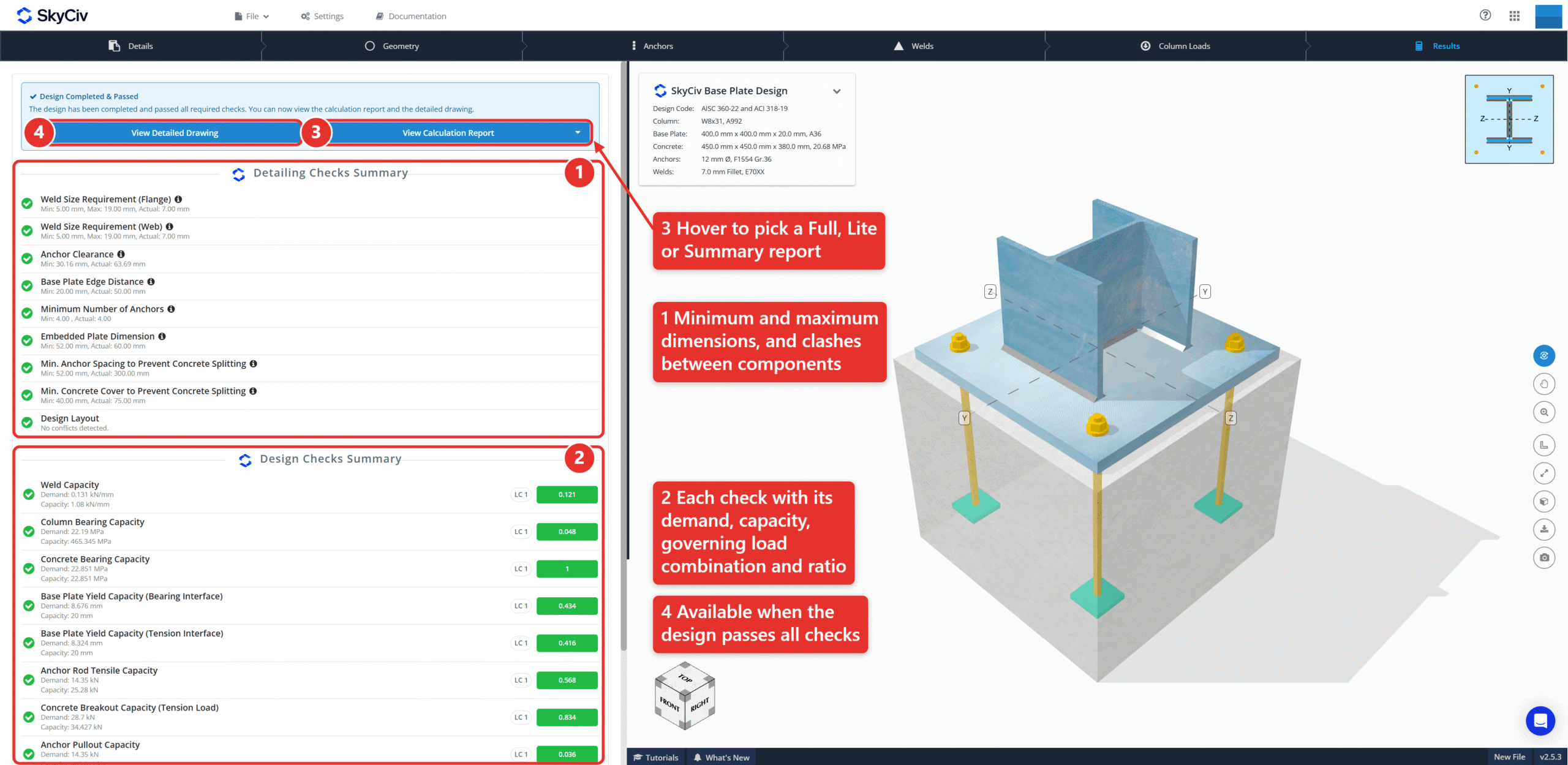
The first time you open the Results tab, the software checks the inputs and the detailing rules and then runs the design checks. If an input error or a detailing check fails, the design checks don’t run and the tab lists what needs fixing, with a link to each input. When you change the model afterwards, the tab shows Results Need Updating and you rerun the checks with the Run Design Checks button.
The Results tab has three parts, from top to bottom:
- The design banner. It says whether the design passed (Diseño completado & Aprobado) or failed (Diseño completado & Fallido), and holds the Ver informe de cálculo y Ver dibujo detallado botones. In the free version, the banner only says Design Completed.
- Detailing Checks Summary. It lists the result of each detailing rule and any conflicts in the geometry.
- Resumen de verificaciones de diseño. Each design check is listed once, with the highest ratio across all load combinations. The row shows a pass or fail icon, the demand, la capacidad, la utilization ratio and the load combination that governs (LC 1, LC 2 y así).
Calculation Reports
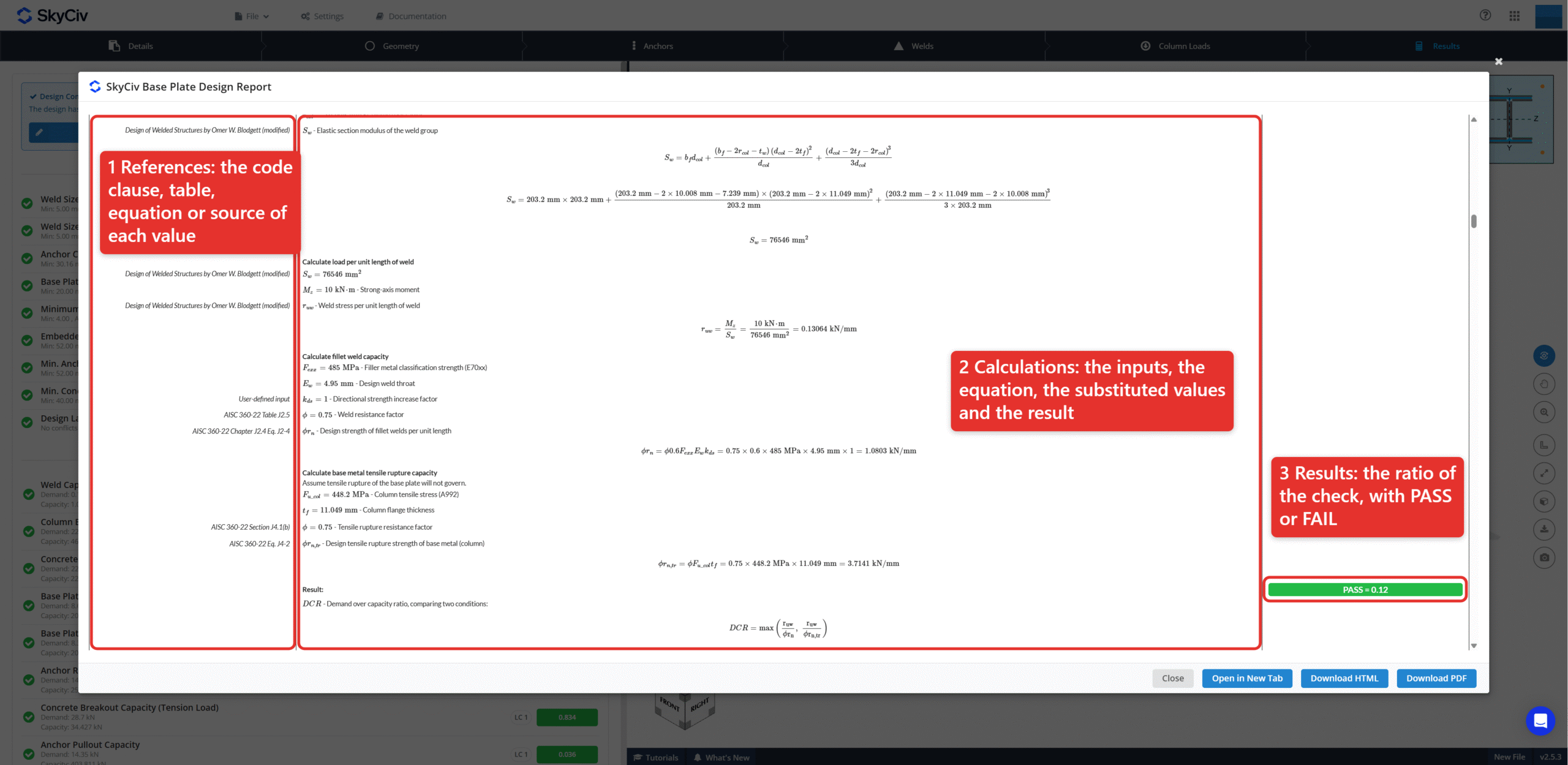
El informe de cálculo is available once the design checks have run, whether the design passes or fails. Pase el cursor sobre Ver informe de cálculo in the design banner and pick one of the three types:
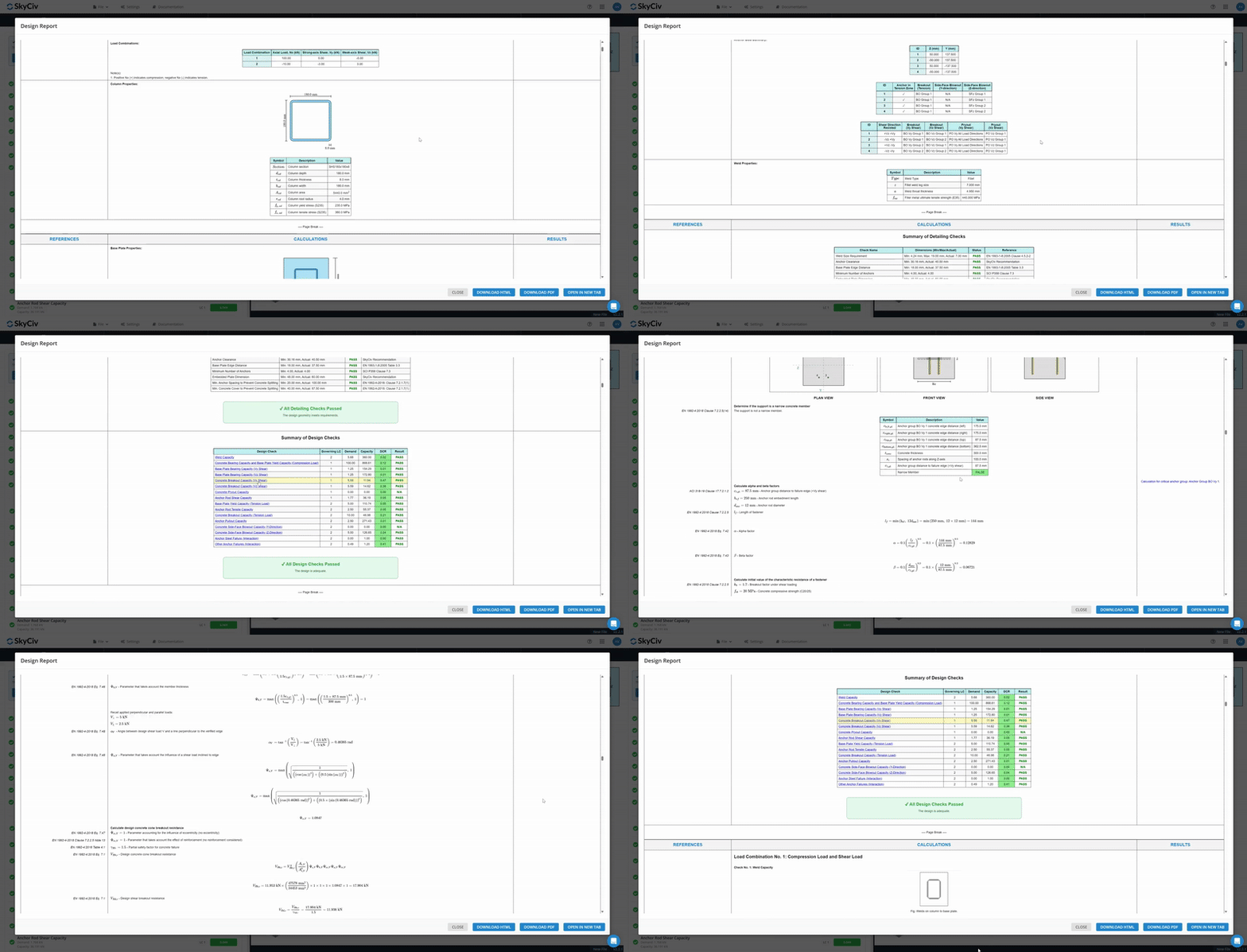
- Completo has the project information with an image of the model, the input tables, the detailing checks, a summary table of the design checks and the step-by-step calculations for each load combination. For Eurocode designs with a fixed support, it also has a section on the initial rotational stiffness of the column base.
- Lite is the Full report without the diagrams and figures. The image of the model on the first page stays.
- Resumen stops before the calculations. It has the project information, the input tables and the summary table.
The calculations are laid out in three columns. The References column gives the code clause, table or equation behind each value, the Calculations column shows the inputs, the equation, the substituted values and the result of each step, and the Results column shows the ratio of the check with PASS or FAIL. In the Full and Lite reports, each check in the summary table links to its calculation for the governing load combination, so a checker can go straight to it. You can view a report in the browser and download it as HTML or PDF.
Detail drawings
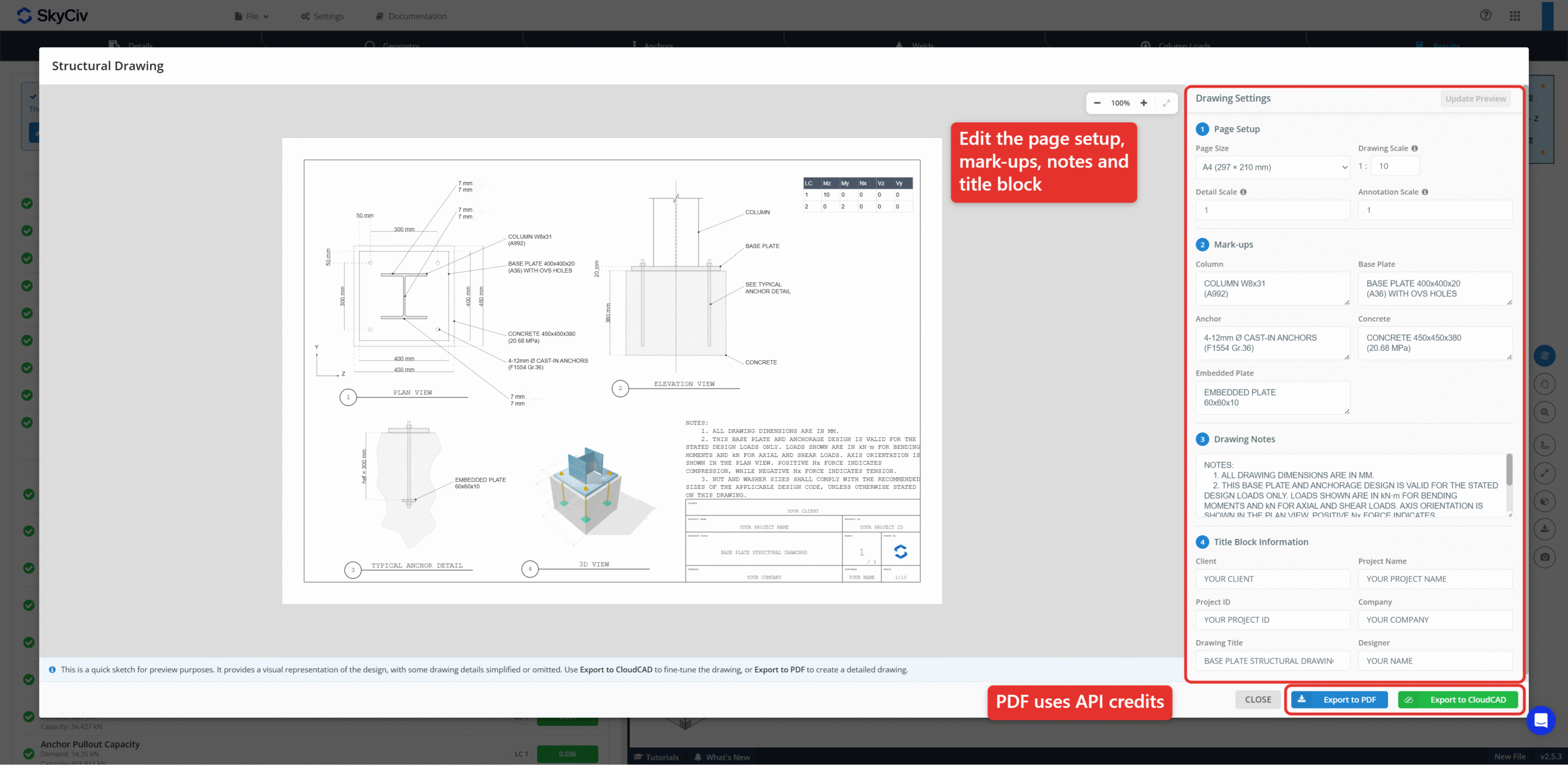
El detail drawing is generated from the model and opens with Ver dibujo detallado in the design banner. The button is only available when the design passes all checks, and it is greyed out when a check fails. By default the software picks the smallest page size, from A4 to A0, that fits the drawing. In the Page Setup section you can change the page size (A4 to A0, Letter, Legal or Tabloid), the drawing scale, the detail scale and the annotation scale. The other sections let you edit the Mark-ups, the Drawing Notes and the Title Block Information. determinar más eficiente export the drawing to PDF, which uses API credits. You can also export it to SkyCiv CloudCAD for further editing if you have a CloudCAD subscription.
Supported design codes
You select the - código de diseño when you start a design, from the Design Code list. Each code has its own section databases, factor settings and anchor options, so some inputs and checks differ between codes.
Major design codes, with pinned and fixed supports:
- 🇺🇸 americanas: AISC 360-22 y ACI 318-19, with AISC Design Guide 1 (3ª edición)
- 🇨🇦 canadiense: CSA S16:19 y CSA A23.3:19
- 🇪🇺 Eurocódigo: EN 1993-1-8:2005 y EN 1992-1-1:2004, with EN 1992-4:2018 for anchors. National Annexes: recommended values (no National Annex), 🇬🇧 UK, 🇫🇮 Finland, 🇸🇪 Sweden and 🇩🇰 Denmark
- 🇦🇺 Australia: AS 4100:2020 y AS 3600:2018, como si 5216:2021 for anchors
Other design codes:
- 🇵🇭 Filipinas: NSCP 2015, pinned supports only
- 🇳🇿 Nueva Zelanda: Nueva Zelanda, pinned supports, próximamente
The design references used include:
- Instituto Americano de Construcción en Acero (AISC): Manual de construcción en acero AISC (15El d), AISC 360-22 (LRFD), Guía de diseño AISC 1 (3ª edición), ACI 318-19
- Eurocódigo: EN 1992-1-1:2004 y EN 1992-4:2018 (Eurocódigo 2), EN 1993-1-1:2005 y EN 1993-1-8:2005 (Eurocódigo 3), Uniones simples según el Eurocódigo 3 (Sci P358), Uniones resistentes a momentos según Eurocódigo 3 (LIC P398)
- Normas Australianas: AS 3600:2018, AS 4100:2020, AS 5216:2021
- Estándar Nacional de Canadá: CSA A23.3:19, CSA S16:19
Assumptions and Limitations
Base Plate Design covers defined geometries, load types and anchor types, and it does not cover every base plate configuration. Please read this section before relying on the results for a design.
All design codes
- Anchors are cast-in only.
- Loads are factored load combinations. The software does not combine or factor loads.
- Biaxial bending isn’t supported. A load combination has a strong-axis or a weak-axis moment, not both.
- A pinned support takes axial and shear loads only. A fixed support needs a moment.
- Usar cracked concrete unless your design code allows uncracked concrete. Some calculations assume cracked concrete.
- Changes to the Design settings change the design assumptions and should be reviewed by a suitably qualified engineer.
AISC
- Only AISC can switch between metric and imperial units. The other codes are metric.
- Moment cases are classified as low or large moment per AISC Design Guide 1.
- Por defecto, shear is taken by the anchors nearest the edge. Allow Shear Distribution to All Anchors in the Design settings spreads it over all anchors, and is always on when welded plate washers are used.
CSA
- Anchor diameters are inch sizes expressed in millimetres.
- Shear distribution and welded plate washers work as for AISC.
Eurocódigo
- Partial factors follow the selected National Annex and the design situation of each load combination.
- Some bolt classes are excluded by some National Annexes.
- Hooked anchors are not available.
- Shear is taken by the edge anchors unless the concrete cover is at least max(10·hef, 60·d), in which case all anchors take shear.
- Moments are designed with the T-stub method. The rotational stiffness of the column base needs the column height.
Normas Australianas
- Hooked anchors are not available.
- Shear is taken by the anchors as for Eurocode.
- Embed Plate Flexural Capacity is not checked.
Donde empezar
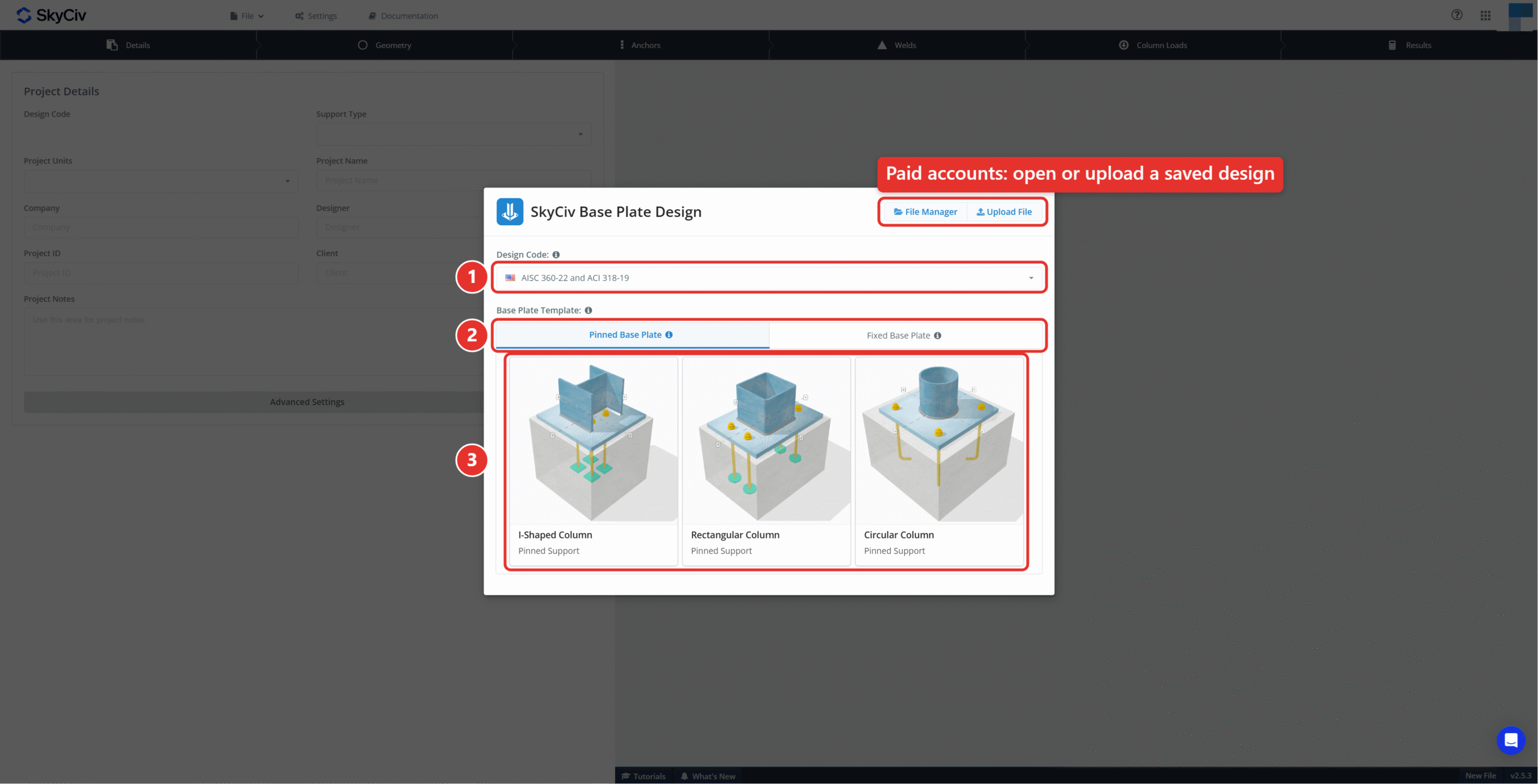
The fastest way to learn Base Plate Design is to run a plantilla de inicio and then change it. You don’t need to sign up.
- Abre el calculadora de placa base gratuita. If you have a SkyCiv account, you can also launch it from the dashboard.
- Choose a design code (and a National Annex for Eurocode), elegir Articulado o Empotrado, then click a column shape: En forma de I, Rectangular or Pipe. The template loads a complete model, so you can open the Results tab and run the design straight away.
- Take the guided tour if it is offered. It goes through each tab and opens the report and the detail drawing. You can replay it at any time from Tutorials under the 3D view.
A template is a starting point, not a recommended design. Replace the column, placa, anchors and loads with your own values before relying on any result.
The free version runs every check but locks some inputs and shows full values for only some checks. Ver Free vs Paid for the full list. With a paid account you can also open a saved design from the File Manager or upload a saved file.
Primeros pasos takes you from your first result to your own design, paso a paso. For every input and setting, see the User Guide for your design code: AISC, CSA, AS o Eurocódigo.
El worked base plate design examples show the calculations step by step, organized by load case and then by design code: compresión axial, tensión axial, el cortante, compresión y corte, tensión y corte y strong-axis bending. For the theory behind moment connections, ver AISC DG1: Placas base con momento grande y momento bajo.
Free vs Paid
El calculadora de placa base gratuita is the same software, without sign-up, with some inputs and outputs locked. A locked input keeps the value from the starting template and is marked PRO.
| Artículo / rasgo | Gratis | Pagado |
|---|---|---|
| Access | ||
| Use in the browser, sin instalación | ✓ | ✓ |
| Use without sign-up | ✓ | |
| All design codes, and all National Annexes when starting a design (EN) | ✓ | ✓ |
| Change the National Annex in the Details tab (EN) | ✓ | |
| Visita guiada | ✓ | ✓ |
| Switch metric and imperial units (AISC) | ✓ | ✓ |
| Columna | ||
| Change the section size | ✓ | ✓ |
| Change the column shape and section database | ✓ | |
| Switch the European and British section databases (EN) | ✓ | |
| Change the column steel material | ✓ | |
| Placa base, grout and concrete | ||
| Change the base plate, grout and concrete dimensions | ✓ | ✓ |
| Auto-size the base plate and concrete | ✓ | ✓ |
| Switch cracked concrete on or off | ✓ | ✓ |
| Change the grout material (EN) | ✓ | ✓ |
| Change the base plate steel material | ✓ | |
| Change the concrete compressive strength | ✓ | |
| Anclajes | ||
| Change the diameter, profundidad de empotramiento, patrón, número, espaciado y distancias al borde | ✓ | ✓ |
| Change the anchor material | ✓ | |
| Change threads in the shear plane (AISC, CSA, EN) | ✓ | |
| Change the anchor ending | ✓ | |
| Anchor tension and shear group tables | ✓ | |
| Failure Modes guide for the default failure mode | ✓ | ✓ |
| Choose another failure mode in the Failure Modes guide | ✓ | |
| Soldaduras | ||
| Change the weld size | ✓ | ✓ |
| Change the weld type and weld material | ✓ | |
| Cargas | ||
| Edit one load combination | ✓ | ✓ |
| Add and delete load combinations | ✓ | |
| Change the design situation of a combination (EN) | ✓ | ✓ |
| Configuración | ||
| Edit resistance and partial factors | ✓ | ✓ |
| Edit Design settings | ✓ | ✓ |
| Switch detailing checks off | ✓ | |
| Resultados | ||
| Run the design checks | ✓ | ✓ |
| Detailing Checks Summary | ✓ | ✓ |
| Demanda, capacity and ratio of every design check (ver la tabla a continuación) | ✓ | |
| Overall pass or fail of the design | ✓ | |
| Rotational Stiffness Summary values (EN, apoyo empotrado) | ✓ | |
| Details of solver errors | ✓ | |
| Calculation reports | ||
| Completo, Lite and Summary reports | ✓ | |
| View in the browser and download as HTML or PDF | ✓ | |
| Detail drawing | ||
| Preview the drawing | ✓ | ✓ |
| Drawing without the "free version" watermark | ✓ | |
| Edit the Mark-ups and Title Block Information | ✓ | ✓ |
| Edit the Page Setup and Drawing Notes | ✓ | |
| Exportar a PDF (uses API credits) | ✓ | |
| Exportar a CloudCAD (needs a CloudCAD subscription) | ✓ | |
| 3D view | ||
| Girar, cacerola, zoom, view cube, perspective and orthographic views, dimensiones | ✓ | ✓ |
| Model without the SkyCiv logo on the base plate | ✓ | |
| Download an image of the model | ✓ | |
| Download the model as an IFC file | ✓ | |
| Archivos | ||
| Save a design | ✓ | |
| Open a design from the File Manager | ✓ | |
| Upload a saved file | ✓ |
Nota: Reports from student accounts carry a watermark.
Design check values in the free and paid versions
Every check runs in both versions. The free version shows the demand, capacity and ratio of the checks marked below. For the other checks it shows the check name and an Upgrade link.
| Verificación de diseño | Gratis | Pagado |
|---|---|---|
| Capacidad de soldadura | ✓ | ✓ |
| Column Bearing Capacity (AISC, CSA, NSCP) | ✓ | ✓ |
| Base Plate Bearing Capacity (Vy cizalla) y (Cizalla Vz) (EN) | ✓ | ✓ |
| Concrete Side-Face Blowout Capacity (Dirección Y) y (Dirección Z) | ✓ | ✓ |
| Concrete Bearing Capacity (AISC, CSA, AS, NSCP) | ✓ | |
| Concrete Bearing Capacity and Base Plate Yield Capacity (Compression Load) (EN) | ✓ | |
| Base Plate Yield Capacity (Compression Load) y (Tension Load) | ✓ | |
| Base Plate Yield Capacity (Bearing Interface) y (Tension Interface) (AISC, CSA, AS) | ✓ | |
| Anchor Rod Tensile Capacity | ✓ | |
| Anchor Pullout Capacity | ✓ | |
| Concrete Breakout Capacity (Tension Load) | ✓ | |
| Embed Plate Flexural Capacity (AISC, CSA, NSCP) | ✓ | |
| Capacidad de corte de la varilla de anclaje | ✓ | |
| Concrete Breakout Capacity (Vy cizalla) y (Cizalla Vz) | ✓ | |
| Concrete Pryout Capacity | ✓ | |
| Anchor Rod Capacity (AISC Tension and Shear) and Interaction Check (ACI) (AISC) | ✓ | |
| Anchor Rod Shear and Tension Capacity (CSA S16) and Interaction Check (CSA A23.3) (CSA) | ✓ | |
| Anchor Steel Failure (Interacción) and Other Anchor Failures (Interacción) (AS, EN) | ✓ |
Latest Updates
The latest release adds AISC Design settings for fillet welds (kds = 1.0) and for two-way bending at the bearing interface, and separate strength reduction factors for AISC concrete pullout, pryout and breakout in shear, and steel tensile rupture. It also corrects several AISC base plate and weld checks. El What’s New button under the 3D view shows the highlights of each release in the software.
Ver el registro de cambios for every release.
