
LEARN
The SkyCiv
Learning Centre
Contents
Beams and Bending
- What is a Beam?
- Types of Beams
- A Complete Guide to Cantilever Beam | Deflections and Moments
- Beam Deflection: Definition, Formula, and Examples
- What is Bending Moment?
- Bending Moment Formula and Equations
- How to Calculate Bending Moment Diagrams?
- Calculating Shear Force Diagrams
- How to Determine the Reactions at the Supports?
- How to Calculate in an Indeterminate Beam?
- Types of Supports in Structural Analysis
Trusses
- What is a Truss? Common Types of Trusses in Structural Engineering
- Truss Tutorial 1: Analysis using Method of Joints
- Truss Tutorial 2: Method of Sections
- Truss Tutorial 3: Roof Truss Design Example
Structural Properties
Beams and Supports
- Beam Deflection: Definition, Formula, and Examples
- Bending Moment Equations
- How to Calculate in an Indeterminate Beam?
- Calculating Shear Force Diagrams
- Types of Supports in Structural Analysis
Trusses
- Truss Tutorial 1: Analysis and Calculation using Method of Joints
- Truss Tutorial 2: Analysis and Calculation using Method of Sections
- Truss Tutorial 3: Roof Truss Design Example
Loads and Reactions
Beams
- Bending Stress Formula – Calculating Bending Stress of a Beam Section
- Calculate the Moment Capacity of a Reinforced Concrete Beam
Reinforced Concrete
- What is Reinforced Concrete?
- What is a Column Interaction Diagram/Curve?
- Reinforced Concrete vs Prestressed Concrete
- How to Design Reinforced Concrete Beams?
Connections
Vibration and Frequency Analysis
Concrete and Reinforced Concrete
Material Properties
Foundation Types and Processes
Moment and Area Calculations

There is currently a technical deficit in regards to the use of structural analysis software for structural engineers. Some engineering students leave university, lacking the confidence to properly model and analyse a structure using software. As a software provider, we want our users to not only operate our software, but to also have a better understanding of how our software works and feel more confident using analysis software.
Adding SkyCiv Certification to your resume can help verify your ability to use Structural Analysis Software.
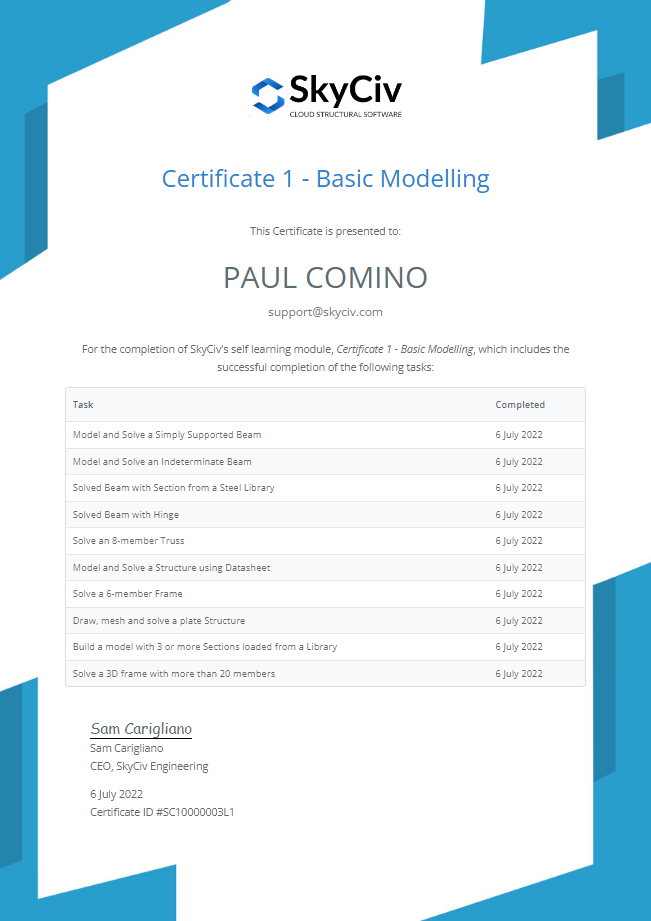
Student Certification
Here at SkyCiv, we want to take up the challenge of closing the skill gap in this aspect with the introduction of our student certification program. The program aims to educate and familiarize students on using the SkyCiv product suite. With the assistance of our documentation, tutorial videos and intuitive interface, the program will hopefully make the SkyCiv suite easier to learn. Also with the entire platform being cloud-based, the program will also be convenient to use. With an active internet connection, users will be able to freely try it out anywhere and anytime.
Benefits
Of course, there are certain advantages to participating into the Student Certification program. Apart from the knowledge gained from this self-learning program, there are also other practical benefits to participating. As participants become certified, they can use this as an addition to their resume. There is also the cost savings realized when participating in these kinds of programs. Typically, these sorts of courses are not offered with certification in colleges and universities and are instead offered commercially. Little things such as these can be a financial burden and an inconvenience.
What are the tasks?
The first Certificate is Level 1 – Certificate in Basic Modelling and features the following 10 tasks:
- Model and Solve a Simply Supported Beam
- Model and Solve an Indeterminate Beam
- Solved Beam with Section from a Steel Library
- Solved Beam with Hinge
- Solve an 8-member Truss
- Model and Solve a Structure using Datasheet
- Solve a 6-member Frame
- Draw, mesh and solve a plate Structure
- Build a model with 3 or more Sections loaded from a Library
- Solve a 3D frame with more than 20 members
Learn more about the tasks in our Documentation
How to get your certificate
It’s easy! The software has built-in detection when a task is complete. If you have an active SkyCiv Student Account, you’ll be able to complete all the tasks on the list. You can check the progress of your certificate by visiting the Certification from the SkyCiv Dashboard. This will give you an up-to-date progress update:
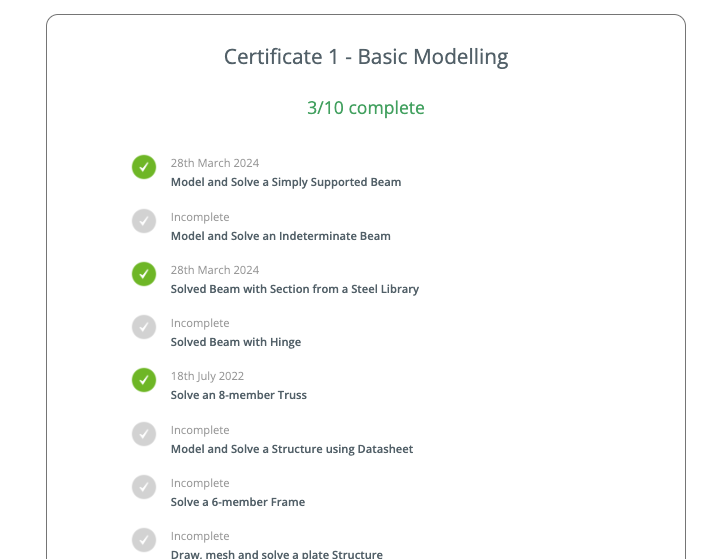
Once completed, you’ll be able to download the certificate in a professional, PDF format.
Don’t forget to post your certificate on LinkedIn and tag our Page so we can endorse your certificate and drive even more eyes to your LinkedIn Profile.
