
Kniebrace-verbindingsontwerp volgens AISC 360 bedekt twee gewrichten. Aan het beugeluiteinde, u controleert de bouten tussen de beugel en de knoopplaat op slippen, lager en uitscheuren, blokkeer vervolgens de schuif- en spanningsbreuk van beide delen, en spanning en knik van de hoekplaat op het Whitmore-gedeelte. Bij de kolom, u berekent de steunkracht aan het kolomvlak, controleer vervolgens de hoeklassen van hoekplaat tot kolom, de hoekplaat onder schuif- en trekspanning langs die rand, en het kolomweb onder de geconcentreerde kracht.
Deze pagina werkt van begin tot eind als een echt voorbeeld. Een L4x4x1/2 kniebrace op 45° draagt 100 kip in spanning en 100 kip in compressie (LRFD). Het is vastgeschroefd met vier 1 in A490-SC-bouten aan a 1/2 in klasse A572 50 knoopplaat, die aan de flens van een kolom W14x90 is gelast 3/16 in filets aan beide kanten. Het ontwerp is naar AISC 360-16 en de AISC-handleiding 15e editie. Elke vergelijking wordt uitgeschreven met zijn cijfers, in dezelfde volgorde als het AISC-berekeningsblad waarop de SkyCiv-verbindingsontwerp module produceert voor deze verbinding.
Wat is een kniebrace aansluiting?
Een kniebrace is een kort diagonaal onderdeel dat van een kolom naar een balk of spant loopt, een eindje verwijderd van het gewricht daartussen. Het verstevigt de hoek van een frame en verkort de niet-verstevigde lengte van de delen die het met elkaar verbindt. Elk uiteinde van de beugel heeft een verbinding nodig, en dit voorbeeld ontwerpt het kolomuiteinde: de beugel wordt met bouten aan een knoopplaat bevestigd, en de hoekplaat wordt aan de kolomflens gelast.
De hoekplaat is slechts langs één rand aan de kolom bevestigd, waardoor het zich onderscheidt van de hoekplaat bij een ligger-kolomverbinding in een concentrisch geschoord frame. U kunt dit voorbeeld rechtstreeks in de rekenmachine voor het aansluiten van een kniebrace. Dezelfde kruisplaatcontroles verschijnen in de rekenmachine voor verticale schoorverbindingen als de chevron brace-verbindingscalculator.
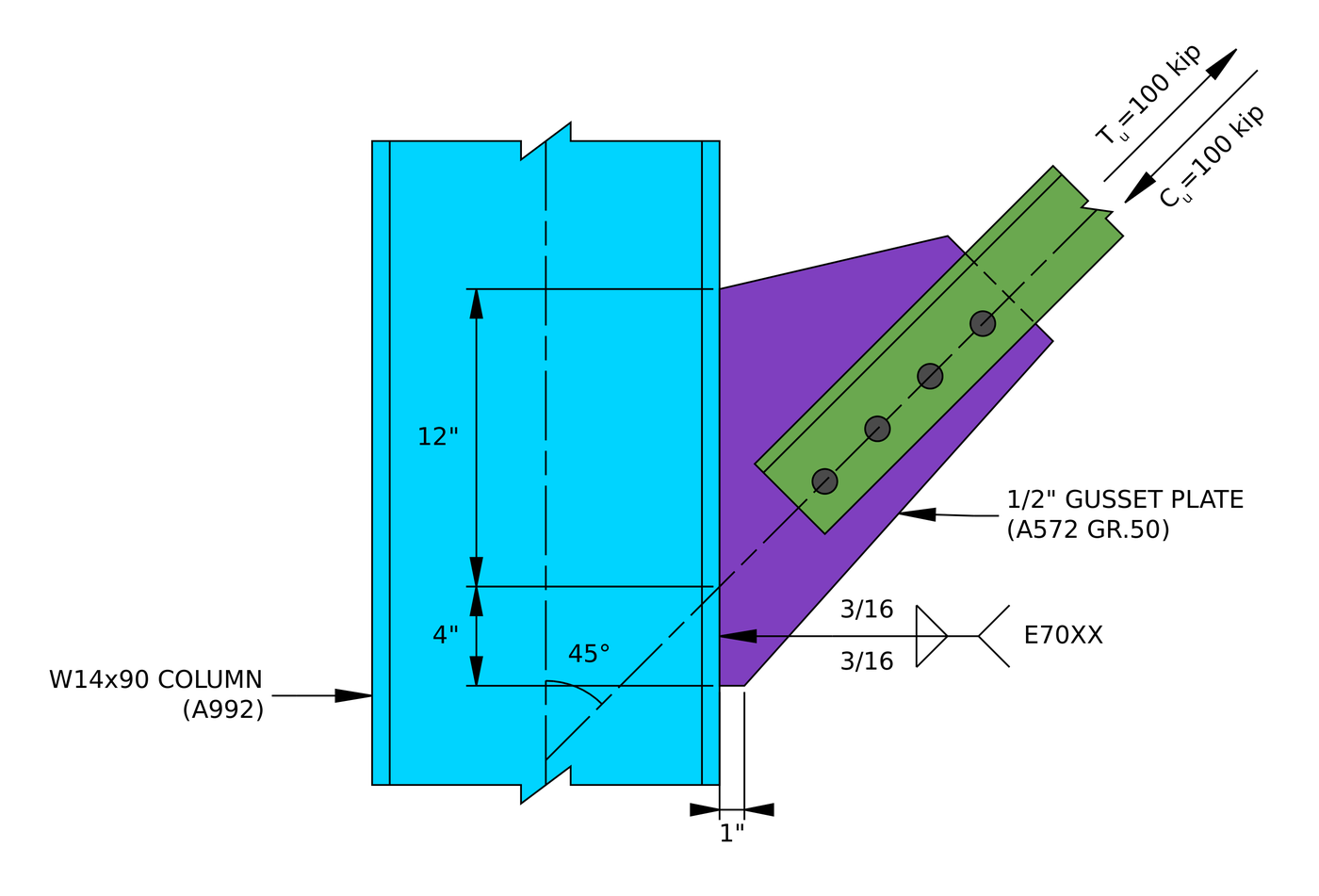
Verhoging van de voorbeeldverbinding. De hoekplaatlas loopt 12 boven en 4 onder het punt waar de steunlijn het kolomvlak kruist.
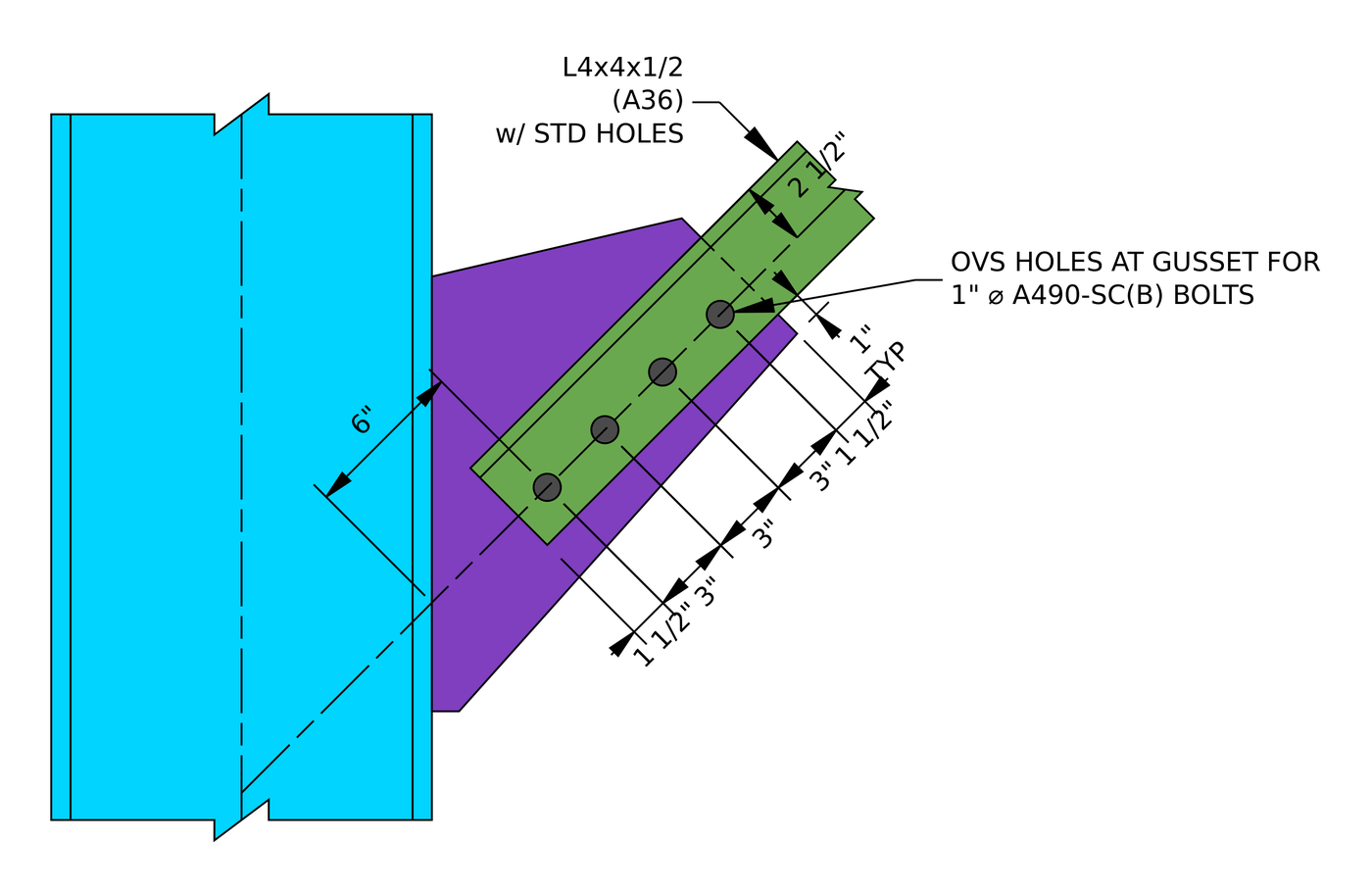
De beugelverbinding. Vier bouten bij 3 op een 2 1/2 in maat, met 1 1/2 in eindafstanden op de hoek en op de hoekplaat.
Kniebrace-verbindingsontwerp: de stappen in één oogopslag
- Controleer de detailleringslimieten bij de steunbouten: maat, afstanden en randafstanden.
- Controleer de slipweerstand van de slipkritische bouten.
- Controleer de boutlagers en uitscheuringen op de knoopplaat.
- Controleer het boutlager en de uitscheuring van de beugel.
- Controleer de blokafschuiving van de knoopplaat.
- Controleer de blokafschuiving van de beugel.
- Controleer of de knoopplaat op spanning staat op het Whitmore-gedeelte.
- Controleer de beugel bij spanningsbreuk met schuifvertraging.
- Controleer of de knoopplaat door compressie knikt.
- Controleer de minimale hoeklasgrootte in de kolom.
- Bepaal de steunkracht aan het kolomvlak en controleer de lasverbinding tussen de kolom en de kolom.
- Controleer de schetsplaat op de meegevende schuifkracht langs de kolom.
- Controleer of de knoopplaat spanning meegeeft langs de kolom.
- Controleer het kolomweb op lokale verlamming en lokale opbrengst.
Ontwerp invoer voor dit voorbeeld
De ontwerpcode is AISC 360-16 LRFD. Sectie-eigenschappen komen uit de AISC-handleiding.
| Item | Symbool | Waarde |
|---|---|---|
| Spanningsbelasting van de beugel | [mathin] T_{u,br} [mathin] | 100 kip |
| Compressiebelasting van de beugel | [mathin] C_{u,br} [mathin] | 100 kip |
| Kolom | B14x90, A992 | |
| Kolom diepte / dikte van het web | [mathin] d_{c},\ t_{w,c} [mathin] | 14 in / 0.44 in |
| Breedte van de kolomflens / dikte | [mathin] b_{f,c},\ t_{f,c} [mathin] | 14.5 in / 0.71 in |
| Kolomgebied / waar | [mathin] A_{c},\ k_{des,c} [mathin] | 26.5 in² / 1.31 in |
| Kolomopbrengst / trekspanning | [mathin] F_{y,c},\ F_{u,c} [mathin] | 50 KSI / 65 KSI |
| Beugel | L4x4x1/2, A36 | |
| Steungebied | [mathin] A_{br} [mathin] | 3.75 in² |
| Zet het been vast / uit kruisje | [mathin] L_{on,gp,br},\ L_{off,gp,br} [mathin] | 4 in / 4 in |
| Dikte van de beugel / zwaartepunt | [mathin] t_{br},\ \bar{y} [mathin] | 0.5 in / 1.18 in |
| Steunhelling vanaf steun | [mathin] \theta_{br} [mathin] | 45° |
| Beugel ongeschoorde lengte (kniklengte van de hoekplaat) | [mathin] L_{b,br} [mathin] | 6 in |
| Opbrengst beugel / trekspanning | [mathin] F_{y,br},\ F_{u,br} [mathin] | 36 KSI / 58 KSI |
| Elasticiteitsmodulus | [mathin] E [mathin] | 29000 KSI |
| Item | Symbool | Waarde |
|---|---|---|
| Knoopplaat | 1/2 in, A572 kwaliteit 50 | |
| De dikte van de inzet | [mathin] t_{gp} [mathin] | 0.5 in |
| Opbrengst kruisje / trekspanning | [mathin] F_{y,gp},\ F_{u,gp} [mathin] | 50 KSI / 65 KSI |
| Bouten | 1 in A490-SC, Klasse B-oppervlak | |
| Diameter bout | [mathin] d_{b} [mathin] | 1 in |
| Gaten in beugel / kruisje | Standaard (soa) / te groot (OVS) | |
| Boutmaat op de beugelpoot | [mathin] g_{a} [mathin] | 2.5 in |
| Rijen vastschroeven / rijafstand | [mathin] n_{r},\ s_{r} [mathin] | 4 / 3 in |
| Kolommen vastschroeven | [mathin] n_{c} [mathin] | 1 |
| Eindafstand op schoor en hoekplaat | [mathin] L_{ev} [mathin] | 1.5 in |
| Las aan de kolom | 3/16 in filet, beide zijden van het kruisje, E70XX | |
| Lasgrootte / vulsterkte | [mathin] W,\ F_{EXX} [mathin] | 0.1875 in / 70 KSI |
| Laslengte hierboven / onder de steunlijn | [mathin] L_{w1},\ L_{w2} [mathin] | 12 in / 4 in |
| Totale hoekplaatlengte langs de kolom | [mathin] L_{WT} [mathin] | 16 in |
De windverbandlengte op de knoopplaat wordt opgeteld op basis van de tekening: twee 1.5 in eindafstanden plus drie 3 in ruimtes, 12 in. De horizontale randafstand op de hoek is het been minus de maat, 4 - 2.5 = 1.5 in.
Stap 1: Detaillering van grenzen bij de steunbouten (AISC 360-16 J3.3, J3.4, J3.5)
De boutindeling moet bouwbaar zijn en overeenkomen met de aannames achter de sterktevergelijkingen. Bouten die te dicht bij elkaar zitten, scheuren tussen de gaten, randen die te dichtbij zijn, scheuren uit, en de meter moet ruimte laten om de bouten naast het uitstekende been van de hoek te passen en vast te draaien.
Voor een 1 in bout is de minimale afstand [mathin] 2\tfrac{2}{3} d_{b} = 2.667\,in [mathin] (J3.3) en de minimale randafstand is 1.25 in (Tabel J3.4). De hoek is voorzien van standaard gaten, Dus 1.25 in is er rechtstreeks op van toepassing. Het kruisje heeft extra grote gaten, dus de tabel J3.5-verhoging van 1/8 in verhoogt de minimale eindafstand tot 1.375 in.
| Detailleringslimiet | Beperken (in) | Werkelijk (in) | DCR | Resultaat |
|---|---|---|---|---|
| Minimale boutmaat | 1.875 | 2.500 | 0.750 | DOORGANG |
| Minimale afstand tussen de boutrijen | 2.667 | 3.000 | 0.889 | DOORGANG |
| Maximale afstand tussen de boutrijen | 6.000 | 3.000 | 0.500 | DOORGANG |
| Minimale verticale randafstand van de knoopplaat | 1.375 | 1.500 | 0.917 | DOORGANG |
| Minimale verticale randafstand van de beugel | 1.250 | 1.500 | 0.833 | DOORGANG |
| Minimale horizontale randafstand van de beugel | 1.250 | 1.500 | 0.833 | DOORGANG |
Voor een minimumlimiet is de verhouding de limiet ten opzichte van de werkelijke waarde, en voor een maximum is het feitelijk boven de limiet. De bepalende rij is de eindafstand van de knoopplaat met de extra grote gaten:
[math] DCR = \frac{d}{c} = \frac{(1.375)}{(1.5)} = 0.91667 [math]
DCR = 0.917 < 1.0, OK
Stap 2: Slipweerstand van de bouten (AISC 360-16 J3.8)
Het kruisje heeft extra grote gaten, en AISC 360-16 J3.2 staat alleen overmaatse gaten toe in slipkritische verbindingen. De bouten worden dus voorgespannen en de schoorkracht wordt gedragen door wrijving tussen de hoek en de hoekplaat. De controle is dat de verbinding niet wegglijdt onder de meegerekende belasting.
Waarbij [mathin] \phi = 0.85 [mathin] voor te grote gaten, [mathin] \mu = 0.5 [mathin] voor een klasse B-oppervlak, [mathin] D_{u} = 1.13 [mathin], [mathin] h_{f} = 1 [mathin] omdat er geen vulstoffen zijn, [mathin] T_{b} = 64\,kip [mathin] voor een 1 in A490-bout (Tabel J3.1), [mathin] N_{s} = 1 [mathin] glijvlak, [mathin] n_{r} = 4 [mathin] en [mathin] n_{c} = 1 [mathin]:
[math] \phi R_{n} = \phi\, \mu\, D_{u}\, h_{f}\, T_{b}\, N_{s}\, n_{r}\, n_{c} [math]
[math] \phi R_{n} = (0.85) \times (0.5) \times (1.13) \times (1) \times (64\,kip) \times (1) \times (4) \times (1) [math]
[math] \phi R_{n} = 122.94\,kip [math]
DCR = 100 kip / 122.94 kip = 0.813 < 1.0, OK
Dezelfde controle heeft betrekking op spanning en compressie, omdat de beugelkracht is 100 kip hoe dan ook.
Stap 3: Boutlager en uitscheuring op de knoopplaat (AISC 360-16 J3.10)
Slipkritische bouten moeten nog steeds op lagering worden gecontroleerd, want als de verbinding wegglijdt, komen de bouten op de zijkanten van hun gaten terecht. Bij spanning trekt de beugel de bouten weg van de kolom, zodat ze op de hoekplaat naar het uiteinde ervan rusten. De bout die het dichtst bij dat uiteinde ligt, heeft het minste materiaal ervoor.
Het kruisje is oversized, [mathin] d_{h} = 1.25\,in [mathin]. Vrije afstand voor de eindbout, met [mathin] L_{ev} = 1.5\,in [mathin]:
[math] l_{c1} = L_{ev} – \frac{d_{h}}{2} = (1.5\,in) – \frac{(1.25\,in)}{2} = 0.875\,in [math]
Vrije afstand tussen de bouten, met [mathin] s_{r} = 3\,in [mathin]:
[math] l_{c2} = s_{r} – d_{h} = (3\,in) – (1.25\,in) = 1.75\,in [math]
Waarbij [mathin] t_{gp} = 0.5\,in [mathin], [mathin] F_{u,gp} = 65\,ksi [mathin], [mathin] n_{r} = 4 [mathin], [mathin] n_{c} = 1 [mathin], [mathin] d_{b} = 1\,in [mathin] en [mathin] \phi = 0.75 [mathin]:
[math] \phi R_{n,tearout} = \phi \left[ \min\left(1.2\, l_{c1},\, 2.4\, d_{b}\right) t_{gp} F_{u,gp}\, n_{c} + \min\left(1.2\, l_{c2},\, 2.4\, d_{b}\right) t_{gp} F_{u,gp}\, n_{c} \left( n_{r} – 1 \right) \right] [math]
[math] \phi R_{n,tearout} = (0.75) \times \left[ \min\left(1.2 \times (0.875\,in),\, 2.4 \times (1\,in)\right) \times (0.5\,in) \times (65\,ksi) \times (1) + \min\left(1.2 \times (1.75\,in),\, 2.4 \times (1\,in)\right) \times (0.5\,in) \times (65\,ksi) \times (1) \times ((4) – 1) \right] [math]
[math] \phi R_{n,tearout} = 179.16\,kip [math]
DCR = 100 kip / 179.16 kip = 0.558 < 1.0, OK
Uitscheuren regeert hier elke bout, omdat het grote, extra grote gat de vrije afstand in beslag neemt: 1.2 LC staat hieronder 2.4 db voor zowel de eindbout als de binnenbouten. Bij compressie dragen de bouten in plaats daarvan naar de kolom, waar veel meer speling is, dus spanning is het geval dat er toe doet.
Stap 4: Boutlager en uitscheuring op de beugel (AISC 360-16 J3.10)
Dezelfde controle geldt voor de hoekpoot. Bij spanning wordt de hoek van de kolom weggetrokken, zodat de bouten naar het uiteinde van de hoek wijzen die het dichtst bij de kolom ligt.
De hoek is voorzien van standaard gaten, [mathin] d_{h} = 1.125\,in [mathin]:
[math] l_{c1} = L_{ev} – \frac{d_{h}}{2} = (1.5\,in) – \frac{(1.125\,in)}{2} = 0.9375\,in [math]
[math] l_{c2} = s_{r} – d_{h} = (3\,in) – (1.125\,in) = 1.875\,in [math]
Waarbij [mathin] t_{br} = 0.5\,in [mathin] en [mathin] F_{u,br} = 58\,ksi [mathin]:
[math] \phi R_{n,tearout} = \phi \left[ \min\left(1.2\, l_{c1},\, 2.4\, d_{b}\right) t_{br} F_{u,br}\, n_{c} + \min\left(1.2\, l_{c2},\, 2.4\, d_{b}\right) t_{br} F_{u,br}\, n_{c} \left( n_{r} – 1 \right) \right] [math]
[math] \phi R_{n,tearout} = (0.75) \times \left[ \min\left(1.2 \times (0.9375\,in),\, 2.4 \times (1\,in)\right) \times (0.5\,in) \times (58\,ksi) \times (1) + \min\left(1.2 \times (1.875\,in),\, 2.4 \times (1\,in)\right) \times (0.5\,in) \times (58\,ksi) \times (1) \times ((4) – 1) \right] [math]
[math] \phi R_{n,tearout} = 171.28\,kip [math]
DCR = 100 kip / 171.28 kip = 0.584 < 1.0, OK
De hoek heeft het kleinere gat maar het zwakkere staal. A36 bij 58 ksi tegen de kruisje 65 ksi annuleert ruimschoots de extra vrije afstand, zodat de beugel iets zwakker wordt in de lagering.
Stap 5: Blokafschuiving van de knoopplaat (AISC 360-16 J4.3)
Een blok van de knoopplaat kan langs de boutlijn uitscheuren: schuif langs de lijn van bouten tot aan het uiteinde van de knoopplaat, plus spanning vanaf de boutlijn tot aan de zijkant van de knoopplaat. Met één rij bouten, het blok is L-vormig.
Nettooppervlak onder spanning, met [mathin] n_{c} = 1 [mathin], [mathin] s_{c} = 0\,in [mathin] en de afstand van de knoopplaatrand tot de boutlijn [mathin] L_{eh,gp} = 1.5\,in [mathin]. Elk gat voegt toe 1/16 op schade tijdens het ponsen (B4.3):
[math] A_{nt} = t_{gp} \left[ (n_{c}-1)\, s_{c} + L_{eh,gp} – (n_{c} – 0.5) \left( d_{h} + 0.0625\,in \right) \right] [math]
[math] A_{nt} = (0.5\,in) \times \left[ ((1)-1) \times (0\,in) + (1.5\,in) – ((1) – 0.5) \times ((1.25\,in) + (0.0625\,in)) \right] = 0.42188\,in^{2} [math]
Bruto oppervlak in afschuiving, vanaf het uiteinde van de knoopplaat tot de verste bout:
[math] A_{gv} = t_{gp} \left[ L_{ev} + (n_{r}-1)\, s_{r} \right] = (0.5\,in) \times \left[ (1.5\,in) + ((4)-1) \times (3\,in) \right] = 5.25\,in^{2} [math]
Netto oppervlak in afschuiving. Het rapport schrijft de afschuiflengte als de 12 in brace-lengte op de kruisje, [mathin] L_{br,gp} [mathin], minus één eindafstand, wat hetzelfde is 10.5 in als in de bruto oppervlakte:
[math] A_{nv} = t_{gp} \left[ L_{br,gp} – L_{ev} – (n_{r} – 0.5)\left( d_{h} + 0.0625\,in \right) \right] [math]
[math] A_{nv} = (0.5\,in) \times \left[ (12\,in) – (1.5\,in) – ((4) – 0.5) \times ((1.25\,in) + (0.0625\,in)) \right] = 2.9531\,in^{2} [math]
Blokschuifsterkte, met [mathin] U_{bs} = 1 [mathin] omdat de spanningsspanning uniform is, [mathin] F_{u,gp} = 65\,ksi [mathin], [mathin] F_{y,gp} = 50\,ksi [mathin] en [mathin] \phi = 0.75 [mathin]:
[math] \phi R_{n} = \phi \left( 0.6\, F_{u,gp} A_{nv} + U_{bs} F_{u,gp} A_{nt} \le 0.6\, F_{y,gp} A_{gv} + U_{bs} F_{u,gp} A_{nt} \right) [math]
[math] \phi R_{n} = (0.75) \times \left( 0.6 \times (65\,ksi) \times (2.9531\,in^{2}) + (1) \times (65\,ksi) \times (0.42188\,in^{2}) \le 0.6 \times (50\,ksi) \times (5.25\,in^{2}) + (1) \times (65\,ksi) \times (0.42188\,in^{2}) \right) [math]
[math] \phi R_{n} = 106.95\,kip [math]
DCR = 100 kip / 106.95 kip = 0.935 < 1.0, OK
Afschuifbreuk op het netgedeelte is bepalend. De 1 1/4 in te grote gaten nemen 4.59 in uit de 10.5 in afschuiflengte, Daarom komt deze controle zo dichtbij.
Stap 6: Blokschaar van de beugel (AISC 360-16 J4.3)
De hoekpoot kan op dezelfde manier uitscheuren: afschuiving langs de boutlijn tot het einde van de hoek, plus spanning vanaf de boutlijn tot aan de teen van het been.
De horizontale randafstand op de hoek is [mathin] L_{eh,br} = 1.5\,in [mathin] en het gat is [mathin] d_{h} = 1.125\,in [mathin]:
[math] A_{nt} = t_{br} \left[ (n_{c}-1)\, s_{c} + L_{eh,br} – (n_{c} – 0.5) \left( d_{h} + 0.0625\,in \right) \right] [math]
[math] A_{nt} = (0.5\,in) \times \left[ ((1)-1) \times (0\,in) + (1.5\,in) – ((1) – 0.5) \times ((1.125\,in) + (0.0625\,in)) \right] = 0.45313\,in^{2} [math]
[math] A_{gv} = t_{br} \left[ L_{ev} + (n_{r}-1)\, s_{r} \right] = (0.5\,in) \times \left[ (1.5\,in) + ((4)-1) \times (3\,in) \right] = 5.25\,in^{2} [math]
[math] A_{nv} = t_{br} \left[ L_{br,gp} – L_{ev} – (n_{r} – 0.5)\left( d_{h} + 0.0625\,in \right) \right] [math]
[math] A_{nv} = (0.5\,in) \times \left[ (12\,in) – (1.5\,in) – ((4) – 0.5) \times ((1.125\,in) + (0.0625\,in)) \right] = 3.1719\,in^{2} [math]
Met [mathin] F_{u,br} = 58\,ksi [mathin], [mathin] F_{y,br} = 36\,ksi [mathin], [mathin] U_{bs} = 1 [mathin] en [mathin] \phi = 0.75 [mathin]:
[math] \phi R_{n} = \phi \left( 0.6\, F_{u,br} A_{nv} + U_{bs} F_{u,br} A_{nt} \le 0.6\, F_{y,br} A_{gv} + U_{bs} F_{u,br} A_{nt} \right) [math]
[math] \phi R_{n} = (0.75) \times \left( 0.6 \times (58\,ksi) \times (3.1719\,in^{2}) + (1) \times (58\,ksi) \times (0.45313\,in^{2}) \le 0.6 \times (36\,ksi) \times (5.25\,in^{2}) + (1) \times (58\,ksi) \times (0.45313\,in^{2}) \right) [math]
[math] \phi R_{n} = 102.5\,kip [math]
DCR = 100 kip / 102.5 kip = 0.976 < 1.0, OK
Dit is de controle van de hele verbinding. Netto schuifbreuk regeert opnieuw, al is het maar net: de opbrengstkant van de vergelijking ligt binnen 3 kip ervan.
Stap 7: Knoopplaat onder spanning op het Whitmore-profiel (AISC 360-16 J4.1)
De kracht van de beugel komt via de bouten in de plaat en verspreidt zich terwijl deze langs de plaat beweegt. Het Whitmore-gedeelte is de effectieve breedte die de kracht bij de laatste bout opneemt: lijnen getrokken vanaf de eerste bout, zich aan elke kant uitspreiden, gemeten over de laatste bout (AISC-handleiding onderdeel 9, Afb. 9-1). Op die breedte mag de kruisplaat niet meegeven, en het mag niet scheuren over die breedte minus het gat.
Whitmore-breedte
De boutgroep is [mathin] L_{br} = (n_{r}-1)\, s_{r} = 9\,in [mathin] lang en heeft een enkele boutlijn, Dus [mathin] W_{br} = 0\,in [mathin]. In het rapport, [mathin] W [mathin] in deze stap is de Whitmore-breedte, niet de lasgrootte:
[math] W = 2\, L_{br} \tan(\theta) + W_{br} = 2 \times (9\,in) \times \tan((18.93)) + (0\,in) = 6.1732\,in [math]
De spreidhoek van de Manual bedraagt 30°, die zou geven 2 × 9 × bruin 30° = 10.39 in. Maar de schuine vrije rand van de hoekplaat aan de teenzijde van de hoek passeert slechts ongeveer 3.1 vanaf de laatste bout, zodat er een lijn van 30 ° van de plaat zou lopen. Het rapport verkleint de spread terug naar 18,93°, waardoor de rand van het Whitmore-gedeelte wordt geplaatst 3.0866 vanaf de boutlijn, aan die vrije rand, en gebruikt dezelfde breedte aan de andere kant. Alleen staal dat er ook daadwerkelijk is, wordt meegeteld.
Spanning levert op (Eq. J4-1)
Met [mathin] \phi = 0.9 [mathin], [mathin] F_{y,gp} = 50\,ksi [mathin] en [mathin] t_{gp} = 0.5\,in [mathin]:
[math] \phi R_{n,ty} = \phi\, F_{y,gp}\, t_{gp}\, W = (0.9) \times (50\,ksi) \times (0.5\,in) \times (6.1732\,in) = 138.9\,kip [math]
Spanning breuk (Eq. J4-2)
De nettobreedte verwijdert één te groot gat, [mathin] d_{h} = 1.25\,in [mathin], met [mathin] \phi = 0.75 [mathin] en [mathin] F_{u,gp} = 65\,ksi [mathin]:
[math] \phi R_{n,tr} = \phi\, F_{u,gp}\, t_{gp} \left[ W – n_{c}\left( d_{h} + 0.0625\,in \right) \right] [math]
[math] \phi R_{n,tr} = (0.75) \times (65\,ksi) \times (0.5\,in) \times \left[ (6.1732\,in) – (1) \times ((1.25\,in) + (0.0625\,in)) \right] = 118.48\,kip [math]
[math] \phi R_{n} = \min\left( \phi R_{n,ty},\, \phi R_{n,tr} \right) = \min\left( (138.9\,kip),\, (118.48\,kip) \right) = 118.48\,kip [math]
DCR = 100 kip / 118.48 kip = 0.844 < 1.0, OK
Stap 8: Steun bij spanningsbreuk met schuifvertraging (AISC 360-16 D3, J4.1)
Slechts één been van de hoek is vastgeschroefd, de kracht moet dus van het uitstekende been naar het geschroefde been nabij de verbinding stromen. Die ongelijke spanning is schuifvertraging, en AISC behandelt het met de factor U, waardoor het nettooppervlak kleiner wordt.
Uit tabel D3.1, Geval 2, met het zwaartepunt van de hoek [mathin] \bar{y} = 1.18\,in [mathin] gemeten vanaf het boutvlak en de verbindingslengte [mathin] (n_{r} – 1)\, s_{r} = 9\,in [mathin]:
[math] U = 1 – \frac{\bar{y}}{(n_{r} – 1)\, s_{r}} = 1 – \frac{(1.18\,in)}{((4) – 1) \times (3\,in)} = 0.86894 [math]
Waarbij [mathin] A_{br} = 3.75\,in^{2} [mathin], [mathin] d_{h} = 1.125\,in [mathin], [mathin] t_{br} = 0.5\,in [mathin], [mathin] F_{u,br} = 58\,ksi [mathin] en [mathin] \phi = 0.75 [mathin]:
[math] \phi R_{n,tr} = \phi\, F_{u,br}\, U \left[ A_{br} – n_{c}\left( d_{h} + 0.0625\,in \right) t_{br} \right] [math]
[math] \phi R_{n,tr} = (0.75) \times (58\,ksi) \times (0.86894) \times \left[ (3.75\,in^{2}) – (1) \times ((1.125\,in) + (0.0625\,in)) \times (0.5\,in) \right] = 119.3\,kip [math]
DCR = 100 kip / 119.3 kip = 0.838 < 1.0, OK
Een langere boutgroep verhoogt U. Met zes bouten in plaats van vier, de verbindingslengte zou zijn 15 in en U zou zijn 1 - 1.18/15 = 0.92.
Stap 9: Knoopplaat met drukknik (AISC 360-16 J4.4, E3)
Wanneer de beugel onder druk staat, wordt de hoekplaat naar de kolom geduwd. De strook hoekplaat tussen de laatste bout en het kolomvlak kan uit het vlak knikken, dus wordt gecontroleerd als een kolom met de Whitmore-breedte als dwarsdoorsnede.
De kniklengte is de 6 weergegeven op de tekening, vanaf de lijn van de bout die zich het dichtst bij de kolom bevindt, tot aan het kolomvlak, gemeten langs de beugel. Het rapport noemt het de ongeschoorde lengte van de beugel, [mathin] L_{b,br} = 6\,in [mathin]. De hoekplaat is slechts aan één rand aan de kolom gelast en het vrije uiteinde kan met de beugel uit het vlak zwaaien, zo luidt het rapport [mathin] K = 1.2 [mathin]. Voor een stevige rechthoek, [mathin] r = t_{gp}/\sqrt{12} = 0.14434\,in [mathin]:
[math] \frac{KL}{r} = \frac{(1.2) \times (6\,in)}{(0.5\,in)/\sqrt{12}} = 49.883 [math]
Sinds [mathin] KL/r \gt 25 [mathin], J4.4 stuurt de cheque naar Hoofdstuk E. Elastische knikspanning:
[math] F_{e} = \frac{\pi^{2} E}{\left( \frac{KL}{r} \right)^{2}} = \frac{\pi^{2} \times (29000\,ksi)}{((49.883))^{2}} = 115.02\,ksi [math]
[math] 4.71 \sqrt{\frac{E}{F_{y}}} = 113.43 [math]
Sinds [mathin] KL/r \le 4.71\sqrt{E/F_{y}} [mathin], de inelastische vergelijking E3-2 is van toepassing:
[math] F_{cr} = \left( 0.658^{\frac{F_{y,gp}}{F_{e}}} \right) F_{y,gp} = \left( 0.658^{\frac{(50\,ksi)}{(115.02\,ksi)}} \right) \times (50\,ksi) = 41.683\,ksi [math]
Met [mathin] \phi = 0.9 [mathin] en de Whitmore-breedte [mathin] W = 6.1732\,in [mathin]:
[math] \phi R_{n} = \phi\, F_{cr}\, t_{gp}\, W = (0.9) \times (41.683\,ksi) \times (0.5\,in) \times (6.1732\,in) = 115.79\,kip [math]
DCR = 100 kip / 115.79 kip = 0.864 < 1.0, OK
De breedte van Whitmore drijft deze controle net zo goed als de slankheid. Een kruisje met meer plaat onder de beugel zou een bredere doorsnede en een hogere sterkte krijgen.
Stap 10: Minimale hoeklasgrootte bij de kolom (AISC 360-16 J2.2b)
Een hoeklas die te klein is voor de delen die hij verbindt, kan tijdens het afkoelen barsten, omdat het dikkere deel de warmte er te snel uit haalt. Tabel J2.4 stelt het minimum vast voor het dunnere deel dat wordt samengevoegd. Hier is dat de 1/2 in kruisje, die in de over valt 1/4 in om 1/2 in bands, dus het minimum is 3/16 in.
| Detailleringslimiet | Beperken (in) | Werkelijk (in) | DCR | Resultaat |
|---|---|---|---|---|
| Minimale hoeklasgrootte | 0.188 | 0.188 | 1.000 | DOORGANG |
[math] DCR = \frac{d}{c} = \frac{(0.188)}{(0.188)} = 1 [math]
DCR = 1.000, OK
Een verhouding van 1.000 hier is geen sprake van een bijna-ongeluk. Er staat alleen de 3/16 in las is precies de kleinste toegestane maat, Dat is een gebruikelijke en verstandige keuze.
Stap 11: Lasplaat aan kolom (AISC 360-16 J2.4, AISC-ontwerpgids 29)
De hoekplaat wordt aan de kolomflens gelast met een 3/16 in filet aan elke kant. De steunkracht bereikt het kolomvlak onder een hoek en buiten het midden van de las, dus de las draagt een normaalkracht, een knipbeurt en een moment samen. Met deze stap wordt de schoorkracht op het kolomvlak bepaald, vindt de zwaarste belasting op de las, en controleert de las daarop.
Basismetaallimiet voor lasgrootte (AISC handmatige vergelijking. 9-2)
De kruisplaat heeft aan beide zijden een las, dus de helft van de dikte steunt elke las. Met [mathin] t_{f,c} = 0.71\,in [mathin], [mathin] F_{u,c} = 65\,ksi [mathin], [mathin] t_{gp} = 0.5\,in [mathin] en [mathin] F_{u,gp} = 65\,ksi [mathin]:
[math] D_{max} = \frac{t_{f,c} F_{u,c} \le \frac{t_{gp}}{2} F_{u,gp}}{3.09\,kip/in \times F_{EXX}/F_{E70XX}} = \frac{(0.71\,in) \times (65\,ksi) \le (0.25\,in) \times (65\,ksi)}{(3.09\,kip/in) \times (1)} = 5.2589 [math]
Dat is 5.2589 zestiende, over 0.329 in, dus de volledige 3/16 in lasaantallen.
Effectieve laslengte
Het kruisje loopt [mathin] L_{WT} = 16\,in [mathin] langs de kolom. Elk van de twee laslijnen wordt aan de uiteinden met 2W verminderd:
[math] L_{w} = 2 \left[ L_{WT} – 2W \right] = 2 \times \left[ (16\,in) – 2 \times (0.1875\,in) \right] = 31.25\,in [math]
Krachten aan het kolomvlak
Verdeel de 100 kracht van de kipbrace, [mathin] P_{u,br} [mathin], in een component loodrecht op het kolomvlak en één erlangs:
[math] N_{br} = P_{u,br} \sin(\theta_{br}) = (100\,kip) \times \sin((45)) = 70.711\,kip [math]
[math] V_{br} = P_{u,br} \cos(\theta_{br}) = (100\,kip) \times \cos((45)) = 70.711\,kip [math]
De steunlijn kruist het kolomvlak 12 onder de bovenkant van de kruisje en 4 boven zijn bodem, dus het mist het midden van de 16 in las door [mathin] (12 – 4)/2 = 4\,in [mathin]. De afschuiving werkt langs de laslijn en maakt zich daar geen zorgen over, maar de normaalkracht is dat wel 4 buiten het midden:
[math] M_{br} = \frac{N_{br} \left| L_{w1} – L_{w2} \right|}{2} = \frac{(70.711\,kip) \times |(12\,in) – (4\,in)|}{2} = 23.57\,kip{\cdot}ft [math]
Dat is 282.84 kip-in. Het moment voegt toe aan de normaalkracht aan het ene uiteinde van de las en trekt af aan het andere uiteinde. Het rapport zet het moment om in een equivalente normaalkracht met behulp van de plastische sectiemodulus van de twee laslijnen, [mathin] L_{w}^{2}/8 [mathin], wat de normale piekbelasting geeft:
[math] N_{br,T} = \frac{8\, M_{br}}{L_{w}} + N_{br} = \frac{8 \times (23.57\,kip{\cdot}ft)}{(31.25\,in)} + (70.711\,kip) = 143.12\,kip [math]
Het moment wordt omgezet in kip-in (× 12) binnen die fractie. De resultante op de piek en de hoek ervan met de lasas:
[math] R = \sqrt{\left( N_{br,T} \right)^{2} + \left( V_{br} \right)^{2}} = \sqrt{((143.12\,kip))^{2} + ((70.711\,kip))^{2}} = 159.63\,kip [math]
[math] \theta = \tan^{-1}\left| \frac{N_{br,T}}{V_{br}} \right| = \tan^{-1}\left| \frac{(143.12\,kip)}{(70.711\,kip)} \right| = 63.707 [math]
Lasductiliteitsfactor
De belasting op de las is niet gelijkmatig. Het piekt aan de ene kant en valt bijna tot niets aan de andere kant. Hoeklassen hebben een beperkte ductiliteit, dus AISC-ontwerpgids 29 en AISC-handboekonderdeel 13 ontwerp een hoekplaatrandlas voor de grootste piekbelasting en 1.25 maal het gemiddelde van de piek- en minimumbelastingen. De 1.25 zorgt ervoor dat de las de belasting herverdeelt voordat deze breekt.
Aan het uiteinde met lage spanning trekt de buiging af van de normaalkracht:
[math] N_{br,min} = \left| N_{br} – \frac{8\, M_{br}}{L_{w}} \right| = \left| (70.711\,kip) – \frac{8 \times (23.57\,kip{\cdot}ft)}{(31.25\,in)} \right| = 1.6971\,kip [math]
[math] R_{min} = \sqrt{\left( N_{br,min} \right)^{2} + \left( V_{br} \right)^{2}} = \sqrt{((1.6971\,kip))^{2} + ((70.711\,kip))^{2}} = 70.731\,kip [math]
[math] R_{w} = \max\left( R,\, 1.25\, \frac{R + R_{min}}{2} \right) = \max\left( (159.63\,kip),\, 1.25 \times \frac{(159.63\,kip) + (70.731\,kip)}{2} \right) = 159.63\,kip [math]
De gemiddelde waarde is 143.98 kip, dus de piek regeert.
Lassterkte (Eq. J2-4)
Het resultaat bevindt zich op 63,707° ten opzichte van de las, dus de richtingsfactor [mathin] 1 + 0.5 \sin^{1.5}\theta [mathin] voegt ongeveer toe 42% aan de kracht. Met [mathin] \phi = 0.75 [mathin] en [mathin] F_{EXX} = 70\,ksi [mathin]:
[math] \phi R_{n} = \phi\, 0.6\, F_{EXX} \frac{\sqrt{2}}{2} \left( W \le \frac{D_{max}}{16} \right) \left[ 1 + 0.5 \left( \sin\theta \right)^{1.5} \right] L_{w} [math]
[math] \phi R_{n} = (0.75) \times 0.6 \times (70\,ksi) \times \frac{\sqrt{2}}{2} \times \left( (0.1875\,in) \le \frac{(5.2589)}{(16)} \right) \times \left[ 1 + 0.5 \times (\sin(63.707))^{1.5} \right] \times (31.25\,in) [math]
[math] \phi R_{n} = 185.91\,kip [math]
DCR = 159.63 kip / 185.91 kip = 0.859 < 1.0, OK
De 4 in excentriciteit kost hier veel. Zonder dit zou de las een 100 kip resultante in plaats van 159.63 kip. Door de hoekplaat te centreren op het punt waar de windverbandlijn het kolomvlak kruist, wordt het moment verwijderd.
Stap 12: Knoopplaat in schuifmeegevend langs de kolom (AISC 360-16 J4.2)
De component van de schoorkracht langs het kolomvlak, [mathin] V_{br} = 70.711\,kip [mathin], gaat als afschuiving door de gelaste rand van de knoopplaat. Het bruto gedeelte langs die rand mag niet meegeven.
Met [mathin] L_{WT} = 16\,in [mathin], [mathin] t_{gp} = 0.5\,in [mathin], [mathin] F_{y,gp} = 50\,ksi [mathin] en [mathin] \phi = 1 [mathin]:
[math] A_{gv} = L_{WT}\, t_{gp} = (16\,in) \times (0.5\,in) = 8\,in^{2} [math]
[math] \phi R_{n,sy} = \phi\, 0.6\, F_{y,gp} A_{gv} = (1) \times 0.6 \times (50\,ksi) \times (8\,in^{2}) = 240\,kip [math]
DCR = 70.711 kip / 240 kip = 0.295 < 1.0, OK
Stap 13: Knoopplaat onder spanning meegevend langs de kolom (AISC 360-16 J4.1)
Het normale onderdeel en het moment zetten de gelaste rand van de kruisplaat op spanning, aan één uiteinde het hoogst. Volgens de AISC-ontwerpgids 29, Voorbeeld 5.3, het rapport telt de twee op als normale spanningen op de rand en verandert de piek terug in een equivalente kracht over de volledige rand.
De normale spanning is [mathin] N/(t\,l) + M/(t\,l^{2}/4) [mathin]. Vermenigvuldigen met [mathin] t\,l [mathin], met [mathin] l = L_{WT} = 16\,in [mathin]:
[math] N_{e} = \left| N_{br} \right| + \frac{4 \left| M_{br} \right|}{L_{WT}} = |(70.711\,kip)| + \frac{4 \times |(23.57\,kip{\cdot}ft)|}{(16\,in)} = 141.42\,kip [math]
Dit is iets onder de lasnaad 143.12 kip omdat het gebruik maakt van de 16 in de hoekplaatrand in plaats van de 31.25 in effectieve las verdeeld over twee lijnen. Met [mathin] \phi = 0.9 [mathin]:
[math] \phi R_{n,ty} = \phi\, F_{y,gp}\, t_{gp}\, L_{WT} = (0.9) \times (50\,ksi) \times (0.5\,in) \times (16\,in) = 360\,kip [math]
DCR = 141.42 kip / 360 kip = 0.393 < 1.0, OK
Stap 14: Kolomweb lokaal verlammend en lokaal opleverend (AISC 360-16 J10.3, J10.2)
De hoekplaat oefent een geconcentreerde kracht uit op de kolomflens 16 in lengte. Wanneer de brace onder druk staat, die kracht drukt op de flens, en het daarachter gelegen kolomweb kan plaatselijk meegeven of verkreukelen (kreupel). De vraag is de pieknormale belasting van Step 11, [mathin] N_{br,T} = 143.12\,kip [mathin].
Weblokaal verlammend (Eq. J10-4)
Met [mathin] \phi = 0.75 [mathin], [mathin] t_{w,c} = 0.44\,in [mathin], lager lengte [mathin] L_{WT} = 16\,in [mathin], [mathin] d_{c} = 14\,in [mathin], [mathin] t_{f,c} = 0.71\,in [mathin], [mathin] F_{y,c} = 50\,ksi [mathin] en [mathin] Q_{f} = 1 [mathin]:
[math] \phi R_{n,wlc} = \phi\, 0.8 \left( t_{w,c} \right)^{2} \left[ 1 + 3 \left( \frac{L_{WT}}{d_{c}} \right) \left( \frac{t_{w,c}}{t_{f,c}} \right)^{1.5} \right] \sqrt{\frac{E\, F_{y,c}\, t_{f,c}}{t_{w,c}}}\, Q_{f} [math]
[math] \phi R_{n,wlc} = (0.75) \times 0.8 \times ((0.44\,in))^{2} \times \left[ 1 + 3 \times \left( \frac{(16\,in)}{(14\,in)} \right) \times \left( \frac{(0.44\,in)}{(0.71\,in)} \right)^{1.5} \right] \times \sqrt{\frac{(29000\,ksi) \times (50\,ksi) \times (0.71\,in)}{(0.44\,in)}} \times (1) [math]
[math] \phi R_{n,wlc} = 474.88\,kip [math]
Web lokale opbrengst (Eq. J10-2)
De kracht verspreidt zich door de flens en de filet op a 2.5:1 helling aan elke kant, zodat het web meegeeft [mathin] 5k + l_{b} [mathin]. Met [mathin] \phi = 1 [mathin] en [mathin] k_{des,c} = 1.31\,in [mathin]:
[math] \phi R_{n,wly} = \phi\, F_{y,c}\, t_{w,c} \left( 5\, k_{des,c} + L_{WT} \right) = (1) \times (50\,ksi) \times (0.44\,in) \times \left( 5 \times (1.31\,in) + (16\,in) \right) = 496.1\,kip [math]
[math] \phi R_{n} = \min\left( \phi R_{n,wlc},\, \phi R_{n,wly} \right) = \min\left( (474.88\,kip),\, (496.1\,kip) \right) = 474.88\,kip [math]
DCR = 143.12 kip / 474.88 kip = 0.301 < 1.0, OK
Een lange kruisje verdeelt de kracht goed, het kolomweb heeft dus voldoende reserve en heeft geen verstijving nodig.
Samenvatting van controles
| Ontwerpcontrole | Vraag naar | Capaciteit | DCR | Resultaat |
|---|---|---|---|---|
| Detaillering van grenzen bij de steunbouten | 1.375 in | 1.500 in | 0.917 | DOORGANG |
| Bouten in afschuiving (slip-kritisch) | 100.000 kip | 122.944 kip | 0.813 | DOORGANG |
| Boutlager op de knoopplaat | 100.000 kip | 179.156 kip | 0.558 | DOORGANG |
| Boutlager op de beugel | 100.000 kip | 171.281 kip | 0.584 | DOORGANG |
| Blokafschuiving van de knoopplaat | 100.000 kip | 106.945 kip | 0.935 | DOORGANG |
| Blokschaar van de beugel | 100.000 kip | 102.497 kip | 0.976 | DOORGANG |
| Knoopplaat op spanning | 100.000 kip | 118.480 kip | 0.844 | DOORGANG |
| Brace bij spanningsbreuk | 100.000 kip | 119.303 kip | 0.838 | DOORGANG |
| Knoopplaat onder druk | 100.000 kip | 115.792 kip | 0.864 | DOORGANG |
| Minimale hoeklasgrootte | 0.188 in | 0.188 in | 1.000 | DOORGANG |
| Las bij hoekplaat aan kolom | 159.634 kip | 185.906 kip | 0.859 | DOORGANG |
| Hoekplaatafschuiving langs de kolom | 70.711 kip | 240.000 kip | 0.295 | DOORGANG |
| Kruisplaatspanning meegevend langs de kolom | 141.421 kip | 360.000 kip | 0.393 | DOORGANG |
| Kolom web (lokale verlammende regeringen) | 143.118 kip | 474.882 kip | 0.301 | DOORGANG |
De verbinding doorstaat elke controle van dit kniebrace-verbindingsontwerp. Blokafschuiving van de beugel regelt de sterktecontroles bij 0.976, met blokschaar van de hoekplaat naast 0.935. Beide komen uit dezelfde korte boutlijn met grote gaten. De minimale lasgrootte wordt weergegeven 1.000 alleen omdat de las precies het minimum van Tabel J2.4 bedraagt. Bij de kolom, de las is het drukste onderdeel 0.859, vooral vanwege de 4 in excentriciteit.
Wat u moet wijzigen als een controle mislukt
- Blokschuifkracht van de beugel of hoekplaat: voeg een boutenrij toe, waardoor de schuifvlakken langer worden. Een grotere eindafstand of een langere randafstand tot de zijkant van de kruisplaat helpt ook. Op het kruisje, standaard gaten in plaats van extra grote gaten zorgen voor een netto oppervlak.
- Slipweerstand: bouten toevoegen, gebruik een grotere bout, of gebruik standaardgaten in de kruisplaat, wat φ verhoogt van 0.85 naar 1.00.
- Lager en uitscheuring: vergroot de eindafstand of de boutafstand, of gebruik een dikkere kruisje.
- Breuk van de bracespanning: verleng de boutgroep om U omhoog te brengen, of gebruik een zwaardere hoek.
- Kruisjespanning of compressie: een dikkere kruisje verhoogt beide. Door een plaat aan de teenzijde van de beugel toe te voegen, wordt het Whitmore-gedeelte breder, en door de bouten dichter bij de kolom te plaatsen, wordt de kniklengte verkort.
- Las aan de kolom: Centreer de hoekplaat op het punt waar de steunlijn het kolomvlak raakt om het moment te verwijderen, maak de kruisje langer, of gebruik een grotere filet. Het basismetaal maakt tot ongeveer 5/16 hier.
- Kolom web: verleng de kruisje om de kracht te spreiden, of voeg een paar verstijvers of een dubbele plaat toe.
Veel Gestelde Vragen
Waar wordt een kniebrace voor gebruikt??
Een kniebrace is een korte diagonaal tussen een kolom en een balk of spant, op korte afstand van hun gewricht plaatsen. Het verstevigt de framehoek tegen slingeren en geeft de leden een tussenliggend steunpunt. Omdat het kort is en dicht bij het gewricht zit, het heeft vanwege zijn grootte vaak een grote axiale kracht, in spanning of compressie, afhankelijk van de manier waarop het frame zwaait. Daarom ontwerpt dit voorbeeld voor 100 kip beide kanten op.
Waarom zijn de bouten slipkritisch??
Het kruisje heeft extra grote gaten, die de erector tolerantie geven om de beugel te passen. AISC 360-16 J3.2 staat alleen overmaatse gaten toe in slipkritische verbindingen, dus de bouten zijn voorgespannen en de faying-oppervlakken zijn voorbereid op klasse B. Een brace die omkeert tussen spanning en compressie heeft ook baat bij een gewricht dat niet heen en weer glijdt. Slipkritische bouten worden nog steeds gecontroleerd op lagering en uitscheuring, zoals in Stappen 3 en 4.
Wat is de Whitmore-sectie, en waarom is de spreidingshoek hier 18,93°?
Het Whitmore-gedeelte is de effectieve breedte van de kruisplaat die weerstand biedt aan de schoorkracht aan het uiteinde van de boutgroep. U vindt dit door lijnen te tekenen op 30° vanaf de eerste bout aan elke kant van de boutlijn en daar overheen te meten bij de laatste bout. In dit voorbeeld bevindt de schuine vrije rand van de knoopplaat zich dichter bij de bouten dan deze 30°-lijnen zouden bereiken, dus beperkt het rapport de spread tot 18,93°. De Whitmore-breedte blijft dan binnen de plaat, Bij 6.1732 in plaats van 10.39 in.
Waarom is K = 1.2 gebruikt voor het knikken van de kruisplaat?
De hoekplaat is langs één rand aan de kolom gelast, en het beugeluiteinde ervan kan vrij uit het vlak bewegen. Dat is een kolom die aan beide uiteinden tegen rotatie is vastgezet, maar aan één kant vrij kan worden verplaatst, waarvoor het AISC-commentaar een aanbevolen K van geeft 1.2. Een hoekplaat die aan zowel een balk als een kolom is bevestigd, wordt aan twee randen vastgehouden en krijgt meestal een lagere K. Gebruik makend van 1.2 voor een kniebrace kruisje is de conservatieve keuze.
Waar komt het moment op de knoopplaat-kolomlas vandaan?
De steunlijn raakt het kolomvlak 12 onder de bovenkant van de kruisje en 4 boven zijn bodem, dus het mist het midden van de 16 in las door 4 in. De normale component van de bracekracht, 70.711 kip, acteren 4 buiten het midden geeft een moment van 282.84 kip-in, of 23.57 kip-ft. Als de hoekplaat gecentreerd zou zijn op dat kruispunt, zou er geen moment zijn, en de las zou alleen de 100 kracht van de kipbrace.
Waarom is de hoekplaatlas ontworpen? 1.25 maal de gemiddelde belasting?
De belasting langs een hoekplaatlas is ongelijkmatig, en hoeklassen kunnen niet ver uitrekken voordat ze breken. AISC-ontwerpgids 29 ontwerpt de las voor de grootste piekbelasting en 1.25 maal het gemiddelde van de piek- en minimumbelastingen, met behulp van de lasductiliteitsfactor uit het AISC Manual Part 13. Dat zorgt ervoor dat de las de belasting over de lengte kan herverdelen. In dit voorbeeld bedraagt de piekbelasting van 159.63 Kip regeert over de 143.98 kip op gemiddelde gebaseerde waarde.
Wordt de Uniform Force-methode gebruikt voor een kniebrace?
Nee. De Uniform Force-methode verdeelt een schoorkracht tussen de ligger- en kolomgrensvlakken van een hoekplaat die aan beide is bevestigd, op een werkpunt van een ligger-kolom-schoorsteen. Er is alleen een kniebeugelsteun aan de kolomflens bevestigd. De steunkracht wordt dus op het kolomvlak als normaalkracht opgelost, een knipoog en een moment, en de hoekplaatrand en de las worden op die drie samen gecontroleerd.
Hoe zou dit veranderen voor AISC ASD in plaats van LRFD?
De grenstoestanden en nominale sterkten zijn identiek. Met AISC ASD vergelijkt u de steunkracht op serviceniveau met de nominale sterkte gedeeld door een veiligheidsfactor in plaats van te vermenigvuldigen met een weerstandsfactor. Een weerstandsfactor van 0.75 wordt een veiligheidsfactor 2.00, 0.90 wordt 1.67, en slip met extra grote gaten gaat uit 0.85 naar 1.76. Ook de belastingscombinaties veranderen, dus de vraag is lager.
Ontwerp gratis een kniebrace verbinding
Elk getal op deze pagina komt uit één oplossing. Kies de configuratie van de kniebrace, voer uw kolom in, beugel, kruisje, bouten, las- en schoorkrachten, en bekijk elk van deze controles in uw browser. Er valt niets te installeren.
De SkyCiv Connection Design-module is de verbindingsontwerpsoftware achter dit voorbeeld. Het geeft u het volledige rekenrapport met elke vergelijking en uw getallen erin, zoals de bovenstaande stappen, plus elke capaciteit en DCR, voor AISC 360-16 (LRFD en ASS) en AS 4100:2020. De bout rekenmachine en las rekenmachine dekken zelf de boutgroep en lascontroles af.
Referenties
- AISC 360-16, Specificatie voor constructieve stalen gebouwen: B4.3, D3 (Tabel D3.1 Casus 2), E3 (Eq. E3-1, E3-2, E3-4), J2.2b (Tabel J2.4), J2.4 (Eq. J2-4), J3.2, J3.3, J3.4 (Tabel J3.4), J3.5 (Tabel J3.5), J3.8 (Eq. J3-4, Tabel J3.1), J3.10 (Eq. J3-6a, J3-6c), J4.1 (Eq. J4-1, J4-2), J4.2 (Eq. J4-3), J4.3 (Eq. J4-5), J4.4, J10.2 (Eq. J10-2), J10.3 (Eq. J10-4).
- AISC-handleiding voor staalconstructie, 15e editie: Een deel 9, Afb. 9-1 (Whitmore-sectie, pagina 9-4) Stapelcapaciteit schatten. 9-2; Een deel 10, laslengte minus 2w aan de uiteinden; Een deel 13, ductiliteitsfactor van het lassen.
- AISC-ontwerpgids 29, Verticale schoorverbindingen: hoekplaatlasontwerp en voorbeeld 5.3.
- Ontwerp van staalverbindingen met AISC 360-16
- Bouten en lassen in SkyCiv-verbindingsontwerp

Harold Munalem
Productmanager, Verbindingsontwerp
10+ jaar in het ontwerpen van stalen verbindingen
LinkedIn

