
Fácil de usar, en línea, CAD más barato e integrado, para Ingenieros Estructurales
¿Qué es CloudCAD?? ¿Cómo es diferente??
CloudCAD es un software basado en la nube 2Software CAD construido por SkyCiv, con el propósito de ser un potente software CAD diseñado para ingenieros estructurales.. El software funciona como cualquier dibujo., programa de documentación – con la capacidad de crear puntos, líneas, textos, marcas y otras características comunes que se encuentran en dibujos de ingeniería y arquitectura.
Construido para ser diferente, CloudCAD se centra en los siguientes beneficios:
| Integrado | 2-Forma de integración con el software de análisis., construido específicamente para ingenieros estructurales. |
| Más económico | Es más rentable, la mitad del precio del CAD tradicional |
| Compartir en vivo/colaboración | Compartir a través de enlaces en vivo, no necesita instalación, comenta y colabora fácilmente! |
| Basado en la nube | Está completamente basado en la nube, no se requiere instalación de software |
| Impulsado por IA | Capacidades de IA, Creación y edición rápida de sus archivos CAD. (Próximamente) |
| Personalizable | Cree sus propios atajos personalizados para un modelado más rápido |
| Abrir formato JSON | Admite automatizaciones API y AI |
| Desarrollo continuo | Continuar creando nuevas funciones |
Demostración en vídeo
Mire este tutorial rápido de SkyCiv CloudCAD y algunas de sus capacidades clave:
Interfaz de usuario
La interfaz de usuario está diseñada para ser fácil de usar y fácil de orientarse.. A continuación se detallan los principales componentes del CloudCAD interfaz:
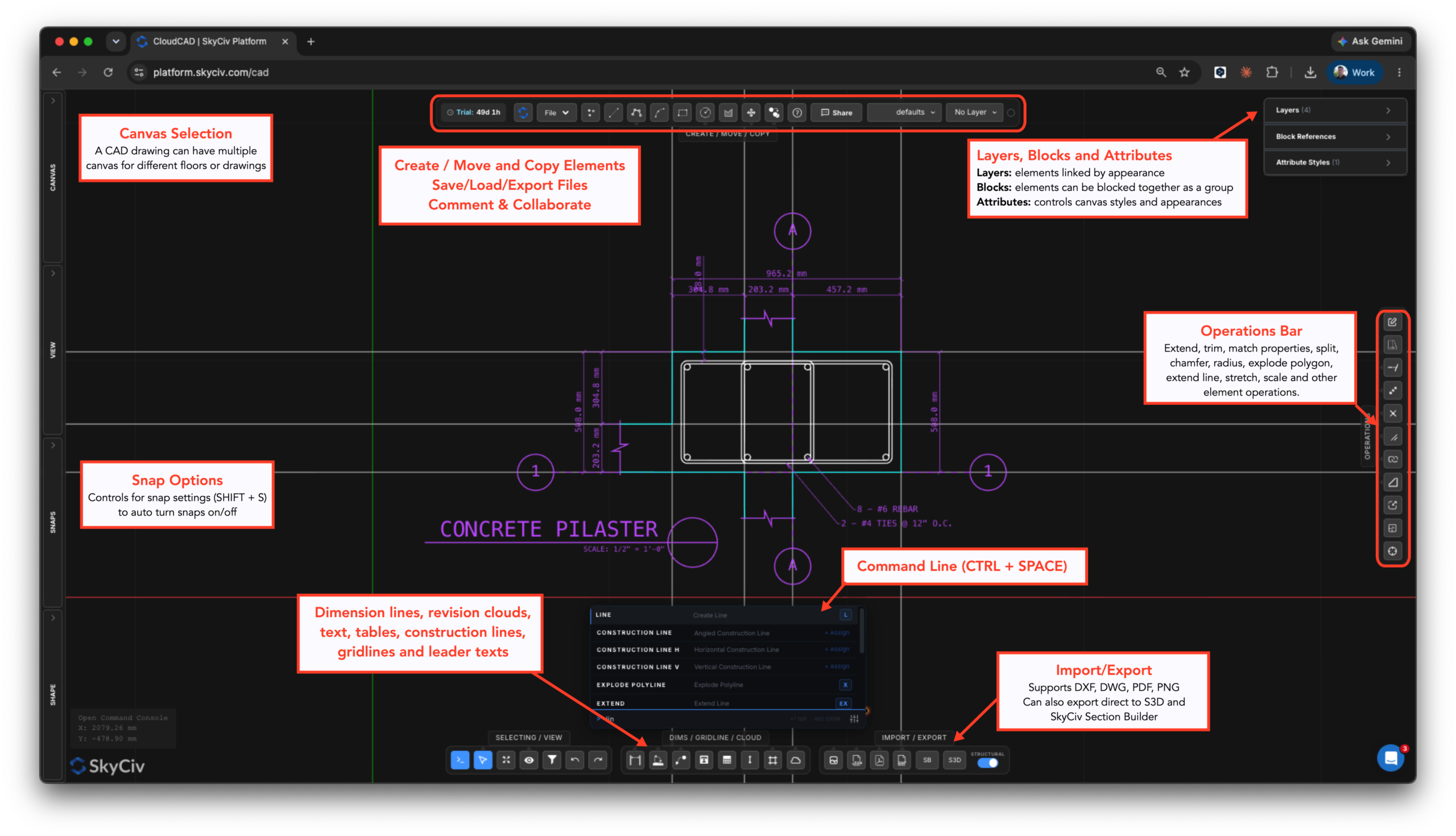
¿Qué puede hacer CloudCAD??
CloudCAD permite a los usuarios modelar, comentario, dimensionar y exportar dibujos a DXF, PDF. Actualmente, CloudCAD admite los siguientes tipos de elementos:
- Agujas
- Líneas:
- Líneas Básicas
- Rectángulos
- círculos
- Polilíneas (círculos)
- Arcos
- Splines
- Líneas de cuadrícula
- Líneas de construcción
- Dimensiones:
- Fimensiones lineales
- Dimensiones en ángulo
- Dimensiones del radio
- Texto
- Textos del líder
- Textos multilíder
- Mesas
- Nubes de revisión
- Escotillas
- Bloques
- Imágenes
¿Qué formatos de archivo admite CloudCAD??
CloudCAD admite las siguientes capacidades de importación y exportación:
Importador
- DWG – AutoDesk formato nativo
- DXF – datos básicos de líneas y puntos
- Imágenes – para rastrear
- PDF (se importa como una imagen para rastrear)
- JSON (Formato de archivo SkyCiv, use esto para API y automatización)
Exportador
- DXF
- SkyCiv Estructural 3D – exporte sus planes a un modelo de análisis
- Constructor de Sección – exporte cualquier forma de sombreado directamente al Generador de secciones (incluye agujeros y recortes)
¿Cómo puedo obtener acceso a CloudCAD??
CloudCAD está disponible para iniciarse desde su Panel de control SkyCiv una vez que hayas iniciado sesión. Desde allí deberás iniciar tu programa gratuito 30 o 60 Prueba de un día o tener una suscripción que incluya CloudCAD.

