
Fácil de usar, conectados, CAD mais barato e integrado, para engenheiros estruturais
O que é CloudCAD? Como é diferente?
CloudCAD é um software baseado em nuvem 2Software CAD D construído por SkyCiv, com o propósito de ser um poderoso software CAD feito sob medida para engenheiros estruturais. O software funciona como qualquer desenho, programa de documentação seria – com a capacidade de criar pontos, linhas, textos, marcações e outros recursos comuns encontrados em desenhos de engenharia e arquitetura.
Construído para ser diferente, CloudCAD está focado nos seguintes benefícios:
| Integrado | 2-forma de integração com software de análise, construído especificamente para engenheiros estruturais. |
| Mais barato | É mais econômico, metade do preço do CAD tradicional |
| Compartilhamento/colaboração ao vivo | Compartilhe por meio de links ao vivo, nenhuma instalação necessária, comente e colabore facilmente! |
| Baseada em nuvem | É totalmente baseado em nuvem, nenhuma instalação de software necessária |
| Alimentado por IA | Capacidades de IA, construção e edição baseada em prompt de seus arquivos CAD (em breve) |
| Personalizável | Crie seus próprios atalhos personalizados para modelagem mais rápida |
| Abra o formato JSON | Suporta API e automações de IA |
| Desenvolvimento Contínuo | Continuando a construir novos recursos |
Demonstração em vídeo
Assista a este rápido passo a passo do SkyCiv CloudCAD e alguns de seus principais recursos:
Interface de usuário
A interface do usuário foi projetada para ser fácil de usar e fácil de se orientar. Aqui estão os principais componentes do NuvemCAD interface:
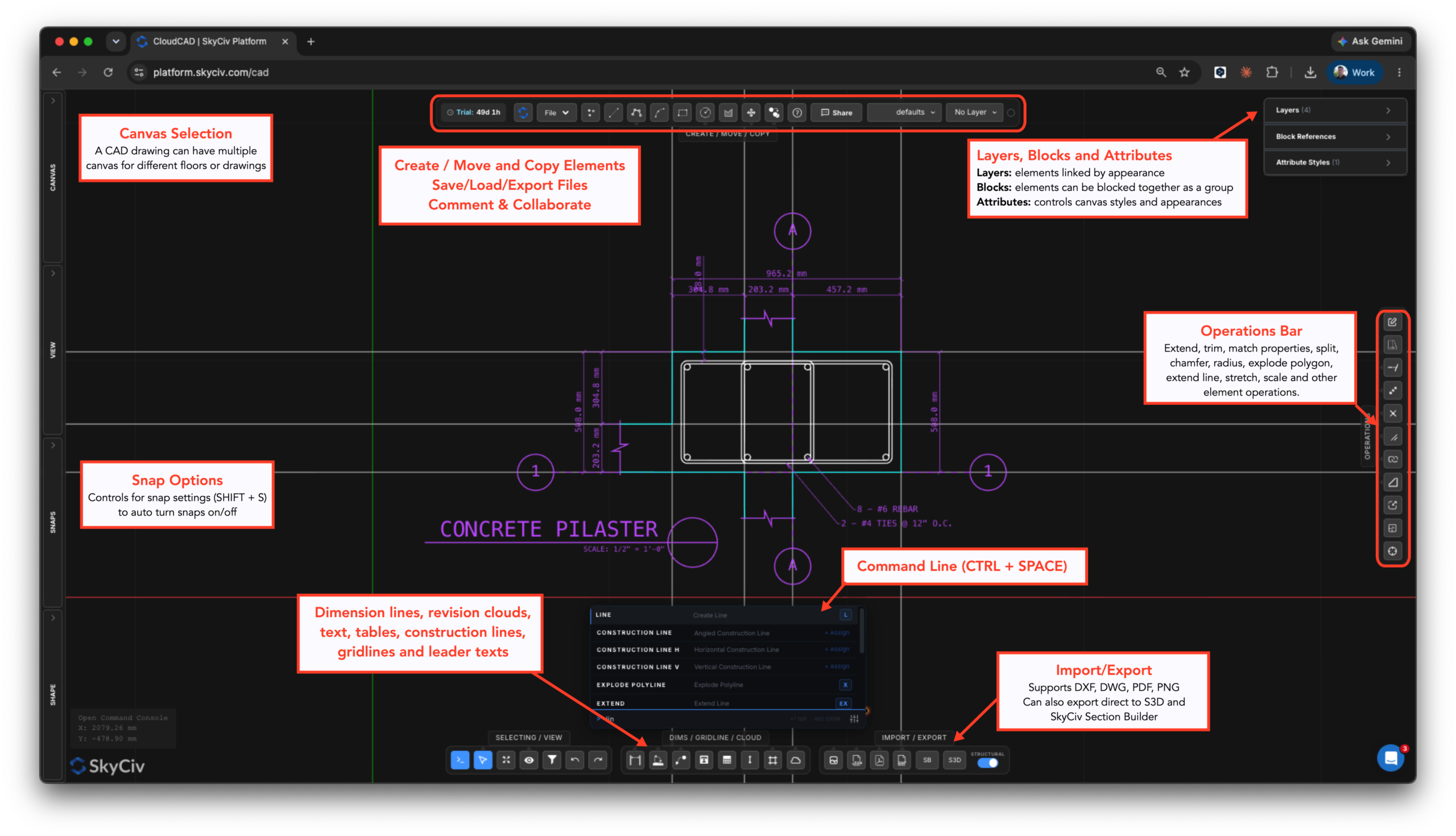
O que o CloudCAD pode fazer?
CloudCAD permite aos usuários modelar, comentário, dimensionar e exportar desenhos para DXF, PDF. Atualmente, CloudCAD suporta os seguintes tipos de elementos:
- Pontos
- Linhas:
- Linhas Básicas
- Retângulos
- Círculos
- Polilinhas (círculos)
- Arcos
- Splines
- Linhas de grade
- Linhas de Construção
- Dimensões:
- Fimsões Lineares
- Dimensões Angulares
- Dimensões do raio
- Texto
- Textos de Líder
- Textos com vários líderes
- Mesas
- Nuvens de Revisão
- Escotilhas
- Blocos
- Imagens
Quais formatos de arquivo o CloudCAD suporta?
CloudCAD suporta os seguintes recursos de importação e exportação:
formato de arquivo legível usado para armazenar dados
- DWG – AutoDesk formato nativo
- DXF – dados básicos de linhas e pontos
- Imagens – para rastreamento
- PDF (importa como uma imagem para rastreamento)
- JSON (Formato de arquivo SkyCiv, use isso para API e automação)
Importará o modelo estrutural
- DXF
- 3D estrutural – exporte seus planos para um modelo de análise
- Construtor de Seção – exporte quaisquer formas de hachura diretamente para o Section Builder (inclui furos e recortes)
Como posso obter acesso ao CloudCAD?
CloudCAD está disponível para lançamento em seu Painel SkyCiv depois de fazer login. A partir daí, você precisará iniciar seu programa gratuito 30 ou 60 Day Trial ou tenha uma assinatura que inclua CloudCAD.

