
Aktie, Kommentieren Sie und arbeiten Sie mit anderen zusammen, auch wenn sie nicht über CloudCAD verfügen
Mit CloudCAD können Benutzer Zeichnungen über einen URL-Link teilen – auch wenn sie kein CloudCAD-Abonnement haben! Da CloudCAD vollständig online ist, Benutzer müssen keine markierten PDFs mehr hin und her schicken, um Kommentare abzugeben und zusammenzuarbeiten.
Benutzer können ihre eigenen Kommentare und offenen Probleme erstellen, damit andere sie überprüfen oder sogar beantworten können.
Teilen Sie Ihre Modelle
Benutzer können Modelle jederzeit über teilen Datei – Aktie. Aus diesem Fenster, Ein Benutzer kann entweder:
- Teilen Sie es mit bestimmten SkyCiv-Benutzern – einschließlich Steuerelementen für Bearbeitungsberechtigungen
- Teilen Sie es über einen öffentlichen Link mit anderen – kein Konto erforderlich, Teilen Sie einfach die geöffnete Datei und beginnen Sie mit der Zusammenarbeit! Klicken Sie hier für ein Beispiel
- Teilen Sie es mit dem SkyCiv-Support
Kommentare hinzufügen
Benutzer können Kommentare hinzufügen, damit andere sie überprüfen können, antworten oder lösen. Um das Kommentarfeld zu starten, drücke den Aktie Schaltfläche auf der Oberseite, Dadurch wird das rechte Kollaborationsfenster geöffnet:
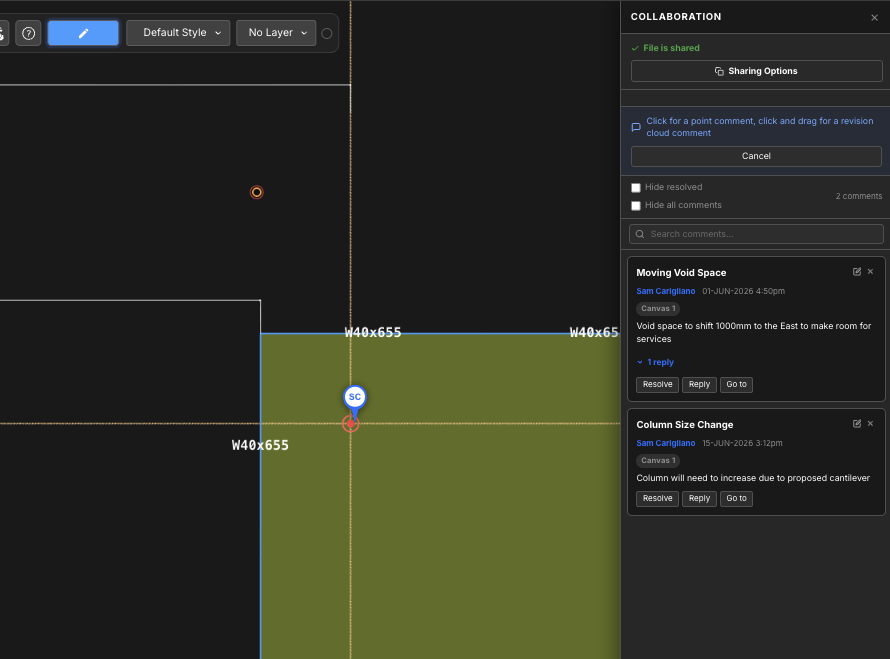
Von hier, Benutzer können die folgenden Funktionen optimal nutzen:
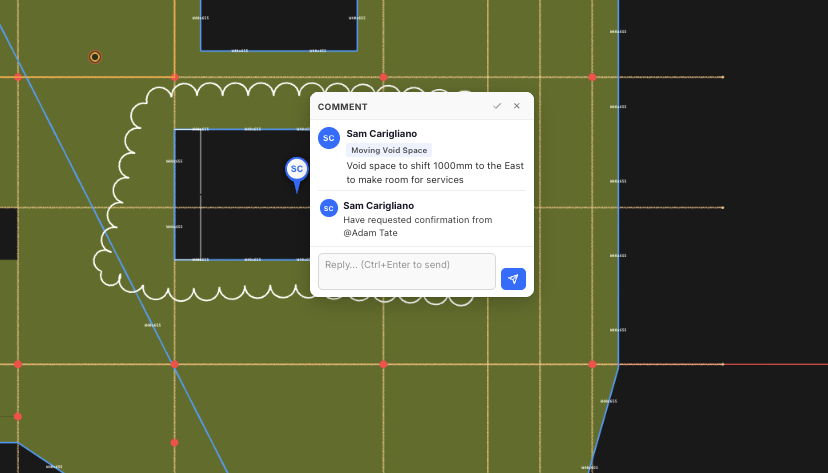
- Fügen Sie neue Kommentare über eine Punkt- oder Revisionswolke hinzu:
- Punkt: Klicken Sie einfach auf einen Punkt und beginnen Sie mit der Eingabe Ihres Kommentars
- RevisionCloud: Klicken und ziehen Sie, um Ihre Kommentarrevisionswolke zu erstellen, Sobald Sie den Klick loslassen, können Sie Ihren Kommentar eingeben
- Auf vorhandene Kommentare antworten
- Kommentare auflösen (Hinweis: Sie können gelöste Kommentare ausblenden, indem Sie ein Häkchen setzen Ausblenden gelöst)
- Durchsuchen Sie Kommentare nach Schlüsselwörtern
- Gehe zu – da Kommentare auf jeder Leinwand vorhanden sein können, Wenn Sie darauf klicken, wird die entsprechende Leinwand geöffnet und Sie gelangen zur Position des Kommentars im Modellbereich
- Löschen und bearbeiten Sie Kommentare, indem Sie auf die Schaltflächen in der oberen rechten Ecke jedes Kommentars klicken
