
Легко использовать, онлайн, более дешевый и интегрированный САПР, для инженеров-строителей
Что такое CloudCAD? Чем это отличается?
CloudCAD — это облачная 2Программное обеспечение САПР построен SkyCiv, с целью стать мощным программным обеспечением САПР, предназначенным для инженеров-строителей.. Программное обеспечение работает как любой чертеж, программа документации будет – с возможностью создавать очки, линии, тексты, пометки и другие общие элементы инженерных и архитектурных чертежей..
Создан, чтобы отличаться, CloudCAD ориентирован на следующие преимущества:
| Интегрированный | 2-способ интеграции с аналитическим программным обеспечением, специально построенный для инженеров-строителей. |
| Дешевле | Это более рентабельно, вдвое дешевле традиционного CAD |
| Живой обмен/сотрудничество | Поделитесь через живые ссылки, установка не требуется, легко комментируйте и сотрудничайте! |
| Облачный | Это полностью облачное решение, установка программного обеспечения не требуется |
| на базе искусственного интеллекта | AI-возможности, оперативное создание и редактирование ваших файлов САПР (скоро будет) |
| Настраиваемый | Создавайте собственные ярлыки для более быстрого моделирования. |
| Открыть формат JSON | Поддерживает автоматизацию API и AI. |
| Продолжение развития | Продолжаем создавать новые функции |
Видео Демо
Посмотрите это краткое описание SkyCiv CloudCAD и некоторых его ключевых возможностей.:
Пользовательский интерфейс
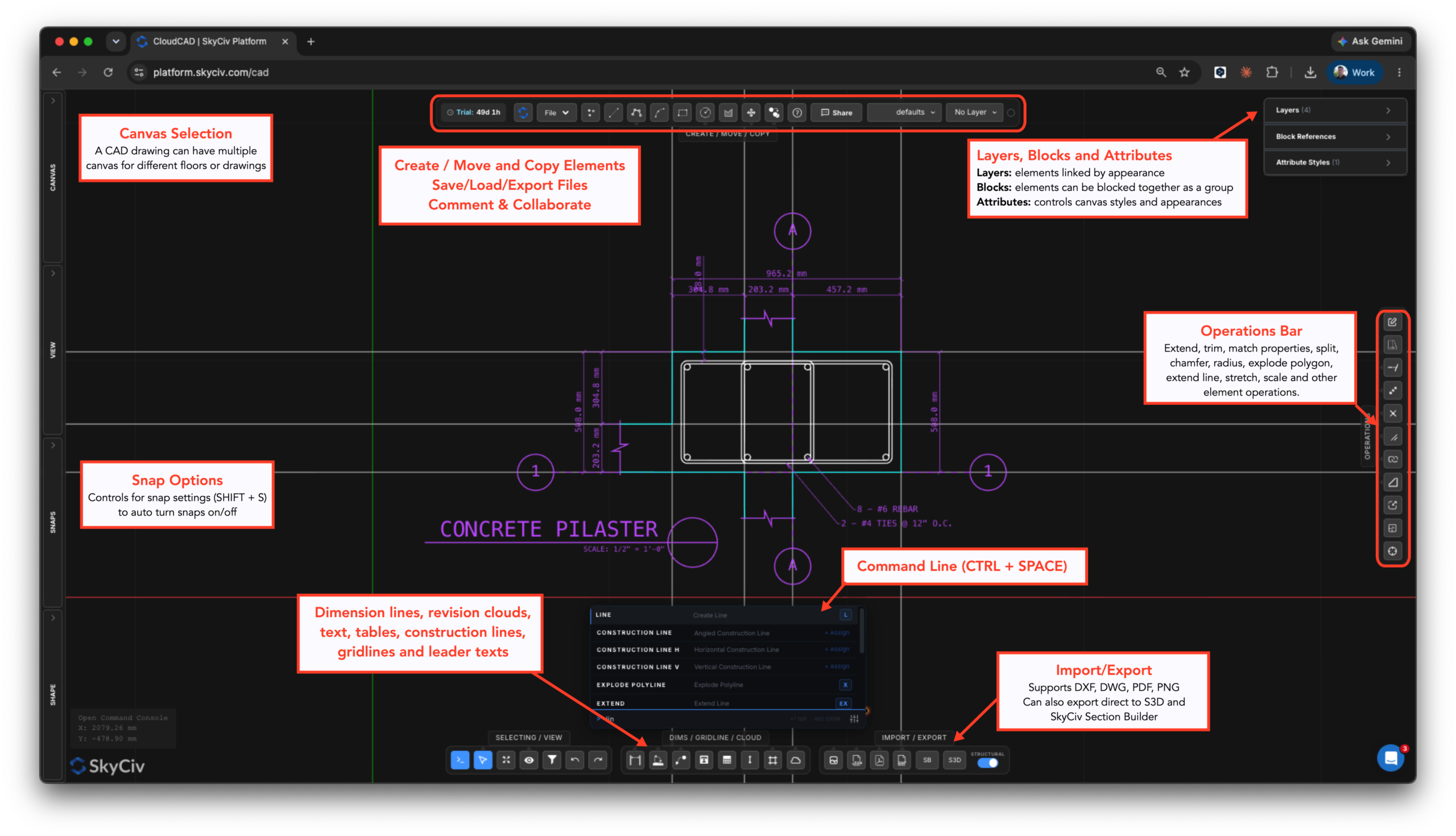
Пользовательский интерфейс разработан таким образом, чтобы его было легко использовать и в нем легко ориентироваться.. Вот основные компоненты ОблакоCAD интерфейс:
Что может CloudCAD?
CloudCAD позволяет пользователям моделировать, комментарий, размеры и экспорт чертежей в DXF, PDF. В настоящее время, CloudCAD поддерживает следующие типы элементов:
- Очки
- Линии:
- Основные линии
- прямоугольники
- Круги
- Полилинии (круги)
- Дуги
- Сплайны
- Линии сетки
- Строительные линии
- Размеры:
- Линейные измерения
- Угловые размеры
- Размеры радиуса
- Текст
- Тексты лидеров
- Многовыносные тексты
- таблицы
- Ревизионные облака
- Люки
- Блоки
- Изображений
Какие форматы файлов поддерживает CloudCAD?
CloudCAD поддерживает следующие возможности импорта и экспорта.:
Импорт
- DWG – Автодеск собственный формат
- DXF – данные основных линий и точек
- Изображений – для отслеживания
- PDF (импортирует как изображение для отслеживания)
- JSON (Формат файла SkyCiv, используйте это для API и автоматизации)
Экспорт
- DXF
- Структурное 3D – экспортируйте свои планы в модель анализа
- Конструктор разделов – экспортируйте любые формы штриховки непосредственно в Конструктор разделов. (включает в себя отверстия и вырезы)
Как я могу получить доступ к CloudCAD?
CloudCAD доступен для запуска с вашего Панель управления SkyCiv как только вы вошли в систему. Оттуда вам нужно будет либо начать бесплатную 30 или 60 Дневная пробная версия или подписка, включающая CloudCAD..

