Αυστραλός / Πρότυπο της Νέας Ζηλανδίας 4600 για δομές χαλύβδινου σχηματισμού με κρύο, 2018 Εκδοση
Το AS/NZS 4600:2018 Η μονάδα ελέγχει τα ψυχρής μορφής χαλύβδινα μέλη με το Μέθοδος Άμεσης Δύναμης. Λειτουργεί σε SkyCiv Structural 3D και υποστηρίζει προσαρμοσμένους περιορισμούς σε κάθε μέλος.
Για το 2005 έκδοση, βλέπω AS4600 Μέλος σχεδιασμού.
Με αυτήν την ενότητα μπορείτε:
- Εκτελέστε ελέγχους σχεδίασης στο AS/NZS 4600:2018 με τη Μέθοδο Άμεσης Αντοχής, συμπεριλαμβανομένου:
- Προεπιλογή μέλους
- Αξονική τάση
- Αξονική συμπίεση: χωρητικότητα τμήματος, και ικανότητα μελών για παγκόσμια, τοπικός και παραμορφωτικός λυγισμός
- Κάμψη και στους δύο άξονες: χωρητικότητα τμήματος, και ικανότητα μέλους για πλευρική-στρεπτική, τοπικός και παραμορφωτικός λυγισμός
- Διάτμηση κατά μήκος των δύο αξόνων
- Συνδυασμένη κάμψη και διάτμηση
- Συνδυασμένη συμπίεση και κάμψη
- Συνδυασμένη τάση και κάμψη
- Σχεδιασμός καναλιών, Ζ τμήματα, τμήματα καπέλων, κανάλια back-to-back και κουτιά καναλιών με χείλη, πρισματικό ή μη πρισματικό
- Ορίστε προσαρμοσμένους περιορισμούς και ψευδο-περιορισμούς κατά μήκος κάθε μέλους
- Ρυθμίστε τα μέλη ως αγκυρωμένα γύρω από τον δευτερεύοντα άξονά τους (για παράδειγμα με φύλλο), άρα ελέγχονται ως προς τους γεωμετρικούς άξονες
- Εξαγωγή λεπτομερών αναφορών PDF βήμα προς βήμα
- Ελέγξτε τις παραμέτρους και την είσοδο για κάθε μέλος (Run Designer) για να βρείτε την πιο αποτελεσματική ενότητα
Υποστήριξη τρέχουσας έκδοσης
Ενότητες
- Κανάλι
- Lipped Channel
- Lipped Channel single
- Ενότητα Z
- Lipped Z
- για χρήση με LRFD και τους κατάλληλους παράγοντες ασφαλείας
- Πίσω με πλάτη Κανάλια
- Κανάλια με χείλη πίσω με πλάτη
- Lipped Channel Box
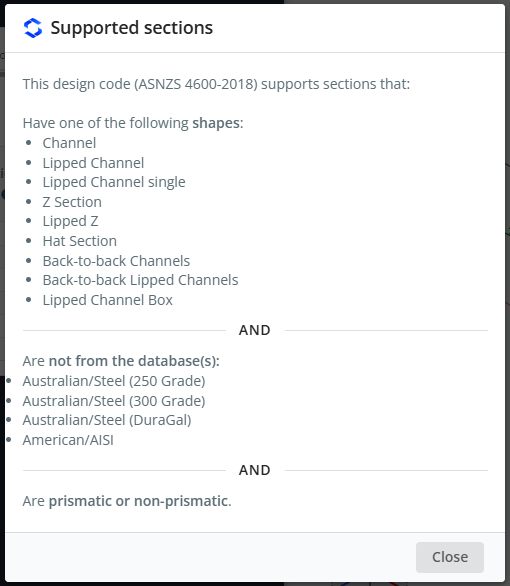
Τα κανάλια με χειλέο και τα κουτιά με χειλικά κανάλια υποστηρίζονται μόνο από αυτόν τον κωδικό. Οι τομές μπορεί να είναι πρισματικές ή μη πρισματικές, και το υλικό πρέπει να είναι χάλυβας. Τα τμήματα δεν πρέπει να προέρχονται από το Australian/Steel (250 Βαθμός), Αυστραλιανή/Χάλυβας (300 Βαθμός), Αυστραλιανή/Χάλυβας (Αγαπητός) ή αμερικανικές/AISI βάσεις δεδομένων.
Για να δείτε αυτήν τη λίστα στο λογισμικό, ανοίξτε το αρχείο καταγραφής και κάντε κλικ Προβολή υποστηριζόμενων ενοτήτων.
Λογισμικό
- SkyCiv Structural 3D
AS / NZS 4600-2018 αναφέρεται επίσης στο Κωδικός σχεδίασης dropdown του SkyCiv Beam. Αυτή η σελίδα περιγράφει τη μονάδα στο SkyCiv Structural 3D.
Σημείωση
Οι μονάδες πρέπει να είναι μέσα Μετρικός για να χρησιμοποιήσετε αυτήν την ενότητα σχεδιασμού. Στο Μοντέλο, Άνοιξε Ρυθμίσεις (κορυφαία μπάρα) > Μονάδες και ρυθμίστε το σύστημα της μονάδας σε Μετρικός.
Άνοιγμα της ενότητας
- Λύστε το μοντέλο.
- Κάντε κλικ Σχέδιο στην επάνω μπάρα.
- Σε Επιλέξτε μια ενότητα σχεδίασης, επιλέγω Κρυοσχηματισμένο μέλος χάλυβα.
- Σε Ποιον κώδικα σχεδίασης θα θέλατε να ξεκινήσετε?, διαλέγω AS / NZS 4600-2018, μετά κάντε κλικ Αρχή.
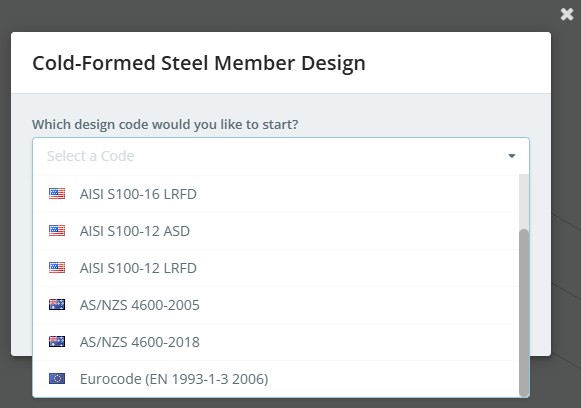
Εάν μια ενότητα σχεδιασμού είναι ήδη ανοιχτή, χρήση Αλλαγή ενότητας στο Σχέδιο μενού για εναλλαγή κωδικών.
Ο πίνακας σχεδίασης ανοίγει στα αριστερά, με το τρισδιάστατο μοντέλο στα δεξιά. Η κεφαλίδα δείχνει τον κωδικό, συν Λειτουργία αιτήματος και Run Designer. Στα δεξιά της γραμμής καρτελών υπάρχουν τρία κουμπιά:
- τις ρυθμίσεις (γρανάζι) κουμπί, που ανοίγει Ρυθμίσεις σχεδίασης μελών
- το κουμπί καταγραφής, που ανοίγει το Ημερολόγιο σχεδίασης μελών
- Ελεγχος, που εκτελεί τον έλεγχο σχεδιασμού
Όταν ξεκινά η ενότητα, μια ειδοποίηση μπορεί να σας πει ότι υπάρχουν σημαντικά μηνύματα. Εμφανίζονται στο Ημερολόγιο σχεδίασης μελών, for example "6 members were loaded with default values", ή μέλη που δεν εισήχθησαν επειδή η ενότητα ή το υλικό τους δεν υποστηρίζεται. Το ημερολόγιο έχει ένα Προβολή υποστηριζόμενων ενοτήτων Σύνδεσμος.
Οι καρτέλες είναι Λεπτομέριες, Παράγοντες, Υλικά, Ενότητες, Μέλη, Περιορισμοί, Φορτία και Αποτελέσματα.
Ρυθμίσεις σχεδίασης μελών
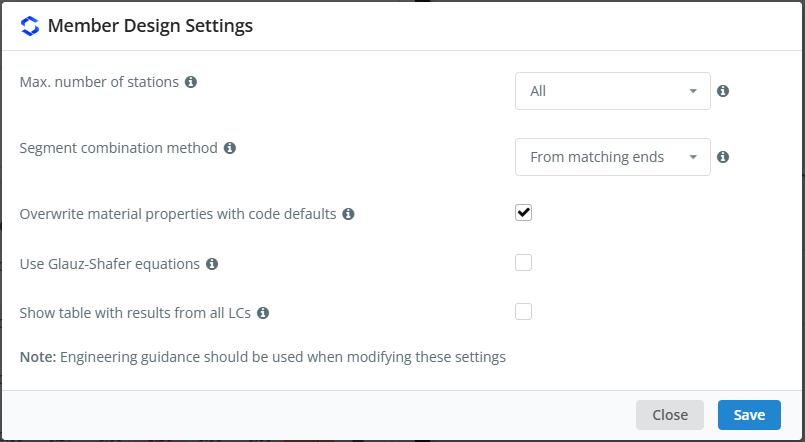
Κάντε κλικ στο κουμπί με το γρανάζι για να ανοίξει Ρυθμίσεις σχεδίασης μελών. Τοποθετήστε το δείκτη του ποντικιού πάνω από το εικονίδιο ℹ δίπλα σε μια ρύθμιση για να δείτε την περιγραφή της.
| Σύνθεση | Επιλέξτε είτε Z είτε Y-Axis | Περιγραφή |
|---|---|---|
| Μέγιστη. αριθμός σταθμών | Ολα | Ο μέγιστος αριθμός σταθμών κατά μήκος κάθε μέλους στον οποίο ελέγχονται τα αποτελέσματα: Ολα χρησιμοποιεί όλους τους διαθέσιμους σταθμούς, ή επιλέξτε μέχρι 3, 5, 7, 9, 11, 15 ή 51 σταθμούς ανά μέλος |
| Μέθοδος συνδυασμού τμημάτων | Από ταιριαστά άκρα | Πώς ελέγχει τα τμήματα της μεμονωμένης ενέργειας (συμπίεση και κάμψη) συνδυάζονται για τους ελέγχους συνδυασμένων ενεργειών. Από ταιριαστά άκρα συνδυάζει τα τμήματα που έχουν τα ίδια άκρα. Από διαφορετικές τοποθεσίες συνδυάζει, για κάθε συνδυασμό φορτίου, τα τμήματα με τους υψηλότερους δείκτες χρησιμότητας, ακόμα κι αν βρίσκονται σε διαφορετικές θέσεις κατά μήκος του μέλους |
| Αντικαταστήστε τις ιδιότητες υλικού με προεπιλογές κώδικα | Σημειώθηκε | Χρησιμοποιεί το μέτρο ελαστικότητας E = 200000 MPa και το μέτρο διάτμησης G = 80000 MPa αντί για τις τιμές του υλικού στο μοντέλο. Όταν δεν είναι επιλεγμένο, Το E λαμβάνεται από το υλικό του μοντέλου και το G υπολογίζεται από το E και τον λόγο Poisson του |
| Χρησιμοποιήστε τις εξισώσεις Glauz-Shafer | Μη επιλεγμένο | Χρησιμοποιεί τις εξισώσεις του Glauz & Σάφερ (2022), Πρόβλεψη αντοχής σε κάμψη για χαλύβδινες διατομές ψυχρής μορφοποίησης ασύμμετρες ως προς τον άξονα κάμψης. Αυτό επηρεάζει την ικανότητα κάμψης του τμήματος και του μέλους γύρω από τον μη συμμετρικό άξονα |
| Εμφάνιση πίνακα με αποτελέσματα από όλα τα LC | Μη επιλεγμένο | Προστίθεται στους ελέγχους των αναφορών μελών, όπου είναι διαθέσιμο, έναν πίνακα με τα αποτελέσματα από όλους τους συνδυασμούς φορτίων |
Δεν υπάρχει ρύθμιση για την εκτέλεση των ελέγχων σχετικά με τους γεωμετρικούς άξονες για όλα τα μέλη. Για έλεγχο των μελών σχετικά με τους γεωμετρικούς άξονες, χρήση Στήριγμα δευτερεύοντος άξονα στο Περιορισμοί αυτί (βλέπω Στήριγμα μικρού άξονα κάτω από Περιορισμοί παρακάτω).
Όπως σημειώνει ο διάλογος, Όταν αλλάζετε αυτές τις ρυθμίσεις, θα πρέπει να χρησιμοποιούνται οδηγίες μηχανικής. Κάντε κλικ Αποθηκεύσετε να κάνετε αίτηση.
Λεπτομέριες
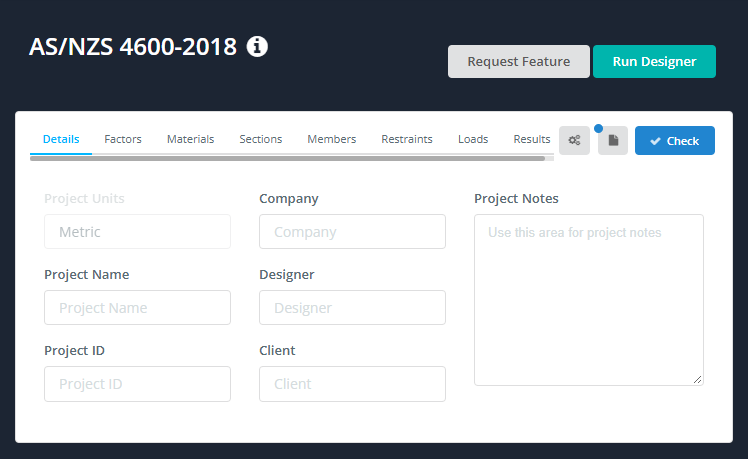
Στο Λεπτομέριες καρτέλα μπορείτε να εισαγάγετε τα στοιχεία του έργου. Δεν χρειάζεται να τα συμπληρώσετε, αλλά οτιδήποτε εισάγετε εμφανίζεται στο Λεπτομέρειες Έργου πίνακα των αναφορών σας. Μονάδες Έργου δείχνει Μετρικός και δεν μπορεί να αλλάξει εδώ.
Παράγοντες
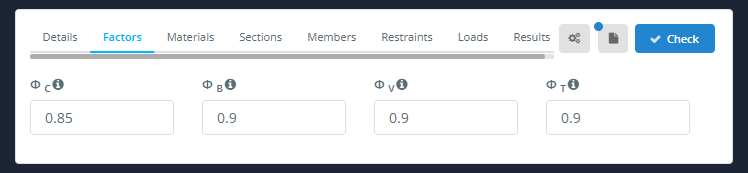
ο Παράγοντες Η καρτέλα δείχνει τους συντελεστές μείωσης χωρητικότητας:
| Παράγοντας | Περιγραφή | Επιλέξτε είτε Z είτε Y-Axis |
|---|---|---|
| Φντο | Συμπίεση | 0.85 |
| Φσι | Κάμψη | 0.9 |
| ΦΒ | Κουρεύω | 0.9 |
| ΦΤ | Ενταση | 0.9 |
Εάν ένα μέλος δεν είναι προεπιλεγμένο (Ρήτρα 1.6.3(ντο)(Εγώ)), Φντο, Φσι και ΦΒ μειώνονται σε 0.8. Οι παράγοντες που χρησιμοποιούνται για κάθε μέλος παρατίθενται στην έκθεσή του παρακάτω Παράγοντες οριακής κατάστασης αντοχής, με τις παραπομπές ρήτρες τους.
Υλικά
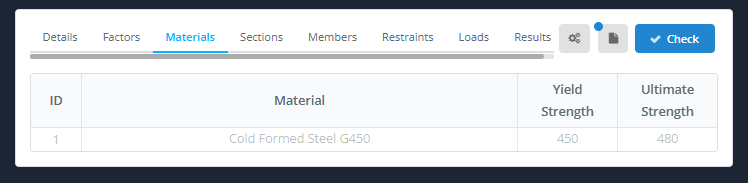
ο Υλικά Η καρτέλα παραθέτει τα υλικά που χρησιμοποιούνται από τα σχεδιασμένα μέλη, με τους Αντοχή διαρροής και Υπέρτατη δύναμη. Ο πίνακας συμπληρώνεται από το μοντέλο και δεν μπορεί να τροποποιηθεί εδώ. Για να αλλάξετε ένα υλικό, επιστρέψτε στο μοντέλο.
Ενότητες
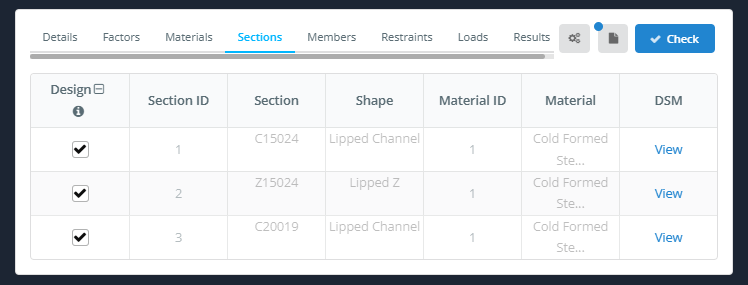
ο Ενότητες Η καρτέλα παραθέτει τις ενότητες που χρησιμοποιούνται από τα σχεδιασμένα μέλη. Τα δεδομένα της ενότητας προέρχονται από το μοντέλο και δεν μπορούν να τροποποιηθούν εδώ.
- Σχέδιο: επιλέξτε το πλαίσιο για να σχεδιάσετε τα μέλη που χρησιμοποιούν αυτήν την ενότητα. Το εικονίδιο στην κεφαλίδα της στήλης εναλλάσσει όλες τις σειρές.
- Αναγνωριστικό ενότητας, Ενότητα, Σχήμα, Αναγνωριστικό υλικού και Υλικό: λαμβάνονται από το μοντέλο.
- DSM: Κάντε κλικ Θέα για να δείτε τους παράγοντες DSM της ενότητας.
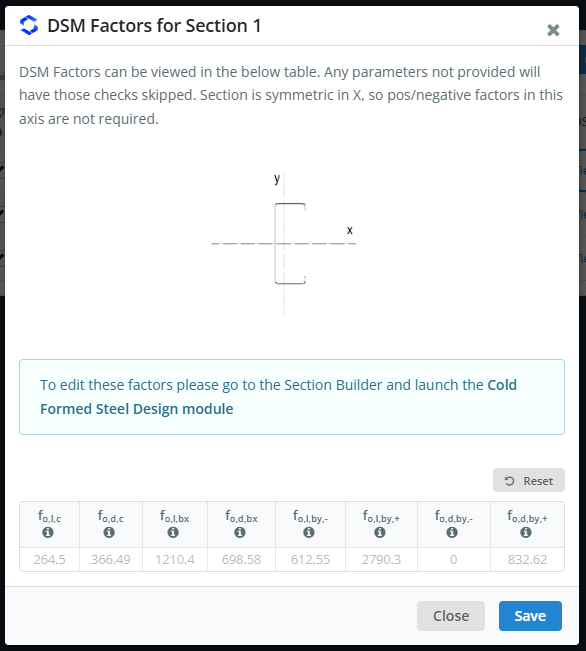
ο Παράγοντες DSM για την Ενότητα n Το παράθυρο διαλόγου δείχνει ένα σκίτσο του τμήματος με τους άξονές του, και τις ελαστικές τάσεις λυγισμού (σε MPa) που χρησιμοποιείται με τη μέθοδο Direct Strength:
| Σύμβολο | Καταπόνηση λυγισμού |
|---|---|
| φάο,μεγάλο,ντο | Τοπικός λυγισμός, συμπίεση |
| φάο,ρε,ντο | Παραμορφωτικός λυγισμός, συμπίεση |
| φάο,μεγάλο,bx | Τοπικός λυγισμός, κάμψη περίπου x |
| φάο,ρε,bx | Παραμορφωτικός λυγισμός, κάμψη περίπου x |
| φάο,μεγάλο,με,- και στο,μεγάλο,με,+ | Τοπικός λυγισμός, κάμψη γύρω από το y (αρνητικό και θετικό) |
| φάο,ρε,με,- και στο,ρε,με,+ | Παραμορφωτικός λυγισμός, κάμψη γύρω από το y (αρνητικό και θετικό) |
Οποιοσδήποτε παράγοντας που δεν παρέχεται παραλείπεται ο έλεγχος του. Για ένα τμήμα που είναι συμμετρικό ως προς έναν άξονα, δεν χρειάζονται οι θετικοί και οι αρνητικοί παράγοντες για αυτόν τον άξονα.
Τα τμήματα Z και τα τμήματα Lipped Z έχουν επίσης τους ίδιους παράγοντες σχετικά με τους γεωμετρικούς άξονες, με α σολ υπογεγραμμένη (για παράδειγμα fο,μεγάλο,ντο,σολ). Χρησιμοποιούνται μόνο από τα μέλη που στηρίζονται γύρω από τον δευτερεύοντα άξονά τους (βλέπω Στήριγμα μικρού άξονα κάτω από Περιορισμοί παρακάτω). Εάν δεν είναι διαθέσιμος παράγοντας γεωμετρικών αξόνων, Αντ' αυτού χρησιμοποιείται ο κύριος παράγοντας αξόνων: ο Ημερολόγιο σχεδίασης μελών παραθέτει τις ενότητες που λείπουν μερικές από αυτές, και οι αναφορές των πληγέντων μελών το λένε. Δεν είναι δυνατή η επεξεργασία των τιμών εδώ: να τα αλλάξουν, μεταβείτε στο Κατασκευαστής ενότητας και εκκινήστε το Σχέδιο ψυχρής διαμόρφωσης χάλυβα μονάδα μέτρησης.
Μέλη
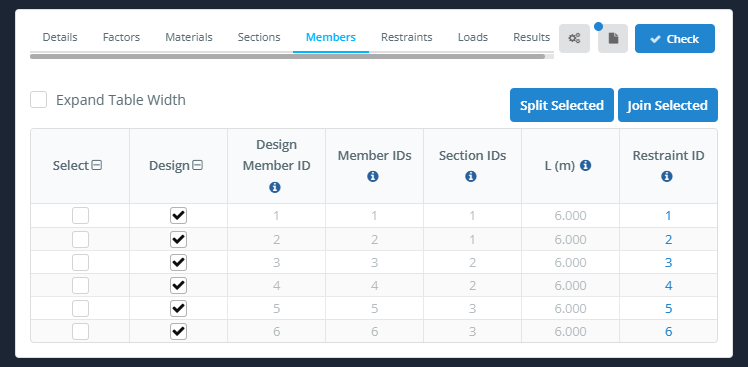
ο Μέλη Η καρτέλα παραθέτει τα μέλη σχεδιασμού. Κάθε μέλος σχεδιασμού αποτελείται από ένα ή περισσότερα μέλη μοντέλου.
- Αναπτύξτε το Πλάτος πίνακα: διευρύνει το τραπέζι.
- Επιλέχτηκε διαχωρισμός και Εγγραφείτε επιλεγμένα: χωρίσει τα επιλεγμένα μέλη σχεδιασμού, ή ενώστε τα σε ένα σχεδιαστικό μέλος.
| Στήλη | Περιγραφή |
|---|---|
| Επιλέγω | Σημειώνει τη σειρά, για παράδειγμα να χωρίσετε ή να ενταχθείτε σε μέλη |
| Σχέδιο | Σημειώστε για να συμπεριλάβετε το μέλος στον έλεγχο σχεδιασμού, ξεκολλήστε να το αφήσετε έξω |
| Σχεδιασμός ID μέλους | Η ταυτότητα του μέλους σχεδιασμού |
| Τα μη ορθογώνια φορτία είναι παρόμοια με τα αμφίδρομα φορτία καθώς η ενέργεια προϋποθέτει ότι το φορτίο υποστηρίζεται από όλα τα μέλη του συστήματος | Το πρότυπο μέλος(μικρό) που αποτελούν το σχεδιαστικό μέλος |
| Αναγνωριστικά τμήματος | Ο τομέας(μικρό) του μέλους σχεδιασμού |
| μεγάλο (Μ) | Το μήκος του σχεδιαστικού μέλους |
| Ταυτότητα συγκράτησης | Το σετ συγκράτησης που χρησιμοποιείται από το μέλος. Κάντε κλικ σε αυτό για να ανοίξετε αυτόν τον περιορισμό στο Περιορισμοί αυτί |
Σχεδιασμός ID μέλους, Τα μη ορθογώνια φορτία είναι παρόμοια με τα αμφίδρομα φορτία καθώς η ενέργεια προϋποθέτει ότι το φορτίο υποστηρίζεται από όλα τα μέλη του συστήματος, Αναγνωριστικά τμήματος και μεγάλο (Μ) προέρχονται από το μοντέλο και δεν μπορούν να αλλάξουν εδώ. Τα ενεργά μήκη και οι συντελεστές Κ δεν εισάγονται σε αυτήν την καρτέλα: προέρχονται από το Περιορισμοί αυτί.
Περιορισμοί
AS / NZS 4600:2018 υποστηρίζει προσαρμοσμένους περιορισμούς, ώστε να μπορείτε να προσθέσετε τους δικούς σας περιορισμούς που θα χρησιμοποιηθούν στους υπολογισμούς. Για πλήρη περιγραφή, δείτε την τεκμηρίωσή μας στο περιορισμοί μέλους.
- Auto Group: δίνει στα παρόμοια μέλη το ίδιο αναγνωριστικό περιορισμού.
- Ταυτότητα συγκράτησης: επιλέγει το αναγνωριστικό συγκράτησης για προβολή ή επεξεργασία. Χρησιμοποιήστε τα κάτω και τα επάνω βέλη για να μεταβείτε στο επόμενο ή στο προηγούμενο αναγνωριστικό.
- Αναθέστε σε Μέλος(μικρό): εκχωρεί το τρέχον αναγνωριστικό περιορισμού στα μέλη.
- Αντίγραφο: αντιγράφει το τρέχον αναγνωριστικό περιορισμού σε ένα νέο αναγνωριστικό.
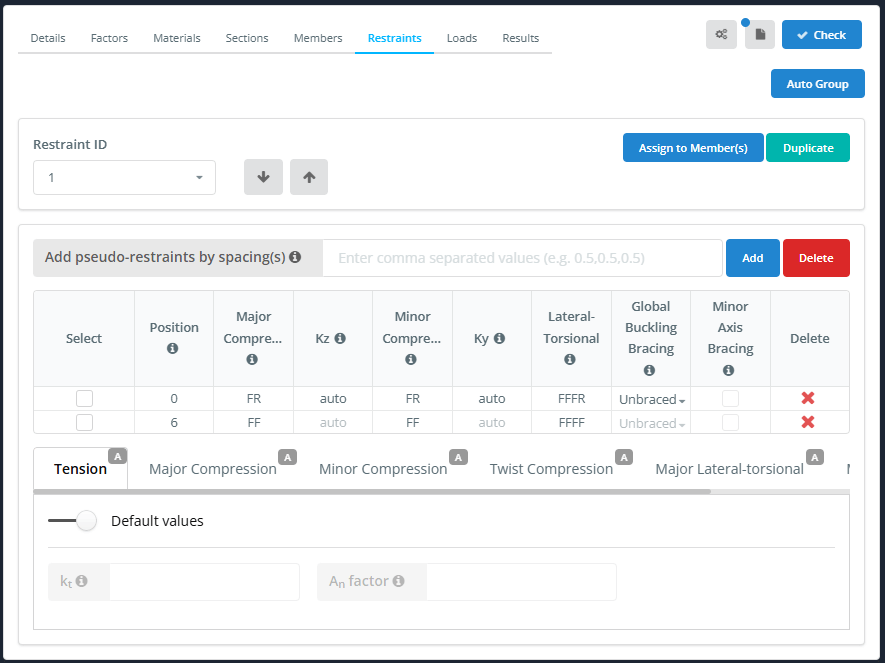
Ο πίνακας συγκράτησης συμπληρώνεται από τα στηρίγματα και τις συνδέσεις του μοντέλου. Για παράδειγμα, ένα μέλος που υποστηρίζεται και στα δύο άκρα παίρνει μια σειρά σε κάθε άκρο.
| Στήλη | Περιγραφή |
|---|---|
| Επιλέγω | Σημειώνει τη σειρά, για παράδειγμα να εφαρμόσει έναν τυπικό περιορισμό σε αυτό |
| Θέση | Απόσταση του περιορισμού από την έναρξη του μέλους |
| Μεγάλη συμπίεση | 2-κωδικός συγκράτησης κλειδιού (F ή R) για καμπτικό λυγισμό μεγάλου άξονα |
| Κζ | Αποτελεσματικός συντελεστής μήκους για τον κύριο άξονα (αυτο από προεπιλογή) |
| Μικρή συμπίεση | 2-κωδικός συγκράτησης κλειδιού (F ή R) για καμπτικό λυγισμό μικρού άξονα |
| Κυ | Αποτελεσματικός συντελεστής μήκους για τον δευτερεύοντα άξονα (αυτο από προεπιλογή) |
| Πλευρική-Στρεπτική | 4-κωδικός συγκράτησης κλειδιού (φά, R ή S) για πλευρικό λυγισμό |
| Παγκόσμια στήριγμα λυγισμού | Αστήρικτος, Μπλουζα, Κάτω μέρος ή Και τα δυο. Εάν το πλευρικό στρέψιμο συγκρατεί πλήρως μια φλάντζα, ο γενικός έλεγχος λυγισμού παραλείπεται για τις περιπτώσεις που καλύπτει το στήριγμα. Τοποθετήστε το δείκτη του ποντικιού πάνω από το εικονίδιο ℹ για λεπτομέρειες |
| Στήριγμα δευτερεύοντος άξονα | Σημειώστε εάν το μέλος στερεώνεται συνεχώς γύρω από τον δευτερεύοντα άξονά του, για παράδειγμα με φύλλο. Ισχύει για ολόκληρο το αναγνωριστικό συγκράτησης, βλέπω Στήριγμα μικρού άξονα παρακάτω |
| Διαγράφω | Διαγράφει τη σειρά συγκράτησης |
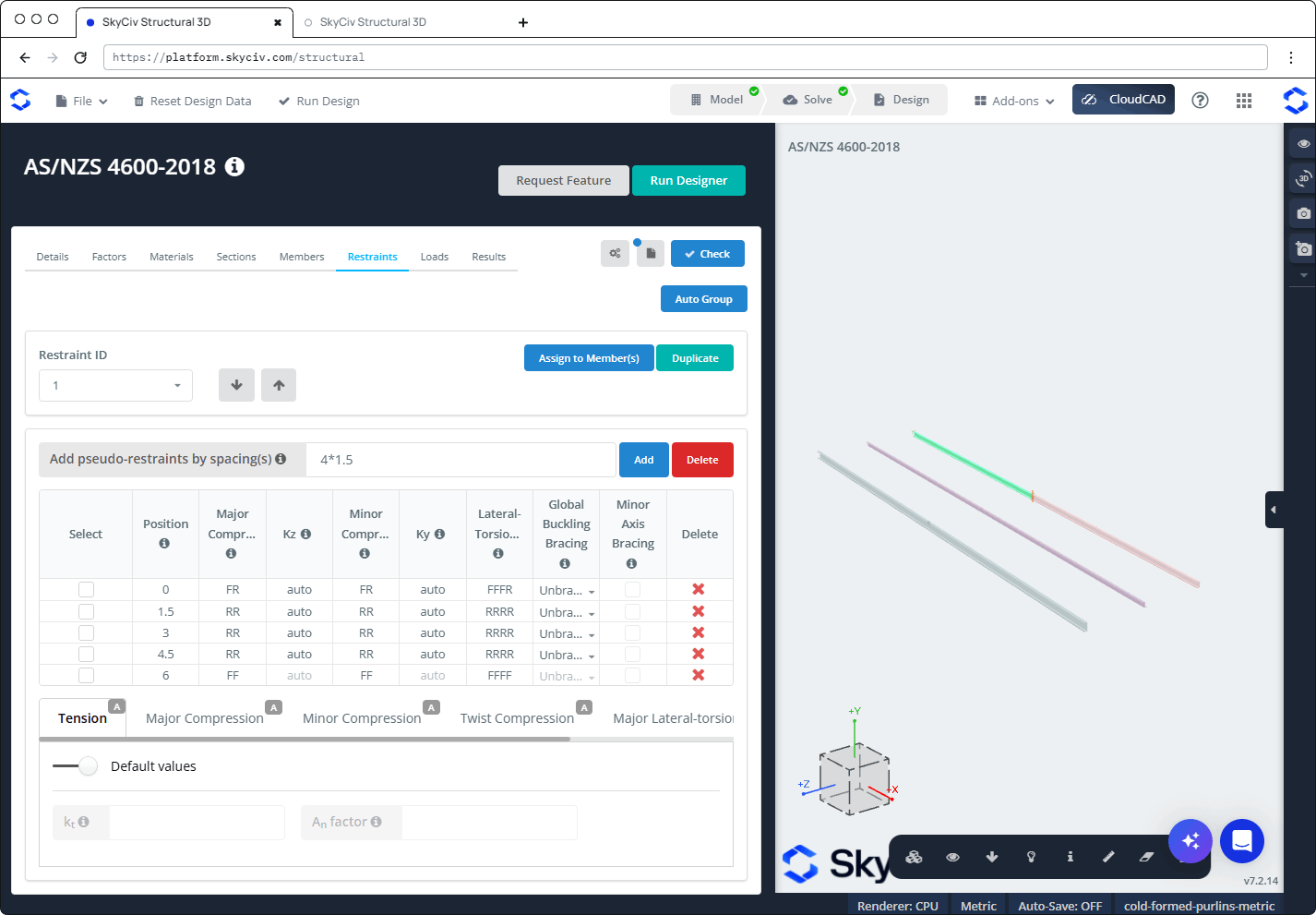
Για να προσθέσετε ψευδο-περιορισμούς (περιορισμούς που δεν είναι μοντελοποιημένοι), εισάγετε τα κενά Προσθέστε ψευδο-περιορισμούς με απόσταση(μικρό) και κάντε κλικ Προσθήκη. Μπορείτε να εισάγετε μια λίστα διαχωρισμένη με κόμματα (για παράδειγμα 1.5,1.5,1.5), χρησιμοποιήστε τον τελεστή πολλαπλασιασμού (4*1.5), ή χρησιμοποιήστε το < χειριστή για να χωρέσει όσο το δυνατόν περισσότερα συστήματα συγκράτησης. Κάντε κλικ Διαγράφω δίπλα στο Προσθήκη να αφαιρέσει όλους τους ψευδο-περιορισμούς.
Οι ψευδο-περιορισμοί προστίθενται όπως απελευθερώνονται (RR και RRRR), οπότε δεν έχουν αποτέλεσμα μέχρι να αλλάξετε τους κωδικούς τους. Στο παρακάτω παράδειγμα, 4*1.5 προσθέτει σειρές στο 1.5, 3 και 4.5 μ σε α 6 m μέλος.
Κάτω από τον πίνακα υπάρχουν υποκαρτέλες, το καθένα με ένα ΕΝΑ (αυτόματο) σήμα από προεπιλογή:
- Ενταση: με Προεπιλεγμένες τιμές επί, χρησιμοποιούνται οι προεπιλογές. Απενεργοποιήστε το για να εισάγετε το δικό σας:
- κτ: συντελεστής διόρθωσης για την κατανομή των δυνάμεων σε ένα στέλεχος τάσης. Η προεπιλογή προϋποθέτει μια ανομοιόμορφη κατανομή δύναμης, ανά AS/NZS 4600:2018 Ρήτρα 3.2.3.2.
- ΕΝΑν παράγοντας: παράγοντας που μειώνει τη μεικτή επιφάνεια στην καθαρή επιφάνεια. Η προεπιλογή είναι 0.85, που προϋποθέτει μια βιδωτή σύνδεση.
- Μεγάλη συμπίεση (μεγάλομε, κμε), Μικρή συμπίεση (μεγάλοκαι, κκαι), Συμπίεση περιστροφής (μεγάλοΧ, κΧ), Μείζον Πλευρικό-στρεπτικό (μεγάλοσι, κLT, ντοσι) και Ελάσσονα Πλάγιο-στρεπτικό (μεγάλοσι, κLT): από προεπιλογή, Προσδιορίστε από τους περιορισμούς (όπως ορίζεται στον πίνακα συγκράτησης) είναι ενεργοποιημένο. Απενεργοποιήστε το για να εισαγάγετε τις δικές σας τιμές για ολόκληρο το μέλος. Κάτω από Τυπικοί περιορισμοί, κάντε κλικ σε ένα εικονίδιο για να εφαρμόσετε έναν τυπικό περιορισμό στις επιλεγμένες σειρές.
Στήριγμα μικρού άξονα
Τσιμπούρι Στήριγμα δευτερεύοντος άξονα όταν το μέλος στερεώνεται συνεχώς γύρω από τον δευτερεύοντα άξονά του, για παράδειγμα με σεντόνι στερεωμένο σε τεγίδα ή περιφέρεια. Τότε:
- Η ροπή κάμψης γύρω από τον δευτερεύοντα άξονα (Μκαι*) από την ανάλυση αγνοείται, και λαμβάνεται ως μηδέν σε όλους τους συνδυασμούς φορτίων και τους ελέγχους.
- Οι έλεγχοι σχεδιασμού πραγματοποιούνται σχετικά με το γεωμετρικούς άξονες του τμήματος αντί των κύριων αξόνων του. Αυτό αλλάζει μόνο τα αποτελέσματα των τμημάτων των οποίων οι κύριοι άξονες περιστρέφονται, όπως τα τμήματα Ζ. Για τμήματα Z και Lipped Z τμήματα, χρησιμοποιούνται οι παράγοντες DSM για τους γεωμετρικούς άξονες (βλέπω Ενότητες πάνω από).
Η ρύθμιση ισχύει για ολόκληρο το μέλος: επιλέγοντας ή ξεμπλοκάροντάς το σε οποιαδήποτε σειρά αλλάζει όλες οι θέσεις του αναγνωριστικού συγκράτησης, και έτσι όλα τα μέλη σχεδιασμού στα οποία έχει εκχωρηθεί το αναγνωριστικό συγκράτησης. Τα μέλη που χρησιμοποιούν το ίδιο τμήμα αλλά δεν είναι αγκυρωμένα ελέγχονται ως συνήθως, σχετικά με τους κύριους άξονες.
Στήριγμα δευτερεύοντος άξονα μπορεί να σημειωθεί μόνο όταν δεν υπάρχει τμήμα Αστήρικτος στο Παγκόσμια στήριγμα λυγισμού στήλη: την πρώτη σειρά και κάθε ενδιάμεση σειρά της οποίας ο πλευρικός-στρεπτικός κώδικας δεν ξεκινά με RR πρέπει να ρυθμιστεί σε Μπλουζα, Κάτω μέρος ή Και τα δυο. Διαφορετικά, τα πλαίσια ελέγχου είναι απενεργοποιημένα και μη επιλεγμένα, και ορίζοντας ένα τμήμα πίσω σε Αστήρικτος τα ξεκολλάει. Το πλαίσιο ελέγχου της τελευταίας σειράς είναι πάντα απενεργοποιημένο, καθώς η τελευταία θέση δεν ξεκινά ένα τμήμα. Τοποθετήστε το δείκτη του ποντικιού πάνω από το εικονίδιο ℹ στην κεφαλίδα της στήλης για λεπτομέρειες.
Στην αναφορά ενός μέλους που στηρίζεται γύρω από τον δευτερεύοντα άξονά του:
- ο Περιορισμοί το τμήμα έχει α Στήριγμα δευτερεύοντος άξονα Σημείωση κάτω από την είσοδο χρήστη.
- Ο πίνακας εσωτερικών ενεργειών δείχνει τον Μκαι* as "-", με σημείωση ότι η ροπή δευτερεύοντος άξονα αγνοείται και οι έλεγχοι πραγματοποιούνται γύρω από τους γεωμετρικούς άξονες.
- Ελέγχει την κάμψη του δευτερεύοντος άξονα, και ο συνδυασμένος έλεγχος διάτμησης και κάμψης δευτερεύοντος άξονα, πείτε ότι δεν χρειάζονται επειδή το μέλος είναι στερεωμένο γύρω από τον δευτερεύοντα άξονά του.
- Το σκίτσο του τμήματος δείχνει τους γεωμετρικούς άξονες, και οι ιδιότητες ενότητας σχετικά με αυτές έχουν α σολ εγγραφείτε αντί για Π (για παράδειγμα Ζxg και Σxg). Για τα Ζ, a DSM factor shown with "(Η τιμή των γεωμετρικών αξόνων δεν είναι διαθέσιμη, χρησιμοποιούμενη τιμή των κύριων αξόνων)" είναι ο κύριος παράγοντας αξόνων, και οι επηρεαζόμενοι έλεγχοι δείχνουν μια προειδοποίηση ότι αντ' αυτού χρησιμοποιήθηκαν οι κύριοι άξονες παράγοντες DSM.
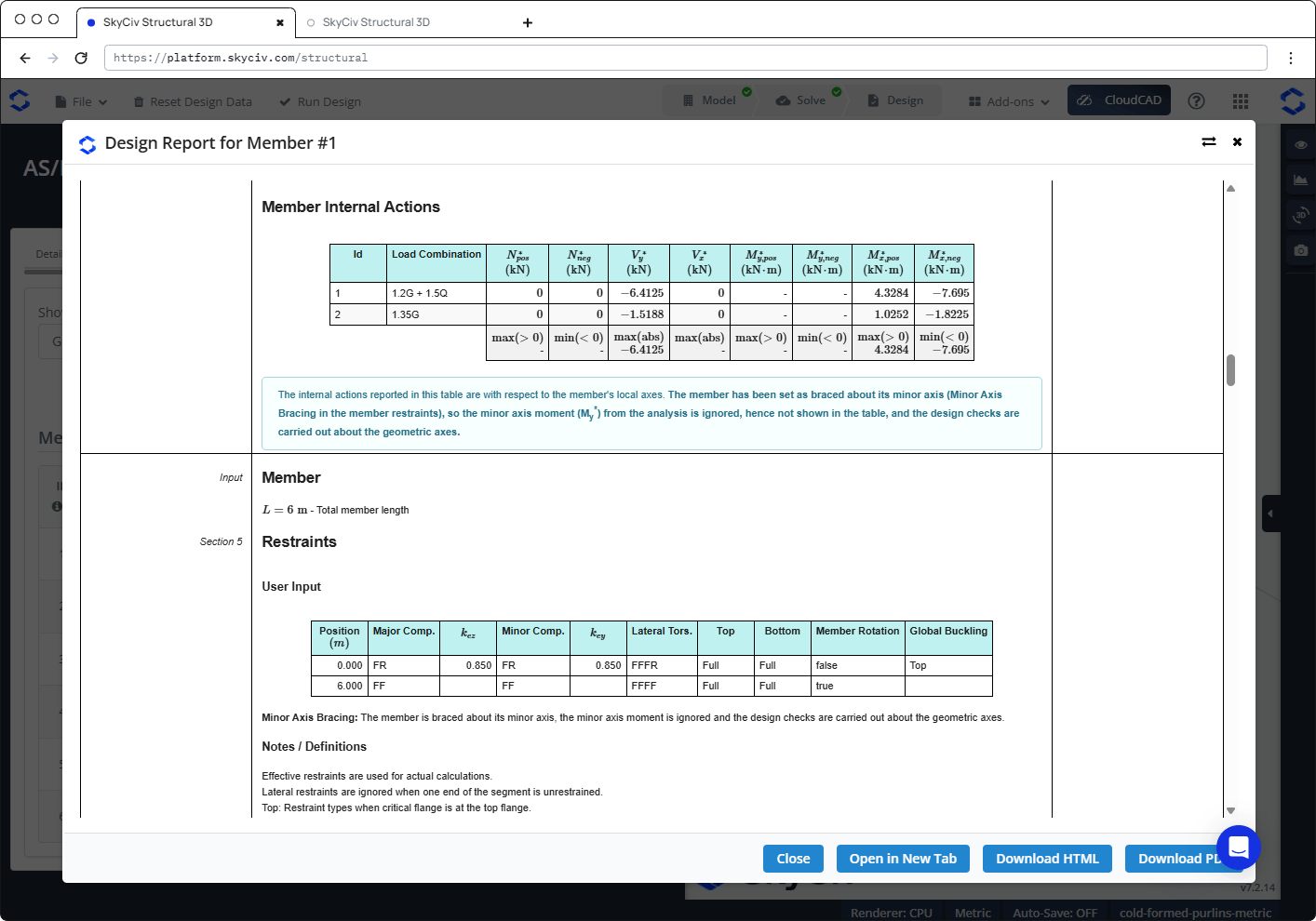
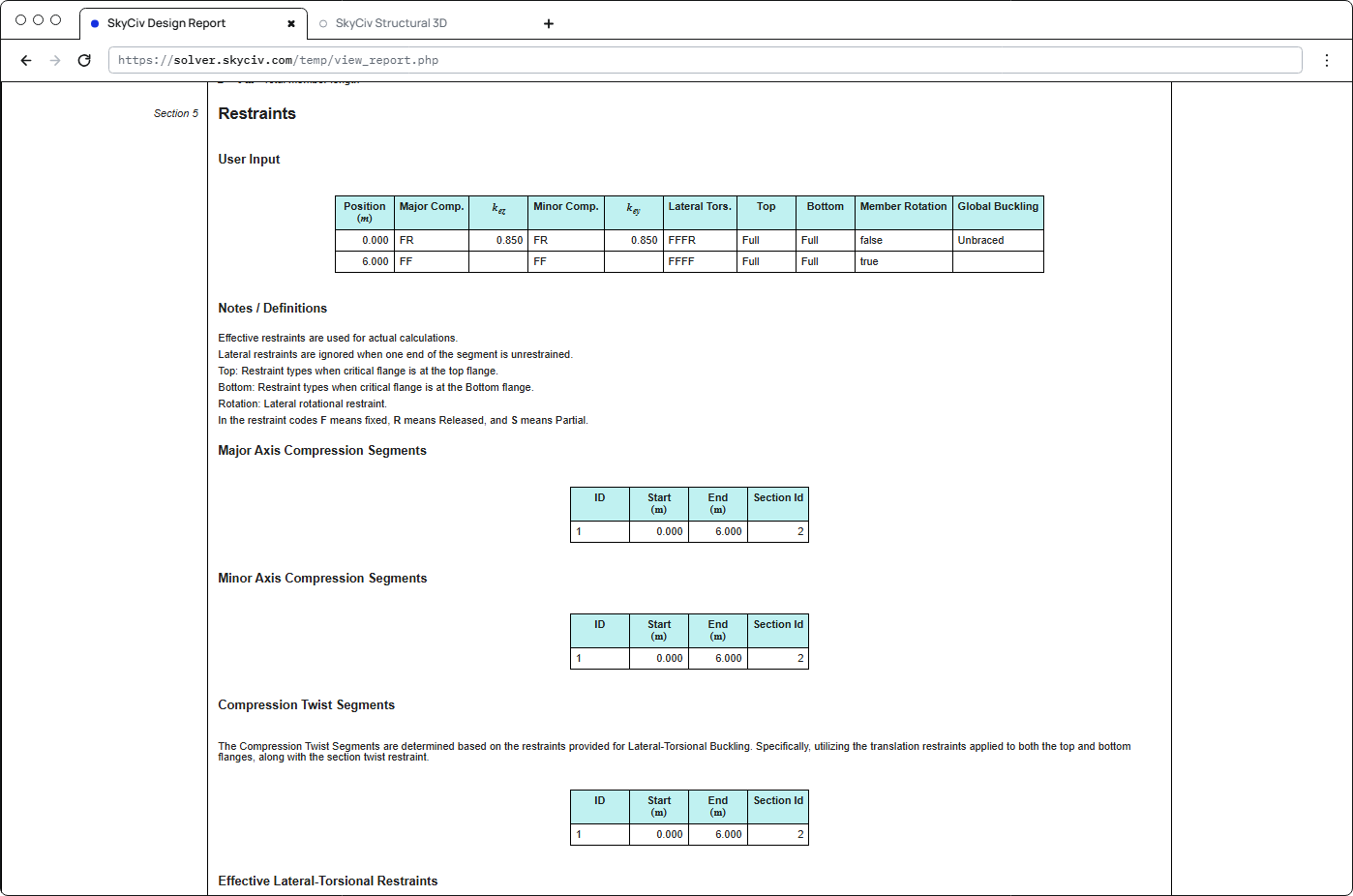
Περιορισμοί στην έκθεση
ο Περιορισμοί ενότητα της αναφοράς κάθε μέλους δείχνει τους περιορισμούς που χρησιμοποιήθηκαν: την είσοδο του χρήστη (θέση, κωδικούς συγκράτησης, κόχι και κμάτι, επάνω και κάτω συγκράτηση φλάντζας, περιστροφή μελών και ολική στήριξη λυγισμού), τα τμήματα συμπίεσης μείζονος και δευτερεύοντος άξονα, τα τμήματα συστροφής συμπίεσης, τους αποτελεσματικούς περιορισμούς πλευρικής στρέψης και τα τμήματα για κάθε συνδυασμό φορτίου.
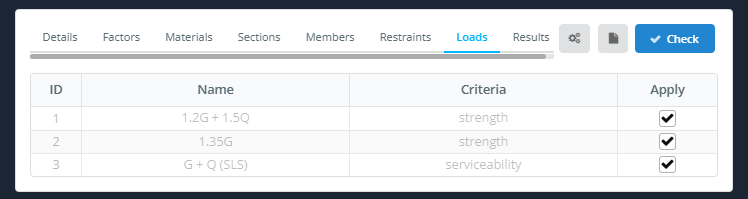
Φορτία
ο Φορτία Η καρτέλα παραθέτει τους συνδυασμούς φορτίων από το μοντέλο, με τους Ονομα και Κριτήρια. Τσιμπούρι Ισχύουν για κάθε συνδυασμό φορτίου που θέλετε να συμπεριλάβετε. Οι συνδυασμοί δυνατότητας συντήρησης παρατίθενται και μπορούν να επισημανθούν, αλλά δεν πραγματοποιείται έλεγχος επισκευής.
Αποτελέσματα
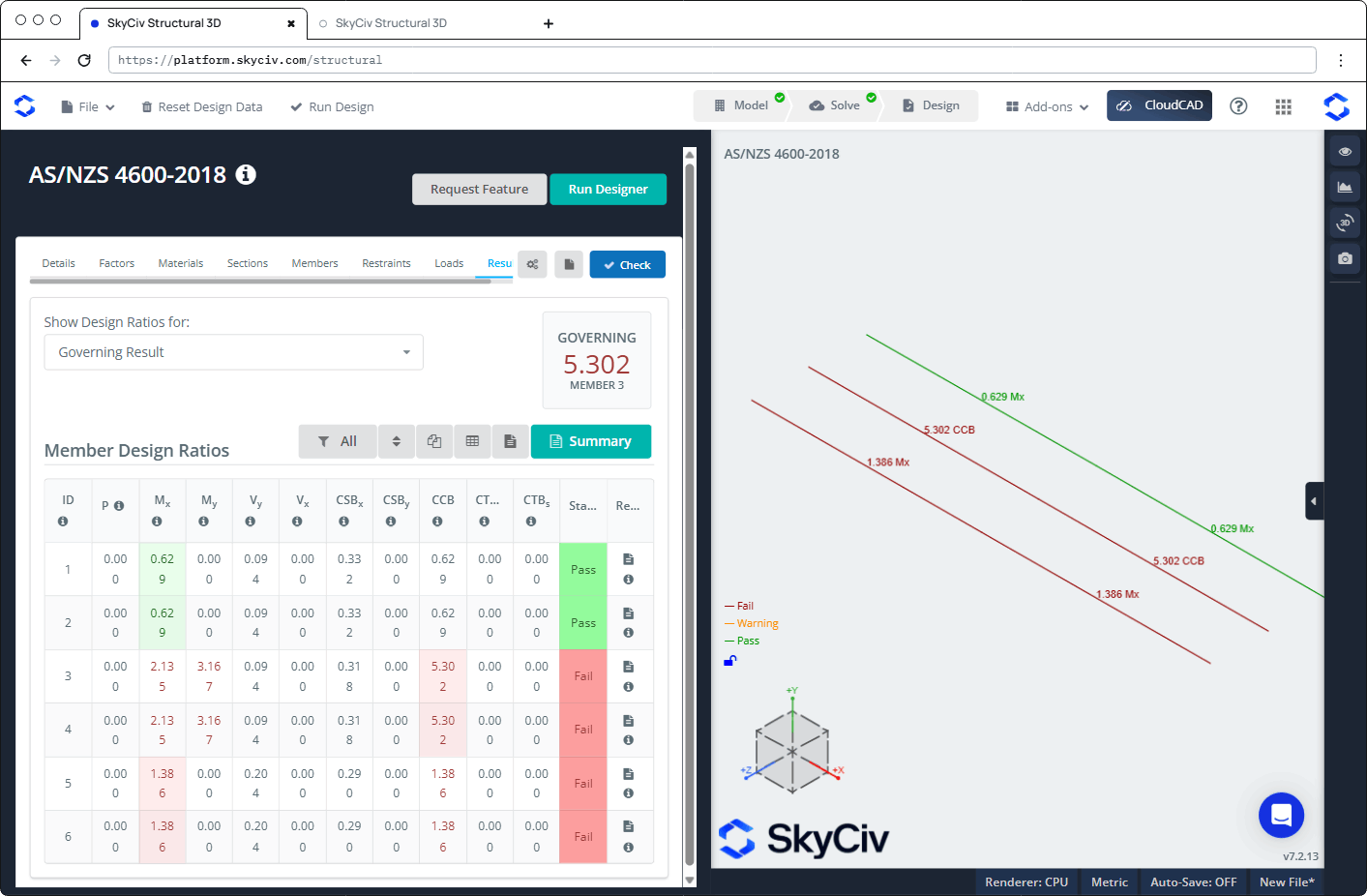
Κάντε κλικ Ελεγχος για να εκτελέσετε τον έλεγχο σχεδιασμού. ο Αποτελέσματα εμφανίζεται η καρτέλα:
- Εμφάνιση αναλογιών σχεδίασης για: επιλέγει ποιες αναλογίες εμφανίζονται, για παράδειγμα Κυβερνητικό αποτέλεσμα, Αποτυχημένα μέλη, ή μία μόνο επιταγή.
- ΔΙΑΚΥΒΕΡΝΗΣΗ: την υψηλότερη αναλογία και το μέλος της.
- Μια γραμμή εργαλείων για φιλτράρισμα (Ολα), είδος, Καταστολή και μετατόπιση της δομής σας Επαναλάβετε, εμφανίστε τον πίνακα και ανοίξτε την αναφορά, περισσότερα έχει Περίληψη κουμπί για τη συνοπτική αναφορά.
- ο Αναλογίες σχεδιασμού μελών τραπέζι, με α Κατάσταση (Πέρασμα ή Αποτυγχάνω) και ένα Κανω ΑΝΑΦΟΡΑ εικονίδιο για κάθε μέλος. Τοποθετήστε το δείκτη του ποντικιού πάνω από το εικονίδιο ℹ σε μια κεφαλίδα στήλης για να δείτε την ρήτρα στην οποία αναφέρεται.
| Στήλη | Ελεγχος | Ρήτρα |
|---|---|---|
| Π | Αξονικός (τάση ή συμπίεση) | 3.2 ή 7.2.1 |
| ΜΧ | Κάμψη περίπου x | 7.2.2 |
| Μκαι | Κάμψη περίπου y | 7.2.2 |
| Βκαι | Διάτμηση κατά μήκος y | 7.2.3 |
| ΒΧ | Διάτμηση κατά μήκος x | 7.2.3 |
| CSBΧ | Συνδυασμένη διάτμηση και κάμψη, περίπου x | 7.2.3 |
| CSBκαι | Συνδυασμένη διάτμηση και κάμψη, περίπου y | 7.2.3 |
| CCB | Συνδυασμένη συμπίεση και κάμψη | 7.2.4 |
| CTBΜ | Συνδυασμένη τάση και κάμψη, ιδιότητα μέλους | 7.2.5(1) |
| CTBμικρό | Συνδυασμένη τάση και κάμψη, χωρητικότητα τμήματος | 7.2.5(2) |
Στην τρισδιάστατη προβολή, κάθε μέλος είναι έγχρωμο Αποτυγχάνω, Προειδοποίηση ή Πέρασμα και επισημαίνεται με την αναλογία διακυβέρνησής του.
Έλεγχοι που πραγματοποιήθηκαν
| Ελεγχος | AS / NZS 4600:2018 αναφορά |
|---|---|
| Προεπιλογή μέλους (σύνολα Φ) | Ρήτρα 1.6.3 |
| Αξονική τάση, χωρητικότητα τμήματος | Ενότητα 3.2 |
| Αξονική συμπίεση, χωρητικότητα τμήματος | Ενότητα 7.2.1.3 |
| Αξονική συμπίεση, ιδιότητα μέλους (παγκόσμια, τοπικός και παραμορφωτικός λυγισμός) | Ενότητα 7.2.1 |
| Κάμψη περίπου x και y, χωρητικότητα τμήματος | Ενότητα 7.2.2.3.2 |
| Κάμψη περίπου x και y, ιδιότητα μέλους (πλάγια-στρεπτική, τοπικός και παραμορφωτικός λυγισμός), συμπεριλαμβανομένης της θετικής και αρνητικής κάμψης για το y για μεμονωμένα συμμετρικά τμήματα | Ενότητα 7.2.2.1 |
| Διάτμηση κατά μήκος y (ιστός) και κατά μήκος του x (φλάντζα) | Ενότητα 7.2.3 |
| Συνδυασμένη κάμψη και διάτμηση, και για τους δύο άξονες | Εξ. 7.2.3(9) |
| Συνδυασμένη αξονική συμπίεση και κάμψη | Εξ. 7.2.4 |
| Συνδυασμένη αξονική τάση και ικανότητα κάμψης τομής | Εξ. 7.2.5(2) |
| Συνδυασμένη αξονική τάση και ικανότητα κάμψης μέλους | Εξ. 7.2.5(1) |
Η μονάδα δεν ελέγχει τα όρια λεπτότητας, εκτροπή (λειτουργικότητα), ακρωτηριασμός ή στρέψη ιστού.
Αναφορές
Κάντε κλικ στο εικονίδιο αναφοράς σε ένα μέλος Κανω ΑΝΑΦΟΡΑ στήλη για να ανοίξει την έκθεση σχεδιασμού του. Ανοίγει σε α Αναφορά σχεδίασης για το μέλος #n διάλογος με Κοντά, Άνοιγμα σε Νέα καρτέλα, Λήψη HTML και Λήψη PDF κουμπιά. The report is titled "AS/NZS 4600-2018 – Direct Strength Method", και περιέχει:
- Λεπτομέρειες Έργου
- Χρησιμότητα: κάθε επιταγή με την αναφορά του, σύμβολο, περιγραφή, αναλογία και κατάσταση
- Ενότητες: τις διαστάσεις και τις ιδιότητες του τμήματος
- Τελικές οριακές καταστάσεις: Προεπιλογή μέλους, Παράγοντες οριακής κατάστασης αντοχής, Εσωτερικές Δράσεις Μελών, Μέλος και Περιορισμοί, ακολουθούμενο από κάθε έλεγχο βήμα προς βήμα
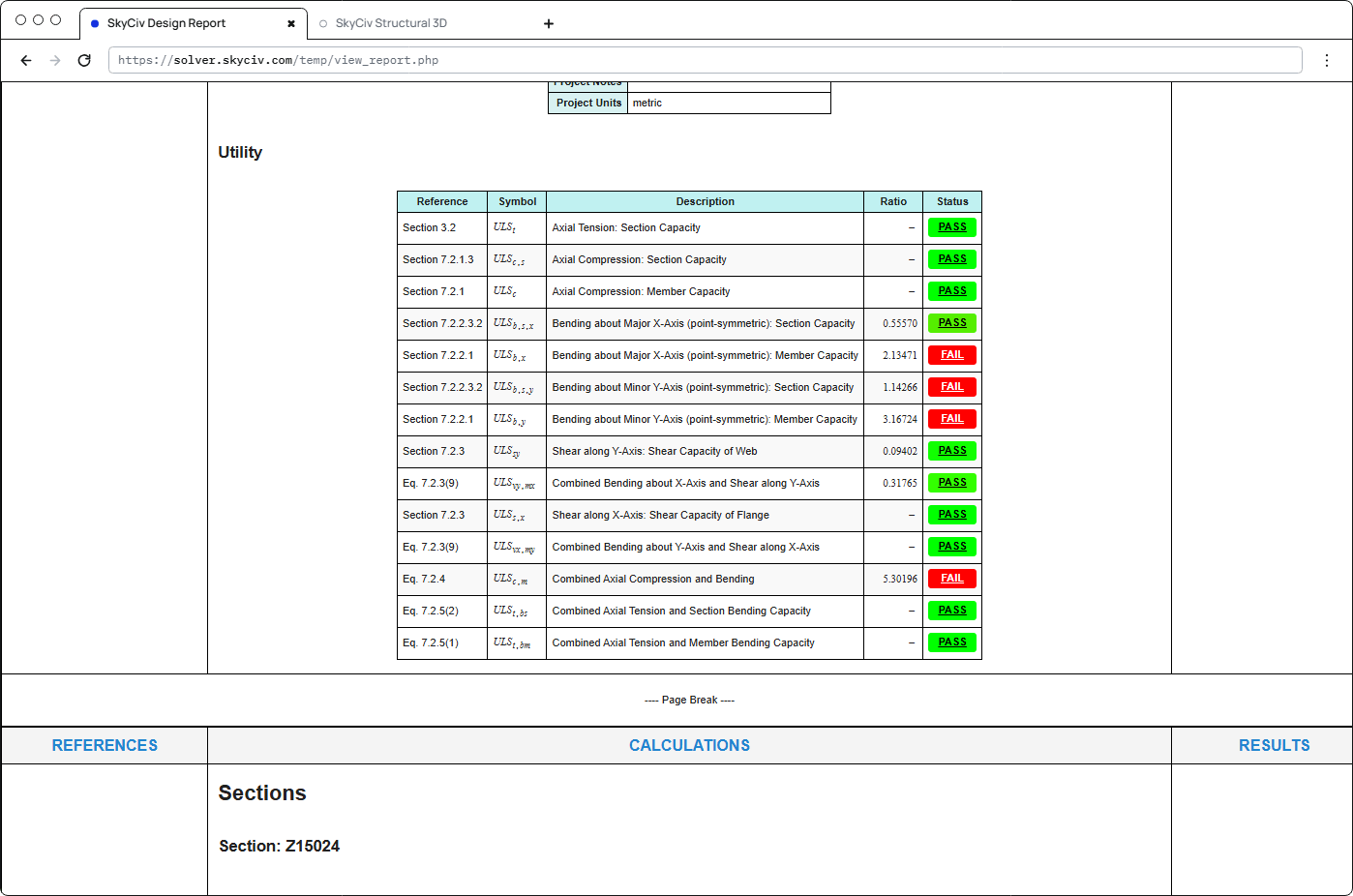
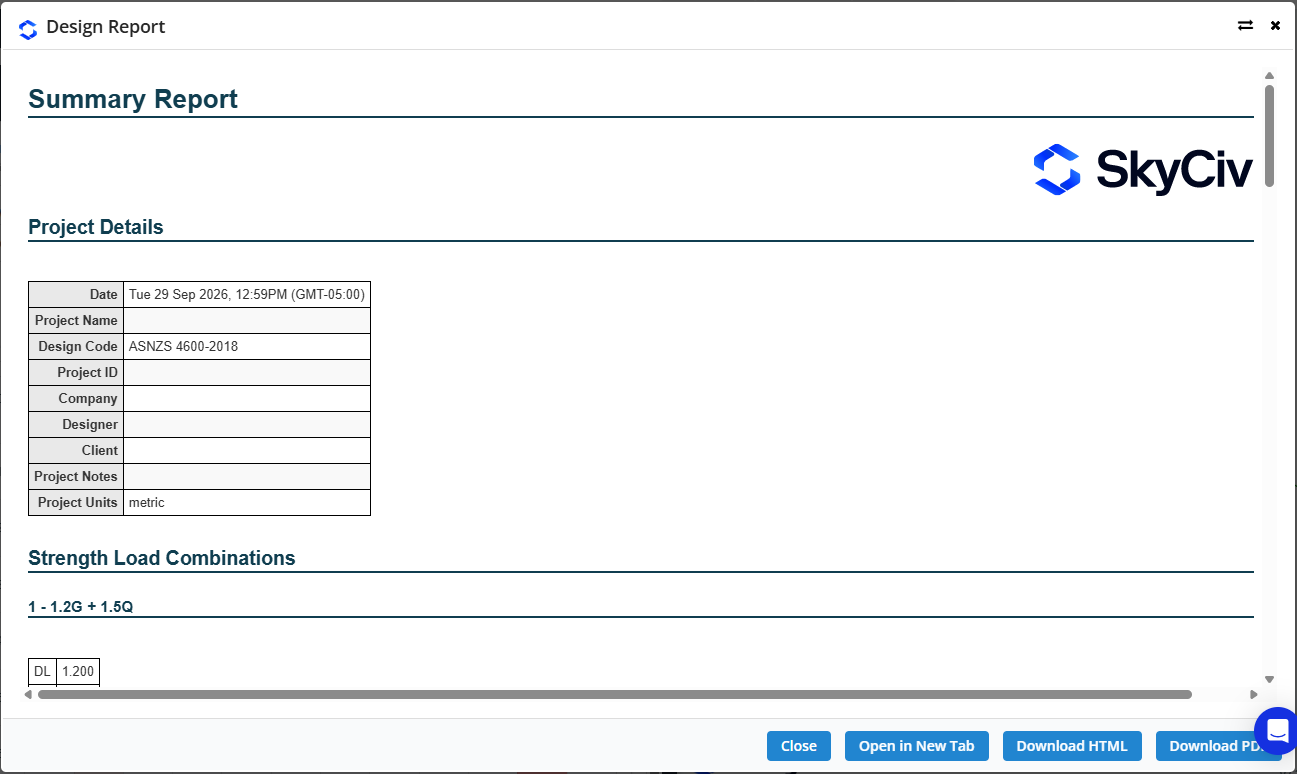
Κάντε κλικ Περίληψη στην καρτέλα Αποτελέσματα για να ανοίξετε το Συνοπτική αναφορά. Αναφέρει τις λεπτομέρειες του έργου (συμπεριλαμβανομένου του κώδικα σχεδίασης), τους συνδυασμούς φορτίων αντοχής με τους συντελεστές τους, και τα αποτελέσματα για όλα τα μέλη.