Stahlbauteilbemessungssoftware für Eurocode 3 (IM 1993-1-1:2005)
Among the many design standards SkyCiv offers is Eurocode 3 (IM 1993-1-1:2005), Entwurf von Stahlkonstruktionen. The module checks hot-rolled and welded steel members to the Ultimate Limit State, with a deflection check for the Serviceability Limit State. It runs in SkyCiv Structural 3D, where it reads the members, Querschnitte, Materialien, forces and load combinations of your model.
Mit diesem Modul können Sie:
- Design I-shapes, T-Formen, Winkel, channels and hollow sections (RHS, SHS and CHS)
- Classify the cross-section (Eurocode-Schrauben werden nach ihrer ungefähren Zugfestigkeit klassifiziert 1, 2, 3 oder 4) for each load combination and limit state, with effective properties for Class 4 Querschnitte
- Check the resistance of cross-sections to tension, Druck-, bending about both axes and shear, including the reduction of the yield strength for high shear
- Check the combined resistance of cross-sections (bending and axial force)
- Check the buckling resistance of members: biegsam, torsional and torsional-flexural buckling in compression, lateral-torsional buckling in bending, and combined bending and axial compression with the interaction factors of Annex A or Annex B
- Split each member into lateral-torsional buckling segments, with C1 calculated from the bending moment diagram or entered by you
- Optionally check torsion (basic stress check) for I-shapes and rectangular hollow sections
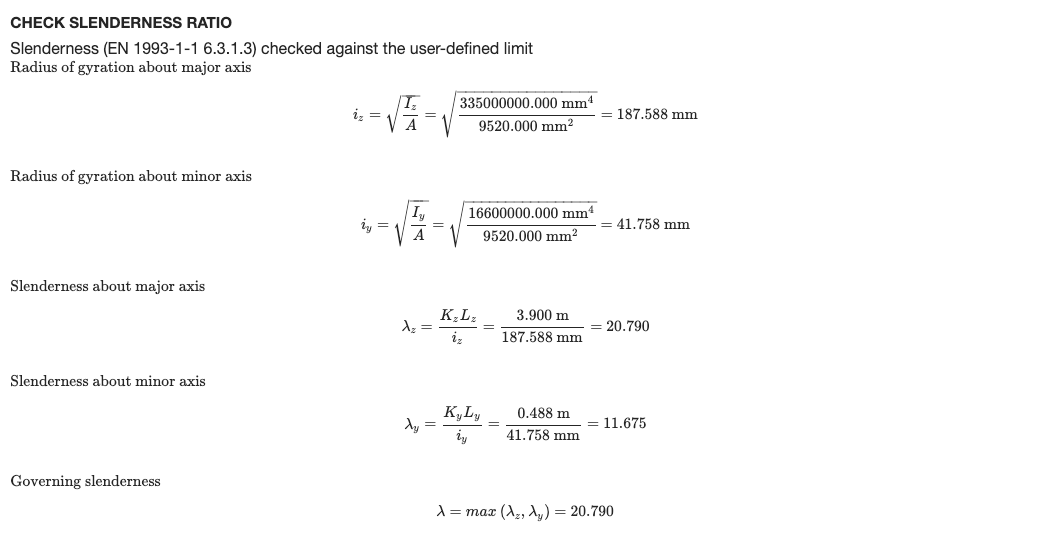
- Check the slenderness ratio (KL/r) against limits for compression and tension, optionally shown in the detailed report
- Check deflections against a span/deflection limit
- View the design ratios on the 3D model
- Export detailed step-by-step reports and a summary report, as HTML or PDF (Benutzerdefiniertes Logo auf Unternehmen)
- Führen Sie den SkyCiv Designer aus (Führen Sie Designer aus) um den effizientesten Abschnitt zu finden
- Vollständig verifiziert mit Ergebnissen Dritter
Unterstützung der aktuellen Version
Abschnitte
- Ich glänze (I-shapes and H-shapes, hot-rolled or welded)
- T-Beam
- Winkel
- Kanal
- Hohl rechteckig (RHS and SHS)
- Hohlkreis (CHS)
The material must be steel. A Class 4 circular hollow section is outside the scope of the module and stops the check with an error message.
Einheiten
The module only works in Metrisch Einheiten. Im Modell, öffnen die Einstellungen (obere Leiste) > Einheiten und stellen Sie das Einheitensystem auf ein Metrisch.
Design in SkyCiv Structural 3D
Dieses Modul ist vollständig in unser leistungsstarkes integriert Strukturanalyse-Software die es Ingenieuren ermöglicht, zu modellieren, Analysieren und entwerfen Sie mit einem Modell. unserer Software, the software pulls your entire model and checks each member against the criteria of the Standard to determine whether or not it passes the requirements of these European Standards. Ladungen, members and design parameters are imported automatically, including the load combinations from EN 1990.
Klicken Sie hier für weitere allgemeine Informationen zu unserem Integrated Tragwerksplanung Software
Öffnen des Moduls
- Lösen Sie das Modell.
- Klicken Design in der oberen Leiste.
- Im Wählen Sie ein Designmodul aus, wählen Mitglied aus Stahl.
- Im Mit welchem Designcode möchten Sie beginnen??, wählen Eurocode 3 (IM 1993-1-1:2005), dann klicken Start.
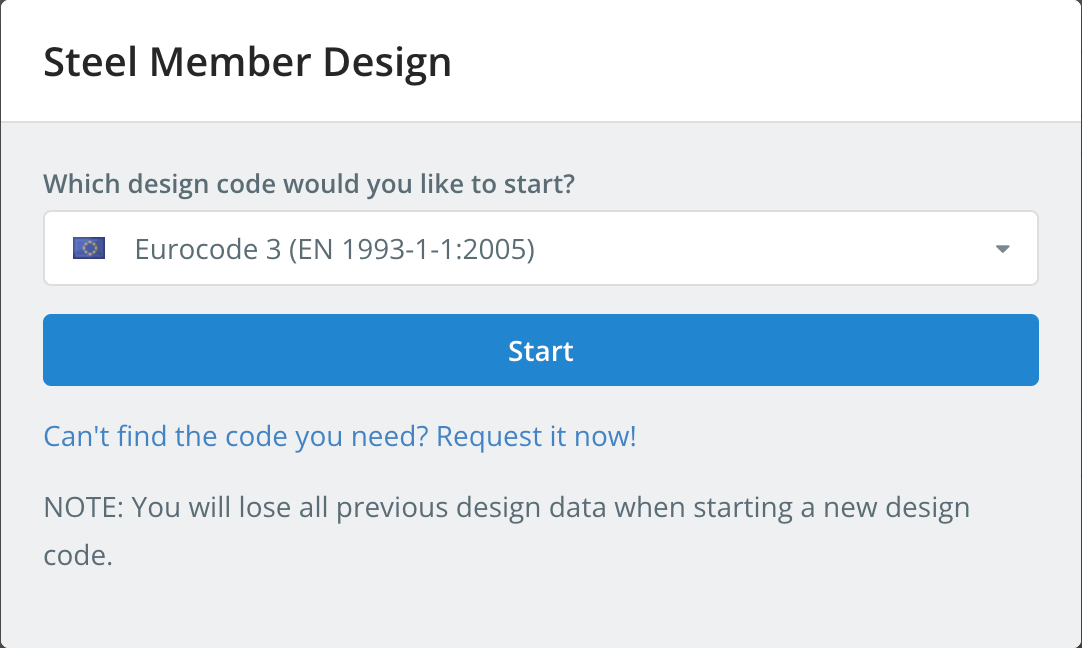
Starting a design code deletes the design data of the previous one. To switch codes later, benutzen Neuen Code starten in dem Design Speisekarte.
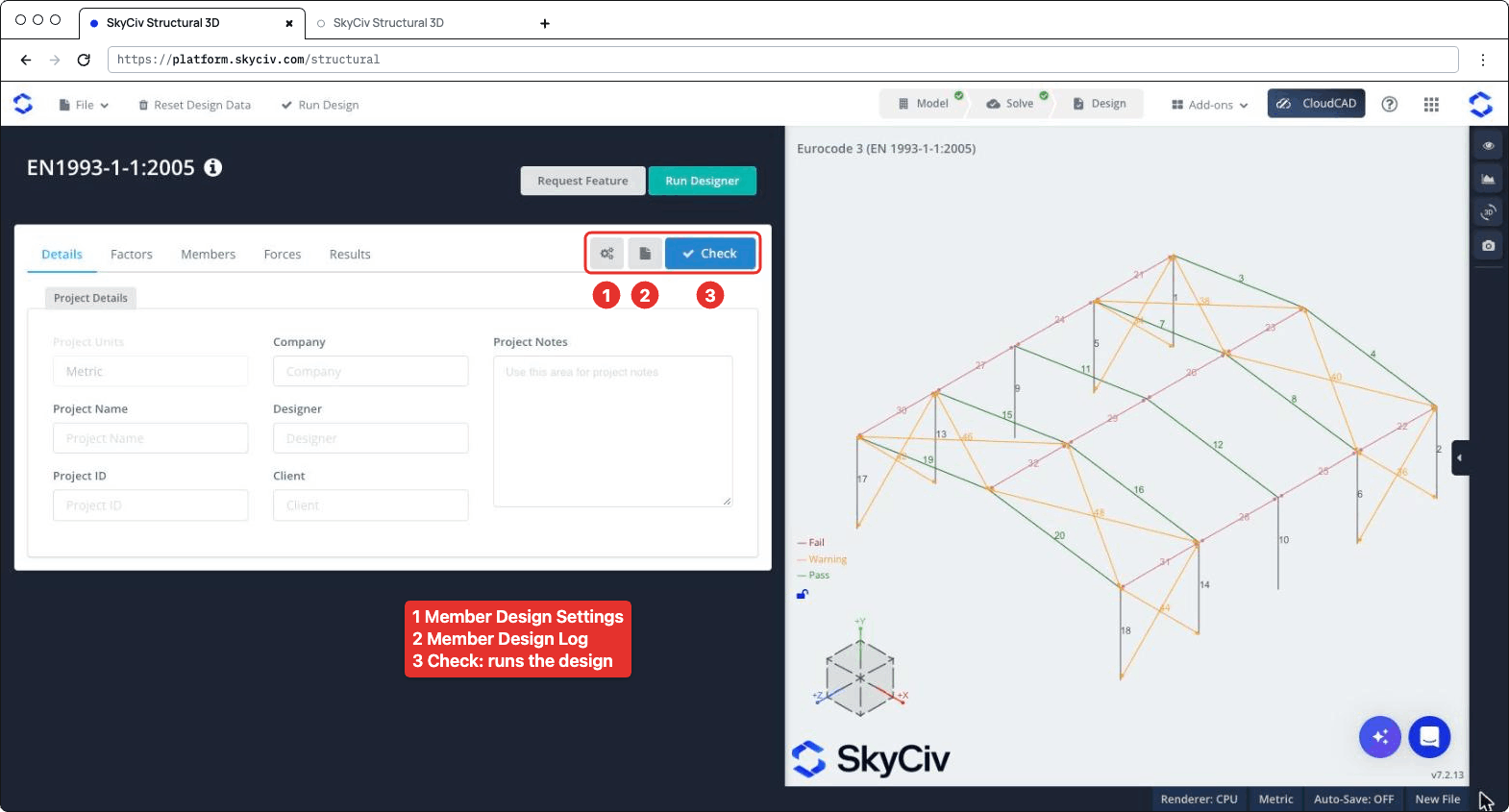
Das Design-Panel wird auf der linken Seite geöffnet, mit dem 3D-Modell auf der rechten Seite. Der Header zeigt den Code, Plus Anforderungsfunktion und Führen Sie Designer aus. Rechts in der Tab-Leiste befinden sich drei Schaltflächen: die Einstellungen (Gang) Taste, welches sich öffnet Mitgliederdesign-Einstellungen, die Schaltfläche „Loggen“., das öffnet die Mitgliedsentwurfsprotokoll, und Prüfen, welches die Designprüfung durchführt. Die Registerkarten sind Einzelheiten, Faktoren, Mitglieder, Kräfte und Ergebnisse.
Mitgliederdesign-Einstellungen
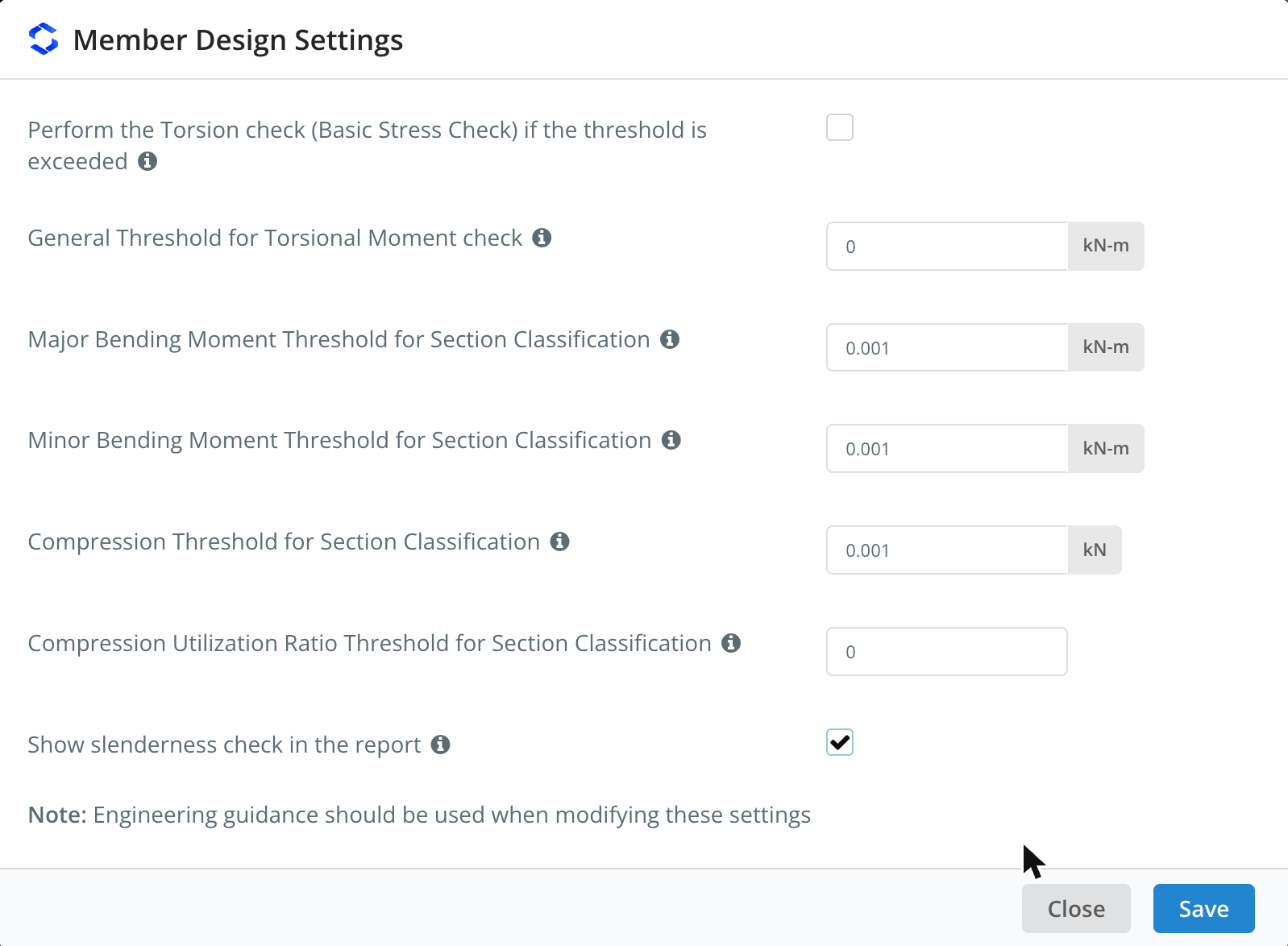
Klicken Sie zum Öffnen auf die Zahnradschaltfläche Mitgliederdesign-Einstellungen. Bewegen Sie den Mauszeiger über das ℹ-Symbol neben einer Einstellung, um deren Beschreibung anzuzeigen.
| Einstellung | Die Druckfestigkeit wird gemäß AS4600 berücksichtigt | Beschreibung |
|---|---|---|
| Perform the Torsion check (Grundlegender Stresscheck) if the threshold is exceeded | Nicht markiert | Runs the torsion check of I-shapes and rectangular hollow sections when the torsional moment exceeds the threshold. Wenn deaktiviert, the torsion check is skipped whatever the threshold |
| General Threshold for Torsional Moment check | 0 kN-m | The torsional moment (in absolute value) above which the torsion check is performed, for all members whose T.Grenze ist Auto in dem Mitglieder Tab |
| Major Bending Moment Threshold for Section Classification | 0.001 kN-m | Bending about the major axis is included in the overall section classification of a limit state only when the moment exceeds this value |
| Minor Bending Moment Threshold for Section Classification | 0.001 kN-m | Das gleiche, for bending about the minor axis |
| Compression Threshold for Section Classification | 0.001 kN | Compression is included in the overall section classification of a limit state only when the compression force exceeds this value |
| Compression Utilization Ratio Threshold for Section Classification | 0 | Compression is included in the overall section classification only when its utilization ratio exceeds this value. It applies to all the limit states other than compression |
| Show slenderness check in the report | Nicht markiert | Adds the slenderness check to the detailed report of each member, sehen Slenderness Ratio Check unten |
The classification thresholds keep very small forces from governing the class of a section: beispielsweise dem, a beam with a negligible axial force is not classified as if it were in pure compression. Wie im Dialog vermerkt, Wenn Sie diese Einstellungen ändern, sollten Sie sich an die technische Anleitung halten. Klicken sparen bewerben.
Einzelheiten
Auf der Einzelheiten Auf der Registerkarte können Sie die Projektdetails eingeben (Unternehmen, Projektname, Designer, Projekt-ID, Klient und Projektnotizen). Sie müssen sie nicht ausfüllen, but anything you enter is shown in your reports. Projekteinheiten zeigt Metrisch und kann hier nicht geändert werden.
Faktoren
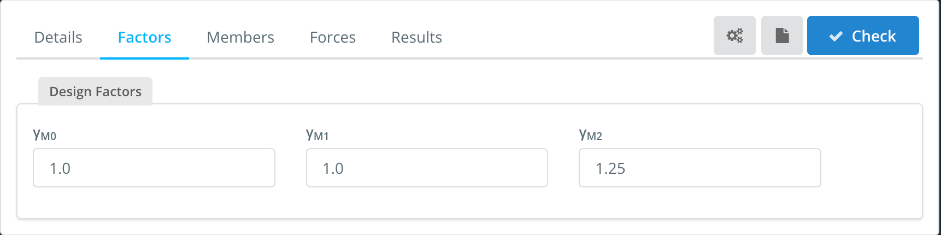
Mit der Faktoren tab shows the partial factors for resistance, which you can change:
| Faktor | Used for | Die Druckfestigkeit wird gemäß AS4600 berücksichtigt |
|---|---|---|
| γ M0 | Resistance of cross-sections | 1.0 |
| γ M1 | Resistance of members to instability (Knicken) | 1.0 |
| γ M2 | Resistance of cross-sections in tension to fracture (net section) | 1.25 |
Mitglieder
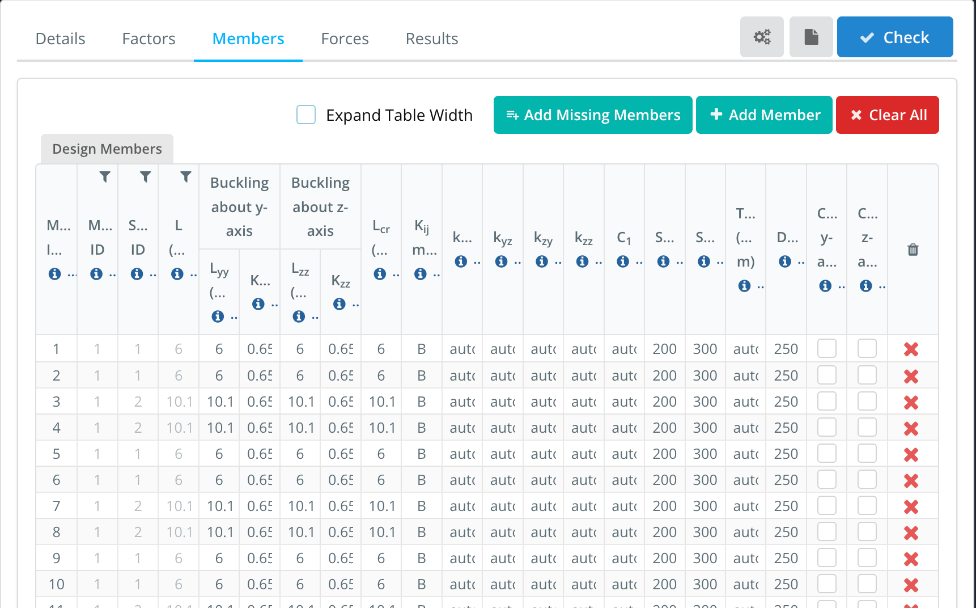
Mit der Mitglieder Auf der Registerkarte werden die Entwurfsmitglieder aufgeführt, with one row for each member of the model. Mitgliedsnummer(s), Material-ID, Abschnitts-ID und L. come from the model. The buckling lengths and the other parameters are filled in with default values that you can change. Hover over the ℹ icon in a column header to see its description.
- Erweitern Sie die Tabellenbreite: shows the full column headers and values, with a horizontal scroll bar.
- Add Missing Members, Auf der Registerkarte können Sie alle Mitglieder definieren, mit denen Sie arbeiten, indem Sie auf klicken und Clear All: add the model members that are not in the table, add a design member, or remove all of them. Enter several member IDs, durch Kommata abgetrennt, im Mitgliedsnummer(s) to design them as a single design member.
| Spalte | Beschreibung | Die Druckfestigkeit wird gemäß AS4600 berücksichtigt |
|---|---|---|
| L.yy, K.yy | Buckling length and effective length factor for flexural buckling about the y-y (major) Achse, used to calculate NEinstellungen für Biege-Torsionsknicken | L.yy = member length, K.yy from the end fixity of the member |
| L.zz, K.zz | Das gleiche, about the z-z (minor) Achse | L.zz = member length, K.zz from the end fixity of the member |
| L.Einstellungen für Biege-Torsionsknicken | Buckling length for lateral-torsional buckling. Enter the member length, or comma-separated lengths, one for each segment between lateral restraints | Mitgliedslänge |
| K.ij Methode | Method used to calculate the interaction factors: Ein (Annex A, alternative method 1) oder B. (Anhang B, alternative method 2) | B. |
| kyy, kja, kzy, kzz | Interaction factors for bending and axial compression (Gl. 6.61 und 6.62). Mit Auto, they are calculated with the method chosen in Kij Methode | Auto |
| C.1 | Moment modification factor for the elastic critical moment MEinstellungen für Biege-Torsionsknicken. Mit Auto, it is calculated from the bending moment diagram of each segment. Enter a single value for all the segments, or comma-separated values, one for each segment | Auto |
| Sie können den Mauszeiger über das Symbol bewegen, um weitere Informationen zu erhaltenC., Sie können den Mauszeiger über das Symbol bewegen, um weitere Informationen zu erhaltenT. | Slenderness limits in compression and in tension, sehen Slenderness Ratio Check unten | 200, 300 |
| T.Grenze | Torsional moment threshold for the torsion check of this member. Mit Auto, the general threshold of the settings is used. The torsion check must be ticked in the settings | Auto |
| Sie können den Mauszeiger über das Symbol bewegen, um weitere Informationen zu erhaltenL. | Sie können den Mauszeiger über das Symbol bewegen, um weitere Informationen zu erhalten: the member passes when span/deflection is at least this value | 250 |
| Cantilever y-axis, Cantilever z-axis | Tick if the deflection check should consider the member as supported at one end only, for deflection along that axis | Nicht markiert |
Ein Träger, für ein 10.1 m rafter with purlins every 2.02 Mio., eingeben 2.02,2.02,2.02,2.02,2.02 im L.Einstellungen für Biege-Torsionsknicken. The lengths must add up to the member length (innerhalb 1%). Each segment is then checked for lateral-torsional buckling with its own length and C1. If you enter a single length that is different from the member length, C.1 can’t be calculated automatically and must be entered as a number.
Kräfte
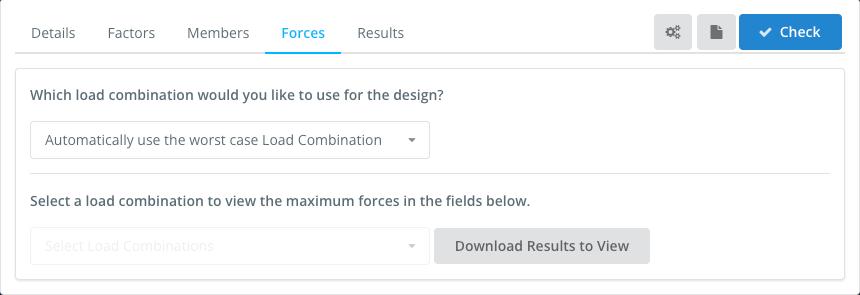
Mit der Kräfte tab sets the load combination used in the design. Standardmäßig, Automatically use the worst case Load Combination checks every strength load combination of the model and reports the worst one for each check. You can also select a single load combination. Serviceability combinations are not listed here: they are used for the deflection check.
To view the forces of a load combination, select it in Select a load combination to view the maximum forces in the fields below, und klicke Download Results to View.
Ergebnisse
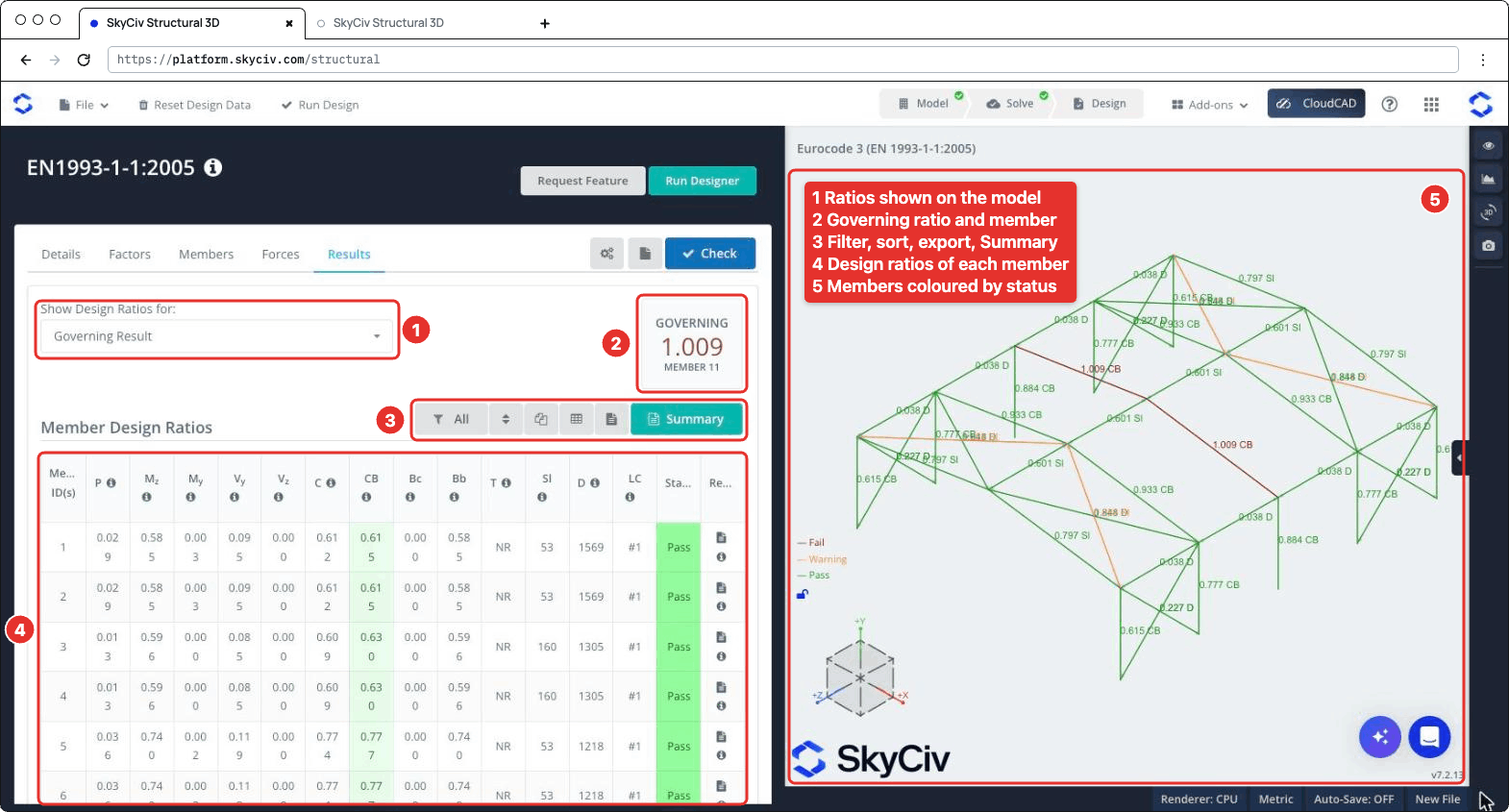
Klicken Prüfen um die Designprüfung durchzuführen. Mit der Ergebnisse Registerkarte zeigt (numbered as in the screenshot below):
- Konstruktionskennzahlen anzeigen für: chooses which ratios are shown on the 3D model, beispielsweise dem Entscheidendes Ergebnis, Ausgefallene Mitglieder, a single check or the Worst Load Combination.
- REGIEREN: das höchste Verhältnis und sein Mitglied.
- A toolbar to filter the members (Alle, Failed, Bestanden oder Warnung Elemente, or the members of a section), reset the sorting, copy the table, download it as CSV, download all the member reports as HTML, und öffnen Sie die Zusammenfassung Bericht.
- Mit der Elementauslegungsverhältnisse Verwendung des in S3D integrierten Lastgenerators für Windlasten, mit einem Status (Bestehen, Warn oder Scheitern) and the report icon of each member. Bewegen Sie den Mauszeiger über das ℹ-Symbol in einer Spaltenüberschrift, um die Klausel anzuzeigen, auf die es sich bezieht.
- The 3D view, where each member is coloured Scheitern, Warnung oder Bestehen and labelled with its governing ratio and check.
| Spalte | Prüfen | Klausel |
|---|---|---|
| P. | Axial force, Zug oder Druck | 6.2.3 oder 6.2.4 |
| M.mit | Bending about the major axis | 6.2.5 |
| M.j | Bending about the minor axis | 6.2.5 |
| V j, V mit | Scheren | 6.2.6 |
| C. | Kombinierte Aktionen, resistance of cross-sections | 6.2.1 |
| CB | Combined bending and axial compression, buckling resistance of members | 6.3.3 |
| Bc | Buckling resistance of compression members | 6.3.1 |
| Bb | Lateral-torsional buckling resistance | 6.3.2 |
| T. | Drehung (basic stress check), NR when it is not performed | 6.2.7 |
| Sl | Governing slenderness λ of the member (not a ratio) | |
| D. | Span/deflection of the member (not a ratio) | |
| LC | Load combination of the governing result |
A member fails when one of its strength ratios is above 1.0. The slenderness and deflection checks are not part of the governing ratio: when the slenderness exceeds its limit, or the span/deflection is below Sie können den Mauszeiger über das Symbol bewegen, um weitere Informationen zu erhaltenL., bleibt die Sl oder D. value is highlighted and the member status is Warn. Their ratios to the limits are shown on the 3D model (beispielsweise dem 0.797 Sl) und in der Zusammenfassung Bericht.
Berichte
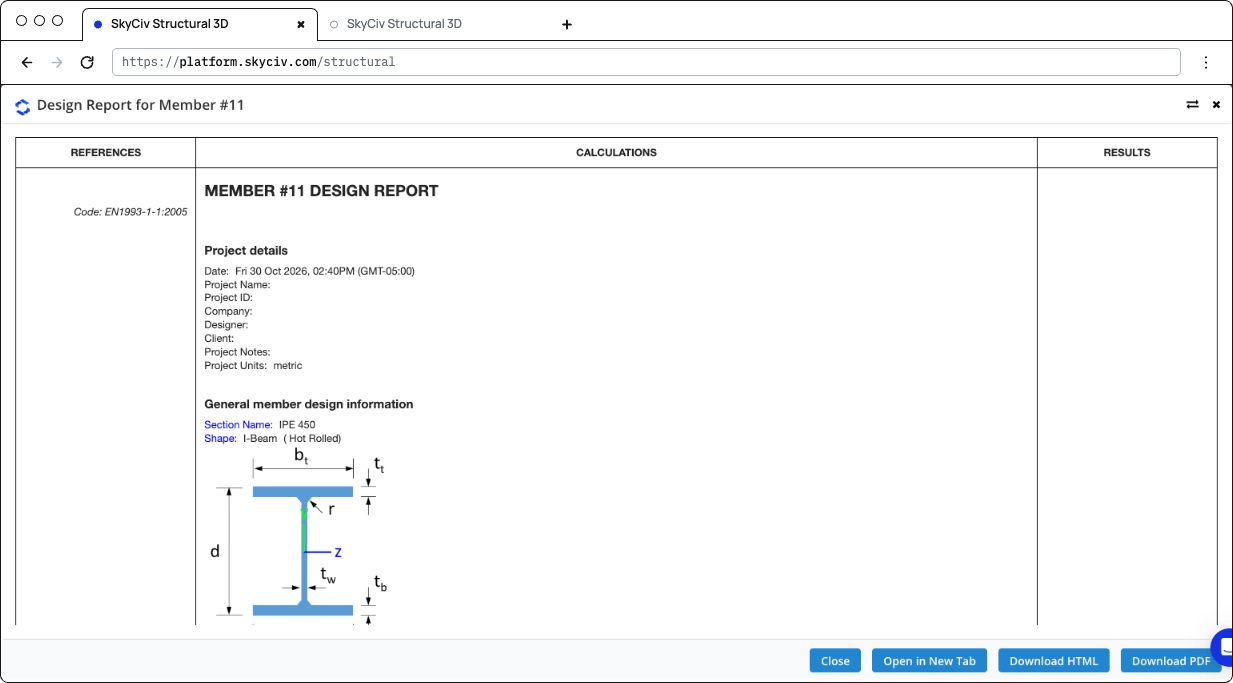
Click the report icon of a member to open its design report, in einem Entwurfsbericht für Mitglied #n Dialog mit Schließen, In neuem Tab öffnen, Laden Sie HTML herunter und PDF herunterladen. The report shows the references (clauses), the calculations and the result (STATUS PASS oder SCHEITERN) of each check:
- Projektdetails und General member design information: die Sektion, its shape and fabrication (hot-rolled or welded), the material properties and the design parameters
- Design Internal Forces: the governing forces used for each check
- The checks of axial strength (Zug oder Druck), axial buckling strength, flexural strength about the major and minor axes, lateral-torsional buckling resistance, interaction of combined resistance, interaction of combined buckling, shear strength along y and z and, when performed, Drehung
- Deflection Check: the critical serviceability load combination and position, the span, the maximum deflection and the ratio to the limit
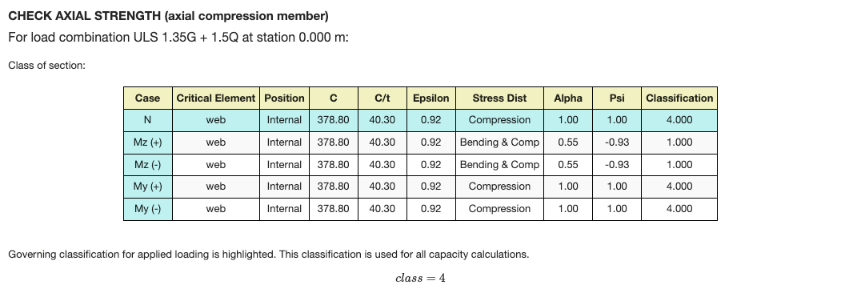
Each check gives the load combination and station that govern it, and the section classification table for that limit state: the class of each element (Netz, Flansche) for the axial force and for bending about each axis, with the governing class highlighted. Für eine Klasse 4 Sektion, the effective properties are used. When the shear force is high (6.2.8), the reduced yield strength is used for the resistances.
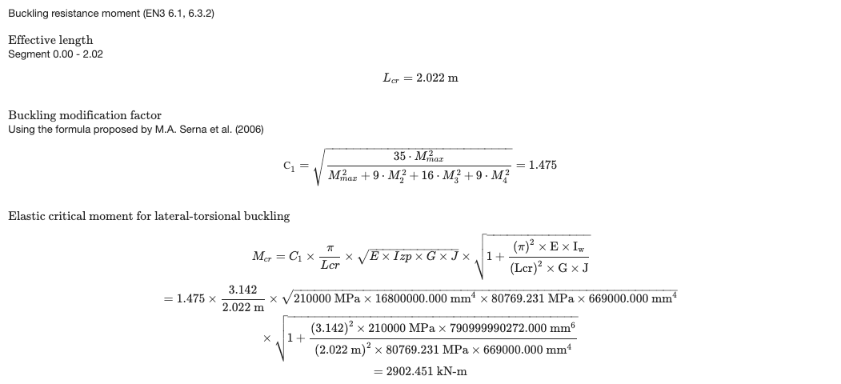
The lateral-torsional buckling check is calculated for the segment where the governing station is, with its LEinstellungen für Biege-Torsionsknicken und C1. When C1 ist Auto, it is calculated from the moments along the segment with the formula proposed by Serna et al. (2006). The report then gives MEinstellungen für Biege-Torsionsknicken, the non-dimensional slenderness, the buckling curve and the reduction factor χLT.
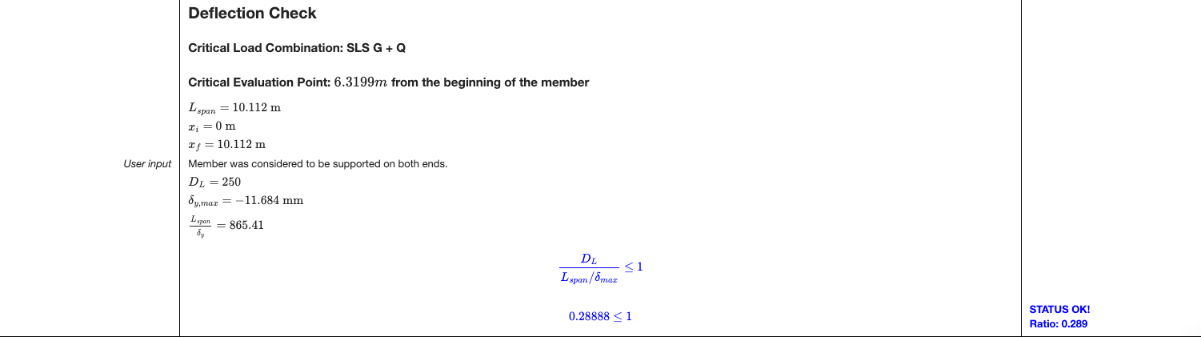
The deflection check is performed when the model has serviceability load combinations and Sie können den Mauszeiger über das Symbol bewegen, um weitere Informationen zu erhaltenL. ist größer als 0. Otherwise the report says that the deflection check was skipped.
Klicken Zusammenfassung on the Results tab to open the summary report. Es listet die Projektdetails auf (Design-Code, user name and unit system), the design factors, die Materialien, the section dimensions and properties, the properties of each member (buckling lengths, L.Einstellungen für Biege-Torsionsknicken, C.1, C. Mio. factors and limits), the results of all the members and the definitions of the symbols.
Durchgeführte Kontrollen
Here are the details of some of the checks performed by the module.
Slenderness Ratio Check
Each member is checked against the slenderness limits entered in the Mitglieder Tab: Sie können den Mauszeiger über das Symbol bewegen, um weitere Informationen zu erhaltenC. for members in compression (200 standardmäßig) und Sie können den Mauszeiger über das Symbol bewegen, um weitere Informationen zu erhaltenT. for members in tension or without axial force (300 standardmäßig). The slenderness is calculated about both axes from the effective length and the radius of gyration about the same axis:
- λmit = KmitL.mit / ichmit about the major axis, with imit = √(Imit / Ein)
- λj = KjL.j / ichj about the minor axis, with ij = √(Ij / Ein)
The governing slenderness λ = max(λmit, λj) is divided by the limit, and the member passes when this ratio is 1.0 oder weniger. The slenderness check is listed in the Sl column of the Results tab.
To show this check in the detailed report of each member, open the settings (the gear button next to Prüfen) and tick Show slenderness check in the report. It’s off by default.
The report then has a Check Slenderness Ratio section after the buckling check, with the radii of gyration, the slenderness about each axis, the governing slenderness and its ratio to the compression and/or tension limit, with a PASS or FAIL status.