SkyCiv文档

您的SkyCiv软件指南 - 教程, 使用指南和技术文章

云CAD

  1. 云CAD
  2. 入门
  3. Share and Collaborate

Share and Collaborate

分享, Comment and Collaborate with others, even if they don’t have CloudCAD

CloudCAD allows users to share drawings via a URL linkeven if they don’t have a CloudCAD subscription! Since CloudCAD is on completely online, users no longer need to send marked-up PDFs back and forward to each other for comments and collaboration.

Users can create their own comments and outstanding issues for others to review or even reply to.

Sharing your Models

Users can share models at anytime via 文件 – 分享. From this window, a user can either:

  1. Share with specific SkyCiv Usersincluding controls for edit permissions
  2. Share to anyone via a public linkno account needed, just share the open file and start collaborating! Click here for an example
  3. 与 SkyCiv 支持共享

Adding Comments

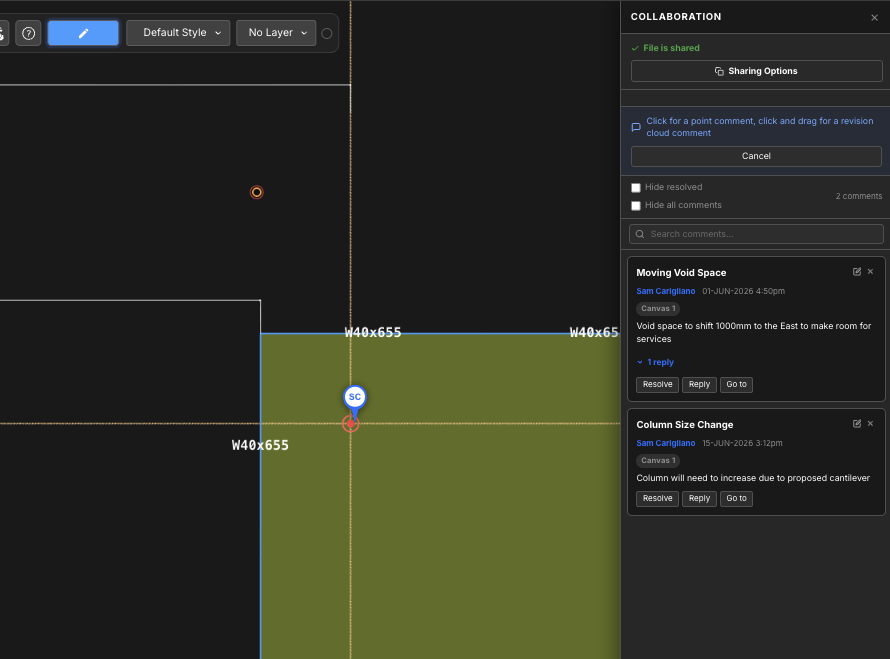
Users can add comments for others to review, reply or resolve. To launch the commenting panel, 点击 分享 button on the top panel, which will open the right Collaboration panel:

从这里, users can make the most of the following features:

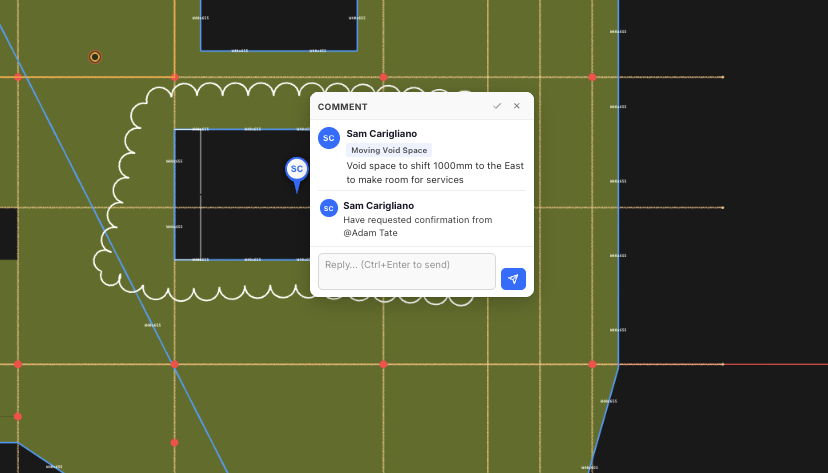
  • Add new comments via a point or revision cloud:
    • 观点: simply click a point and start typing your comment
    • RevisionCloud: Click and drag to create your comment revision cloud, once you release the click you can type in your comment
  • Reply to existing comments
  • Resolve comments (注意: you can hide resolved comments by ticking on Hide Resolved)
  • Search comments via keywords
  • 去 – since comments can exist on any canvas, clicking this will open the appropriate canvas and take you to the comment’s location on the model space
  • Delete and edit comments by clicking the top right corner buttons of each comment
本文对您有帮助吗??
是的 没有

我们能帮你什么吗?

回到顶部