
The SkyCiv AI Assistant is an AI structural modeling tool built into SkyCiv Structural 3D and CloudCAD. Опишите то, что вы хотите, простым языком, и это сработает на вашей модели.: it can build models from scratch, модифицируйте существующие модели, запросите результаты вашего анализа, диагностировать и помогать устранять проблемы, решить вашу модель, и ответьте на вопросы об использовании SkyCiv. This article covers what the AI Assistant can do in SkyCiv Structural 3D and how to use it.
Открытие AI-помощника
- Откройте модель в Structural 3D., или начать новый.
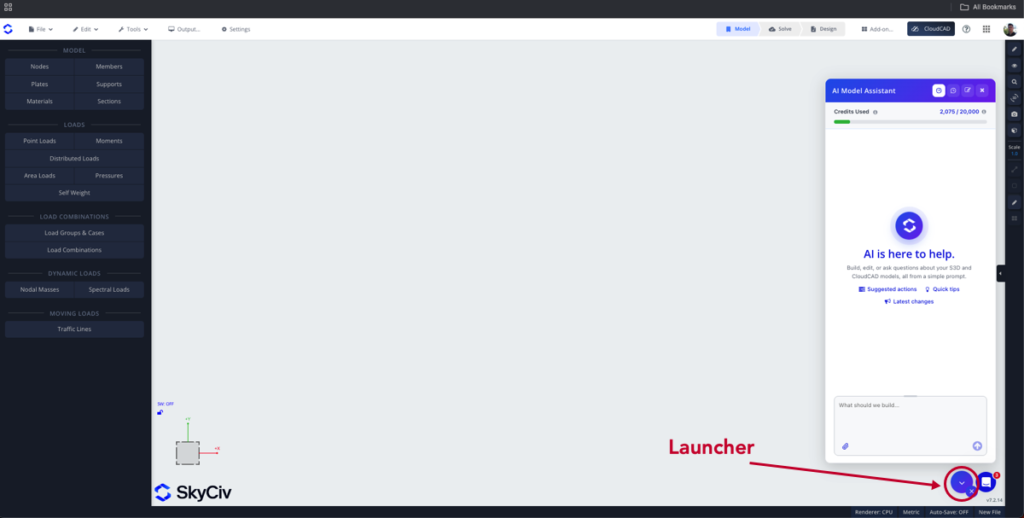
- Click the AI Assistant button (the sparkle icon) in the bottom right corner to open the AI Assistant panel (Смотри ниже).
- Type your request in the prompt box and press Enter, or click Send, to run your prompt.
AI Credits
Каждый запрос использует кредиты AI., based on the work it takes to complete. A free monthly allowance of credits is available on paid commercial accounts (Базовый, Professional, или Бизнес). Нажмите кнопку Применение button at the top of the panel to see your Credits Used for the month, and hover over the info icon beside it to see when your credits reset. On a Business account, the credits are shared across the whole account.
If you use all your credits, the AI Assistant stops running new requests until your credits reset. You can add more credits at any time from the страница оформления заказа, or with the Add more credits button in the usage panel.
What You Can Ask the AI Assistant
| Намерение | Что он делает | Пример приглашения |
|---|---|---|
| Создавайте | Строит структурную модель с нуля. | “Build a 2-storey steel portal frame, 12 пролет м, 6 m bays” |
| Изменить | Изменяет или дополняет существующую модель | “Change all internal columns to W12x26” |
| Результаты запроса | Отвечает на вопросы о результатах вашего анализа, and can export or generate them in a format of your choice | “What is the maximum deflection, и в каком члене? Export all the member results in CSV format” |
| Диагностика | Находит потенциальные проблемы и помогает их устранить.. It can also re-solve the model to check that the issue is fixed | “Why won’t my model solve?» |
| Решить | Запускает анализ и открывает результаты; расследует неудачное решение | “Can you run an analysis and locate the worst reaction in my outer columns?» |
| Поддержка программного обеспечения | Answers how-to questions from the SkyCiv documentation and guides you through using the software | “How do I export to DXF?» |
The intent of your prompt is detected automatically, and the appropriate agent runs to complete your task.
Типы ответов агента
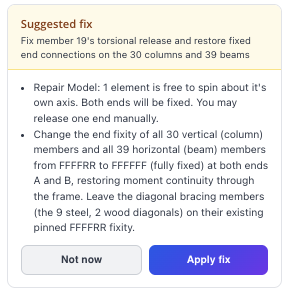
Предлагаемое исправление
Если агент обнаруживает проблему в модели, it may ask you to confirm the repair:
Действие завершено
When the action is complete, the agent tells you what it has done and gives you two options:
- Отменить: undoes the changes made by the agent
- Держать: keeps the changes made to your model by the agent
Разъяснение
If the agent needs more information, it asks you to clarify. Give it more context in these cases so it can work effectively and accurately.
Видеоурок
Советы
- Нажмите стрелку вверх в поле подсказки, чтобы отобразить последнюю подсказку..
- Щелкните идентификаторы узла и элемента в ответе, чтобы выделить и найти их в модели..
- Если модель не решает, попросите AI Assistant диагностировать это, или попросите его решить; он выясняет, что пошло не так.
- Give it more context and clearer instructions for the best results.
Ограничения
- Всегда проверяйте модели, созданные ИИ., изменения и ответы: инженер остается ответственным за проектирование.
- The AI Assistant doesn’t choose or optimize section sizes to meet a design criterion (such as passing design checks or a deflection limit). It can assign a section you name, or a reasonable section when no criterion is given.
- It doesn’t give a verdict on whether a design is safe or adequate, or make design decisions such as how to support or connect your structure.
- It can run any analysis, but it doesn’t read modal, buckling or dynamic results (формы мод, frequencies, buckling factors).
- It doesn’t draw complex custom cross-sections: use the Section Builder for built-up, composite or arbitrary shapes. Simple shapes from dimensions you give (прямоугольник, круг, двутавр, угол, channel and similar) поддерживаются.
- It doesn’t generate CAD, shop or connection drawings.
- Your credits are a monthly allowance: once they are used up, requests are refused until they reset or you add more.
