
Paylaş, Başkalarıyla yorum yapın ve işbirliği yapın, CloudCAD'e sahip olmasalar bile
CloudCAD, kullanıcıların çizimleri bir URL bağlantısı aracılığıyla paylaşmasına olanak tanır – CloudCAD aboneliği olmasa bile! CloudCAD tamamen çevrimiçi olduğundan, Kullanıcıların artık yorum ve işbirliği için işaretlenmiş PDF'leri birbirlerine ileri geri göndermelerine gerek yok.
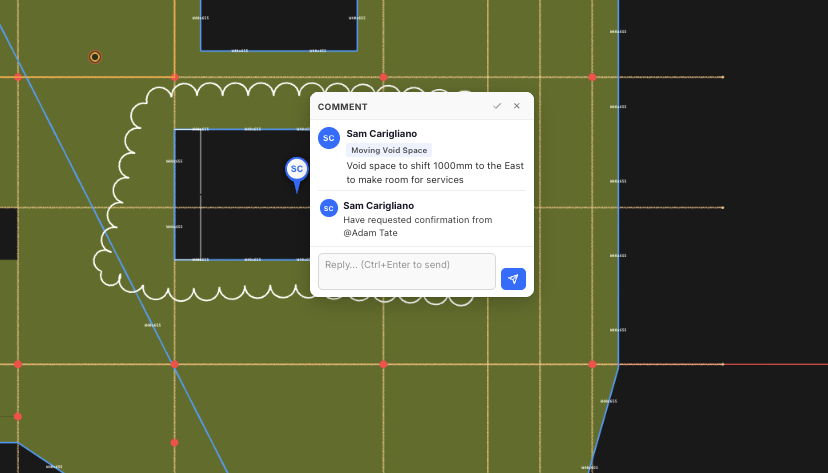
Kullanıcılar, başkalarının incelemesi ve hatta yanıtlaması için kendi yorumlarını ve çözülmemiş sorunları oluşturabilirler.
Modellerinizi Paylaşma
Kullanıcılar modelleri diledikleri zaman aracılığıyla paylaşabilirler. Dosya – Paylaş. Bu pencereden, bir kullanıcı şunları da yapabilir::
- Belirli SkyCiv Kullanıcılarıyla paylaşın – düzenleme izinlerine ilişkin kontroller dahil
- Herkese açık bir bağlantı aracılığıyla herkesle paylaşın – hesaba gerek yok, sadece açık dosyayı paylaşın ve ortak çalışmaya başlayın! Bir örnek için burayı tıklayın
- SkyCiv Desteği ile paylaşın
Yorum Ekleme
Kullanıcılar başkalarının incelemesi için yorum ekleyebilir, yanıtla veya çöz. Yorumlama panelini başlatmak için, tıkla Paylaş üst paneldeki düğme, doğru İşbirliği panelini açacak:
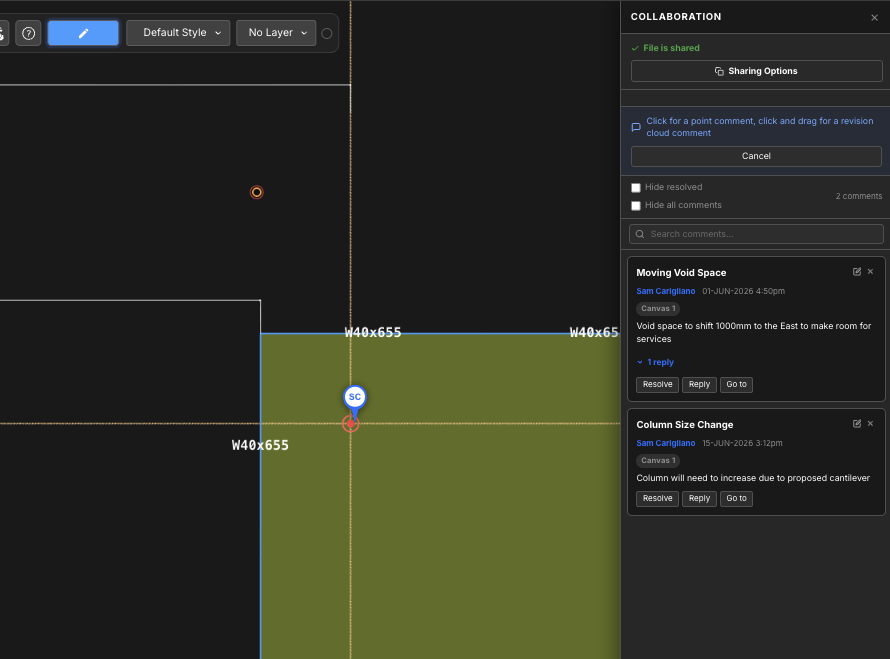
Buradan, kullanıcılar aşağıdaki özelliklerden en iyi şekilde yararlanabilirler:
- Bir nokta veya revizyon bulutu aracılığıyla yeni yorumlar ekleyin:
- DM: sadece bir noktaya tıklayın ve yorumunuzu yazmaya başlayın
- Revizyon Bulutu: Yorum revizyon bulutunuzu oluşturmak için tıklayın ve sürükleyin, Tıklamayı bıraktıktan sonra yorumunuzu yazabilirsiniz
- Mevcut yorumları yanıtlayın
- Yorumları çözümle (Not: işaretleyerek çözümlenen yorumları gizleyebilirsiniz Çözümlenenleri Gizle)
- Yorumları anahtar kelimelere göre arayın
- Şimdi kalça ve ortak kirişlere sahibiz – yorumlar her tuvalde bulunabileceğinden, buna tıklamak uygun tuvali açacak ve sizi model alanındaki yorumun konumuna götürecektir
- Her yorumun sağ üst köşesindeki düğmelere tıklayarak yorumları silin ve düzenleyin
