
The SkyCiv AI Assistant is an AI structural modeling tool built into SkyCiv Structural 3D and CloudCAD. Ne istediğinizi sade bir dille açıklayın; bu sizin için modelinizde işe yarar: it can build models from scratch, mevcut modellerinizi değiştirin, analiz sonuçlarınızı sorgulayın, sorunları teşhis edin ve onarılmasına yardımcı olun, modelini çöz, ve SkyCiv kullanımıyla ilgili soruları yanıtlayın. This article covers what the AI Assistant can do in SkyCiv Structural 3D and how to use it.
AI Asistanını Açma
- Yapısal 3B'de bir model açın, veya yeni bir tane başlat.
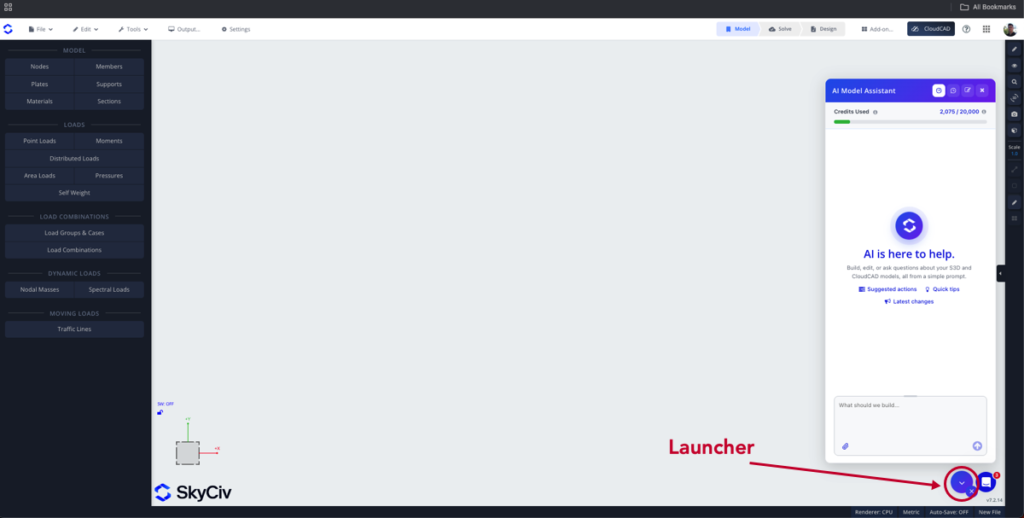
- Click the AI Assistant button (the sparkle icon) in the bottom right corner to open the AI Assistant panel (aşağıya bakınız).
- Type your request in the prompt box and press Enter, or click Send, to run your prompt.
AI Credits
Her istek AI kredilerini kullanır, based on the work it takes to complete. A free monthly allowance of credits is available on paid commercial accounts (Temel, Profesyonel, veya İş). Şuna tıklayın kullanım button at the top of the panel to see your Credits Used for the month, and hover over the info icon beside it to see when your credits reset. On a Business account, the credits are shared across the whole account.
If you use all your credits, the AI Assistant stops running new requests until your credits reset. You can add more credits at any time from the ödeme sayfası, or with the Add more credits button in the usage panel.
What You Can Ask the AI Assistant
| Niyet | Ne işe yarar | Örnek istem |
|---|---|---|
| Oluşturun | Sıfırdan yapısal bir model oluşturur | “Build a 2-storey steel portal frame, 12 m açıklık, 6 m bays” |
| değiştir | Mevcut modelinizde değişiklikler veya eklemeler | “Change all internal columns to W12x26” |
| Sorgu sonuçları | Analiz sonuçlarınızla ilgili soruları yanıtlar, and can export or generate them in a format of your choice | “What is the maximum deflection, ve hangi üyede? Export all the member results in CSV format” |
| Teşhis | Potansiyel sorunları bulur ve onarılmasına yardımcı olur. It can also re-solve the model to check that the issue is fixed | “Why won’t my model solve?" |
| Çöz | Analizi çalıştırır ve sonuçları açar; başarısız bir çözümü araştırır | “Can you run an analysis and locate the worst reaction in my outer columns?" |
| Yazılım Desteği | Answers how-to questions from the SkyCiv documentation and guides you through using the software | “How do I export to DXF?" |
The intent of your prompt is detected automatically, and the appropriate agent runs to complete your task.
Temsilci Yanıt Türleri
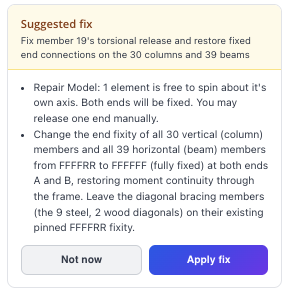
Önerilen Düzeltme
Aracı modelde bir sorun tespit ederse, it may ask you to confirm the repair:
İşlem Tamamlandı
When the action is complete, the agent tells you what it has done and gives you two options:
- Geri alma: undoes the changes made by the agent
- Kale: keeps the changes made to your model by the agent
Açıklama
If the agent needs more information, it asks you to clarify. Give it more context in these cases so it can work effectively and accurately.
Video öğretici
İpuçları
- Son isteminizi göstermek için bilgi istemi kutusundaki Yukarı oka basın.
- Yanıttaki düğüm ve öğe kimliklerini tıklatarak bunları vurgulayın ve modelde konumlandırın.
- Model çözülmezse, Yapay Zeka Asistanından sorunu teşhis etmesini isteyin, veya çözmesini isteyin; neyin yanlış gittiğine bakıyor.
- Give it more context and clearer instructions for the best results.
Sınırlamalar
- Her zaman yapay zeka tarafından oluşturulan modelleri kontrol edin, değişiklikler ve cevaplar: mühendis tasarımdan sorumlu olmaya devam eder.
- The AI Assistant doesn’t choose or optimize section sizes to meet a design criterion (such as passing design checks or a deflection limit). It can assign a section you name, or a reasonable section when no criterion is given.
- It doesn’t give a verdict on whether a design is safe or adequate, or make design decisions such as how to support or connect your structure.
- It can run any analysis, but it doesn’t read modal, buckling or dynamic results (mod şekilleri, frequencies, buckling factors).
- It doesn’t draw complex custom cross-sections: use the Section Builder for built-up, composite or arbitrary shapes. Simple shapes from dimensions you give (dikdörtgen, daire, Kiriş, açı, channel and similar) Desteklenmektedir.
- It doesn’t generate CAD, shop or connection drawings.
- Your credits are a monthly allowance: once they are used up, requests are refused until they reset or you add more.
