This page explains how to apply a point load (a concentrated force) to a node or to any point along a member in SkyCiv Structural 3D. In both cases you specify the location of the load and its magnitude in the global X, Y and Z directions, so a force at an angle is entered as its X, Y ve Z bileşenleri.
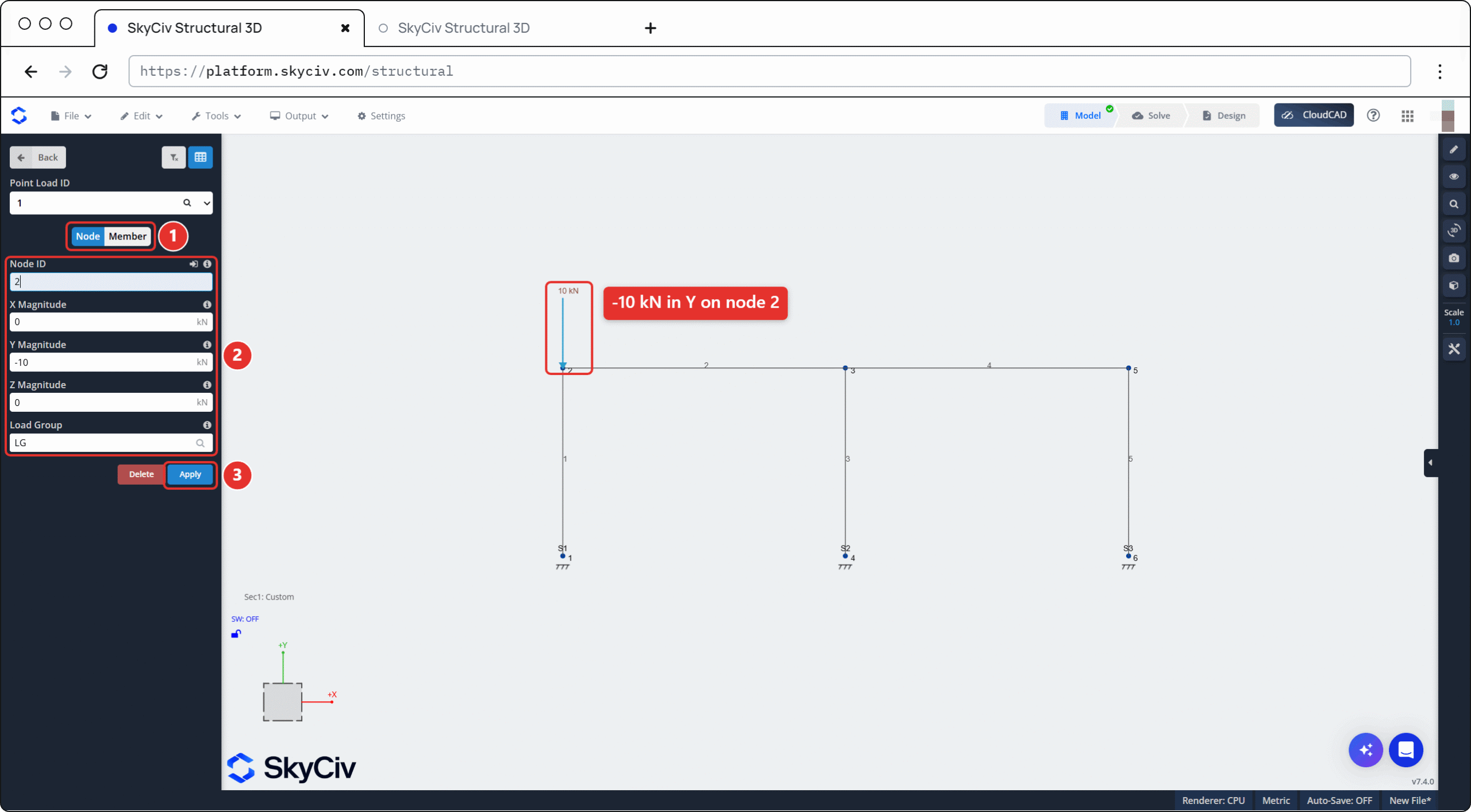
To add a point load, açık Tekil Yükler under the loads section of the left menu. At the top of the form, kullan Düğüm ve Üye toggle to choose where the load is applied, fill in the fields below, sonra tıklayın Uygula.
Düğümlere Uygulanan Nokta Yükleri
İle Düğüm seçilmiş, specify values for:
- Nokta Yük Kimliği – Her nokta yükünü tanımlamak için kullanılan sayısal kimlik. Pick an existing ID from the list to edit that load.
- Düğüm Kimliği – Nokta yükünün uygulandığı düğüm. You can enter several nodes at once (Örneğin 1,2,3, 1-3 veya hepsi), or highlight nodes in the model and double-click to fill in the field.
- X Büyüklüğü – Küresel X yönündeki kuvvetin büyüklüğü. Negatif X yönünü belirtmek için negatifleri kullanın.
- Y Büyüklüğü – Küresel Y yönündeki kuvvetin büyüklüğü. Negatif Y yönünü belirtmek için negatifleri kullanın.
- Z Büyüklüğü – Küresel Z yönündeki kuvvetin büyüklüğü. Negatif Z yönünü belirtmek için negatifleri kullanın.
- Yük Grubu – The name of the load group the load belongs to (LG by default). Load groups are assigned to load cases and can then be multiplied by a factor in yük kombinasyonları.
Üyelere Uygulanan Nokta Yükleri
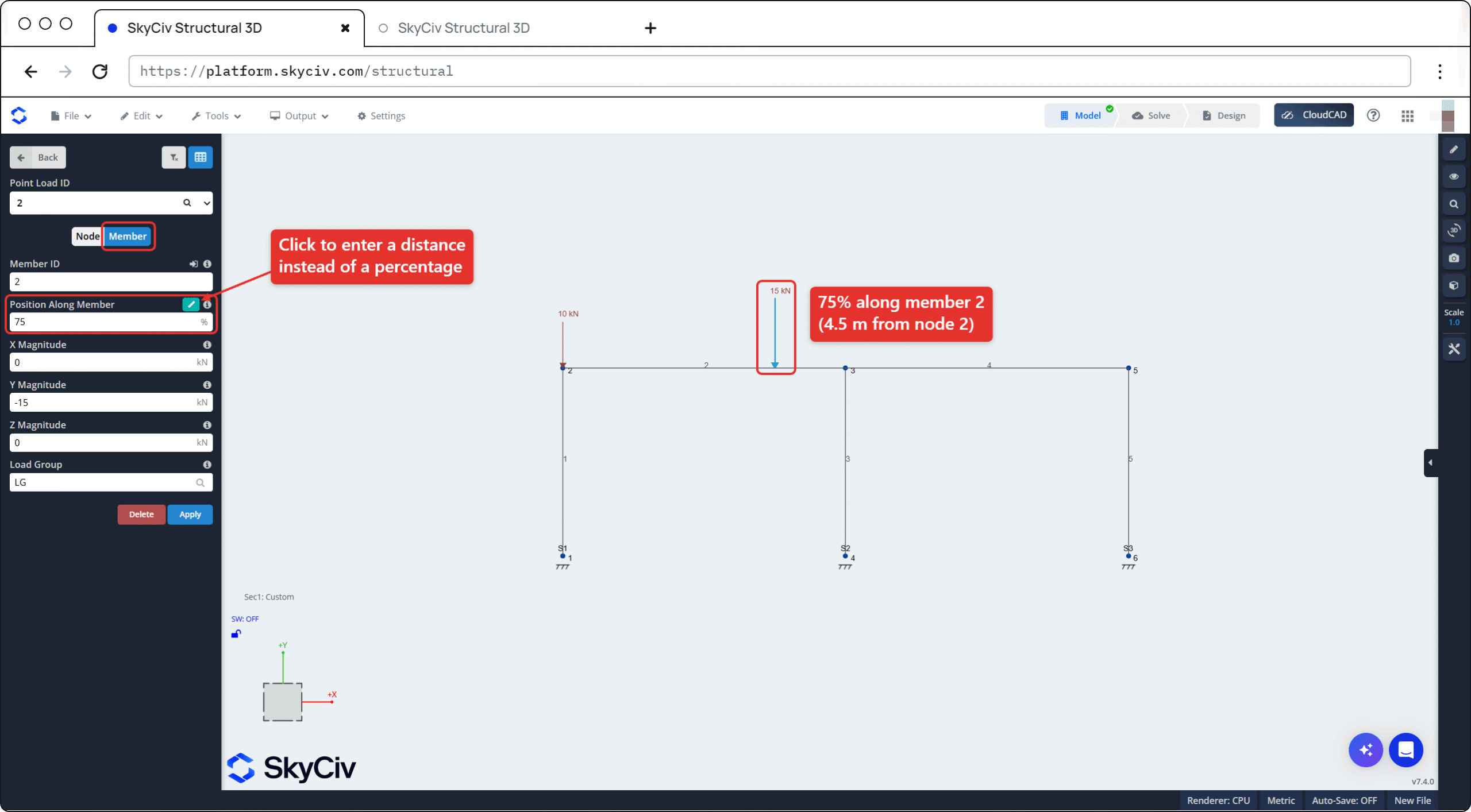
İle Üye seçilmiş, specify values for:
- Nokta Yük Kimliği – Her nokta yükünü tanımlamak için kullanılan sayısal kimlik.
- Üye Kimliği – Puan yükünün uygulandığı üye. Like the Node ID, it accepts several members at once (1,2,3, 1-3 veya hepsi) and highlighted members.
- Üye Boyunca Pozisyon – The position of the load along the member, as a percentage of its length from node A (0%) to node B (100%). To enter a distance instead, click the small button next to the field label (Enter a distance rather than a percentage): bir Enter Distance box asks for a distance from node A, arasında 0 and the member length in the length units of the model, and converts it to a percentage when you click Gönder.
- X Büyüklüğü – Küresel X yönündeki kuvvetin büyüklüğü. Negatif X yönünü belirtmek için negatifleri kullanın.
- Y Büyüklüğü – Küresel Y yönündeki kuvvetin büyüklüğü. Negatif Y yönünü belirtmek için negatifleri kullanın.
- Z Büyüklüğü – Küresel Z yönündeki kuvvetin büyüklüğü. Negatif Z yönünü belirtmek için negatifleri kullanın.
- Yük Grubu – The name of the load group the load belongs to. Load groups can then be multiplied by a factor in load combinations.
Açılı Yükler
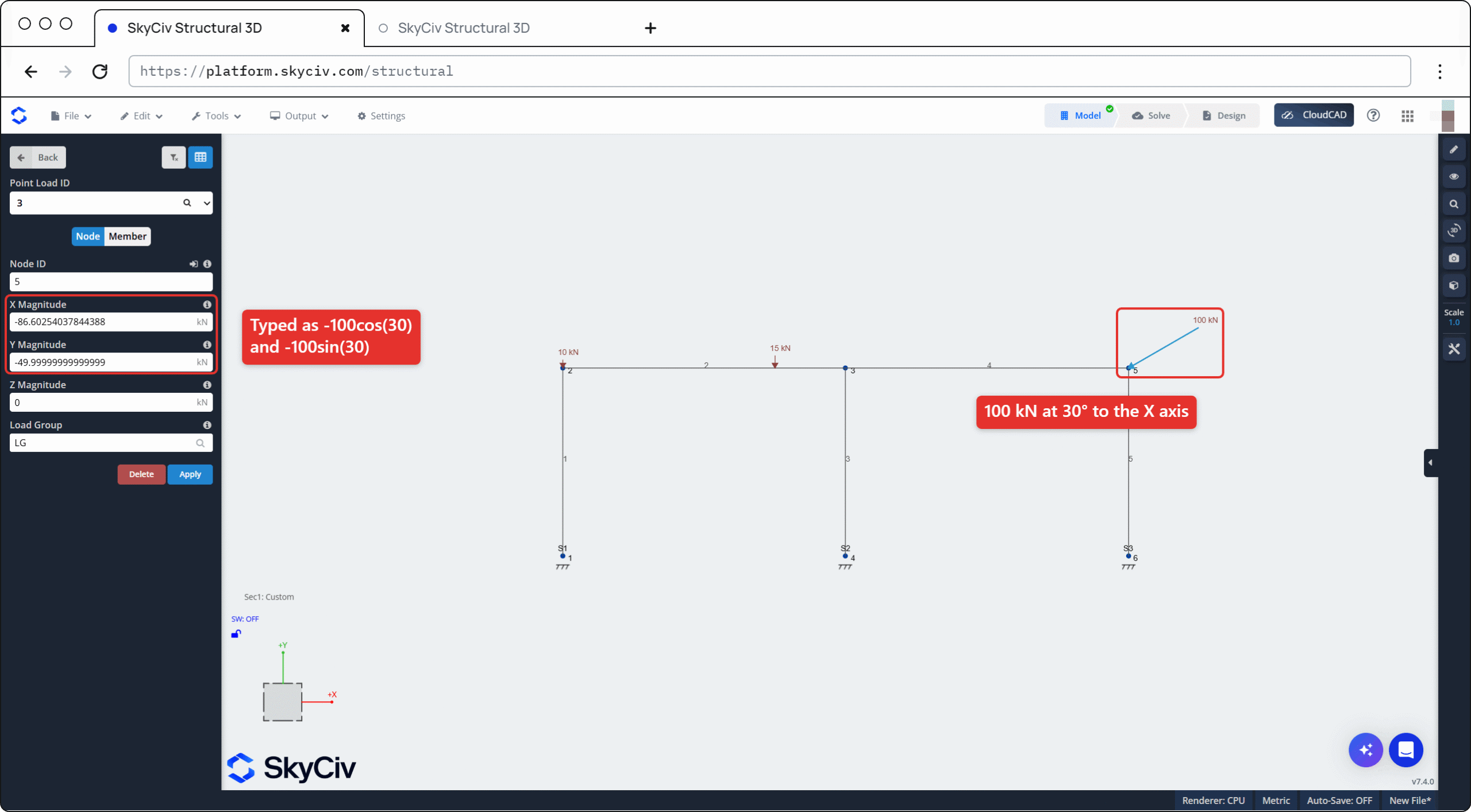
Bir açıda bir nokta yükünün nasıl uygulanacağına dair kısa bir örnek. Say you want to apply a 100 kN load acting downwards in the XY plane, -de 30 degrees below the negative X axis. Since the load inputs are global X, Y and Z magnitudes, the force is split into its components.
Break the force into its X and Y components as follows:
Xmag = -100cos(30) = -86.602 kN
Ymag = -100sin(30) = -50 kN
Kombine, these create a 100 kN force at a 30° angle: