australianas / Padrão da Nova Zelândia 4600 para estruturas de aço formadas a frio, 2018 Edição
O AS/NZS 4600:2018 módulo verifica membros de aço formados a frio com o Método de Força Direta. Ele é executado em SkyCiv Structural 3D e oferece suporte a restrições personalizadas ao longo de cada membro.
Para o 2005 edição, Vejo Design de membros AS4600.
Com este módulo você pode:
- Execute verificações de projeto para AS/NZS 4600:2018 com o Método de Força Direta, incluindo:
- Pré-qualificação de membros
- Tensão axial
- Compressão axial: capacidade da seção, e capacidade dos membros para o mundo, Flambagem local e distorcional
- Dobrando em torno de ambos os eixos: capacidade da seção, e capacidade do membro para torção lateral, Flambagem local e distorcional
- Cisalhamento ao longo de ambos os eixos
- Flexão e cisalhamento combinados
- Compressão e flexão combinadas
- Tensão e flexão combinadas
- Canais de design, Seções Z, seções de chapéu, canais consecutivos e caixas de canal com lábios, prismático ou não prismático
- Defina restrições personalizadas e pseudo-restrições ao longo de cada membro
- Definir membros como apoiados em relação ao seu eixo menor (por exemplo, por folhas), então eles são verificados em relação aos eixos geométricos
- Exporte relatórios detalhados em PDF passo a passo
- Execute o SkyCiv Designer (Executar designer) para encontrar a seção mais eficiente
Suporte à versão atual
Seções
- o canal
- Canal labial
- Canal Lipped único
- Seção Z
- Lábios Z
- especificação fornece um tratamento integrado do Projeto de Resistência Permitida
- Canais consecutivos
- Canais com lábios consecutivos
- Caixa de canal Lipped
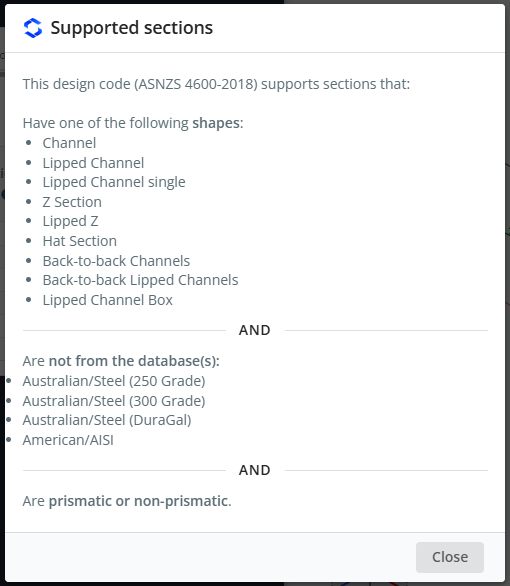
Canais com lábios consecutivos e caixas de canais com lábios são suportados apenas por este código. As seções podem ser prismáticas ou não prismáticas, e o material deve ser aço. As seções não devem vir do Australian/Steel (250 Avaliar), Australiano/Aço (300 Avaliar), Australiano/Aço (Querido) ou bancos de dados americanos/AISI.
Para ver esta lista no software, abra o log e clique Ver seções suportadas.
Programas
- SkyCiv Structural 3D
AS / NZS 4600-2018 também está listado no Código de Design menu suspenso de SkyCiv Beam. Esta página descreve o módulo no SkyCiv Structural 3D.
Observação
As unidades devem estar em Métrica para usar este módulo de design. No modelo, abrir Configurações (barra superior) > Unidades e configure o sistema de unidades para Métrica.
Abrindo o módulo
- Resolva o modelo.
- Clique Projeto na barra superior.
- No Selecione um módulo de design, escolher Membro de aço formado a frio.
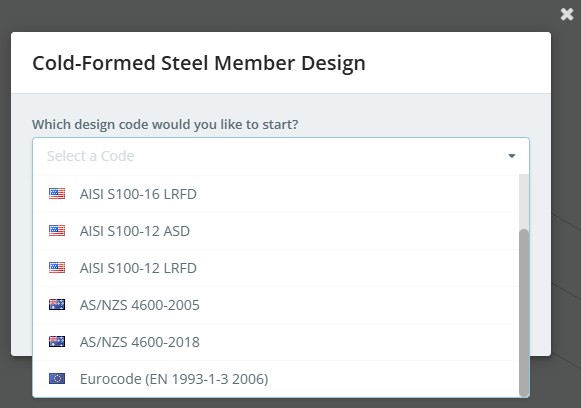
- No Qual código de design você gostaria de iniciar?, escolha AS / NZS 4600-2018, então clique Começar.
Se um módulo de design já estiver aberto, usar ferramenta integrada com Structural 3D que otimizará projetos de membros para usuários automaticamente no Projeto menu para trocar códigos.
O painel de design abre à esquerda, com o modelo 3D à direita. O cabeçalho mostra o código, mais Solicitar recurso e Executar designer. À direita da barra de guias há três botões:
- as configurações (engrenagem) botão, que abre Configurações de design de membros
- o botão de registro, que abre o Registro de design de membros
- Verificar, que executa a verificação de design
Quando o módulo inicia, um alerta pode informar que há mensagens importantes. Eles são mostrados no Registro de design de membros, for example "6 members were loaded with default values", ou membros que não foram importados porque sua seção ou material não é compatível. O registro tem um Ver seções suportadas link.
As guias são Detalhes, Fatores, Materiais, Seções, Membros, Restrições, Cargas e Resultados.
Configurações de design de membros
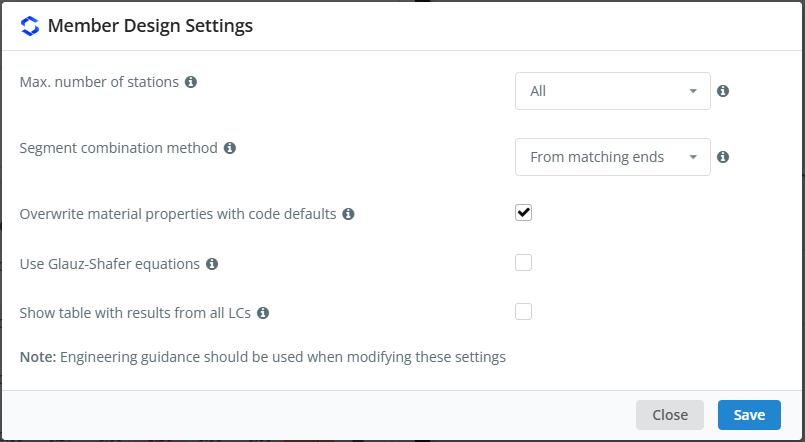
Clique no botão de engrenagem para abrir Configurações de design de membros. Passe o mouse sobre o ícone ℹ próximo a uma configuração para ver sua descrição.
| Contexto | Padrão | Descrição |
|---|---|---|
| Máx.. número de estações | Tudo | O número máximo de estações ao longo de cada membro nas quais os resultados são verificados: Tudo usa todas as estações disponíveis, ou escolha até 3, 5, 7, 9, 11, 15 ou 51 estações por membro |
| Método de combinação de segmentos | De extremidades correspondentes | Como os segmentos da ação única verificam (compressão e flexão) são combinados para as verificações de ações combinadas. De extremidades correspondentes combina os segmentos que têm as mesmas extremidades. De diferentes locais combina, para cada combinação de carga, os segmentos com os maiores índices de utilidade, mesmo que estejam em locais diferentes ao longo do membro |
| Substituir propriedades de materiais por padrões de código | Marcado | Usa o módulo de elasticidade E = 200000 MPa e o módulo de cisalhamento G = 80000 MPa em vez dos valores do material no modelo. Quando desmarcado, E é retirado do material do modelo e G é calculado a partir de E e seu coeficiente de Poisson |
| Use equações de Glauz-Shafer | Desmarcado | Usa as equações de Glauz & Schafer (2022), Previsão de resistência à flexão para seções de aço formadas a frio assimétricas em relação ao eixo de flexão. Isto afeta a capacidade de flexão da seção e da barra em torno do eixo assimétrico |
| Mostrar tabela com resultados de todos os LCs | Desmarcado | Adiciona às verificações dos relatórios dos membros, quando disponível, uma tabela com os resultados de todas as combinações de carga |
Não há configuração para executar as verificações dos eixos geométricos para todos os membros. Para verificar membros sobre os eixos geométricos, usar Suporte de eixo menor no Restrições aba (Vejo Contraventamento do eixo menor por debaixo Restrições abaixo).
Como a caixa de diálogo observa, orientação de engenharia deve ser usada quando você altera essas configurações. Clique Salve aplicar.
Detalhes
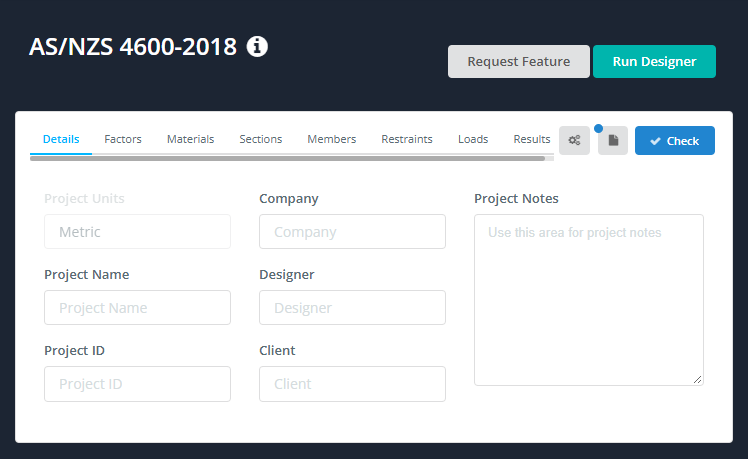
No Detalhes guia você pode inserir os detalhes do projeto. Você não precisa preenchê-los, mas tudo o que você digita é mostrado no Detalhes do Projeto tabela de seus relatórios. Unidades de Projeto mostra Métrica e não pode ser alterado aqui.
Fatores
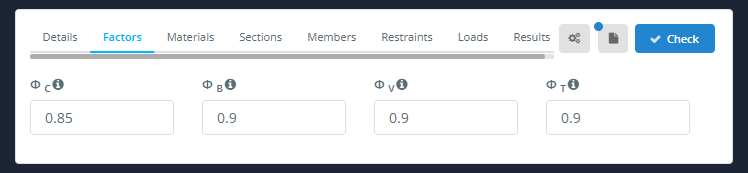
A Fatores guia mostra os fatores de redução de capacidade:
| Fator | Descrição | Padrão |
|---|---|---|
| A seguir estão as diferentes maneiras de determinar os coeficientes de pressão de terra para calcular a resistência ao atrito unitária de estacas em areiaC | compressão | 0.85 |
| A seguir estão as diferentes maneiras de determinar os coeficientes de pressão de terra para calcular a resistência ao atrito unitária de estacas em areiaB | Dobra | 0.9 |
| A seguir estão as diferentes maneiras de determinar os coeficientes de pressão de terra para calcular a resistência ao atrito unitária de estacas em areiaV | Cisalhamento | 0.9 |
| A seguir estão as diferentes maneiras de determinar os coeficientes de pressão de terra para calcular a resistência ao atrito unitária de estacas em areiaT | Tensão | 0.9 |
Se um membro não for pré-qualificado (Cláusula 1.6.3(c)(I)), A seguir estão as diferentes maneiras de determinar os coeficientes de pressão de terra para calcular a resistência ao atrito unitária de estacas em areiaC, A seguir estão as diferentes maneiras de determinar os coeficientes de pressão de terra para calcular a resistência ao atrito unitária de estacas em areiaB e ΦV são reduzidos a 0.8. Os fatores usados para cada membro estão listados em seu relatório em Fatores de estado limite de resistência, com suas referências de cláusulas.
Materiais
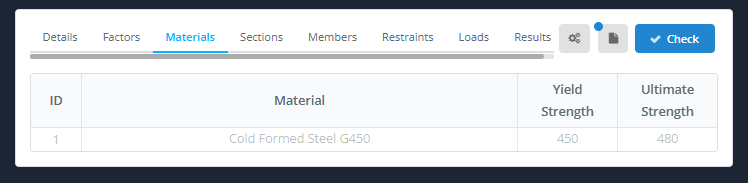
A Materiais guia lista os materiais usados pelos membros projetados, com seus Força de rendimento e Força máxima. A tabela é preenchida a partir do modelo e não pode ser modificada aqui. Para alterar um material, volte para o modelo.
Seções
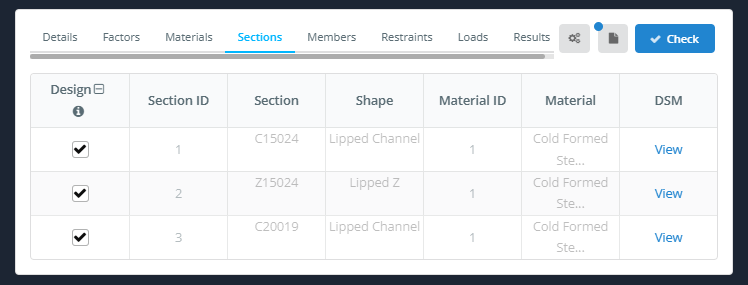
A Seções guia lista as seções usadas pelos membros projetados. Os dados da seção vêm do modelo e não podem ser modificados aqui.
- Projeto: marque a caixa para projetar os membros que usam esta seção. O ícone no cabeçalho da coluna alterna todas as linhas.
- ID da seção, Seção, Forma, ID de material e Material: retirado do modelo.
- DSM: clique Visualizar para ver os fatores DSM da seção.
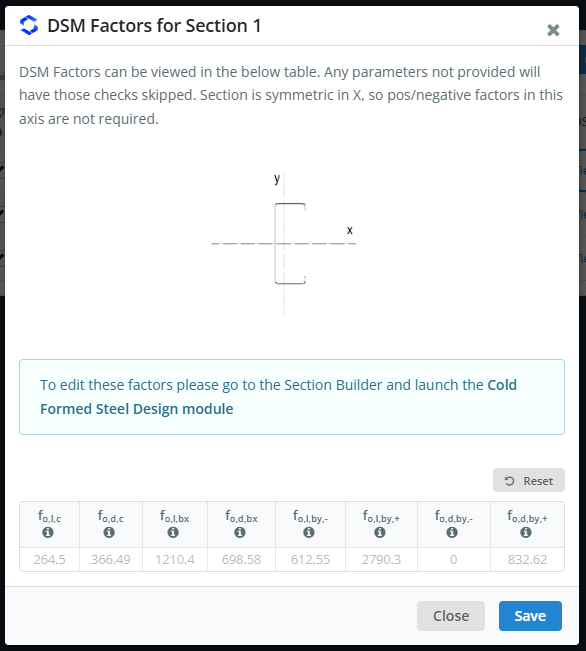
A Fatores DSM para a Seção n caixa de diálogo mostra um esboço da seção com seus eixos, e as tensões de flambagem elástica (em MPa) usado pelo Método de Força Direta:
| Símbolo | Estresse de flexão |
|---|---|
| fo,eu,c | Flambagem local, compressão |
| fo,d,c | Flambagem distorcional, compressão |
| fo,eu,bx | Flambagem local, curvando-se sobre x |
| fo,d,bx | Flambagem distorcional, curvando-se sobre x |
| fo,eu,de,- e fo,eu,de,+ | Flambagem local, curvando-se sobre você (negativo e positivo) |
| fo,d,de,- e fo,d,de,+ | Flambagem distorcional, curvando-se sobre você (negativo e positivo) |
Qualquer fator que não for fornecido terá sua verificação ignorada. Para uma seção simétrica em relação a um eixo, os fatores positivos e negativos sobre esse eixo não são necessários.
Seções Z e seções Z com lábios também têm os mesmos fatores sobre os eixos geométricos, com um g subscrito (por exemplo fo,eu,c,g). Eles são usados apenas pelos membros apoiados em torno de seu eixo menor (Vejo Contraventamento do eixo menor por debaixo Restrições abaixo). Se um fator de eixos geométricos não estiver disponível, o fator dos eixos principais é usado em seu lugar: a Registro de design de membros lista as seções que estão faltando algumas delas, e os relatórios dos membros afetados dizem isso. Os valores não podem ser editados aqui: para mudá-los, vou ao Construtor de Seção e lançar o Projeto de aço formado a frio módulo.
Membros
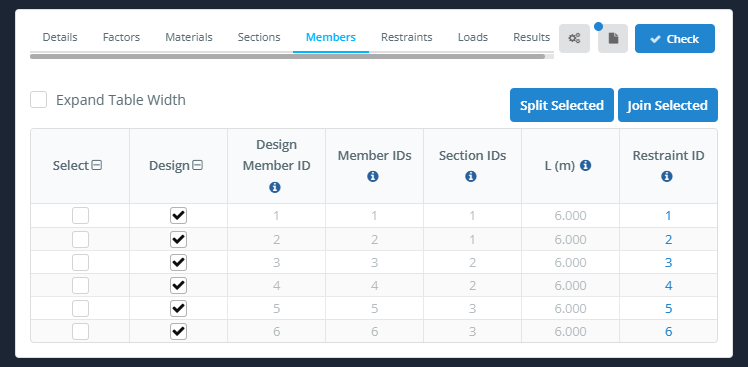
A Membros guia lista os membros do design. Cada membro de design é composto por um ou mais membros de modelo.
- Expandir largura da tabela: amplia a mesa.
- Divisão selecionada e Junte-se ao selecionado: dividir os membros de design selecionados, ou junte-os em um membro de design.
| Coluna | Descrição |
|---|---|
| Selecione | Marca a linha, por exemplo, para dividir ou juntar membros |
| Projeto | Marque para incluir o membro na verificação do projeto, desmarque para deixar de fora |
| ID de membro do projeto | O ID do membro de design |
| Recomenda-se dividir os membros antes de aplicar uma carga de área não retangular | O membro modelo(s) que compõem o membro do design |
| IDs de seção | enquanto a tensão no aço fs é menor que a tensão de escoamento f(s) do membro do design |
| L (m) | O comprimento do membro de design |
| ID de restrição | O conjunto de restrições usado pelo membro. Clique nele para abrir essa restrição no Restrições aba |
ID de membro do projeto, Recomenda-se dividir os membros antes de aplicar uma carga de área não retangular, IDs de seção e L (m) vem do modelo e não pode ser alterado aqui. Os comprimentos efetivos e os fatores K não são inseridos nesta guia: eles vêm do Restrições aba.
Restrições
AS / NZS 4600:2018 suporta restrições personalizadas, para que você possa adicionar suas próprias restrições para serem usadas nos cálculos. Para uma descrição completa, veja nossa documentação em restrições de membros.
- Grupo automático: dá a membros semelhantes o mesmo ID de restrição.
- ID de restrição: seleciona o ID da restrição para visualizar ou editar. Use as setas para baixo e para cima para ir para o ID seguinte ou anterior.
- Atribuir ao membro(s): atribui o ID de restrição atual aos membros.
- Duplicado: copia o ID de restrição atual para um novo ID.
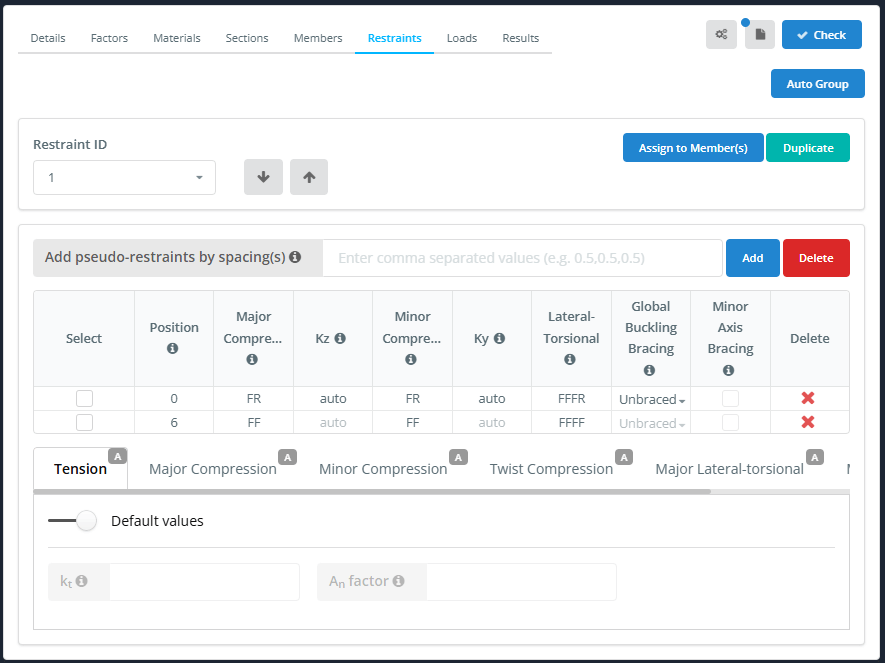
A tabela de restrição é preenchida a partir dos suportes e conexões do modelo. Por exemplo, um membro apoiado em ambas as extremidades obtém uma linha em cada extremidade.
| Coluna | Descrição |
|---|---|
| Selecione | Marca a linha, por exemplo, para aplicar uma restrição padrão a ele |
| Posição | Distância da restrição desde o início do membro |
| Compressão Maior | 2-código de restrição de chave (F ou R) para encurvadura por flexão em eixo maior |
| Kz | Fator de comprimento efetivo para o eixo principal (auto por padrão) |
| Compressão Menor | 2-código de restrição de chave (F ou R) para flambagem por flexão de eixo menor |
| Ky | Fator de comprimento efetivo para o eixo menor (auto por padrão) |
| Lateral-Torsional | 4-código de restrição de chave (F, R ou S) para encurvadura lateral-torcional |
| Contraventamento Global de Flambagem | Desamparado, Principal, Fundo ou Ambos. Se a restrição de torção lateral apoiar totalmente um flange, a verificação global de encurvadura é ignorada nos casos que o contraventamento cobre. Passe o mouse sobre o ícone ℹ para obter detalhes |
| Suporte de eixo menor | Assinale se a barra está continuamente contraventada em torno do seu eixo menor, por exemplo, por folhas. Aplica-se a todo o ID de restrição, Vejo Contraventamento do eixo menor abaixo |
| Excluir | Exclui a linha de restrição |
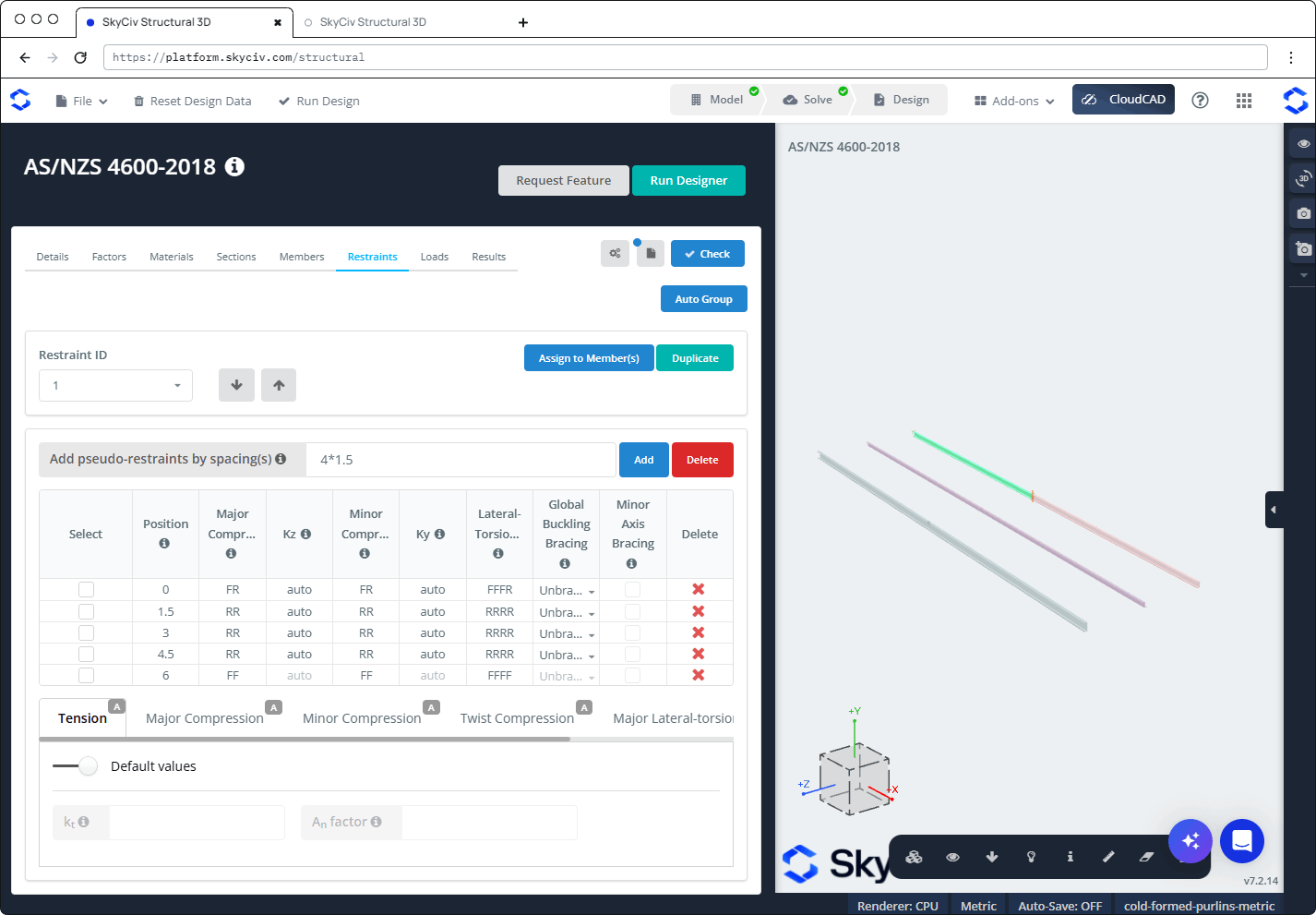
Para adicionar pseudo-restrições (restrições que não são modeladas), insira os espaçamentos em Adicione pseudo-restrições por espaçamento(s) e clique Adicionar. Você pode inserir uma lista separada por vírgulas (por exemplo 1.5,1.5,1.5), use o operador de multiplicação (4*1.5), ou use o < operador ajuste o máximo de restrições possível. Clique Excluir ao lado de Adicionar para remover todas as pseudo-restrições.
Pseudo-restrições são adicionadas conforme liberadas (RR e RRRR), então eles não terão efeito até que você altere seus códigos. No exemplo abaixo, 4*1.5 adiciona linhas em 1.5, 3 e 4.5 estou em um 6 membro.
Abaixo da tabela estão subguias, cada um com um A (automático) emblema por padrão:
- Tensão: com Valores padrão -, os padrões são usados. Desligue-o para inserir o seu próprio:
- kt: fator de correção para a distribuição de forças em uma barra de tração. O padrão assume uma distribuição de força não uniforme, por AS/NZS 4600:2018 Cláusula 3.2.3.2.
- An são influenciados principalmente pelas dimensões da sapata: fator que reduz a área bruta à área líquida. O padrão é 0.85, que assume uma conexão parafusada.
- Compressão Maior (Lz, Kz), Compressão Menor (LY, KY), Compressão de torção (Lx, Kx), Maior lateral-torcional (Lb, kLT, Cb) e Torção lateral menor (Lb, kLT): por padrão, Determinar a partir de restrições (conforme definido na tabela de restrições) está ligado. Desligue-o para inserir seus próprios valores para todo o membro. Sob Restrições Padrão, clique em um ícone para aplicar uma restrição padrão às linhas selecionadas.
Contraventamento do eixo menor
Marcação Suporte de eixo menor quando o membro é continuamente contraventado em torno de seu eixo menor, por exemplo, por lençóis fixados a uma terça ou cinta. Então:
- O momento fletor em relação ao eixo menor (MY*) da análise é ignorado, e tomado como zero em todas as combinações de carga e verificações.
- As verificações de projeto são realizadas sobre o eixos geométricos da seção em vez de seus eixos principais. Isto altera apenas os resultados das seções cujos eixos principais são girados, como seções Z. Para seções Z e seções Z com lábios, os fatores DSM sobre os eixos geométricos são usados (Vejo Seções acima).
A configuração se aplica a todo o membro: marcar ou desmarcar em qualquer linha altera todas as posições do ID de restrição, e, portanto, todos os membros do projeto aos quais o ID de restrição está atribuído. Os membros que usam a mesma seção, mas não estão contraventados, são verificados normalmente, sobre os eixos principais.
Suporte de eixo menor só pode ser marcado quando nenhum segmento estiver Desamparado no Contraventamento Global de Flambagem coluna: a primeira linha e cada linha intermediária cujo código lateral-torcional não começa com RR deve ser definido para Principal, Fundo ou Ambos. Caso contrário, as caixas de seleção serão desativadas e desmarcadas, e definindo um segmento de volta para Desamparado desmarque-os. A caixa de seleção da última linha está sempre desabilitada, já que a última posição não inicia um segmento. Passe o mouse sobre o ícone ℹ no cabeçalho da coluna para obter detalhes.
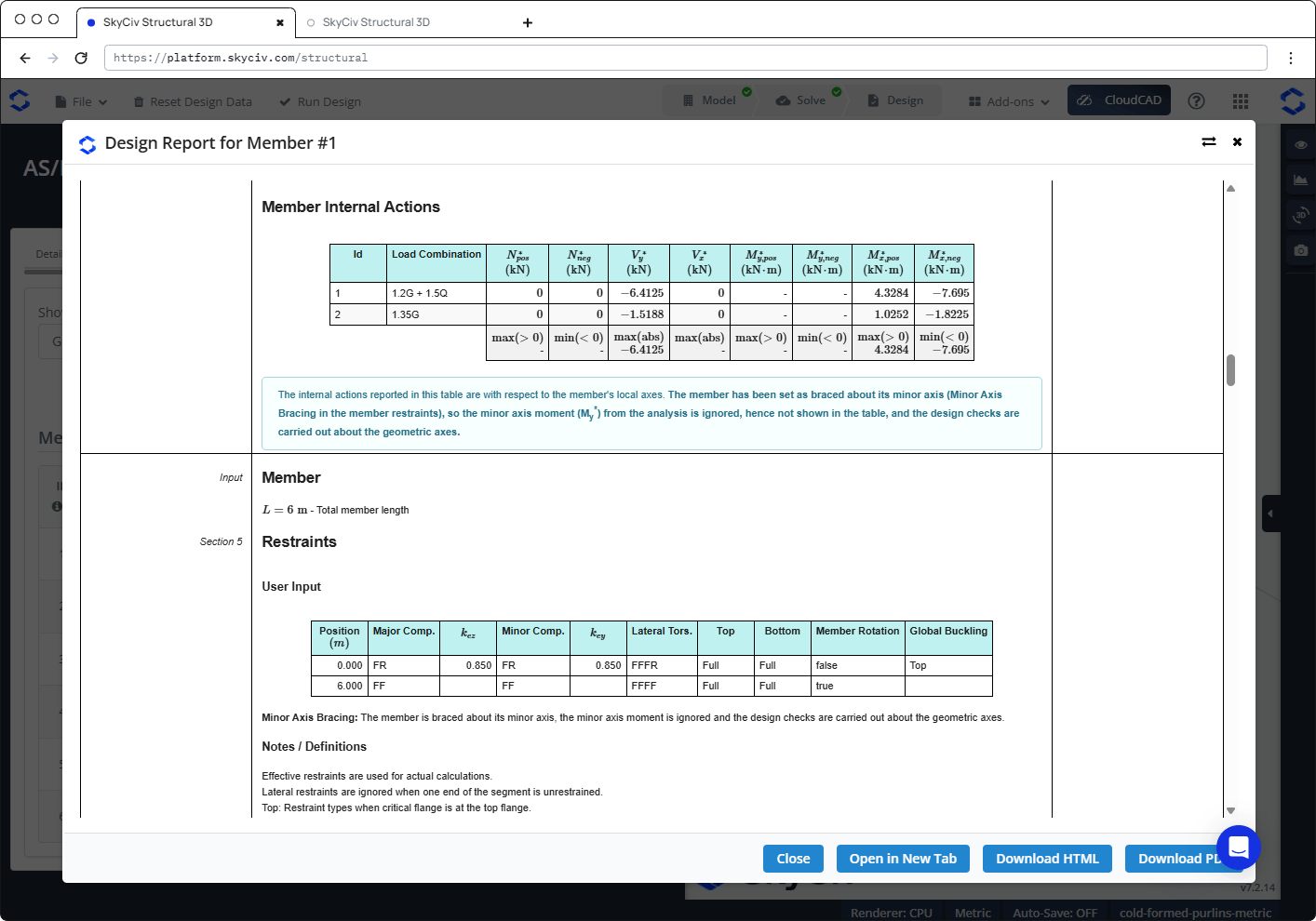
No relatório de um membro apoiado em seu eixo menor:
- A Restrições seção tem um Suporte de eixo menor observe abaixo a entrada do usuário.
- A tabela de ações internas mostra MY* as "-", com uma nota de que o momento axial menor é ignorado e as verificações são realizadas em relação aos eixos geométricos.
- As verificações de flexão do eixo menor, e a verificação combinada de cisalhamento e flexão do eixo menor, dizem que eles não são necessários porque o membro está apoiado em seu eixo menor.
- O esboço da seção mostra os eixos geométricos, e as propriedades da seção sobre eles têm um g subscrito em vez de p (por exemplo Zxg e Sxg). Para seções Z, a DSM factor shown with "(valor dos eixos geométricos não disponível, valor dos eixos principais usado)" é o fator dos eixos principais, e as verificações afetadas mostram um aviso de que os fatores DSM dos eixos principais foram usados em vez disso.
Restrições no relatório
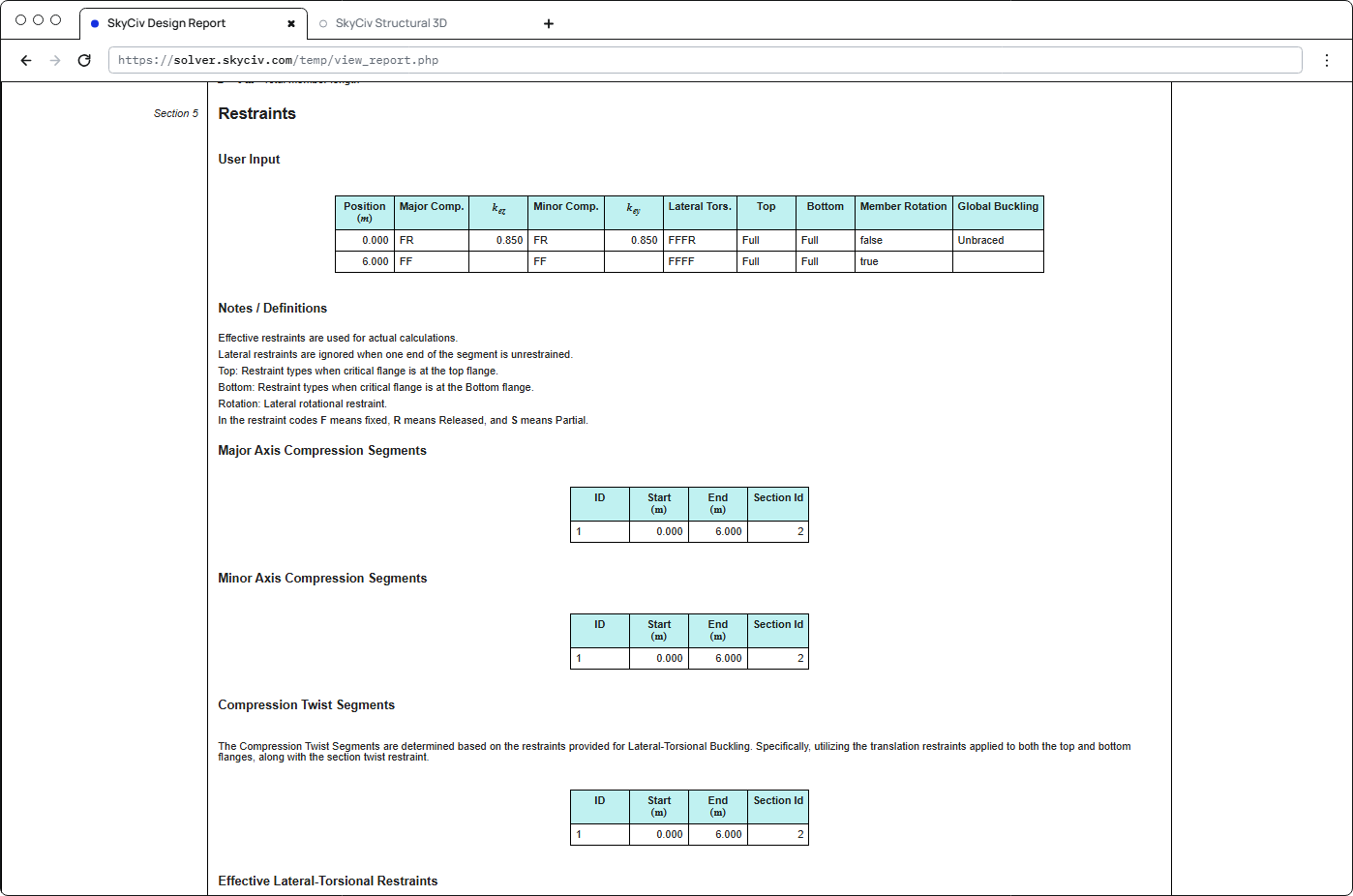
A Restrições seção de cada relatório de membro mostra as restrições que foram usadas: a entrada do usuário (posição, códigos de restrição, knão e kei, restrição de flange superior e inferior, rotação de membros e contraventamento de flambagem global), os segmentos de compressão do eixo maior e do eixo menor, os segmentos de torção de compressão, as restrições de torção lateral efetivas e os segmentos para cada combinação de carga.
Cargas
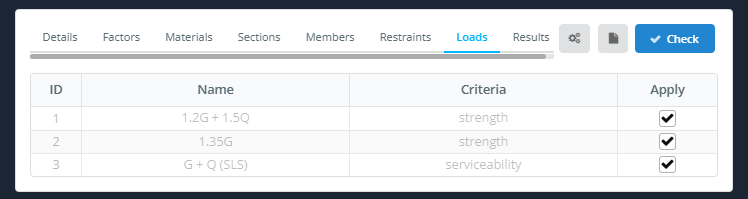
A Cargas guia lista as combinações de carga do modelo, com seus Nome e Critério. Marcação Aplicar para cada combinação de carga que você deseja incluir. As combinações de facilidade de manutenção estão listadas e podem ser marcadas, mas nenhuma verificação de manutenção é realizada.
Resultados
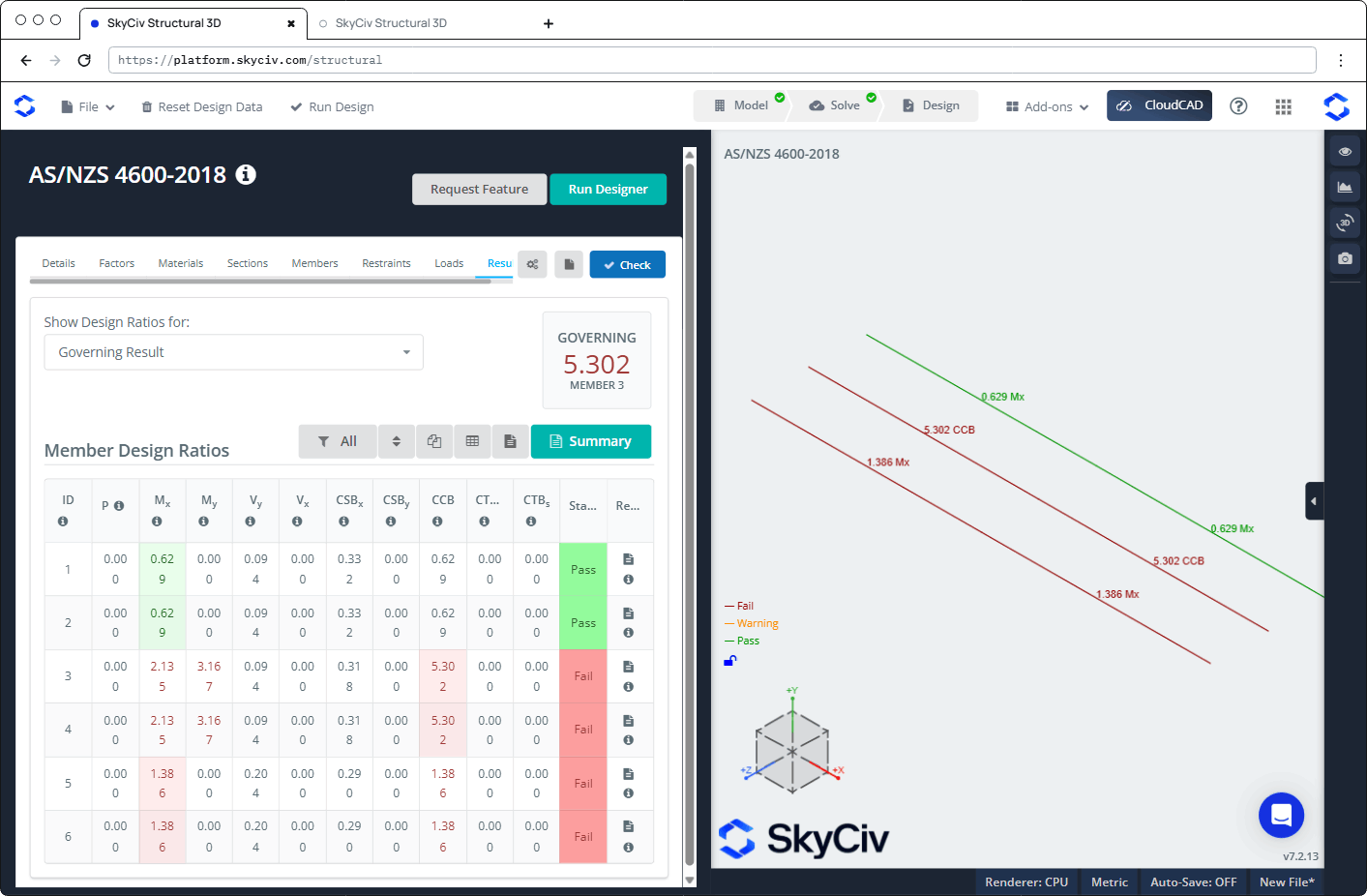
Clique Verificar para executar a verificação do projeto. A Resultados guias mostram:
- Mostrar taxas de design para: escolhe quais proporções são mostradas, por exemplo Resultado Governante, Membros falhados, ou um único cheque.
- GOVERNAR: a proporção mais alta e seu membro.
- Uma barra de ferramentas para filtrar (Tudo), organizar, Suprimindo e mudando sua estrutura Repita, mostre a tabela e abra o relatório, mais tem Resumo botão para o relatório resumido.
- A Proporções de Design de Membros tabela, com um Status (Passar ou Falhou) e uma Relatório ícone para cada membro. Passe o mouse sobre o ícone ℹ no cabeçalho de uma coluna para ver a cláusula à qual ele se refere.
| Coluna | Verificar | Cláusula |
|---|---|---|
| P | Axial (tensão ou compressão) | 3.2 ou 7.2.1 |
| Mx | Dobrando em torno de x | 7.2.2 |
| MY | Curvando-se sobre você | 7.2.2 |
| VY | Corte ao longo de você | 7.2.3 |
| Vx | Cisalhamento ao longo de x | 7.2.3 |
| CSBx | Cisalhamento e flexão combinados, sobre x | 7.2.3 |
| CSBY | Cisalhamento e flexão combinados, sobre você | 7.2.3 |
| CCB | Compressão e flexão combinadas | 7.2.4 |
| CTBm | Tensão e flexão combinadas, capacidade dos membros | 7.2.5(1) |
| CTBs | Tensão e flexão combinadas, capacidade da seção | 7.2.5(2) |
Na visualização 3D, cada membro é colorido Falhou, Aviso ou Passar e rotulado com sua proporção governante.
Verificações realizadas
| Verificar | AS / NZS 4600:2018 referência |
|---|---|
| Pré-qualificação de membros (conjuntos Φ) | Cláusula 1.6.3 |
| Tensão axial, capacidade da seção | Seção 3.2 |
| Compressão axial, capacidade da seção | Seção 7.2.1.3 |
| Compressão axial, capacidade dos membros (global, Flambagem local e distorcional) | Seção 7.2.1 |
| Dobrando em torno de x e y, capacidade da seção | Seção 7.2.2.3.2 |
| Dobrando em torno de x e y, capacidade dos membros (lateral-torcional, Flambagem local e distorcional), incluindo flexão positiva e negativa em torno de y para seções simétricas simples | Seção 7.2.2.1 |
| Corte ao longo de você (rede) e ao longo de x (você teria uma boa noção de como as conexões simples são projetadas sob o AISC) | Seção 7.2.3 |
| Flexão e cisalhamento combinados, sobre ambos os eixos | Eq. 7.2.3(9) |
| Compressão axial e flexão combinadas | Eq. 7.2.4 |
| Tensão axial combinada e capacidade de flexão de seção | Eq. 7.2.5(2) |
| Tensão axial combinada e capacidade de flexão da barra | Eq. 7.2.5(1) |
O módulo não verifica limites de esbeltez, deflexões (facilidade de manutenção), paralisação ou torção da teia.
Relatórios
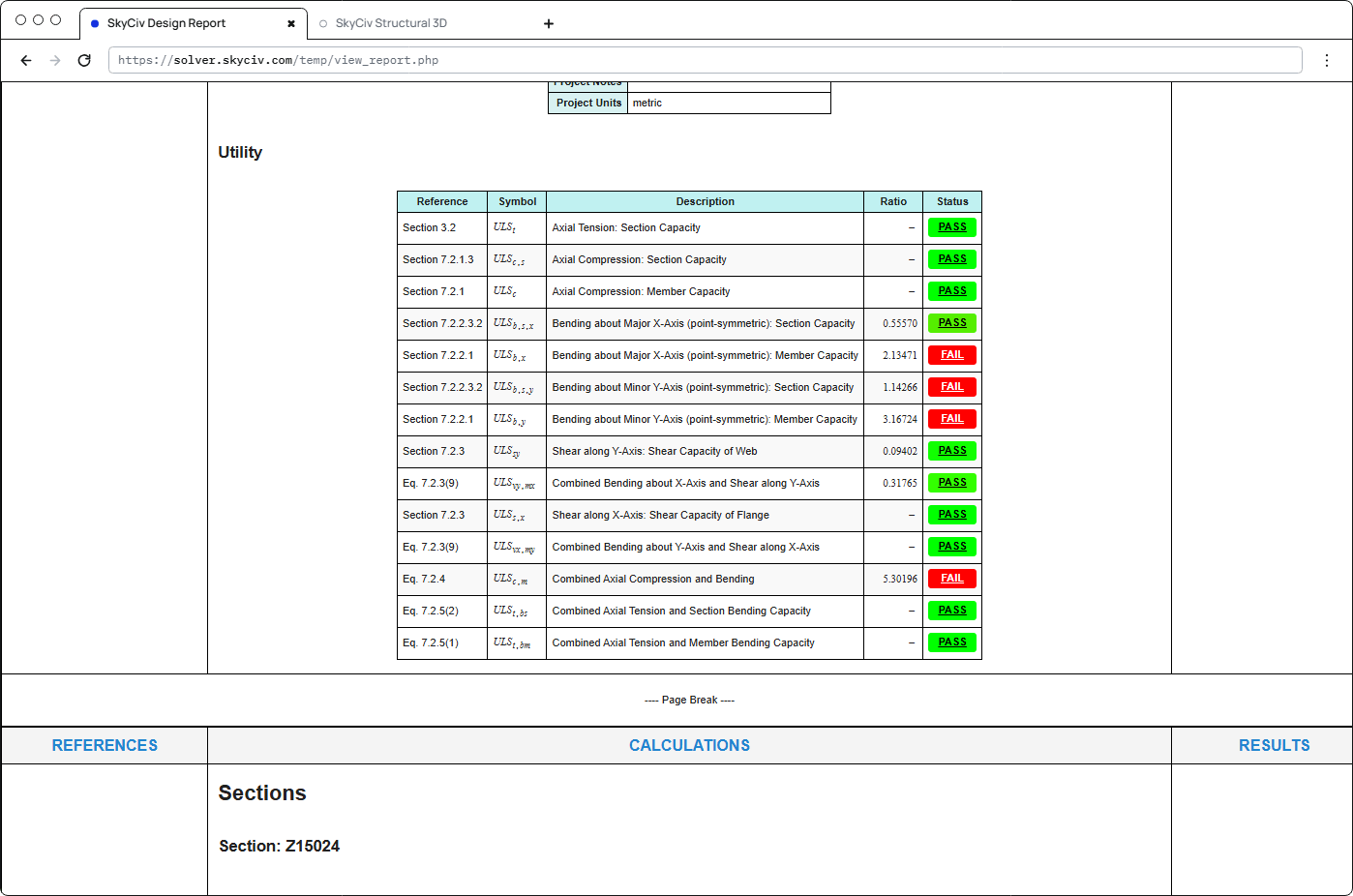
Clique no ícone de relatório na conta de um membro Relatório coluna para abrir seu relatório de design. Ele abre em um Relatório de design para membro #n dialogar com Fechar, Abrir em nova guia, Baixar HTML e Baixar PDF botões. The report is titled "AS/NZS 4600-2018 – Direct Strength Method", e contém:
- Detalhes do Projeto
- Utilitário: cada cheque com sua referência, símbolo, descrição, proporção e status
- Seções: as dimensões e propriedades da seção
- Estados Limites Últimos: Pré-qualificação de membros, Fatores de estado limite de resistência, Ações Internas dos Membros, Membro e Restrições, seguido por cada verificação passo a passo
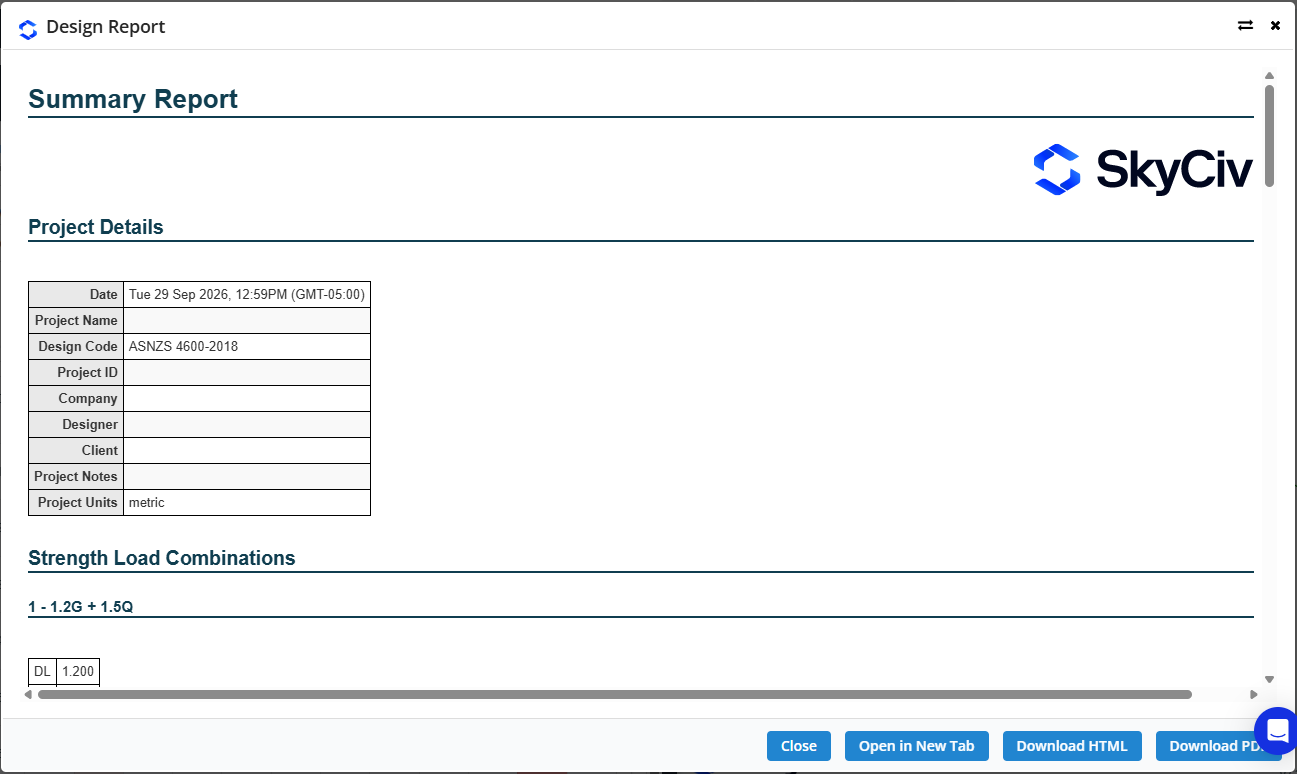
Clique Resumo na guia Resultados para abrir o Relatório resumido. Ele lista os detalhes do projeto (incluindo o código de design), as combinações de carga de força com seus fatores, e os resultados para todos os membros.