
Table des matières
- Créer un nouveau projet
- Ajout de fichiers
- Ouverture de fichiers
- Création de dossiers
- Enregistrement des rapports
- Téléchargement des données du projet
- Partager des projets
Créer un nouveau projet
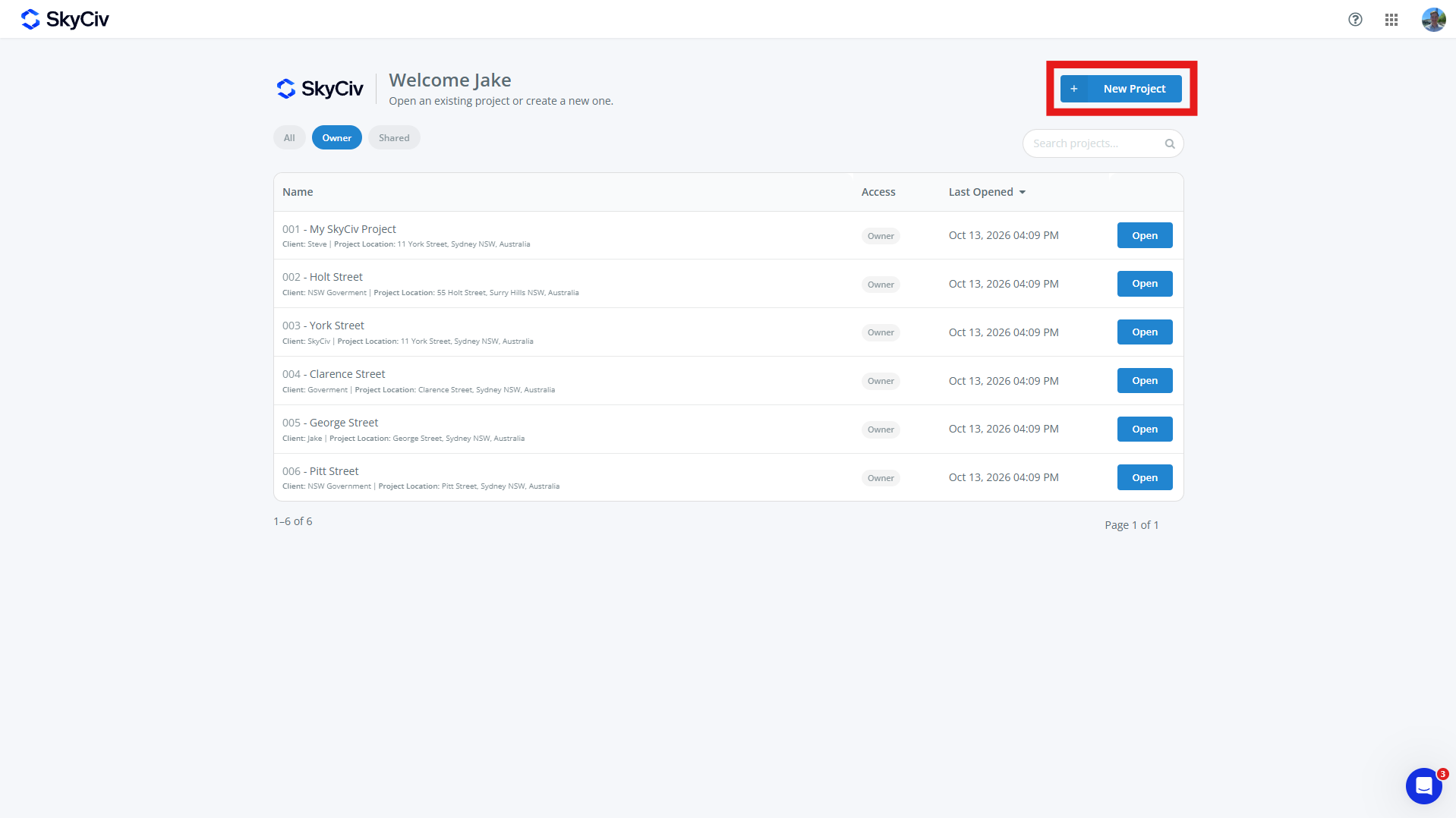
Pour créer un nouveau projet, clique le Nouveau projet bouton de la page Tableau de bord ou Projets SkyCiv. De nouveaux projets peuvent également être créés à partir d'un module SkyCiv.
Remplissez le formulaire de projet qui apparaît. Un projet peut avoir:
-
- ID de projet (optionnel)
- nom du projet (obligatoire)
- Renseignements sur le projet
- Ingénieur (optionnel)
- Client (optionnel)
- Localisation (optionnel)
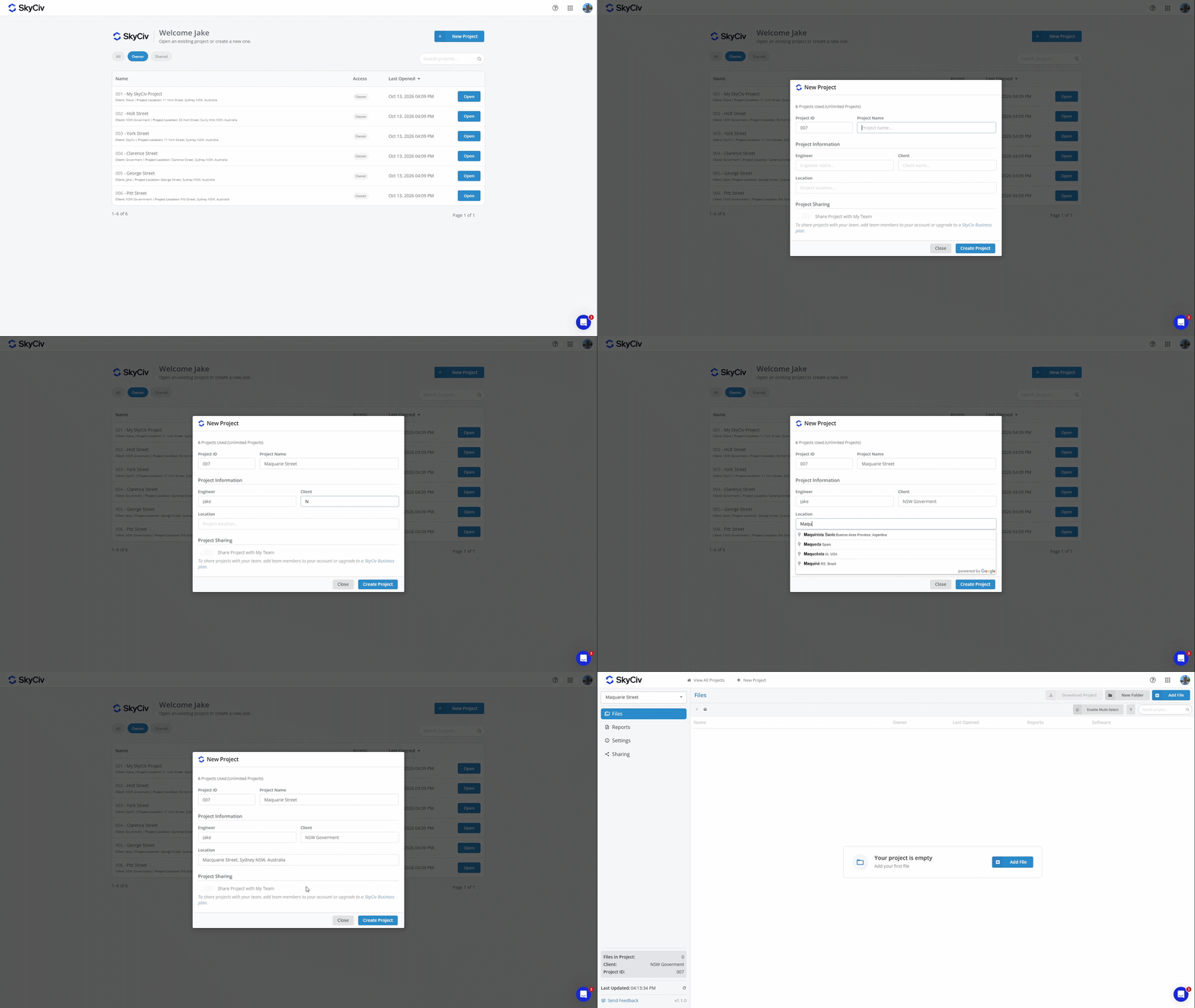
Cliquez sur « Créer un projet » pour créer le nouveau projet. Votre projet est maintenant prêt à ajouter des fichiers également.
Remarque: Les comptes ont un nombre limité de projets. Pour passer aux projets illimités, ajoutez Project Manager à votre abonnement à vérifier ou acheter un Compte commercial Skyciv
Ajout de fichiers
Les fichiers peuvent être ajoutés à un projet en sélectionnant un fichier existant ou en en créant un nouveau. Chaque fichier ne peut appartenir qu'à un seul projet à la fois.
Ajout d'un fichier à partir d'un projet
Les fichiers peuvent être ajoutés depuis un projet à l'aide du Ajouter un fichier bouton en haut à gauche de l'écran.
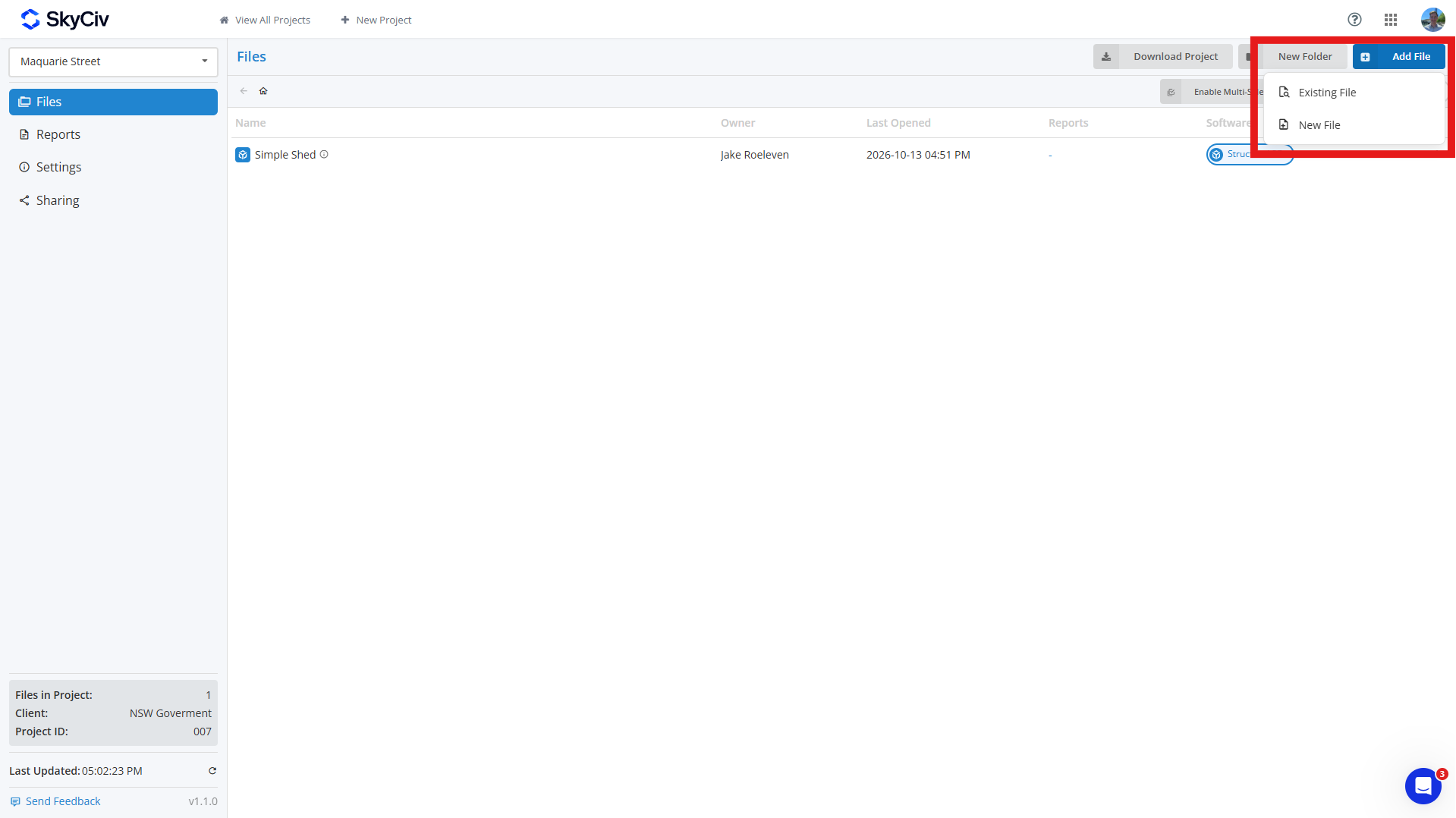
Pour ajouter un fichier existant, Cliquez sur Fichier existant et sélectionnez le fichier(s) vous souhaitez ajouter à votre projet. Vous pouvez rechercher des fichiers et les filtrer par module SkyCiv en haut à gauche de la fenêtre contextuelle.
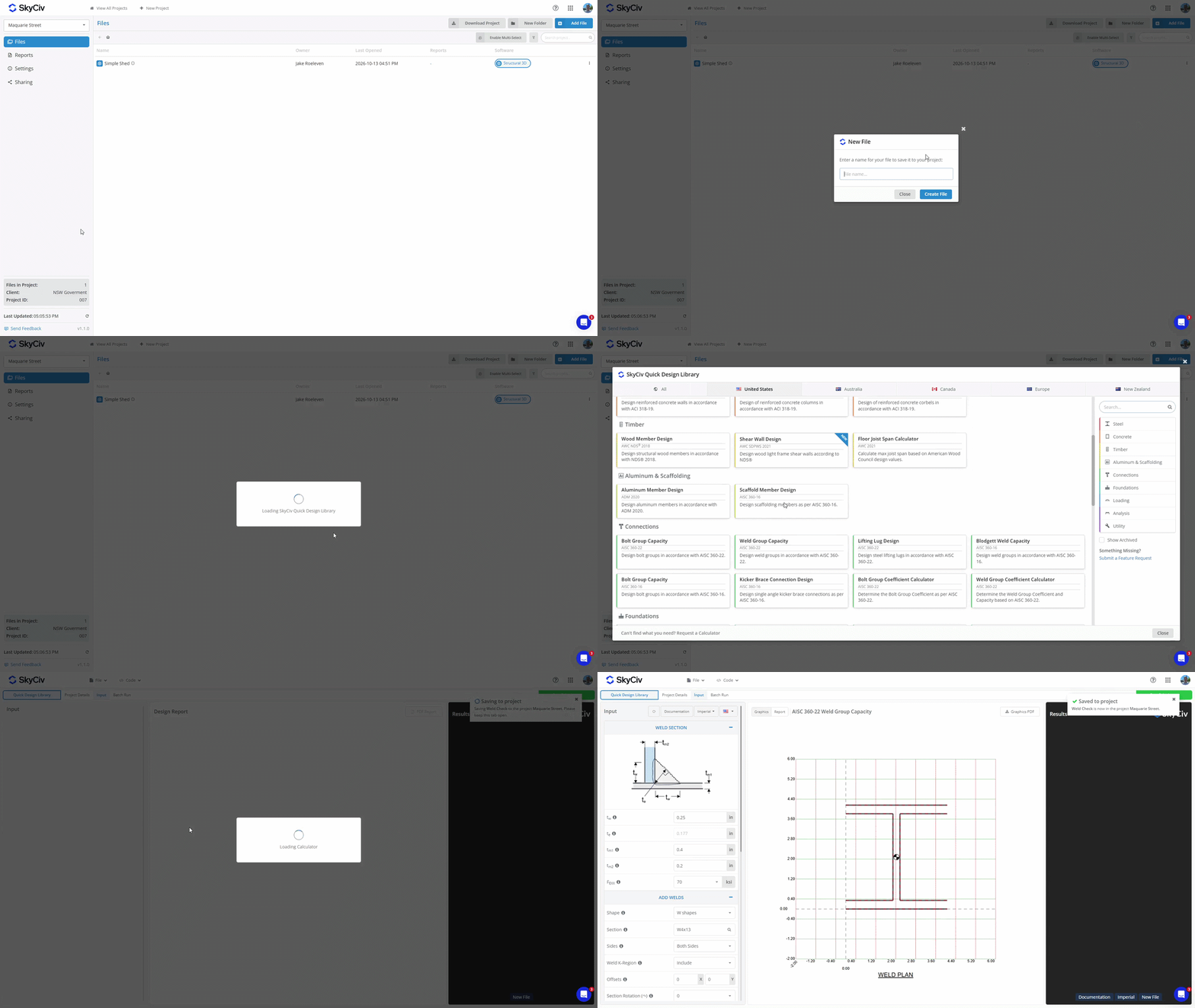
Pour créer un nouveau fichier, Cliquez sur Nouveau fichier et sélectionnez le module logiciel que vous souhaitez utiliser. Entrez un nom pour le fichier, et un nouvel onglet apparaîtra. Si le module sélectionné nécessite une configuration supplémentaire, comme le choix d'un code de conception ou d'une configuration, complétez ceci avant de sauvegarder le fichier. Une fois le fichier enregistré dans le projet, une fenêtre contextuelle apparaîtra dans le coin supérieur droit confirmant qu'elle a été enregistrée.
Ajout d'un fichier à partir d'un module logiciel
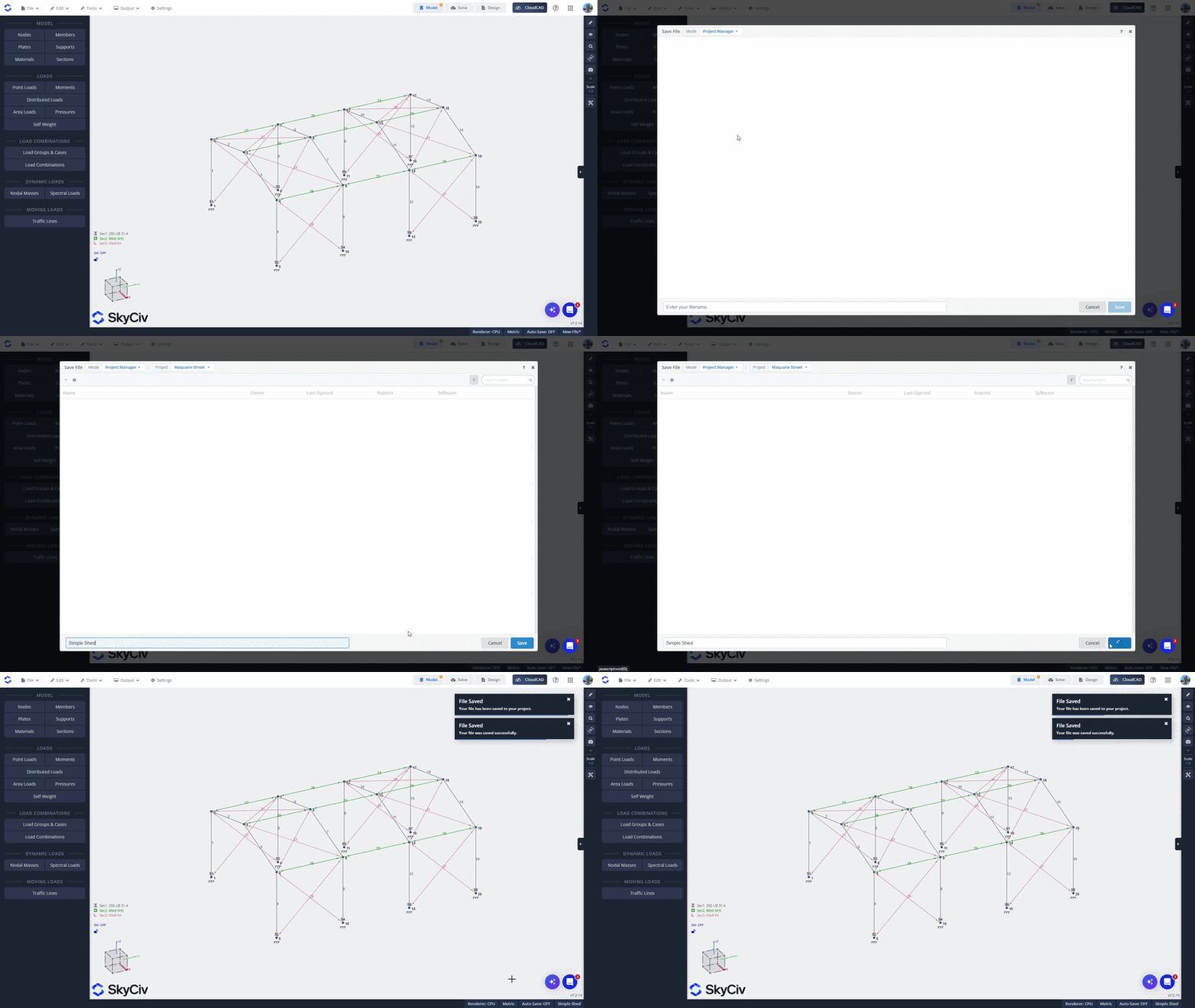
Si vous avez créé un fichier en lançant directement un module SkyCiv, vous pouvez l'enregistrer dans un projet depuis le module. les données d'entrée pertinentes pour le signe sont préréglées lorsque vous ouvrez le Fichier menu et sélectionnez sauver ou Enregistrer sous. Assurez-vous que vous êtes en mode Gestionnaire de projet, qui est affiché en haut à gauche de la fenêtre contextuelle.
Sélectionnez un projet dans la liste ou créez-en un nouveau. Entrez un nom pour le fichier et cliquez sur sauver en bas à gauche pour l'enregistrer dans le projet.
Ajout d'un fichier à partir du gestionnaire de fichiers SkyCiv
Pour ajouter un fichier existant à partir du gestionnaire de fichiers SkyCiv, cliquez avec le bouton droit sur le fichier et sélectionnez Ajouter au projet. Sélectionnez le projet auquel vous souhaitez l'ajouter.
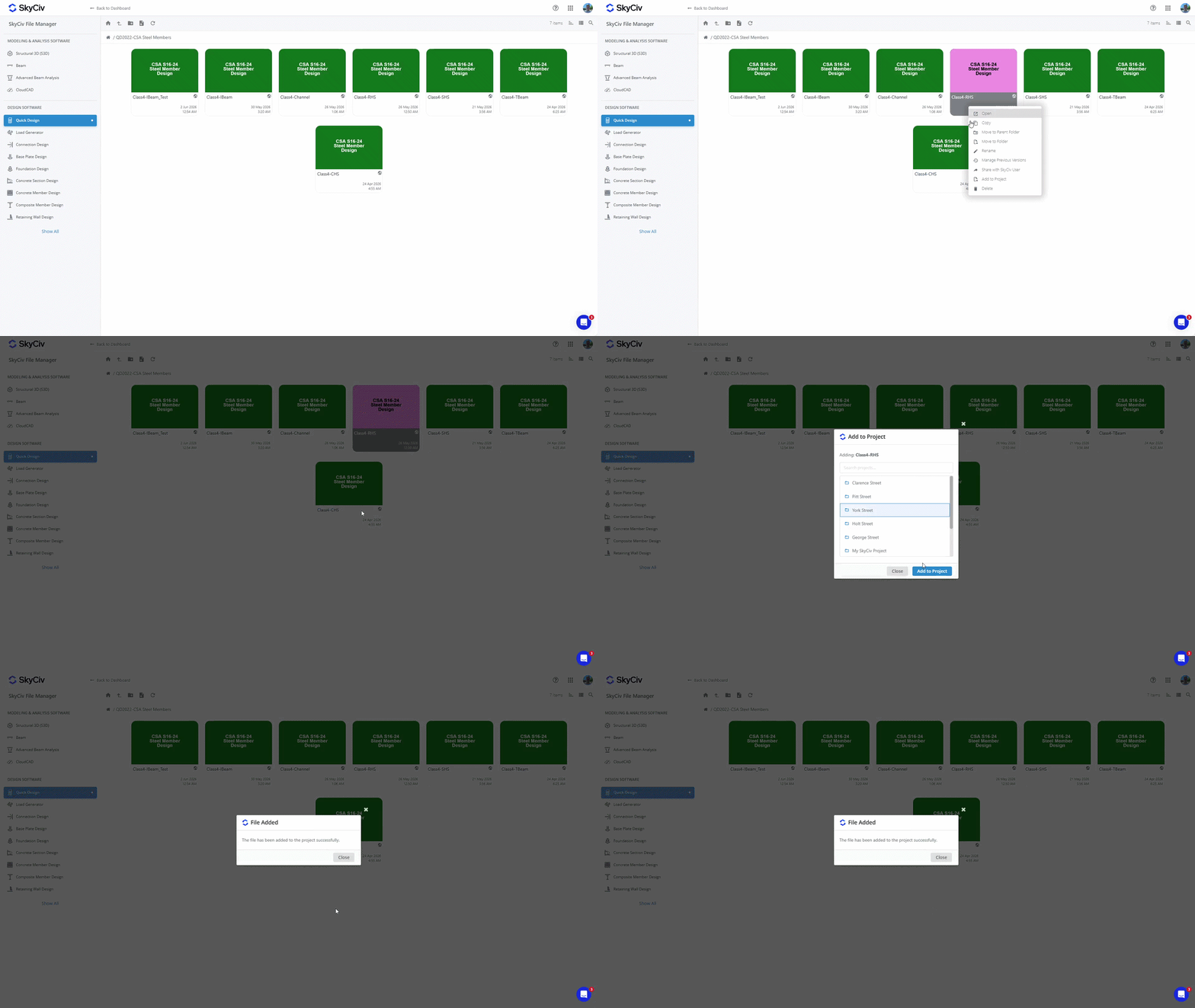
Remarque: Les fichiers enregistrés dans vos projets sont également accessibles depuis le gestionnaire de fichiers. L'ajout d'un fichier à un projet ne modifie pas son emplacement existant dans le gestionnaire de fichiers. Voir Où sont enregistrés les fichiers de projet? in Commencer pour plus de détails.
Ouverture de fichiers
Ouverture d'un fichier depuis l'intérieur du projet
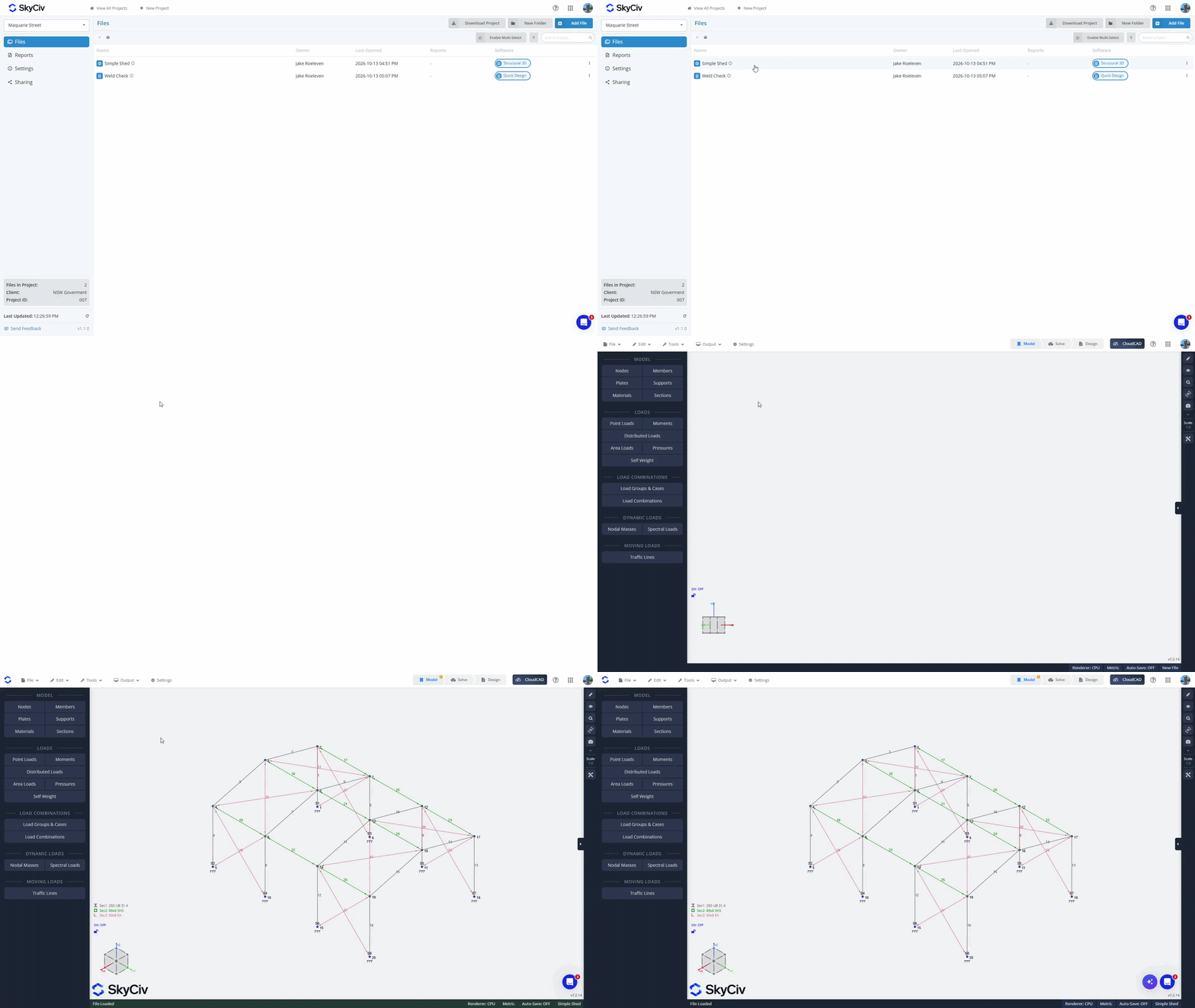
Pour ouvrir un fichier de l'intérieur, double-cliquez pour l'ouvrir dans un nouvel onglet. Aussi, faites un clic droit sur le fichier pour afficher le menu Fichier et sélectionnez l'option "Ouvrir".
Ouverture d'un fichier depuis l'intérieur d'un module logiciel
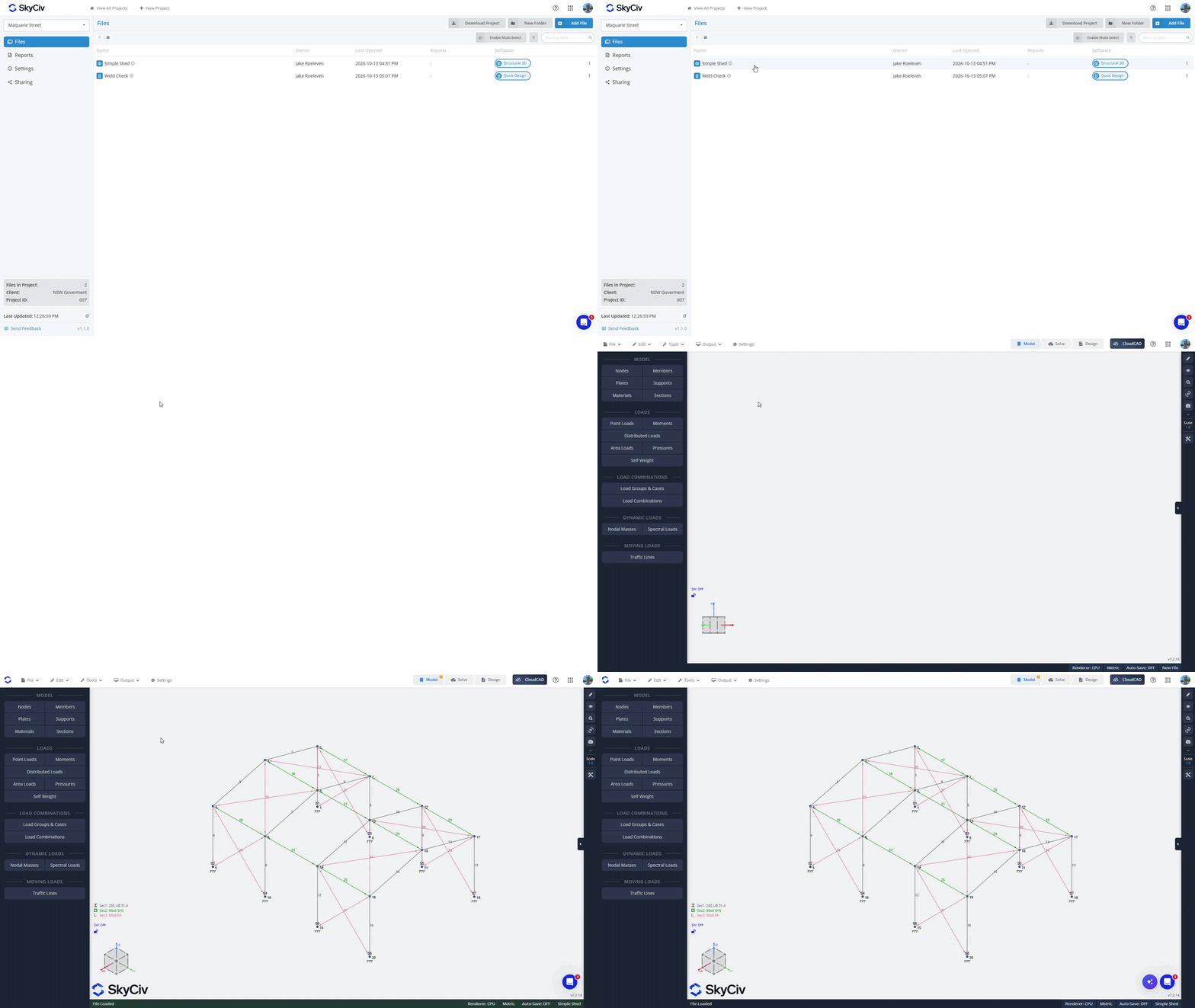
Du Fichier menu, cliquez sur "Forces/moments de déviation Analyse non linéaire à l'aide de la théorie des petits déplacements Les résultats 3D structurels ont été comparés à un logiciel d'analyse tiers". Assurez-vous que vous êtes en mode Gestionnaire de projet; vous pouvez le vérifier en haut à gauche de la fenêtre contextuelle. Sélectionnez votre projet pour charger les fichiers disponibles. Les fichiers du module actuel seront chargés en haut de la liste. Si vous sélectionnez un fichier du module actuel, il s'ouvrira dans l'onglet actuel. Les fichiers des autres modules seront grisés en bas de la liste. Si vous sélectionnez un fichier dans un autre module, il se chargera dans un nouvel onglet.
Création de dossiers
Organisez vos fichiers dans des dossiers en utilisant le "Nouveau dossier" bouton dans le gestionnaire de projet et création d'un nom pour votre dossier. Glissez et déposez des fichiers dans des dossiers pour les déplacer, ou utilisez le "Activer la sélection multiple" Option pour déplacer en masse des fichiers dans des dossiers.
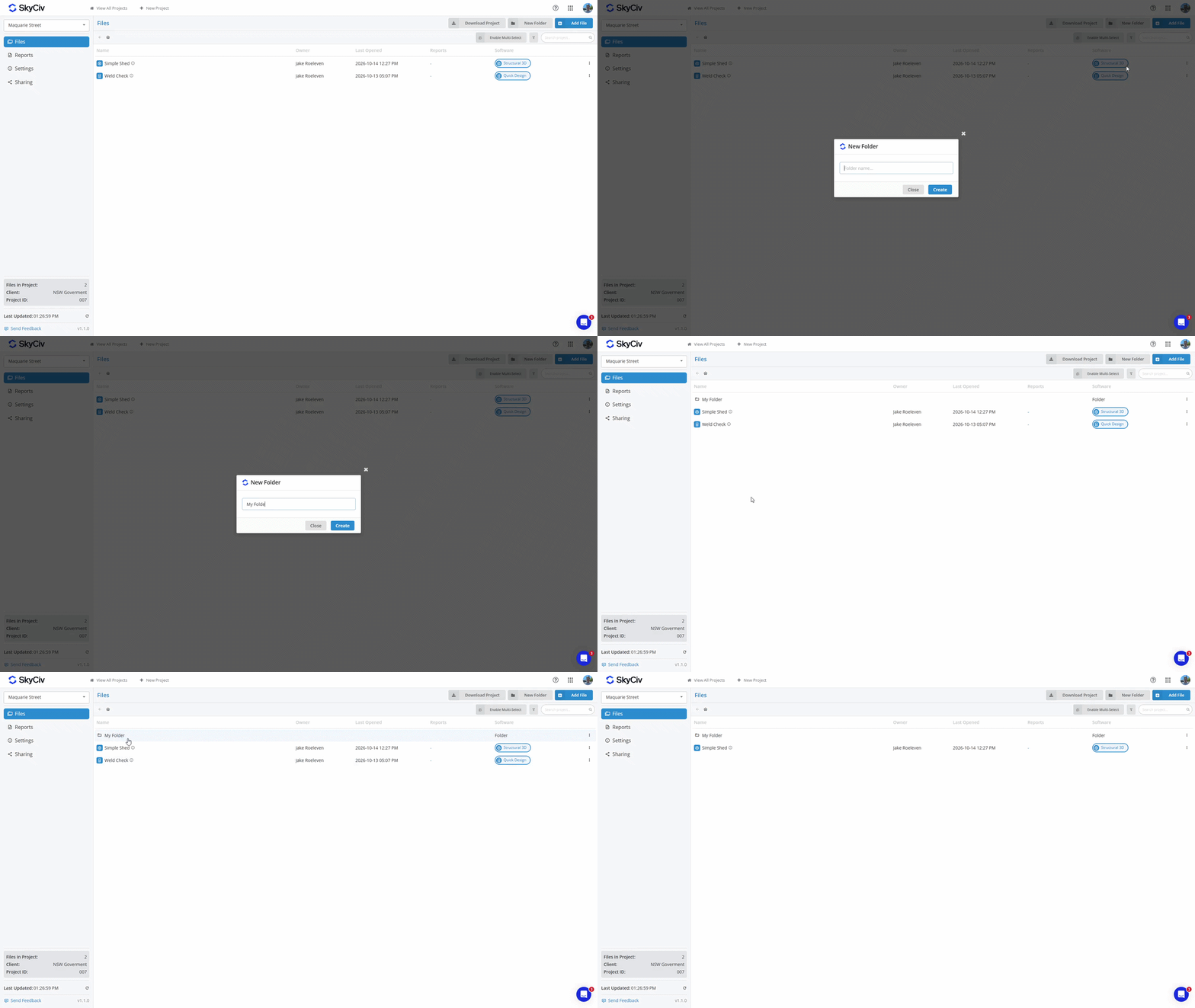
Pour déplacer un fichier vers le dossier parent, faites un clic droit sur le fichier et sélectionnez l'option Déplacer le fichier. Sélectionnez le dossier parent ou le « Racine du projet» pour le plus haut niveau du Projet.
Enregistrement des rapports
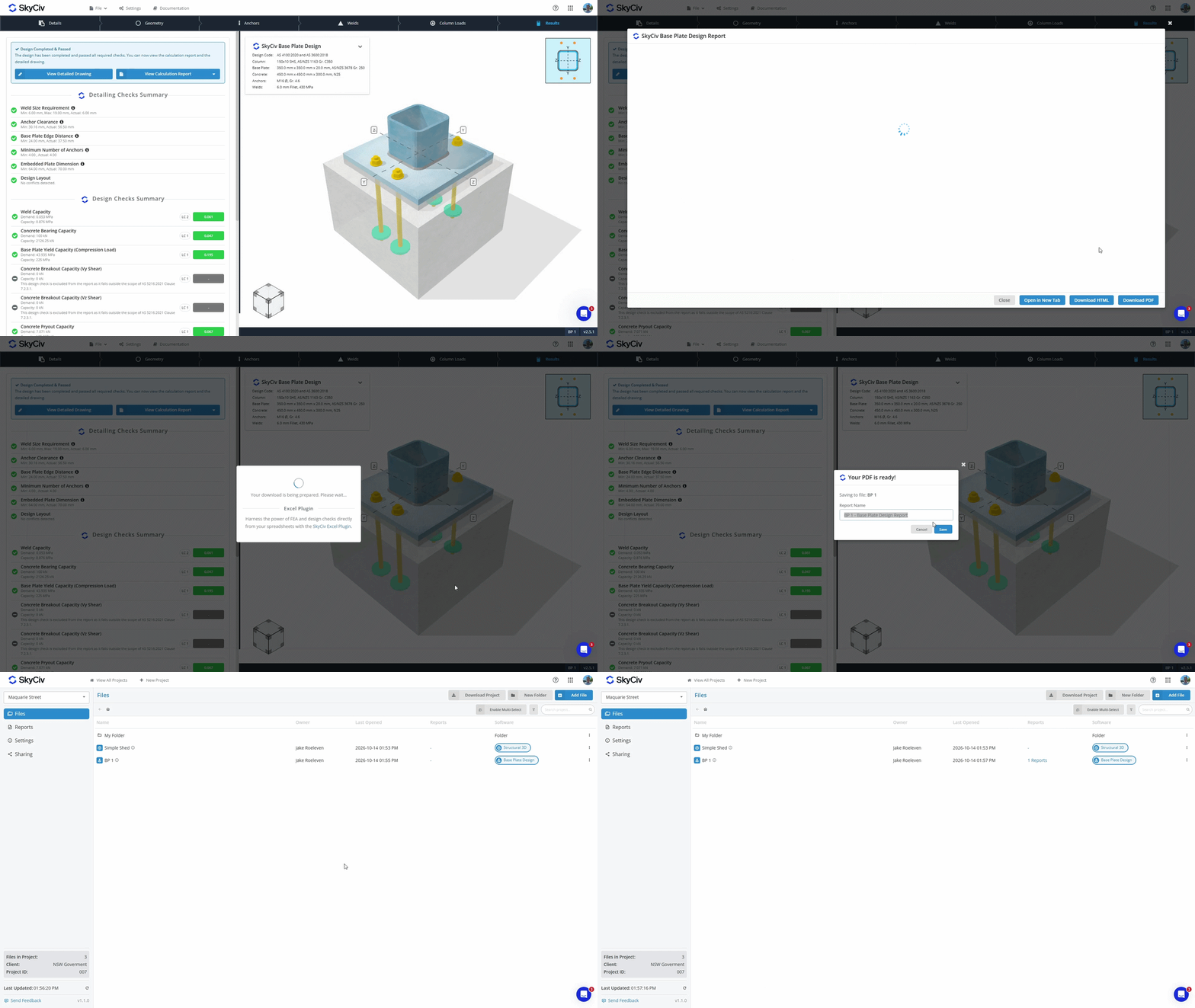
Lorsque vous générez un PDF à partir d'un module SkyCiv, vous avez maintenant la possibilité soit:
- Télécharger et stockez le PDF sur votre appareil local.
- sauver avec votre fichier dans notre stockage cloud.
Les PDF enregistrés dans votre fichier dans le stockage cloud peuvent être consultés depuis le gestionnaire de projet dans les onglets Fichiers et Rapports.. Apprenez-en davantage dans le Documentation du gestionnaire de rapports.
Téléchargement des données du projet
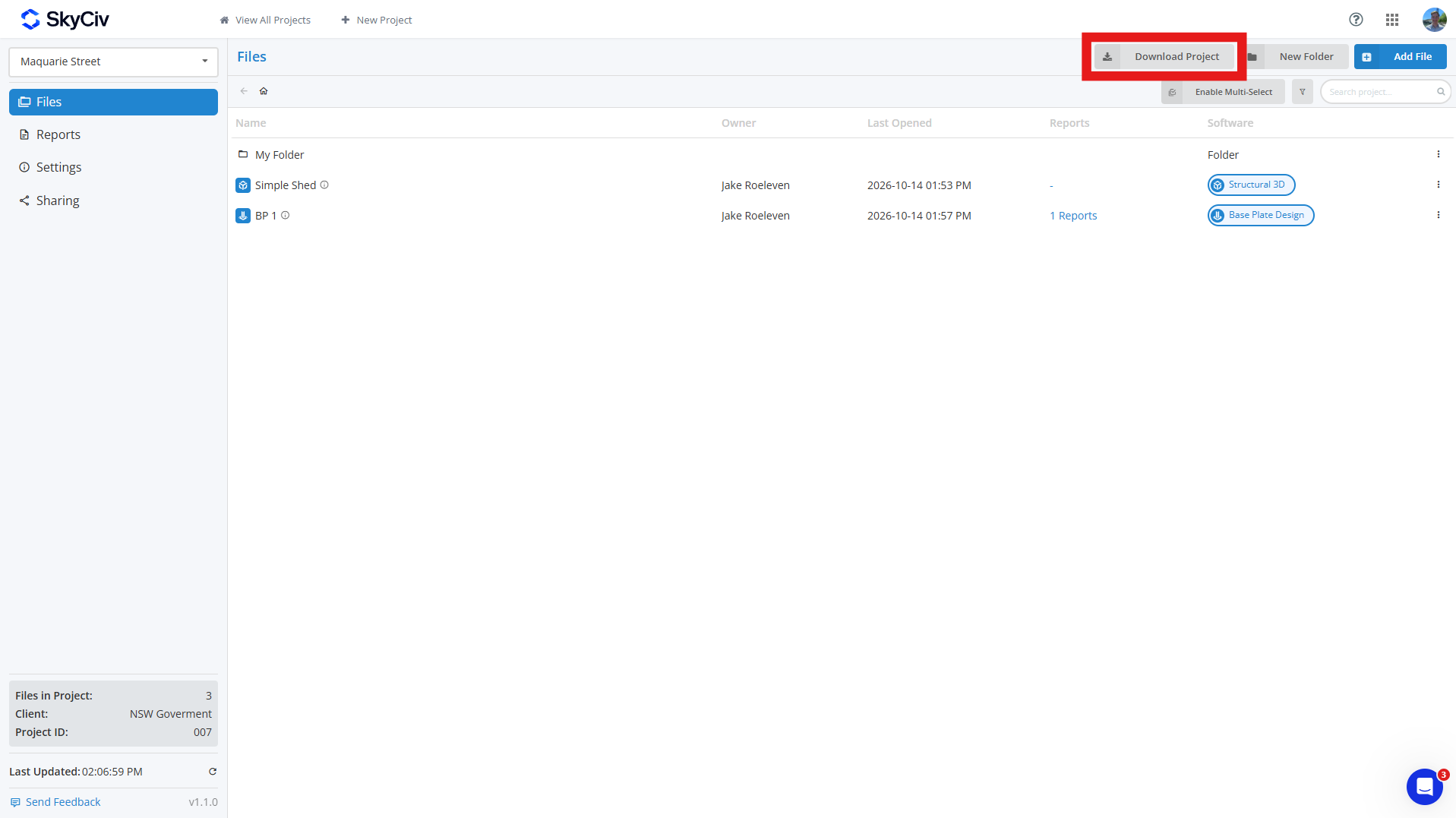
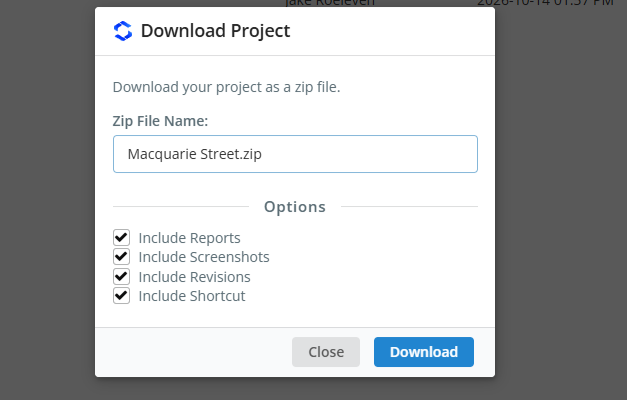
Vous pouvez télécharger les données de votre projet à partir du Fichiers dans votre projet en cliquant sur l'onglet Télécharger le projet bouton. Cela vous permet de générer un ZIP du projet, y compris:
- Fichier modèle (Fichier JSON)
- Données de révision (optionnel)
- Captures d'écran (optionnel)
- Rapports enregistrés (optionnel)
- Lien de raccourci (optionnel)
Si vous sélectionnez des champs facultatifs, alors chaque modèle de votre ZIP sera son propre dossier contenant toutes ces données; si vous incluez uniquement des modèles, chaque modèle sera téléchargé sous forme de fichier JSON. Les dossiers du projet seront répliqués dans le ZIP, avec chaque dossier différencié par un [DOSSIER] balise ajoutée à son nom.
Partager des projets
Vous pouvez partager des projets avec vos coéquipiers via le Partage option sur le côté gauche de la barre d’outils du Gestionnaire de projet. Lorsqu'il est partagé, tous les coéquipiers répertoriés dans la section Mon équipe de votre compte verront le projet. Voir le Configuration du compte d'équipe pour apprendre plus.
Remarque: seuls les comptes professionnels SkyCiv ont accès à la fonctionnalité de partage.

