
You can share your SkyCiv files and folders with any other SkyCiv user, and share whole projects with your team from the Project Manager. Because SkyCiv works 100% dans le nuage, everyone works on the same file, updated in real time, in SkyCiv’s logiciel d'analyse structurelle cloud and the other SkyCiv modules.
Your models can be shared at any time, avec toute personne ayant un compte SkyCiv. Vous et votre équipe pouvez collaborer sur une seule source de vérité en toute confiance, sachant que vous accédez au fichier le plus à jour.
"You and your team can collaborate on a source unique de vérité, le tout en temps réel! Pas de clé USB, aucun problème de compatibilité logicielle, FTP ou contrôle de version."
Sharing is useful for:
- Des équipes travaillant sur un même design
- Sharing with SkyCiv Support for live support on your current model
- Partage de dossiers, pour l'organisation des équipes
- School and university team projects
Sharing a File from the File Manager
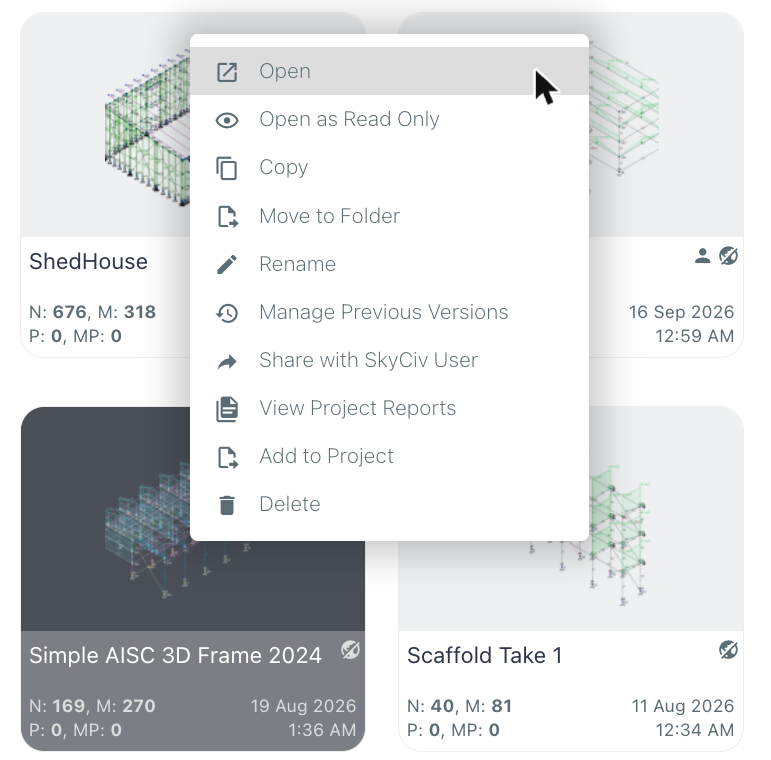
To share a file or folder, open the Gestionnaire de fichiers SkyCiv, right-click the model and click Partager avec l'utilisateur de SkyCiv:
Le Share File with SkyCiv Users window opens. Enter the emails of the SkyCiv users you want to share the model with (separate several emails with commas or new lines), then choose how to share it:
- Partager (le défaut): they work on your model, and every change is saved to the same file in real time.
- Send Copy: they get their own copy of the model, and can modify it without affecting yours.
You also control their permissions: whether they Can Edit the model and Can Share it with others (everyone you share with Can View ce). Cliquez sur Soumettre to share.
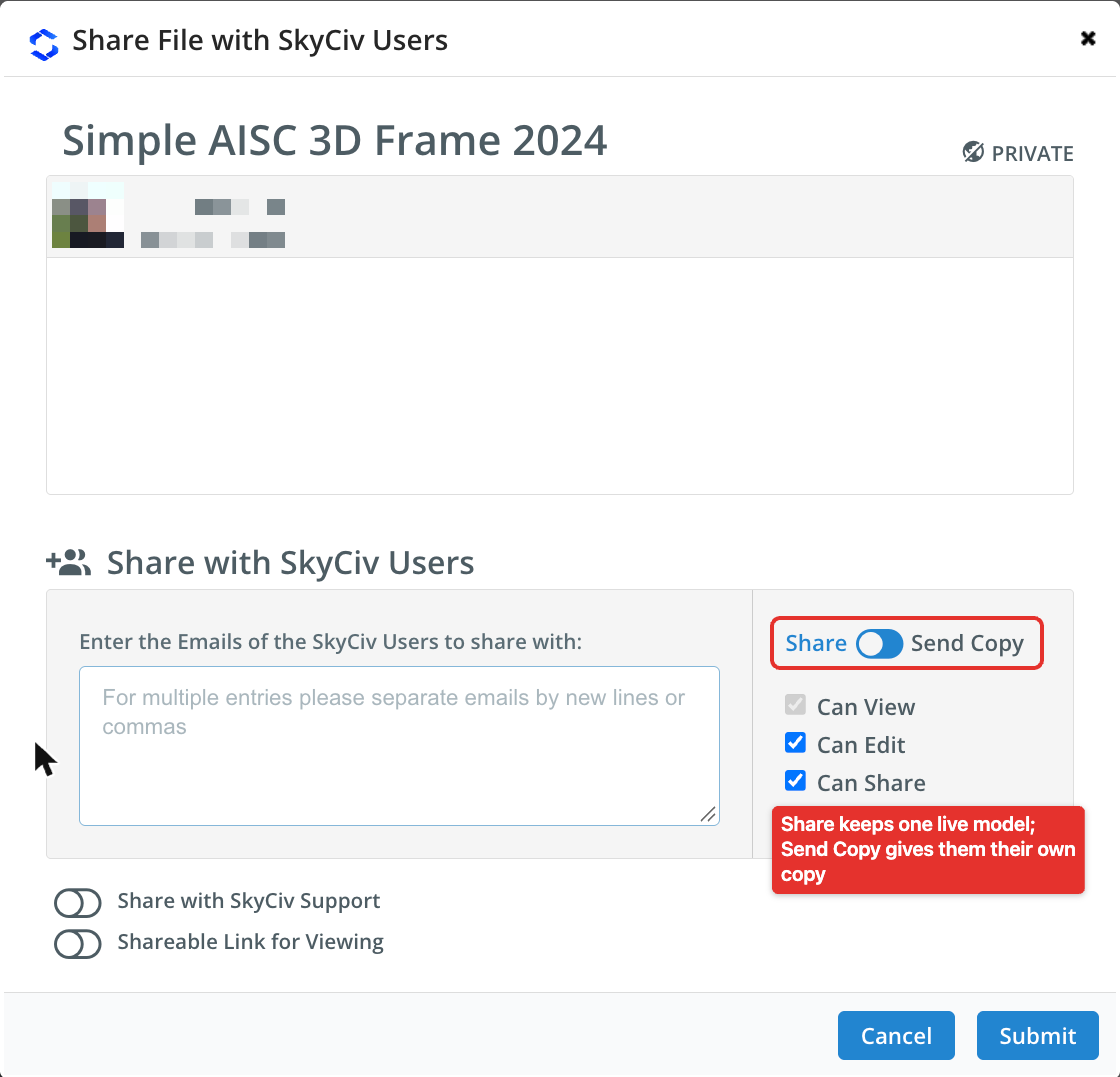
At the bottom of the window, Partager avec l'assistance SkyCiv gives our support team access to the model, so they can help you with it directly, et Shareable Link for Viewing creates a link to view the model.
Files that have been shared with you automatically appear in your Partagé avec moi folder in the File Manager. The people you share with also receive an email to let them know a model has been shared with them.
Que se passe-t-il si deux utilisateurs modifient le modèle en même temps?
Si un deuxième ingénieur tente d'entrer le fichier alors que l'un est déjà en train d'éditer, la plate-forme SkyCiv détectera cela et informera le deuxième utilisateur. Ils peuvent soit Reprendre ou Quitter l'accès pour l'ingénieur qui travaille actuellement sur le projet.
Sharing Projects in the Project Manager
The SkyCiv Project Manager groups the files of a project from any SkyCiv module, from analysis through to design, with their reports. To add a file to a project from the File Manager, right-click it and click Ajouter au projet (see the menu above), then pick the project.
To share a whole project with your team, clique le Partage option sur le côté gauche de la barre d’outils du Gestionnaire de projet. Une fois partagé, all teammates listed in the My Team section of your account see the project and its files. Learn more in sharing projects with your team, and see Configuration du compte d'équipe to add teammates.
Remarque: only SkyCiv Business Accounts have access to project sharing.
