Eurocode için Çelik Üye Tasarım yazılımı 3 (İÇİNDE 1993-1-1:2005)
Among the many design standards SkyCiv offers is Eurocode 3 (İÇİNDE 1993-1-1:2005), Çelik yapıların tasarımı. The module checks hot-rolled and welded steel members to the Ultimate Limit State, with a deflection check for the Serviceability Limit State. It runs in SkyCiv Structural 3D, where it reads the members, bölümler, malzemeler, forces and load combinations of your model.
Bu modül ile şunları yapabilirsiniz:
- Design I-shapes, T-şekilleri, açıları, channels and hollow sections (RHS, SHS and CHS)
- Classify the cross-section (Sınıf 1, 2, 3 veya 4) for each load combination and limit state, with effective properties for Class 4 bölümler
- Check the resistance of cross-sections to tension, sıkıştırma, bending about both axes and shear, including the reduction of the yield strength for high shear
- Check the combined resistance of cross-sections (bending and axial force)
- Check the buckling resistance of members: eğilme, torsional and torsional-flexural buckling in compression, lateral-torsional buckling in bending, and combined bending and axial compression with the interaction factors of Annex A or Annex B
- Split each member into lateral-torsional buckling segments, with C1 calculated from the bending moment diagram or entered by you
- Optionally check torsion (basic stress check) for I-shapes and rectangular hollow sections
- Check the slenderness ratio (KL/r) against limits for compression and tension, optionally shown in the detailed report
- Check deflections against a span/deflection limit
- View the design ratios on the 3D model
- Export detailed step-by-step reports and a summary report, as HTML or PDF (Üzerinde özel logo Kurumsal)
- Her üye için parametreleri ve girişi kontrol edin (Tasarımcıyı Çalıştır) en verimli bölümü bulmak için
- Tamamen doğrulandı üçüncü taraf sonuçlarıyla
Güncel sürüm desteği
Bölümler
- I-Işın (I-shapes and H-shapes, hot-rolled or welded)
- T-Kiriş
- Açı
- Kanal
- İçi Boş Dikdörtgen (RHS and SHS)
- İçi Boş Dairesel (CHS)
The material must be steel. A Class 4 circular hollow section is outside the scope of the module and stops the check with an error message.
Birimler
The module only works in Metrik birimler. Modelde, açık Ayarlar (üst çubuk) > Birimler ve birim sistemini şu şekilde ayarlayın: Metrik.
Design in SkyCiv Structural 3D
Bu modül, güçlü ürünlerimizle tamamen entegredir. yapısal analiz yazılımı mühendislerin modellemesine izin veren, tek bir modelle analiz ve tasarım. Tek bir tıklama ile, the software pulls your entire model and checks each member against the criteria of the Standard to determine whether or not it passes the requirements of these European Standards. Yükler, members and design parameters are imported automatically, including the load combinations from EN 1990.
Entegremiz hakkında daha fazla genel bilgi için buraya tıklayın Yapısal Tasarım Yazılımı
Modülün açılması
- Modeli çöz.
- Tıklayın Tasarım üst çubukta.
- İçinde Bir Tasarım Modülü Seçin, seçmek Çelik Üye.
- İçinde Hangi tasarım kodunu başlatmak istiyorsunuz??, seçmek Eurocode 3 (İÇİNDE 1993-1-1:2005), sonra tıklayın Başlangıç.
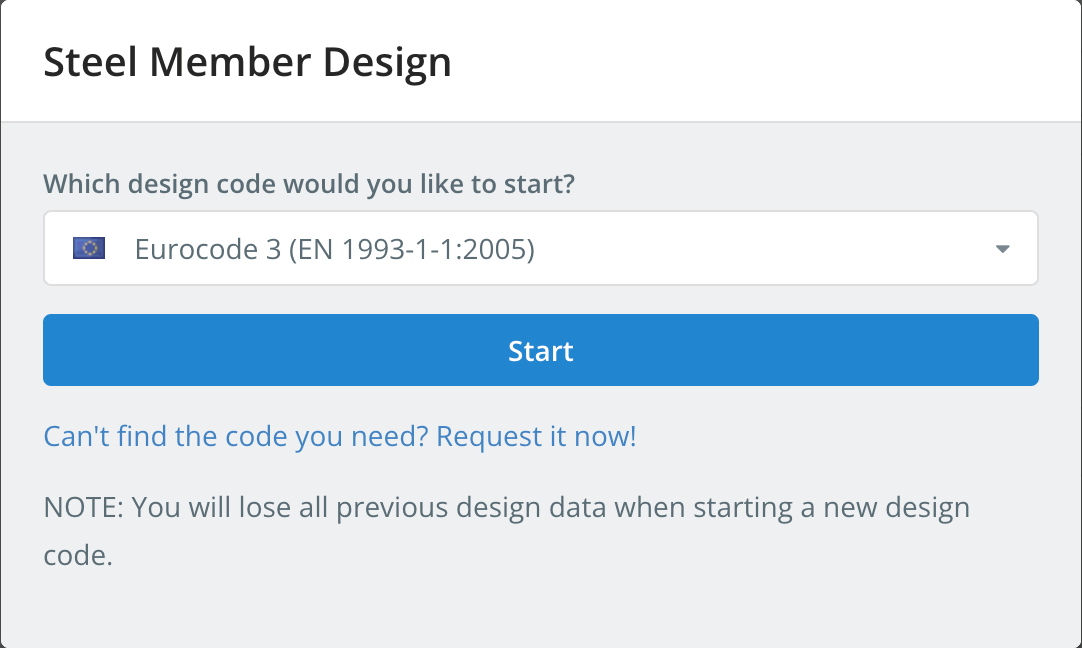
Starting a design code deletes the design data of the previous one. To switch codes later, kullanım Yeni Kod Başlat içinde Tasarım Menü.
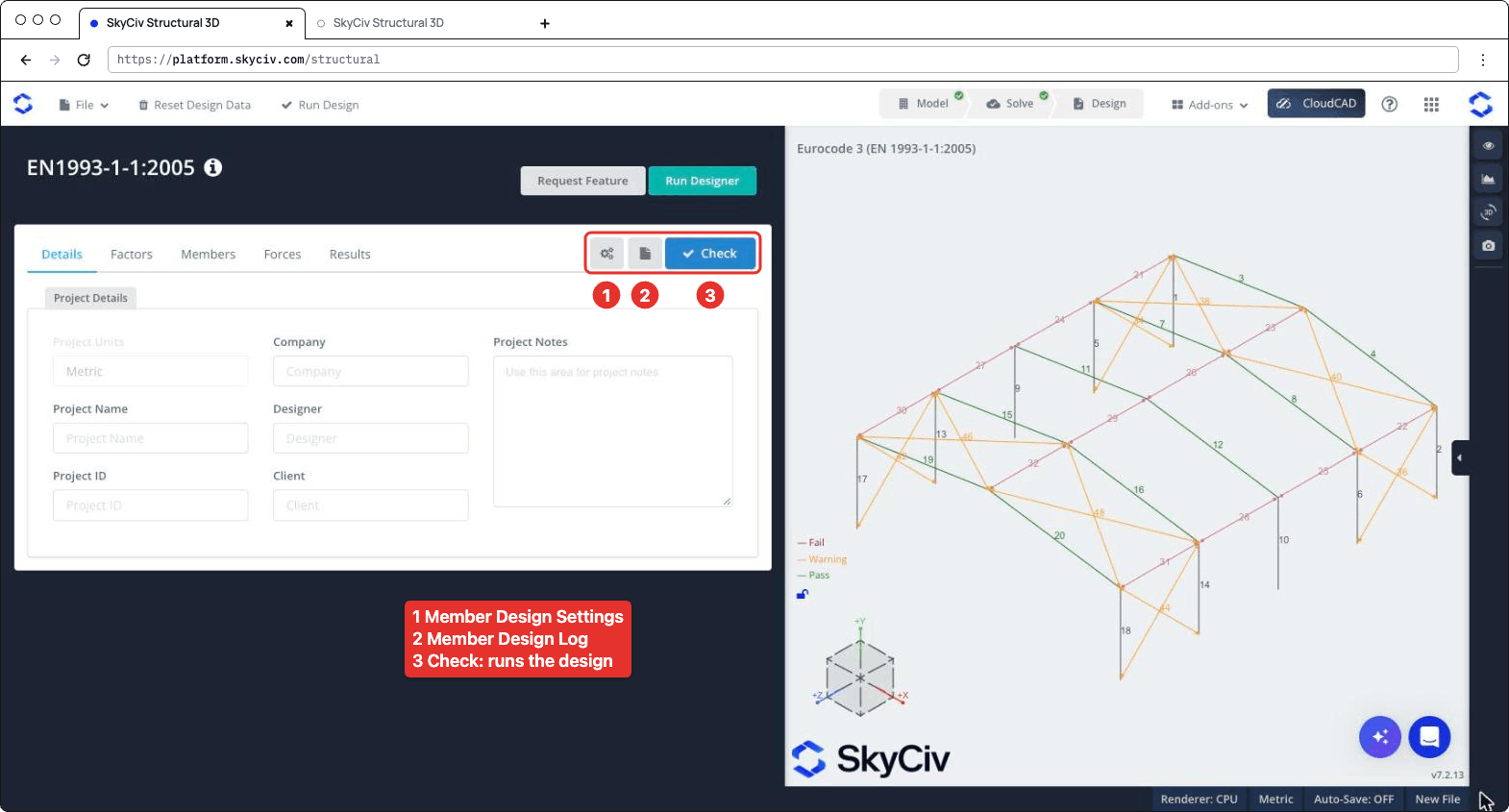
Tasarım paneli solda açılır, sağdaki 3 boyutlu modelle. Başlık kodu gösterir, artı Özellik İste ve Tasarımcıyı Çalıştır. Sekme çubuğunun sağında üç düğme bulunur: ayarlar (vites) buton, hangisi açılır Üye Tasarım Ayarları, günlük düğmesi, hangisi açılır Üye Tasarım Günlüğü, ve Soğuk şekillendirilmiş elemanlar aşağıdakilere uygun olarak tasarlanırken, tasarım kontrolünü yürüten. Sekmeler Detaylar, Faktörler, Üyeler, Kuvvetler ve Sonuçlar.
Üye Tasarım Ayarları
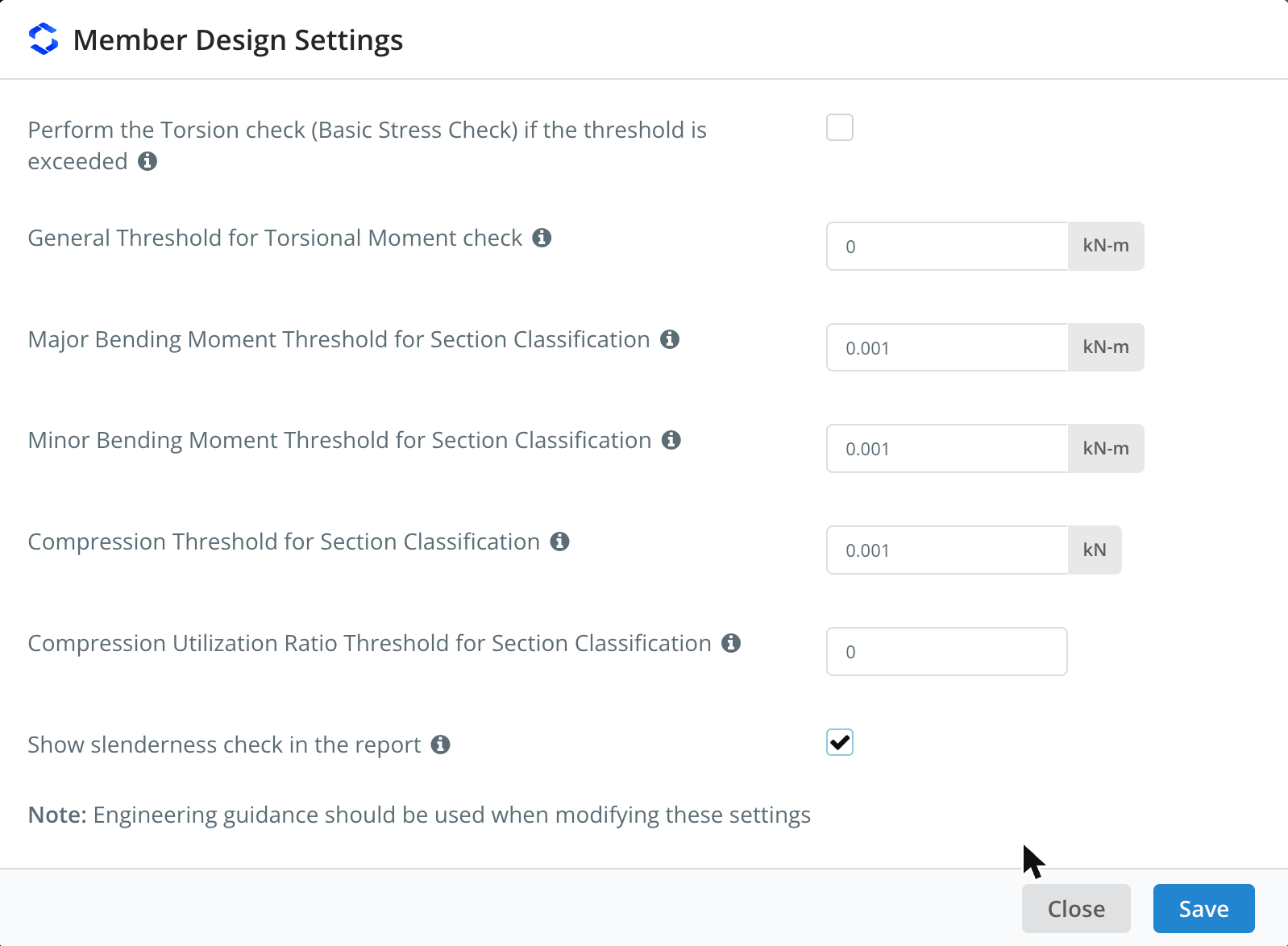
Açmak için dişli düğmesine tıklayın Üye Tasarım Ayarları. Açıklamasını görmek için bir ayarın yanındaki ℹ simgesinin üzerine gelin.
| Ayar | - Varsayılan değer | Tanım |
|---|---|---|
| Perform the Torsion check (Temel Stres Kontrolü) if the threshold is exceeded | işaretlenmemiş | Runs the torsion check of I-shapes and rectangular hollow sections when the torsional moment exceeds the threshold. İşareti kaldırıldığında, the torsion check is skipped whatever the threshold |
| General Threshold for Torsional Moment check | 0 kN-m | The torsional moment (in absolute value) above which the torsion check is performed, for all members whose Tsınır dır-dir oto içinde Üyeler sekme |
| Major Bending Moment Threshold for Section Classification | 0.001 kN-m | Bending about the major axis is included in the overall section classification of a limit state only when the moment exceeds this value |
| Minor Bending Moment Threshold for Section Classification | 0.001 kN-m | Aynısı, for bending about the minor axis |
| Compression Threshold for Section Classification | 0.001 kN | Compression is included in the overall section classification of a limit state only when the compression force exceeds this value |
| Compression Utilization Ratio Threshold for Section Classification | 0 | Compression is included in the overall section classification only when its utilization ratio exceeds this value. It applies to all the limit states other than compression |
| Show slenderness check in the report | işaretlenmemiş | Adds the slenderness check to the detailed report of each member, görmek Slenderness Ratio Check altında |
The classification thresholds keep very small forces from governing the class of a section: Örneğin, a beam with a negligible axial force is not classified as if it were in pure compression. Diyalog notları gibi, Bu ayarları değiştirdiğinizde mühendislik rehberliği kullanılmalıdır. Tıklayın Kayıt etmek uygulamak.
Detaylar
Üzerinde Detaylar sekmesinde proje ayrıntılarını girebilirsiniz (şirket, proje Adı, Tasarımcı, proje kimliği, Müşteri ve Proje Notları). Bunları doldurmanıza gerek yok, but anything you enter is shown in your reports. Proje Birimleri gösteriler Metrik ve burada değiştirilemez.
Faktörler
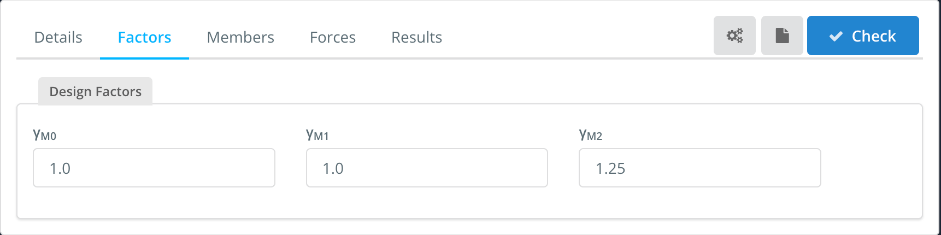
NS Faktörler tab shows the partial factors for resistance, which you can change:
| Faktör | Used for | - Varsayılan değer |
|---|---|---|
| cM0 | Resistance of cross-sections | 1.0 |
| cM1 | Resistance of members to instability (burkulma) | 1.0 |
| cBöylece mühendisler bu hesaplamaların tam olarak nasıl yapıldığını gözden geçirebilirler. | Resistance of cross-sections in tension to fracture (net section) | 1.25 |
Üyeler
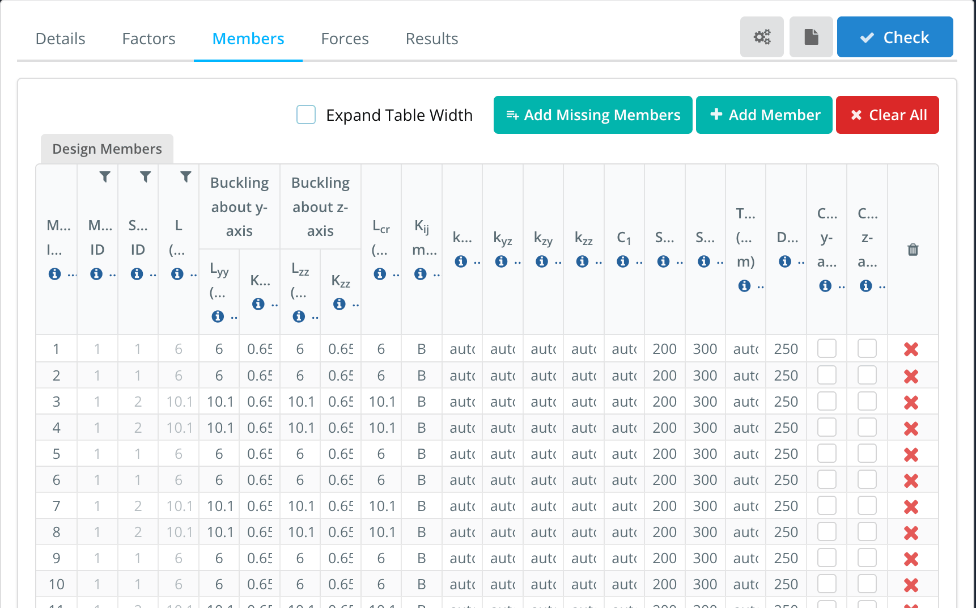
NS Üyeler sekme tasarım üyelerini listeler, with one row for each member of the model. Üye Kimliği(s), Malzeme Kimliği, Bölüm Kimliği ve L come from the model. The buckling lengths and the other parameters are filled in with default values that you can change. Hover over the ℹ icon in a column header to see its description.
- Tablo Genişliğini Genişlet: shows the full column headers and values, with a horizontal scroll bar.
- Add Missing Members, sekmesi, birlikte çalıştığınız herhangi bir üyeyi şuraya tıklayarak tanımlayabileceğiniz yerdir. ve Clear All: add the model members that are not in the table, add a design member, or remove all of them. Enter several member IDs, virgüllerle ayrılmış, içinde Üye Kimliği(s) to design them as a single design member.
| Sütun | Tanım | - Varsayılan değer |
|---|---|---|
| Lyy, Kyy | Buckling length and effective length factor for flexural buckling about the y-y (major) eksen, used to calculate Nsonucu AISI S100-12'ye göre hesaplayacaktır | Lyy = member length, Kyy from the end fixity of the member |
| Lzz, Kzz | Aynısı, about the z-z (minor) eksen | Lzz = member length, Kzz from the end fixity of the member |
| Lsonucu AISI S100-12'ye göre hesaplayacaktır | Buckling length for lateral-torsional buckling. Enter the member length, or comma-separated lengths, one for each segment between lateral restraints | Üye uzunluğu |
| Kij yöntem | Method used to calculate the interaction factors: Bir (Annex A, alternative method 1) veya B (Ek B, alternative method 2) | B |
| kyy, kyz, kzy, kzz | Interaction factors for bending and axial compression (Eşitlik. 6.61 ve 6.62). İle oto, they are calculated with the method chosen in Kij yöntem | oto |
| C1 | Moment modification factor for the elastic critical moment Msonucu AISI S100-12'ye göre hesaplayacaktır. İle oto, it is calculated from the bending moment diagram of each segment. Enter a single value for all the segments, or comma-separated values, one for each segment | oto |
| hücrelerdeki değerleri değiştirerekC, hücrelerdeki değerleri değiştirerekT | Slenderness limits in compression and in tension, görmek Slenderness Ratio Check altında | 200, 300 |
| Tsınır | Torsional moment threshold for the torsion check of this member. İle oto, the general threshold of the settings is used. The torsion check must be ticked in the settings | oto |
| Gerginlik için narinlik oranıL | Gerginlik için narinlik oranı: the member passes when span/deflection is at least this value | 250 |
| Cantilever y-axis, Cantilever z-axis | Tick if the deflection check should consider the member as supported at one end only, for deflection along that axis | işaretlenmemiş |
Örneğin, bir için 10.1 m rafter with purlins every 2.02 m, giriş 2.02,2.02,2.02,2.02,2.02 içinde Lsonucu AISI S100-12'ye göre hesaplayacaktır. The lengths must add up to the member length (içinde 1%). Each segment is then checked for lateral-torsional buckling with its own length and C1. If you enter a single length that is different from the member length, C1 can’t be calculated automatically and must be entered as a number.
Kuvvetler
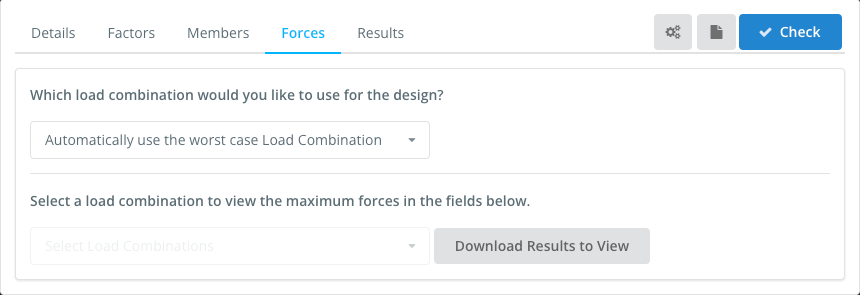
NS Kuvvetler tab sets the load combination used in the design. Varsayılan olarak, Automatically use the worst case Load Combination checks every strength load combination of the model and reports the worst one for each check. You can also select a single load combination. Serviceability combinations are not listed here: they are used for the deflection check.
To view the forces of a load combination, select it in Select a load combination to view the maximum forces in the fields below, Genellikle aşırı sapmalar, bu dengesizliklerin de var olduğuna dair bir ipucu olabilir. Download Results to View.
Sonuçlar
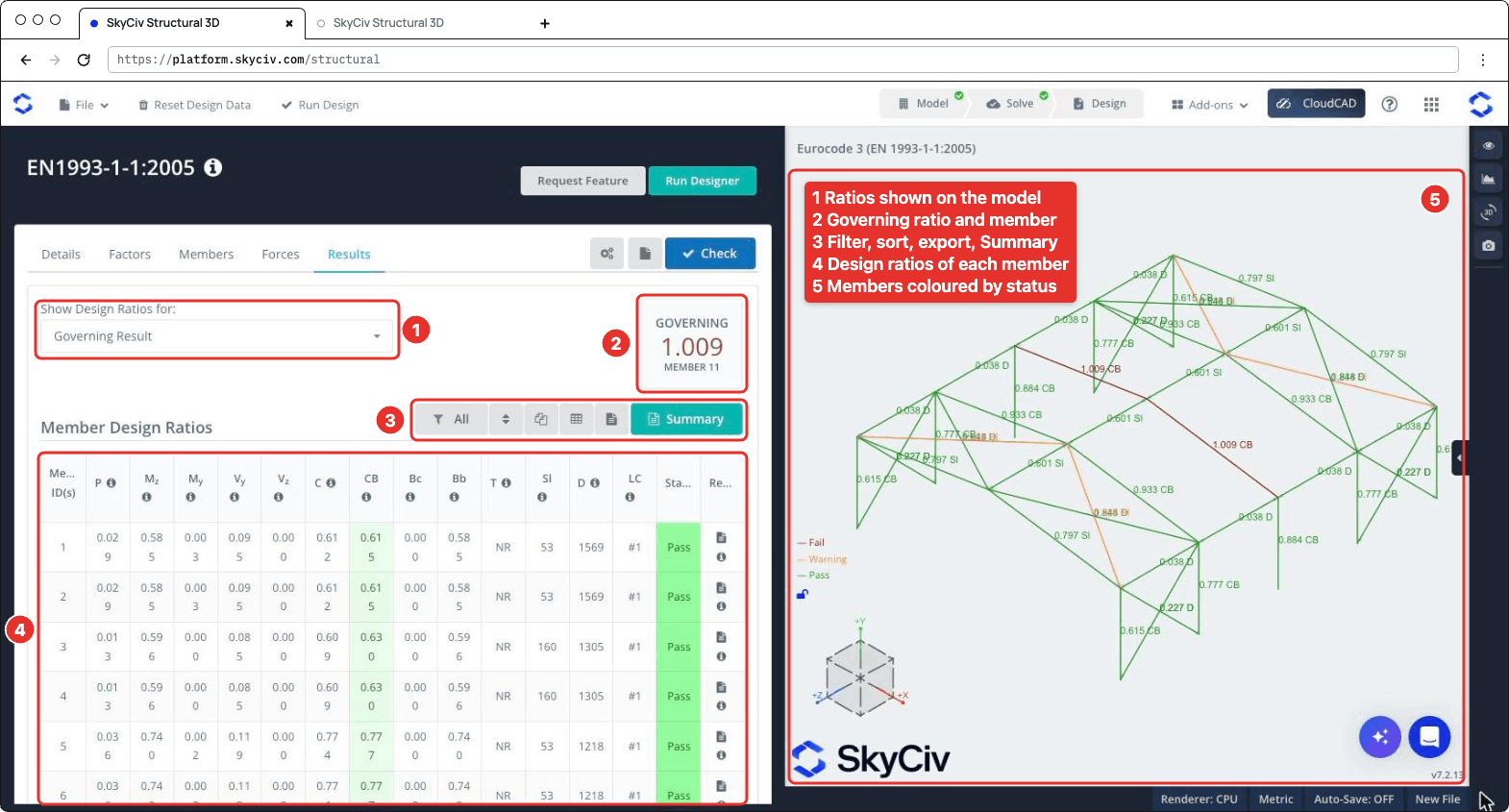
Tıklayın Soğuk şekillendirilmiş elemanlar aşağıdakilere uygun olarak tasarlanırken tasarım kontrolünü çalıştırmak için. NS Sonuçlar sekme gösterileri (numbered as in the screenshot below):
- Tasarım Oranlarını Göster: chooses which ratios are shown on the 3D model, Örneğin Geçerli Sonuç, Başarısız Üyeler, a single check or the Worst Load Combination.
- YÖNETİM: en yüksek oran ve üyesi.
- A toolbar to filter the members (Herşey, Failed, SkyCiv tasarım modüllerinin en özel işlevlerinden biri, her üye için Rapor sütunu altındaki rapor simgelerinden birine tıklayarak erişilebilen bireysel üye tasarım raporlarıdır. veya Uyarı üyeler, or the members of a section), reset the sorting, copy the table, download it as CSV, download all the member reports as HTML, ve aç Özet bildiri.
- NS Üye Tasarım Oranları masa, bir ile Bu kapsamlı tasarım kontrolleri, önceki şekilde gösterildiği gibi temiz ve açık bir şekilde sunulmaktadır. (Bu kapsamlı tasarım kontrolleri, önceki şekilde gösterildiği gibi temiz ve açık bir şekilde sunulmaktadır., Warn veya Bu kapsamlı tasarım kontrolleri, önceki şekilde gösterildiği gibi temiz ve açık bir şekilde sunulmaktadır.) and the report icon of each member. Atıfta bulunduğu maddeyi görmek için sütun başlığındaki ℹ simgesinin üzerine gelin.
- The 3D view, where each member is coloured Bu kapsamlı tasarım kontrolleri, önceki şekilde gösterildiği gibi temiz ve açık bir şekilde sunulmaktadır., Uyarı veya Bu kapsamlı tasarım kontrolleri, önceki şekilde gösterildiği gibi temiz ve açık bir şekilde sunulmaktadır. and labelled with its governing ratio and check.
| Sütun | Soğuk şekillendirilmiş elemanlar aşağıdakilere uygun olarak tasarlanırken | Madde |
|---|---|---|
| P | Axial force, gerilim veya sıkıştırma | 6.2.3 veya 6.2.4 |
| Mile | Bending about the major axis | 6.2.5 |
| MY | Bending about the minor axis | 6.2.5 |
| V Y, V ile | Kesme | 6.2.6 |
| C | Birleşik eylemler, resistance of cross-sections | 6.2.1 |
| CB | Combined bending and axial compression, buckling resistance of members | 6.3.3 |
| Bc | Buckling resistance of compression members | 6.3.1 |
| Bb | Lateral-torsional buckling resistance | 6.3.2 |
| T | Burulma (basic stress check), NR when it is not performed | 6.2.7 |
| Sl | Governing slenderness λ of the member (not a ratio) | |
| D | Span/deflection of the member (not a ratio) | |
| LC | Load combination of the governing result |
A member fails when one of its strength ratios is above 1.0. The slenderness and deflection checks are not part of the governing ratio: when the slenderness exceeds its limit, or the span/deflection is below Gerginlik için narinlik oranıL, NS Sl veya D value is highlighted and the member status is Warn. Their ratios to the limits are shown on the 3D model (Örneğin 0.797 Sl) Ve içinde Özet bildiri.
Raporlar
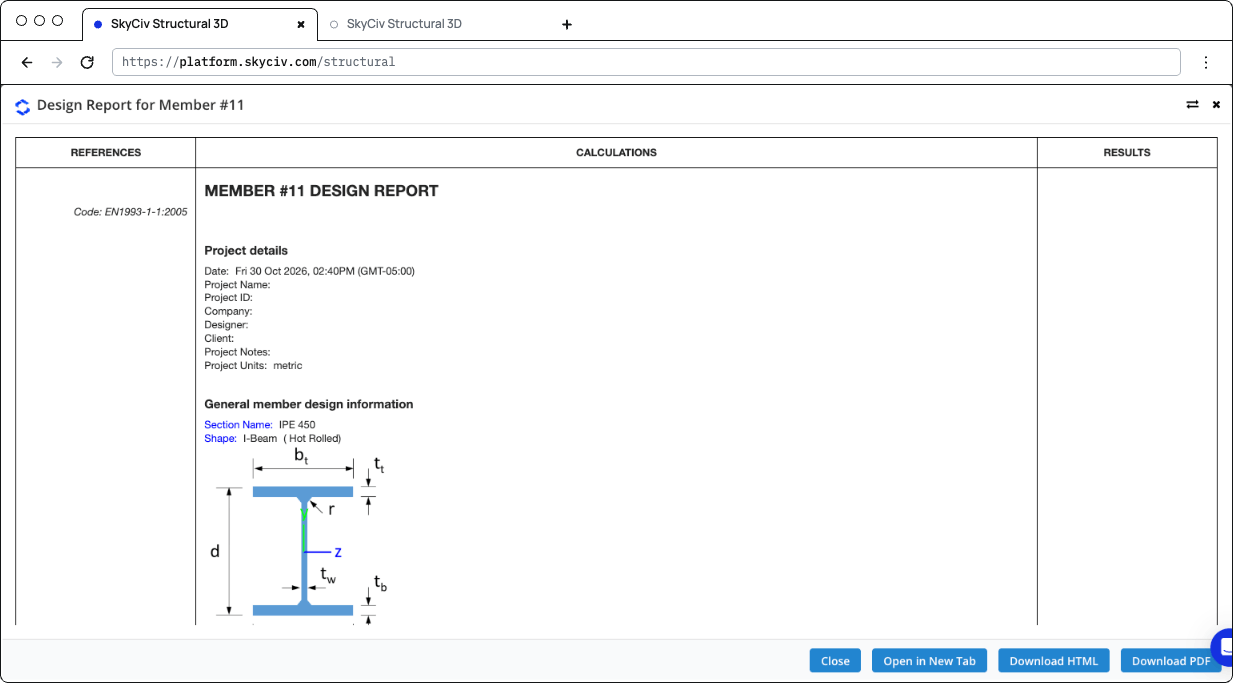
Click the report icon of a member to open its design report, içinde Üye #n için Tasarım Raporu ile diyalog Kapalı, Yeni Sekmede Aç, HTML'yi indir ve PDF'yi indir. The report shows the references (clauses), the calculations and the result (STATUS PASS veya HATA) of each check:
- Proje ayrıntıları ve General member design information: the section, its shape and fabrication (hot-rolled or welded), the material properties and the design parameters
- Design Internal Forces: the governing forces used for each check
- The checks of axial strength (gerilim veya sıkıştırma), axial buckling strength, flexural strength about the major and minor axes, lateral-torsional buckling resistance, interaction of combined resistance, interaction of combined buckling, shear strength along y and z and, when performed, burulma
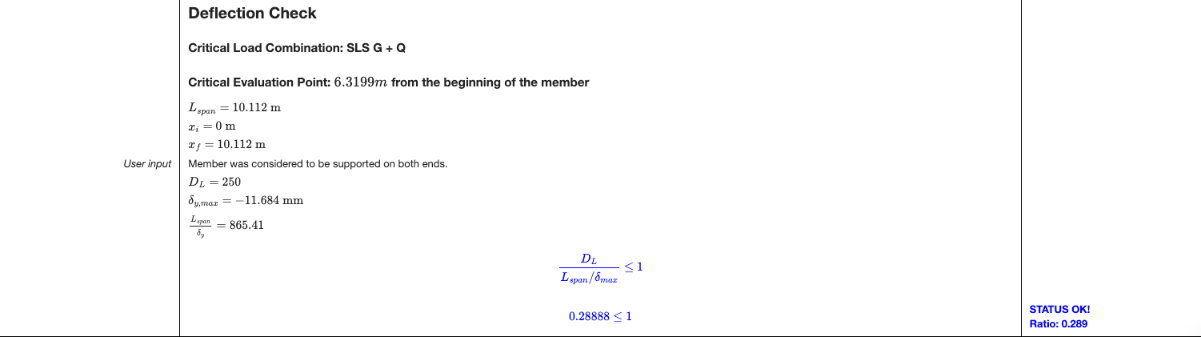
- Deflection Check: the critical serviceability load combination and position, the span, the maximum deflection and the ratio to the limit
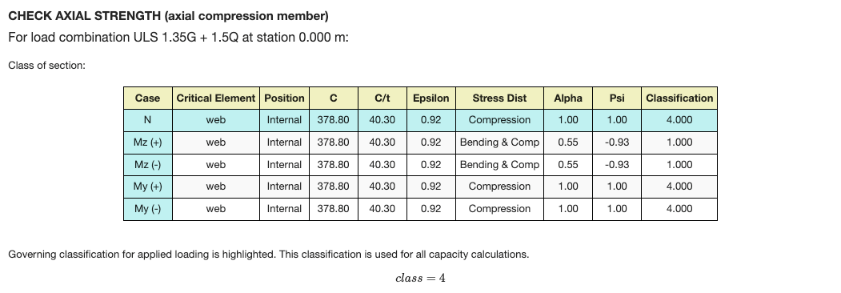
Each check gives the load combination and station that govern it, and the section classification table for that limit state: the class of each element (ağ, flanşlar) for the axial force and for bending about each axis, with the governing class highlighted. Bir Sınıf İçin 4 Bölüm, the effective properties are used. When the shear force is high (6.2.8), the reduced yield strength is used for the resistances.
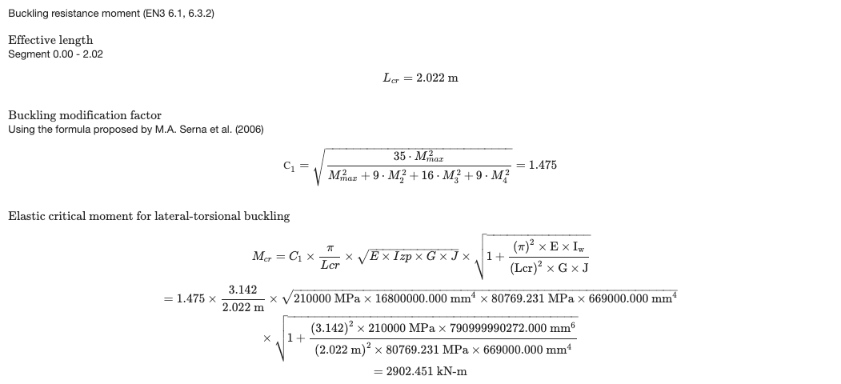
The lateral-torsional buckling check is calculated for the segment where the governing station is, with its Lsonucu AISI S100-12'ye göre hesaplayacaktır ve C1. When C1 dır-dir oto, it is calculated from the moments along the segment with the formula proposed by Serna et al. (2006). The report then gives Msonucu AISI S100-12'ye göre hesaplayacaktır, the non-dimensional slenderness, the buckling curve and the reduction factor χacı.
The deflection check is performed when the model has serviceability load combinations and Gerginlik için narinlik oranıL daha büyüktür 0. Otherwise the report says that the deflection check was skipped.
Tıklayın Özet on the Results tab to open the summary report. Proje ayrıntılarını listeler (Tasarım kodu, user name and unit system), the design factors, materyaller, the section dimensions and properties, the properties of each member (buckling lengths, Lsonucu AISI S100-12'ye göre hesaplayacaktır, C1, Cm factors and limits), the results of all the members and the definitions of the symbols.
Yapılan kontroller
Here are the details of some of the checks performed by the module.
Slenderness Ratio Check
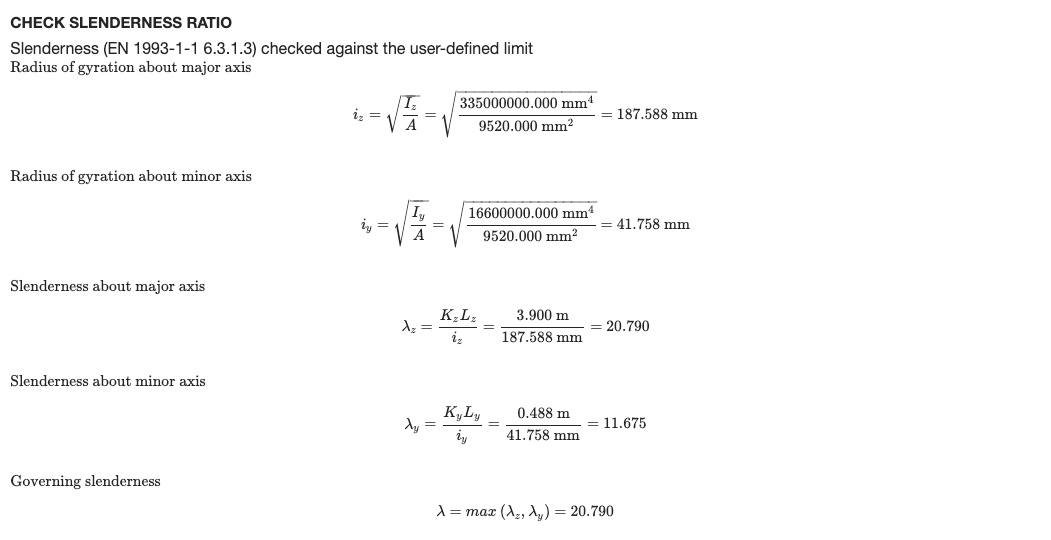
Each member is checked against the slenderness limits entered in the Üyeler sekme: hücrelerdeki değerleri değiştirerekC for members in compression (200 varsayılan olarak) ve hücrelerdeki değerleri değiştirerekT for members in tension or without axial force (300 varsayılan olarak). The slenderness is calculated about both axes from the effective length and the radius of gyration about the same axis:
- λile = KileLile / benile about the major axis, with iile = √(benile / Bir)
- λY = KYLY / benY about the minor axis, with iY = √(benY / Bir)
The governing slenderness λ = max(λile, λY) is divided by the limit, and the member passes when this ratio is 1.0 narinlik oranı. The slenderness check is listed in the Sl column of the Results tab.
To show this check in the detailed report of each member, open the settings (the gear button next to Soğuk şekillendirilmiş elemanlar aşağıdakilere uygun olarak tasarlanırken) and tick Show slenderness check in the report. It’s off by default.
The report then has a Check Slenderness Ratio section after the buckling check, with the radii of gyration, the slenderness about each axis, the governing slenderness and its ratio to the compression and/or tension limit, with a PASS or FAIL status.