
FREE TOOLS
Column Calculator
The SkyCiv Column Calculator is a free tool for engineers analyzing compression members or columns (made with structural steel) and can also function as a column steel or beam column analysis calculator. Columns endure both vertical (axial) and horizontal (lateral) loads and this calculator assists in evaluating the structural integrity through considering column properties (Young’s Modulus, Moment of Inertia (Iy, Iz), Column Length, and Support Types), as well as load values (Lateral Load, Distance, and Axial Load). Based on these inputs, the calculator provides essential outputs which include the minimum and maximum shear forces, minimum and maximum moments, and displacement in both X and Y directions. Replace your engineering column excel spreadsheet using this calculator. By utilizing this tool, engineers can make informed decisions to ensure that the columns can withstand a range of loading scenarios while maintaining safety and structural stability.
Contents
About this Column Calculator
How are column results calculated?
The outputs of the Quick Design calculator include the minimum and maximum shear forces, minimum and maximum moments, and displacement in both X and Y directions and is calculated using the following inputs:
Column Properties:
- Young’s Modulus (E)
- Moment of Inertia (I_y)
- Moment of Inertia (I_z)
- Column Length (L)
- Bottom Support
- Top Support
Load Values:
- Lateral Load (L1)
- Distance (d)
- Axial Load (L2)
These results are are all calculated in the above column size calculator with SkyCiv’s powerful FEA analysis solver, the same used in our Structural 3D program.
Types of Column Loads
Columns in structures are subjected to different types of loads, which influence their behavior and structural performance. The primary types of loads include:
- Axial Loads: Forces applied along the column’s longitudinal axis, either in compression (pushing) or tension (pulling). These are the most common loads for vertical columns.
- Lateral Loads: Forces applied perpendicular to the column’s longitudinal axis, such as wind, seismic activity, or horizontal pressure. Lateral loads cause bending in the column and affect stability.
- Eccentric Loads: Loads whose line of action does not pass through the centroid of the column’s cross-section, producing both axial and bending stresses.
- Combined Loads: Columns often experience a combination of axial, lateral, and eccentric loads. Evaluating combined loading is essential to ensure safety and prevent failure modes like buckling or excessive deflection.
Understanding these load types helps engineers select appropriate column sizes, materials, and support conditions for safe structural performance.
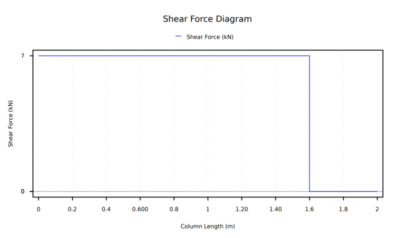
The column shear force diagram displays both the minimum and maximum shear force values based on the inputs provided and illustrates how shear force varies along the length of the column under different column properties and applied loads. Through this visual diagram, engineers are able to depict shear forces at several points which are subject to both axial and lateral forces, identify critical positions and variations along the column, and ensure structural stability and safety.
If you want to gain a deeper understanding of the column shear force diagram and understand the column calculations and steps to create this diagram, then SkyCiv has a detailed tutorial on ‘Calculating Shear Force Diagrams‘ to get you started.
Bending Moment of Column
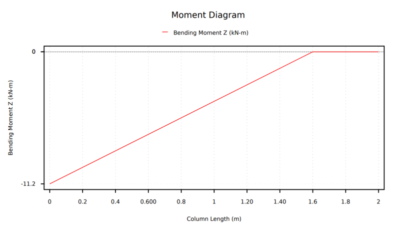
The bending moment of the column diagram displays both the minimum and maximum moment values based on the inputs provided and illustrates how the bending moment value varies along the length of the column under different column properties and applied loads. Through graphically depicting these bending moment values, engineers are able to capture critical points such as the minimum and maximum bending moments, as well as areas and regions where the bending moment significantly changes. This diagram serves as a crucial tool to help engineers understand the structural behavior of the column at different points, and ensure stability and safety.
If you want to gain a deeper understanding of the bending moment of the column diagram and understand the column calculations and steps to create this diagram, then SkyCiv has a detailed tutorial on ‘What is Bending Moment?‘ to get you started.
Column Displacement
The column displacement diagram displays both the displacement X and displacement Y values based on the inputs provided and illustrates how the displacement value varies along the length of the column under different column properties and applied loads. By plotting the displacements along the column length, engineers are able to visualize how the column deflects at various points and identify critical positions such as maximum or minimum displacement and assess the stability of the column or structure. In structural engineering, all columns experience deformations when subjected to loads and this diagram provides a valuable tool to understand the column behavior, allowing engineers to accommodate deformations and ensure stability and safety.
About SkyCiv
As well as our column calculator SkyCiv offers a wide range of Cloud Structural Analysis and Design Software for engineers. As a constantly evolving tech company, we’re committed to innovating and challenging existing workflows to save engineers time in their work processes and designs.
PRICING
Access SkyCiv Quick Design
Column Calculator FAQ’s
Your Questions Answered

Intuitive Interface
Our easy to learn, powerful to use, intuitive interface allows you to quickly access all the features you need. Packed with smart features like the Pen tool, Repeat/Mirror, and Bulk Editing.Your Content Goes Here

Comprehensive Design Code Support
Our software supports a comprehensive array of steel, wood, and concrete design codes including AISC, EN, AISI, NDS, AS, and CSA.

API Technology
SkyCiv is a customised solution featuring seamless integrations, easy implementations, automated reports and a scalable design and architecture.

24/7 Customer Support
SkyCiv is a customised solution featuring seamless integrations, easy implementations, automated reports and a scalable design and architecture.
