
FREE TOOLS
Cold-Formed Steel Design Calculator
The SkyCiv Cold-Formed Steel Design Software assist structural engineers in determining member capacities and performing limit state design in accordance with the selected design code. The tools support all standard AS/NZS, AISI, CSA and Eurocode 3 cold-formed steel sections, and also allow for custom standards and steel grades to be designed. Designs to AS/NZS 4600, AISI S100-16 and CSA S136-16 use the Direct Strength Method (DSM), which typically gives approximately 10% higher member capacities than the Effective Width Method (EWM) used in EN 1993-1-3. The Cold-Formed Steel Design Software is part of the SkyCiv Quick Design module.
Versions of the Cold-Formed Steel Design Calculator are available for:
- Australia and New Zealand – AS/NZS 4600:2018
- United States and Mexico – AISI S100-16 (North American Specification)
- Canada – CSA S136-16 (R2026)
- Europe and UK – EN 1993-1-3 (Eurocode 3)
This is a preview of our full version cold-formed steel design software, which also includes the following premium features when you subscribe to either our Quick Design Module or SkyCiv Professional:
- Premium: Integration with SkyCiv’s analysis software for more comprehensive analysis.
- Premium: Full results, no lockouts.
- Premium: Full reporting capabilities and analysis of sections.
Contents
About the Cold-Formed Steel Design Software
Which cross-sections are supported?
The cold-formed steel design software by SkyCiv supports a diverse range of cold-formed steel sections and grades from the SkyCiv Australian, Canadian, European, New-Zealand and AISI Section Library. It adheres to AS/NZS 4600:2018, CSA S136-16, EN 1993-1-3 and AISI S100-16 standards, providing an efficient tool for structural design and analysis.
AS/NZS 4600:2018
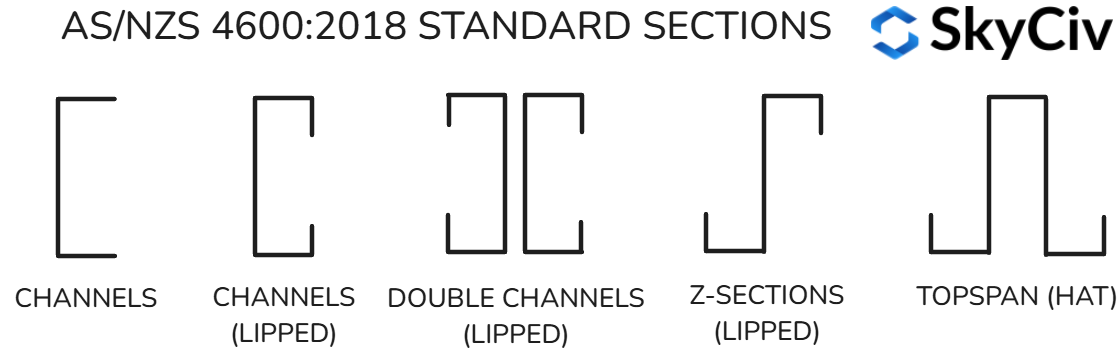
The calculator includes support for the following standard cold-formed steel section types commonly used in Australia and New Zealand:
- Channels
- Lipped Channels
- Double Lipped Channels
- Lipped Z Sections
- Hat Sections
AISI S100-16
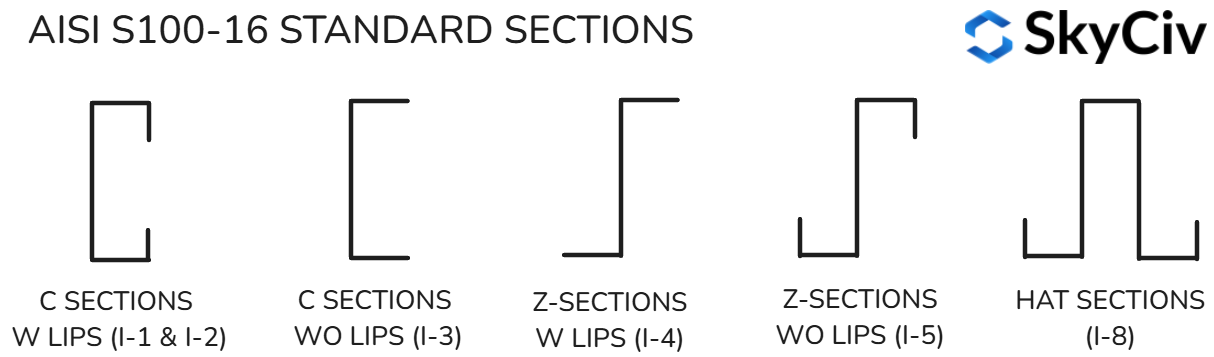
The calculator supports the majority of steel sections in the AISI Cold-Formed Steel Design manual, listed below:
- C-Sections with Lips (I-1, I-2)
- C-Sections without Lips (I-3)
- Z-Sections with Lips (I-4)
- Z-Sections without Lips (I-5)
- Hat Sections (I-8)
CSA S136-16
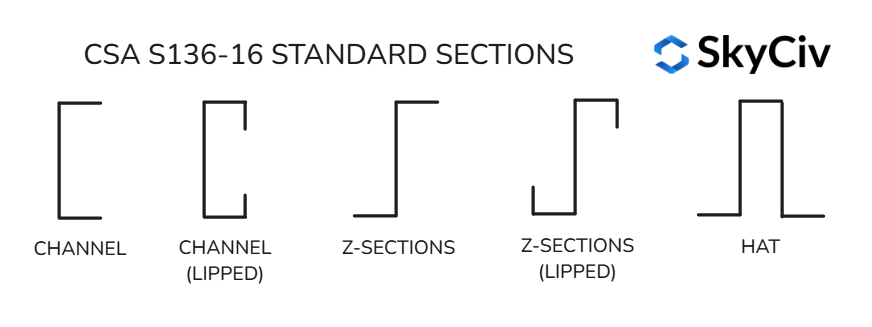
The calculator supports a range of standard Canadian sections from published standard and manufacturer manuals such as CSSBI:
- Channels
- Channels (Lipped)
- Z-Sections
- Z-Sections (Lipped)
- Hat
EN 1993-1-3
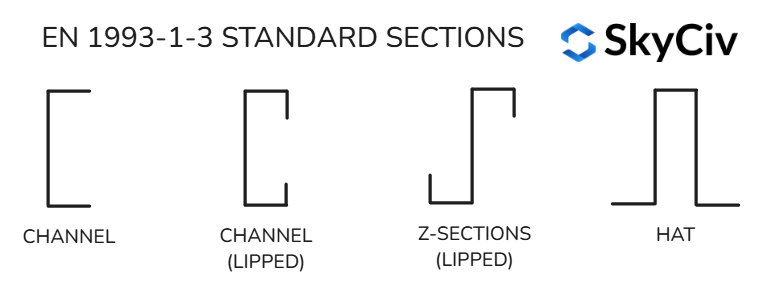
The calculator supports sections from manufacturers such as Lindab, Ruukki and Metsec:
- Channels
- Channels (Lipped)
- Z-Sections (Lipped)
- Hat
What design checks are carried out?
The cold-formed steel calculator performs a comprehensive range of section and member capacity checks.
In accordance with AS/NZS 4600:2018:
- Section Symmetry – Clause 2.1.1
- Compression Capacity – Clause 2.3.1
- Tension and Biaxial Bending Capacity – Clause 3.2
- Lateral-Torsional Buckling – Clause 3.3.2
- Local and Distortional Buckling – Clause 3.3.3
- Shear Moment Compression / Tension Factor – Clause 3.3.3.2.1
- Member Pre-Qualification – Table 7.1
- Capacity Factors – Clause 7.2
- Section Moment Capacity – Clause 7.2.1
- Member Moment Capacity – Clause 7.2.2
- Shear Capacity – Clause 7.2.3
- Unequal End Moment Factor – Clause D2.1.1
- Moment Compression Face Factors – Clause D2.1.1.2
In accordance with AISI S100-16:
- Tension Strength – Appendix 1.1.1(a) and Section E3.1
- Compression Strength – Section E2 / E3 / E4 and Appendix 2
- Distortional Buckling – Section E4 and F4
- Flexure Strength – Section F2 / F3 / F4 and Appendix 2
- Shear Strength – Section G2.1 and G5
- Combined Tensile Axial Load and Bending – Section H1.1
- Combined Compressive Axial Load and Bending – Section H1.1
- Combined Bending and Shear – Section H2
In accordance with CSA S136-16:
- Tension Strength – Section D2 and D3
- Compression Strength – Section E2 / E3 / E4 and Appendix 2
- Distortional Buckling – Section E4 and F4
- Flexure Strength – Section F2 / F3 / F4 and Appendix 2
- Shear Strength – Section G2.1
- Combined Tensile Axial Load and Bending – Section H1.1
- Combined Compressive Axial Load and Bending – Section H1.2
- Combined Bending and Shear – Section H2
In accordance with EN 1993-1-3:2006:
- Average Yield Strength (Cold-Forming Effect) – Clause 3.2.2
- Effective Width of Plane Elements – Clause 5.5.2 (EN 1993-1-5 Clause 4.4)
- Edge Stiffeners (Distortional Buckling) – Clause 5.5.3
- Tension Resistance – Clause 6.1.2
- Compression Resistance – Clause 6.1.3
- Bending Moment Resistance – Clause 6.1.4
- Shear Resistance – Clause 6.1.5
- Combined Tension and Bending – Clause 6.1.8
- Combined Compression and Bending – Clause 6.1.9
- Flexural Buckling – Clause 6.2.2
- Torsional and Torsional-Flexural Buckling – Clause 6.2.3
- Lateral-Torsional Buckling – Clause 6.2.4
What are DSM Factors?
In the cold-formed steel design software, DSM factors are used to determine the elastic buckling capacities of each section. These factors form a key part of cold-formed steel design, allowing the software to account for local, distortional, and flexural buckling effects in accordance with relevant design standards.
The calculator displays the following Direct Strength Method (DSM) factors for each section.
These are elastic buckling stresses (MPa) in accordance with AS/NZS 4600 Clause 7 , AISI S100-16 and CSA S136-16 Appendix 2.
| Factor | Description | Units |
|---|---|---|
fo,l,c |
Local buckling stress under axial compression | ksi / MPa |
fo,d,c |
Distortional buckling stress under axial compression | ksi / MPa |
fo,l,bx,pos |
Local buckling stress under positive bending about x-axis | ksi / MPa |
fo,l,bx,neg |
Local buckling stress under negative bending about x-axis | ksi / MPa |
fo,d,bx,pos |
Distortional buckling stress under positive bending about x-axis | ksi / MPa |
fo,d,bx,neg |
Distortional buckling stress under negative bending about x-axis | ksi / MPa |
fo,l,by,pos |
Local buckling stress under positive bending about y-axis | ksi / MPa |
fo,l,by,neg |
Local buckling stress under negative bending about y-axis | ksi / MPa |
fo,d,by,pos |
Distortional buckling stress under positive bending about y-axis | ksi / MPa |
fo,d,by,neg |
Distortional buckling stress under negative bending about y-axis | ksi / MPa |
Note:
l = local,
d = distortional.
Positive and negative bending directions correspond to the compression face as follows:
- Positive Moment about X-axis → Compression at the bottom
- Negative Moment about X-axis → Compression at the top
- Positive Moment about Y-axis → Compression at the right
- Negative Moment about Y-axis → Compression at the left
What is EWM?
For EN 1993-1-3, the calculator uses the Effective Width Method (EWM) in accordance with Clause 5.5 instead of DSM factors. Rather than checking the gross section against elastic buckling stresses, EWM reduces the width of each slender element in compression. Only the effective portion of the section is then used to calculate its resistances.
- Local buckling is accounted for by reducing each plate element to an effective width, beff = ρb, in accordance with Clause 5.5.2 and EN 1993-1-5 Clause 4.4.
- Distortional buckling is accounted for by reducing the thickness of edge stiffeners (lips) in accordance with Clause 5.5.3.
- Effective section properties are calculated iteratively for each load case until they converge. The effective area (Aeff) is used for compression and the effective section modulus (Weff) for bending.
Light gauge steel vs cold formed steel
Light gauge steel (LGS) and cold-formed steel (CFS) are both terms for steel that is shaped at room temperature (cold-formed) without heat, relying on mechanical processes to achieve strength and shape. These steel sections are produced with a cold-rolling process that uses rollers to transform steel sheets into various profiles with different thicknesses. Light gauge steel (LGS), often discussed in the context of light gauge steel design, typically refers to thinner (typically less than 3mm or 0.12 in) steel sections often used for non-load-bearing elements in structures such as framing and partitions. In contrast, Cold Formed Steel (CFS) is used in more complex profiles like C-sections, Z-sections, and Hat-sections that are found in common structural members such as purlins, girts, and framing elements.
What can the cold-formed steel design software be used for?
The cold-formed steel software can be used to design a wide range of cold-formed steel structural beams, columns and members. This includes the design of the following in accordance with AS/NZS 4600, AISI S100-16, CSA S136-16 or EN 1993-1-3:
- Purlins
- Girts
- Z-section beams
- Steel Wall Studs
- CFS tracks
- Complex cold-formed framing and structural partition systems
Additionally, the tools support the design of other cold-formed steel profiles, such as C-sections (both plain and lipped) and Hat-sections ensuring compliance with the relevant standards for a variety of structural applications.
Axis Convention for Cold-Formed Steel Design
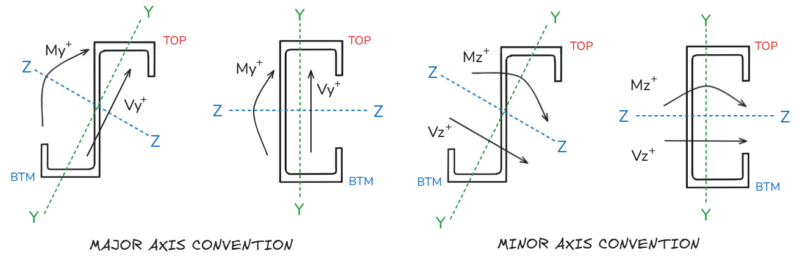
The axis conventions used in the cold formed steel design software are displayed graphically below.
For sections with an inclined principal axis (angles), the conventions displayed below are rotated counter clockwise by the principal axis angle (α).
Loading inputs will be converted to principal / geometric axis directions by the principal axis angle where required.
AS 4600 section symmetry
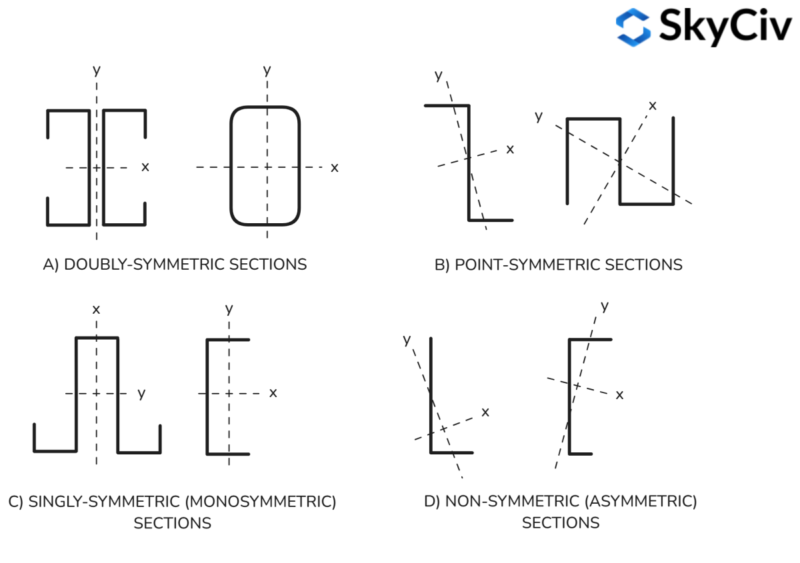
Clause 2.1.1 of AS/NZS 4600:2018 defines section symmetry, classifying sections as doubly, point, singly (monosymmetric) or non (asymmetric), which impacts their structural behaviour under loads. The figure below visually illustrates these classifications, highlighting how section geometry influences buckling resistance and load distribution.
What shapes and material grades are supported by the Cold-Formed Steel Design Calculator?
The Cold-Formed Steel Design Calculator supports a wide range of standard and manufacturer-specific cold-formed steel shapes and material grades, in accordance with the relevant regional design codes.
AS/NZS 4600:2018 – Australia and New Zealand
This version includes extensive support for cold-formed steel sections used across Australian and New Zealand manufacturers. Supported manufacturers include:
- Lysaght
- Enduroframe
- FrameCAD
- Metalcraft
- Metroll
- Millform
- Steeline
- Stramit
- Stratco
- Studco
The calculator includes a comprehensive library of the following cold-formed steel shapes:
- Channels
- Channels (Lipped)
- Double Channels (Lipped)
- Z-Sections (Lipped)
- Topspan (Hat)
- Cee
- U
- MC Purlins
- MZ Purlins
- MS Tophats (Lipped)
- Megaspan C Purlin
- Megaspan Z Purlin
- Extreme C Purlins
- Extreme Z Purlins
- Exacta Cee
- Exacta Zee
- Deflection Head Track
- Steel Stud
The following material standards are available, each offering various material grades, and custom grades are also supported:
- AS/NZS 1163
- AS 1397
- AS/NZS 1594
- AS/NZS 1595
- AS/NZS 3678
AISI S100-16 – United States, Canada, and Mexico
This version supports all standard AISI cold-formed steel sections in accordance with the North American Specification (AISI S100-16) as well as the following North American Manufacturers:
- CEMCO
- ClarkDietrich
- MarinoWARE
- SSMA
- SUPREME
The calculator includes a comprehensive library of the following cold-formed steel shapes:
- C-Sections W Lips (I-1)
- C-Sections W Lips (I-2)
- C-Sections WO Lips (I-3)
- Z-Sections W Lips (I-4)
- Z-Sections WO Lips (I-5)
- Hat Sections (I-8)
- Stud
- Track
- U-Channel
- CR Channel
- Track (T)
- U-Channel (U)
- Track (SFT)
The following material standards are available, each offering various material grades, and custom grades are also supported:
- Gr. 33
- Gr. 37
- Gr. 40
- Gr. 50
- Gr. 55
- Gr. 60
- Gr. 70
- Gr. 80
CSA S136-16 – Canada
This version supports all standard AISI and CSSBI cold-formed steel sections in accordance with CSA S136-16, as well as the following manufacturers:
- BEHLEN
- CEMCO
- ClarkDietrich
- ExSteel
- MarinoWARE
- Purlin Mill
- SUPREME
The calculator includes a comprehensive library of the following cold-formed steel shapes:
- C-Sections W Lips (I-1)
- C-Sections W Lips (I-2)
- C-Sections WO Lips (I-3)
- Z-Sections W Lips (I-4)
- Z-Sections WO Lips (I-5)
- Hat Sections (I-8)
- C
- Z
- Cees
- Zees
- Non-Standard Cees
- Non-Standard Zees
- Stud
- Joist
- Track
- Track (SFT)
- U-Channel
- CR Channel
- Furring Channel
The following material grades are available, and custom grades are also supported:
- Gr. 33
- Gr. 37
- Gr. 40
- Gr. 50
- Gr. 55
- Gr. 60
- Gr. 70
- Gr. 80
EN 1993-1-3:2006 – Europe
This version supports cold-formed steel sections in accordance with EN 1993-1-3:2006 from the following European manufacturers:
- Lindab
- Metsec
- Ruukki
The calculator includes a library of the following cold-formed steel shapes:
- C
- Z-Purlin
- Lipped Z-Purlin
- U-Purlin
- Hat Section
The following material grades are available, and custom grades are also supported:
- S220GD
- S250GD
- S280GD
- S320GD
- S350GD
- S390GD
- S420GD
- S450GD
SkyCiv Quick Design Software
SkyCiv offers a wide range of Cloud Structural Analysis and Engineering Design Software, including:
- I Beam Capacity Calculator
- Aluminum Beam Calculator
- Purlin Design Calculator
- Bolt Group Capacity Calculator
- Weld Group Capacity Calculator
- AS 4100:2020 Steel Beam Calculator
- Eurocode 3 Steel Beam Calculator
- Rafter Length Calculator
As a constantly evolving tech company, we’re committed to innovating and challenging existing workflows to save engineers time in their work processes and designs.
PRICING
Access SkyCiv Quick Design

Intuitive Interface
Our easy to learn, powerful to use, intuitive interface allows you to quickly access all the features you need. Packed with smart features like the Pen tool, Repeat/Mirror, and Bulk Editing.Your Content Goes Here

Comprehensive Design Code Support
Our software supports a comprehensive array of steel, wood, and concrete design codes including AISC, EN, AISI, NDS, AS, and CSA.

API Technology
SkyCiv is a customised solution featuring seamless integrations, easy implementations, automated reports and a scalable design and architecture.

24/7 Customer Support
SkyCiv is a customised solution featuring seamless integrations, easy implementations, automated reports and a scalable design and architecture.
