
You can share your SkyCiv files and folders with any other SkyCiv user, and share whole projects with your team from the Project Manager. Because SkyCiv works 100% in de wolk, everyone works on the same file, updated in real time, in SkyCiv’s cloud structurele analysesoftware and the other SkyCiv modules.
Your models can be shared at any time, met iedereen die een SkyCiv-account heeft. Jij en je team kunnen vol vertrouwen samenwerken aan één enkele bron van waarheid, wetende dat u toegang hebt tot het meest actuele bestand.
"You and your team can collaborate on a enige bron van waarheid, alles in realtime! Geen USB's, geen compatibiliteitsproblemen met software, FTP's of versiebeheer."
Sharing is useful for:
- Teams die aan één ontwerp werken
- Sharing with SkyCiv Support for live support on your current model
- Mappen delen, voor teamorganisatie
- School and university team projects
Sharing a File from the File Manager
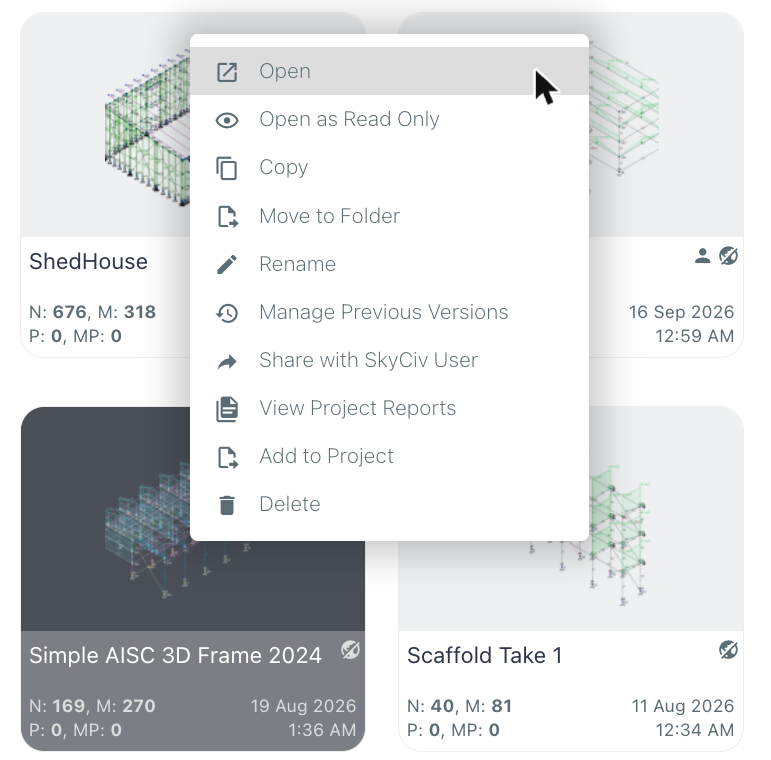
To share a file or folder, open the SkyCiv-bestandsbeheer, right-click the model and click Deel met SkyCiv-gebruiker:
De Share File with SkyCiv Users window opens. Enter the emails of the SkyCiv users you want to share the model with (separate several emails with commas or new lines), then choose how to share it:
- Delen (de standaard): they work on your model, and every change is saved to the same file in real time.
- Send Copy: they get their own copy of the model, and can modify it without affecting yours.
You also control their permissions: whether they Can Edit the model and Can Share it with others (everyone you share with Can View het). Klik Verzenden to share.
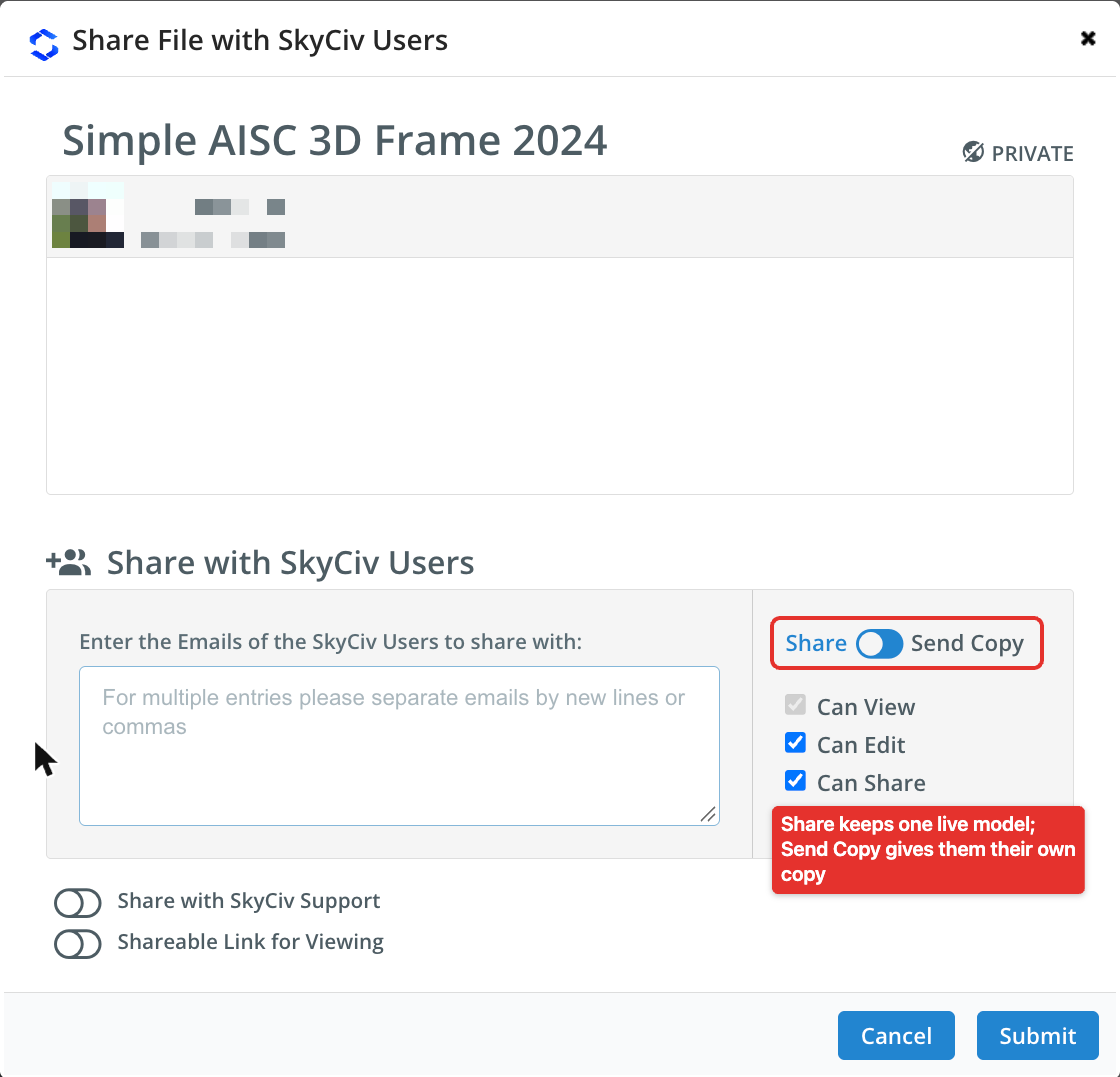
At the bottom of the window, Delen met SkyCiv-ondersteuning gives our support team access to the model, so they can help you with it directly, en Shareable Link for Viewing creates a link to view the model.
Files that have been shared with you automatically appear in your Gedeeld met mij folder in the File Manager. The people you share with also receive an email to let them know a model has been shared with them.
Wat gebeurt er als twee gebruikers het model tegelijkertijd bewerken??
Als een tweede technicus probeert het bestand in te voeren terwijl iemand al aan het bewerken is, het SkyCiv-platform zal dit detecteren en de tweede gebruiker op de hoogte stellen. Dat kunnen ze ook Overnemen of Toegang verlaten voor de ingenieur die momenteel aan het project werkt.
Sharing Projects in the Project Manager
The SkyCiv Project Manager groups the files of a project from any SkyCiv module, from analysis through to design, with their reports. To add a file to a project from the File Manager, right-click it and click Toevoegen aan project (see the menu above), then pick the project.
To share a whole project with your team, Klik op de Delen optie aan de linkerkant van de Project Manager-werkbalk. Eenmaal gedeeld, all teammates listed in the My Team section of your account see the project and its files. Learn more in sharing projects with your team, and see Teamaccount instellen to add teammates.
Notitie: only SkyCiv Business Accounts have access to project sharing.
