
SkyCiv 订阅有一些限制,具体取决于什么 您正在订阅 保护帐户不被过度共享. 学生, Basic 和 Professional 帐户均设计为供单个用户使用,不可共享. 任何帐户限制都可能导致软件锁定. For teams, 的 企业账户 gives each team member their own login to a shared license, limited by the number of simultaneous users rather than by one person’s devices and IP addresses. 联系我们 for more information on Business Accounts.
设备限制
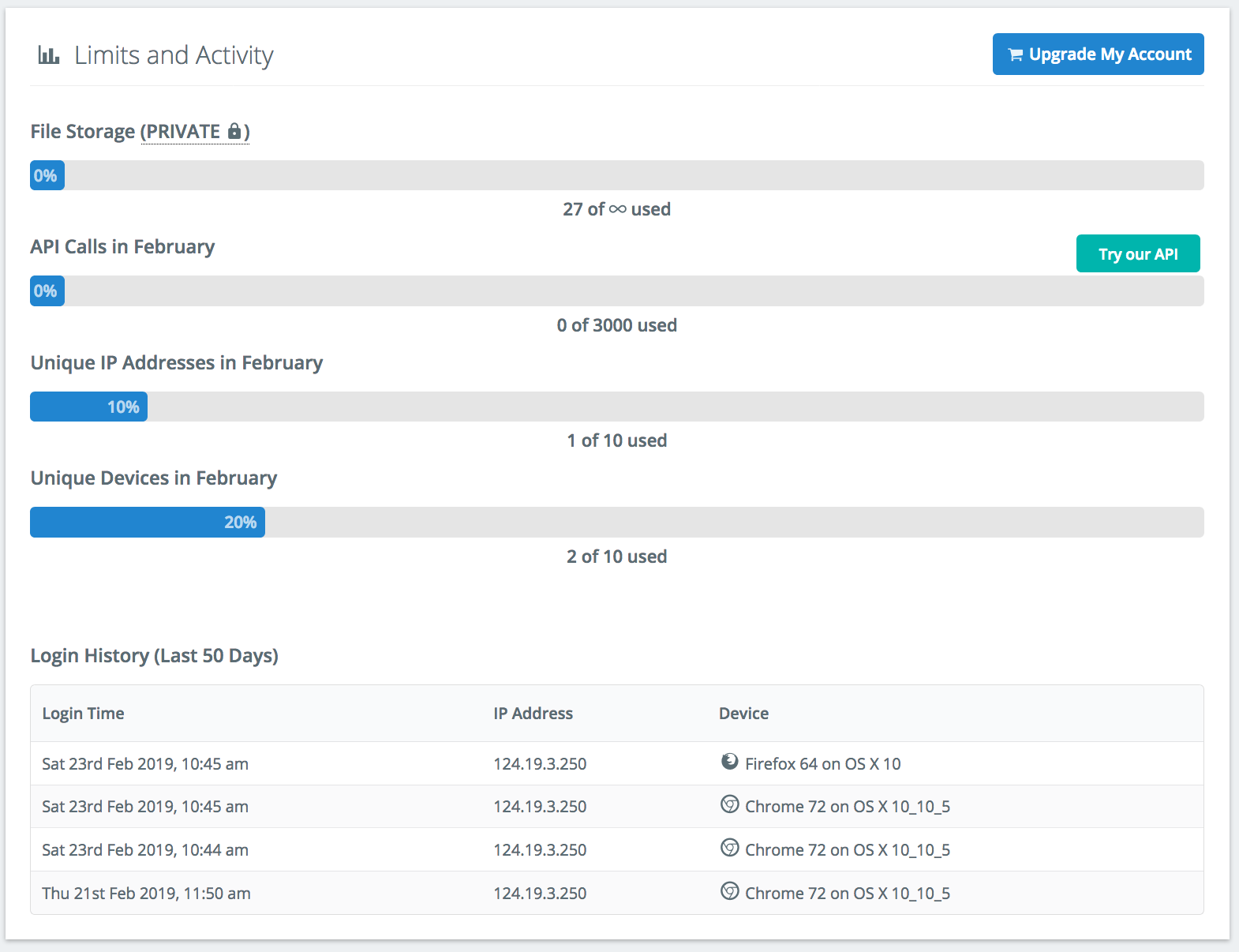
设备限制是一种确保您的帐户安全并防止帐户被共享的措施. 帐户跟踪每次登录,以便用户可以监控自己的帐户和使用情况. 设备的一些示例是; 火狐浏览器 64 在 OS X 上 10, 铬合金 72 在 Windows 上 10, 苹果浏览器 10.1.2 在 iPhone X 上. 您可以随时查看您的限额 帐号设定 -> 限制和活动:
IP限制
类似于设备限制, SkyCiv 帐户受到给定月份内您可以访问 SkyCiv 的 IP 地址数量的限制. 限制在每个日历月的第一天重置. 限制和活动将显示使用的 IP 地址数量,以便您管理您的使用情况并防止锁定.
同时登录
SkyCiv 帐户仅供单个用户使用, 所以如果两个用户同时尝试登录, 该帐户将检测到同时登录并自动注销第一个用户. 他们将收到以下消息:
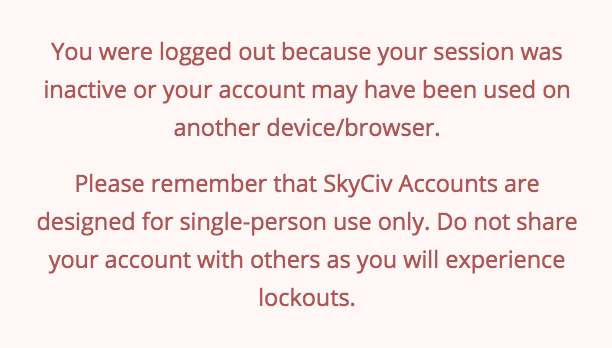
保持您的登录凭据的私密性和安全性非常重要,以防止出现任何可访问性问题. 同时登录过多会导致软件锁定.
如果我被锁在门外会怎样?
如果你被锁在门外, 您的帐户将在本月的剩余时间内停用. 帐户限制会在每个月初自动重置. 如果你被锁在门外, 给我们发电子邮件 [email protected] 我们可以为您重置您的限额.
我怎样才能增加这些限制?
特殊情况下, SkyCiv 可以增加这些限制. 然而, 在团队使用的情况下, 应添加另一个帐户以降低软件锁定的风险. Business Accounts are designed for team usage: each team member has their own login, and several team members can use the software at the same time.
防止锁定的提示
以下是避免单个用户不必要的锁定的一些提示:
- 避免切换浏览器 – 切换浏览器通常会注册新设备,因为平台会检测到完全不同的浏览器系统. 例如, 如果您使用 Chrome, 整个月坚持使用 Chrome. 您可以在同一浏览器中打开 SkyCiv 的多个选项卡,没有任何问题.
- 如果切换设备则注销 – 最好先注销一台设备,然后再登录另一台设备,以防止误操作 同时 登录.
- 通知我们浮动 IP 地址 – 一些互联网提供商使用浮动 (或动态) 周期性变化的IP地址. 这些可能会导致不必要的锁定, 如果您确实使用其中之一,请告知支持团队,我们可以提供帮助.
- 为多个用户添加席位 – 如果您的帐户被多人使用, 您可以通过升级页面快速轻松地添加座位. 或者, 您可以联系 SkyCiv 支持团队添加更多设备/IP 限制
或者, 如果您仍有问题, 请联系我们的支持团队,我们将很乐意提供帮助.
企业帐户
A Business Account is limited by the number of team members who can use SkyCiv at the same time (its simultaneous users), rather than by one person’s devices and IP addresses. The answers below cover common questions about active sessions on a team account. For how team members and simultaneous users are set up, 看到 团队成员和同时用户.
I left SkyCiv open on another computer. Can I still log in?
是的. If you left SkyCiv open on your work computer and log in from home, the new login signs you out of the first one, so you only ever use one simultaneous user seat. You don’t need to go back to the first computer to log out.
Do inactive sessions count toward the simultaneous user limit?
Only a session that is open and running counts as an active session: SkyCiv has to be open in a browser tab for the user to take up a seat. Inactive users are logged out automatically, which frees their seat for another team member.
Can the account admin log out a team member to free up a seat?
没有, the account admin can see which team members are logged in and how recently each one was active, but can’t log a team member out remotely. This is deliberate: a team member who is still logged in may be in the middle of a model, and logging them out could lose their work. Once their session becomes inactive, it is logged out automatically and the seat is freed, without removing them from the team account.
API积分
Paid SkyCiv accounts include a monthly allowance of API credits, used when you run analysis, design and other tasks through the SkyCiv API. Credits more or less work the same way on Student, 基本的, 专业的, Business and other accounts: the allowance is a starting point, and more credits can be added if you need them. The major difference is multi-seat Professional and Business Accounts have a shared allocation of API credits for the team.
Do API credits scale with the number of users?
没有, the API credits included with an account are a single allowance for the whole account. For examplem with a Business Account, 的 300 API credits per month are shared by the team and don’t increase with the number of team members or simultaneous users.
Can I buy additional API credits?
是的, additional API credits can be added to any account in packs of 100 extra credits per month. On a Business Account, the extra credits are shared by the whole team. 联系我们 to add API credits to your account.
