Software di progettazione di elementi in acciaio per Eurocodice 3 (NEL 1993-1-1:2005)
Among the many design standards SkyCiv offers is Eurocode 3 (NEL 1993-1-1:2005), Euro. The module checks hot-rolled and welded steel members to the Ultimate Limit State, with a deflection check for the Serviceability Limit State. It runs in SkyCiv Structural 3D, where it reads the members, sezioni, materiali, forces and load combinations of your model.
Con questo modulo puoi:
- Design I-shapes, Forme a T, angoli, channels and hollow sections (RHS, SHS and CHS)
- Classify the cross-section (Classe 1, 2, 3 o 4) for each load combination and limit state, with effective properties for Class 4 sezioni
- Check the resistance of cross-sections to tension, compressione, bending about both axes and shear, including the reduction of the yield strength for high shear
- Check the combined resistance of cross-sections (bending and axial force)
- Check the buckling resistance of members: flessionale, torsional and torsional-flexural buckling in compression, lateral-torsional buckling in bending, and combined bending and axial compression with the interaction factors of Annex A or Annex B
- Split each member into lateral-torsional buckling segments, with C1 calculated from the bending moment diagram or entered by you
- Optionally check torsion (basic stress check) for I-shapes and rectangular hollow sections
- Check the slenderness ratio (KL/r) against limits for compression and tension, optionally shown in the detailed report
- Check deflections against a span/deflection limit
- View the design ratios on the 3D model
- Export detailed step-by-step reports and a summary report, as HTML or PDF (Logo personalizzato acceso Enterprise)
- Controlli di taglio (Esegui Designer) per trovare la sezione più efficiente
- Completamente verificato con risultati di terze parti
Supporto della versione corrente
sezioni
- I-Beam (I-shapes and H-shapes, hot-rolled or welded)
- T-Beam
- Angolo
- o scanalatura
- Rettangolare vuoto (RHS and SHS)
- Circolare cava (CHS)
The material must be steel. A Class 4 circular hollow section is outside the scope of the module and stops the check with an error message.
unità
The module only works in metrico unità. Nel modello, Aperto impostazioni (barra superiore) > unità e impostare il sistema di unità su metrico.
Design in SkyCiv Structural 3D
Questo modulo è completamente integrato con il nostro potente software di analisi strutturale che consente agli ingegneri di modellare, analizzare e progettare con un modello. Con un solo clic, the software pulls your entire model and checks each member against the criteria of the Standard to determine whether or not it passes the requirements of these European Standards. Carichi, members and design parameters are imported automatically, including the load combinations from EN 1990.
Clicca qui per informazioni più generali sul nostro Integrato Software di progettazione strutturale
Apertura del modulo
- Risolvi il modello.
- Clic Design nella barra in alto.
- Nel Seleziona un modulo di progettazione, scegliere Di seguito è riportato un esempio di alcuni calcoli della piastra di base americana comunemente utilizzati nella progettazione della piastra di base.
- Nel Quale codice di progettazione vorresti iniziare?, scegliere Eurocodice 3 (NEL 1993-1-1:2005), quindi fare clic Inizio.
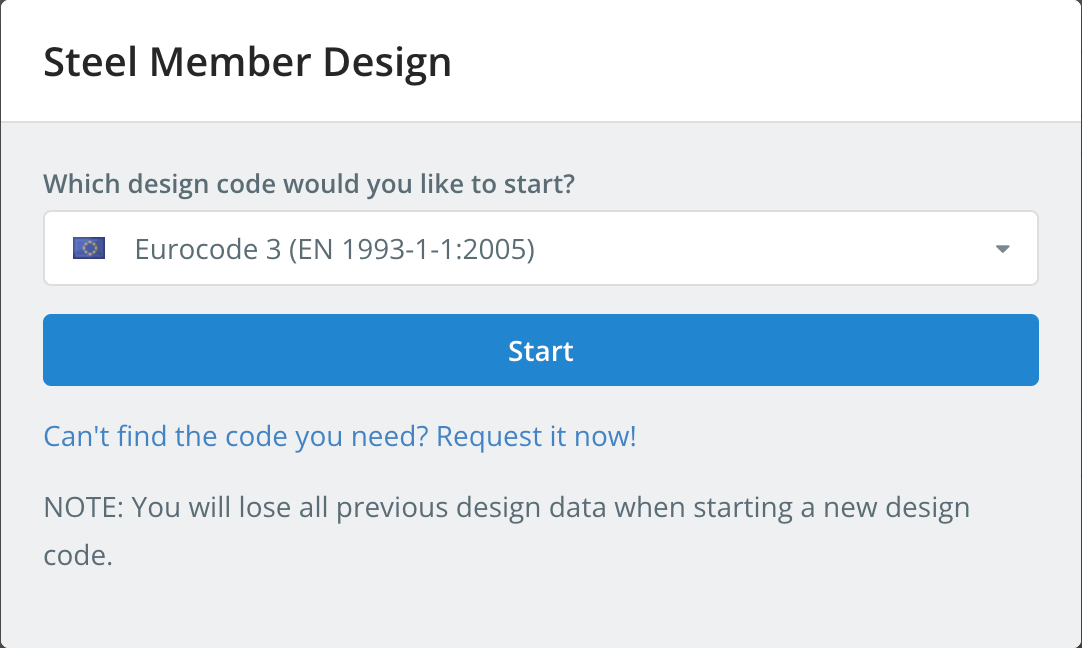
Starting a design code deletes the design data of the previous one. To switch codes later, uso Inizia nuovo codice nel Design menù.
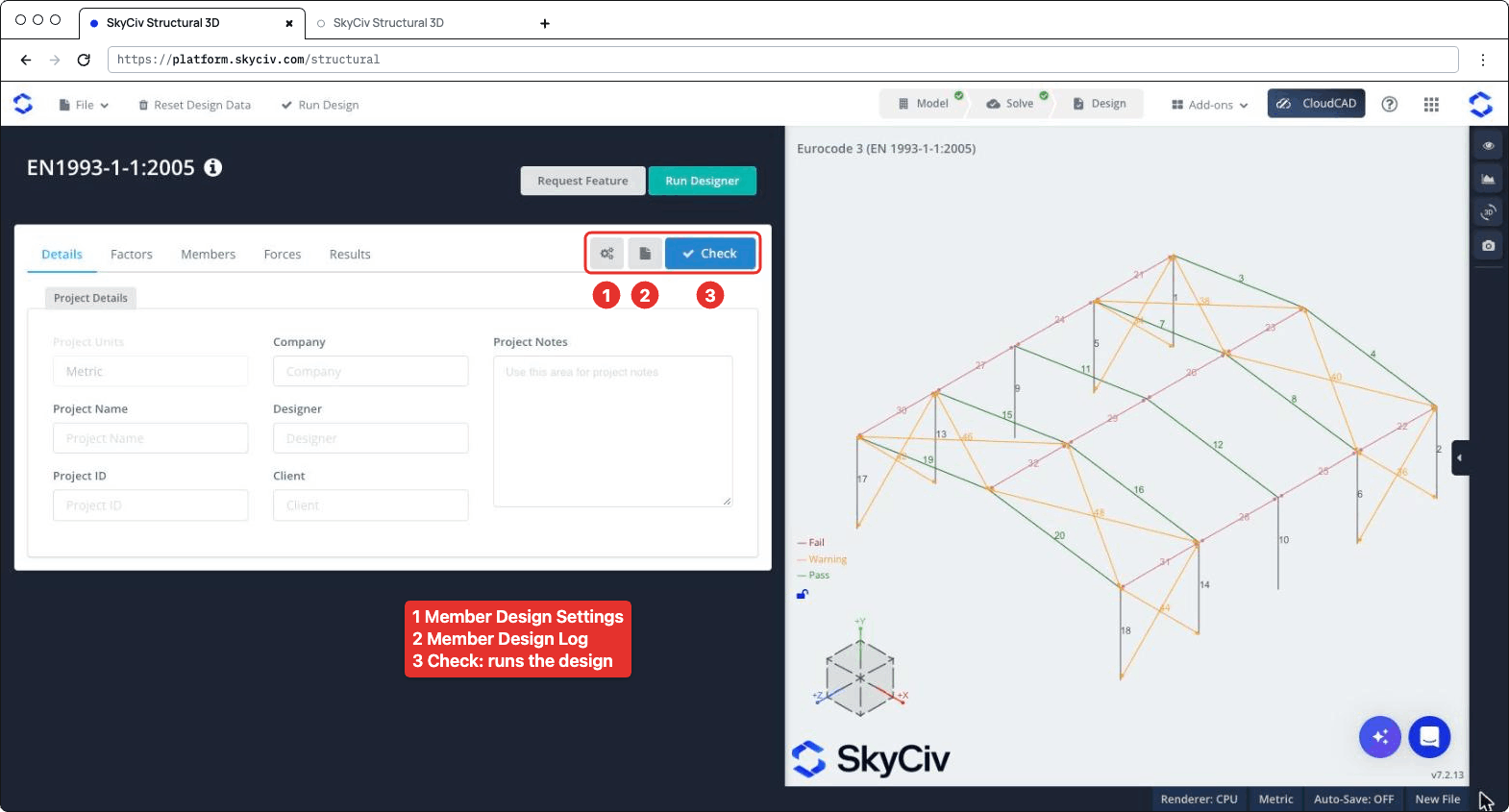
Il pannello di progettazione si apre a sinistra, con il modello 3D a destra. L'intestazione mostra il codice, più Richiedi funzionalità e Esegui Designer. A destra della barra delle schede ci sono tre pulsanti: le impostazioni (ingranaggio) pulsante, che si apre Impostazioni progettazione membro, il pulsante di registro, che apre il Registro di progettazione dei membri, e Dai un'occhiata, che esegue la verifica del progetto. Le schede sono Dettagli, Fattori, Membri, Forze e risultati.
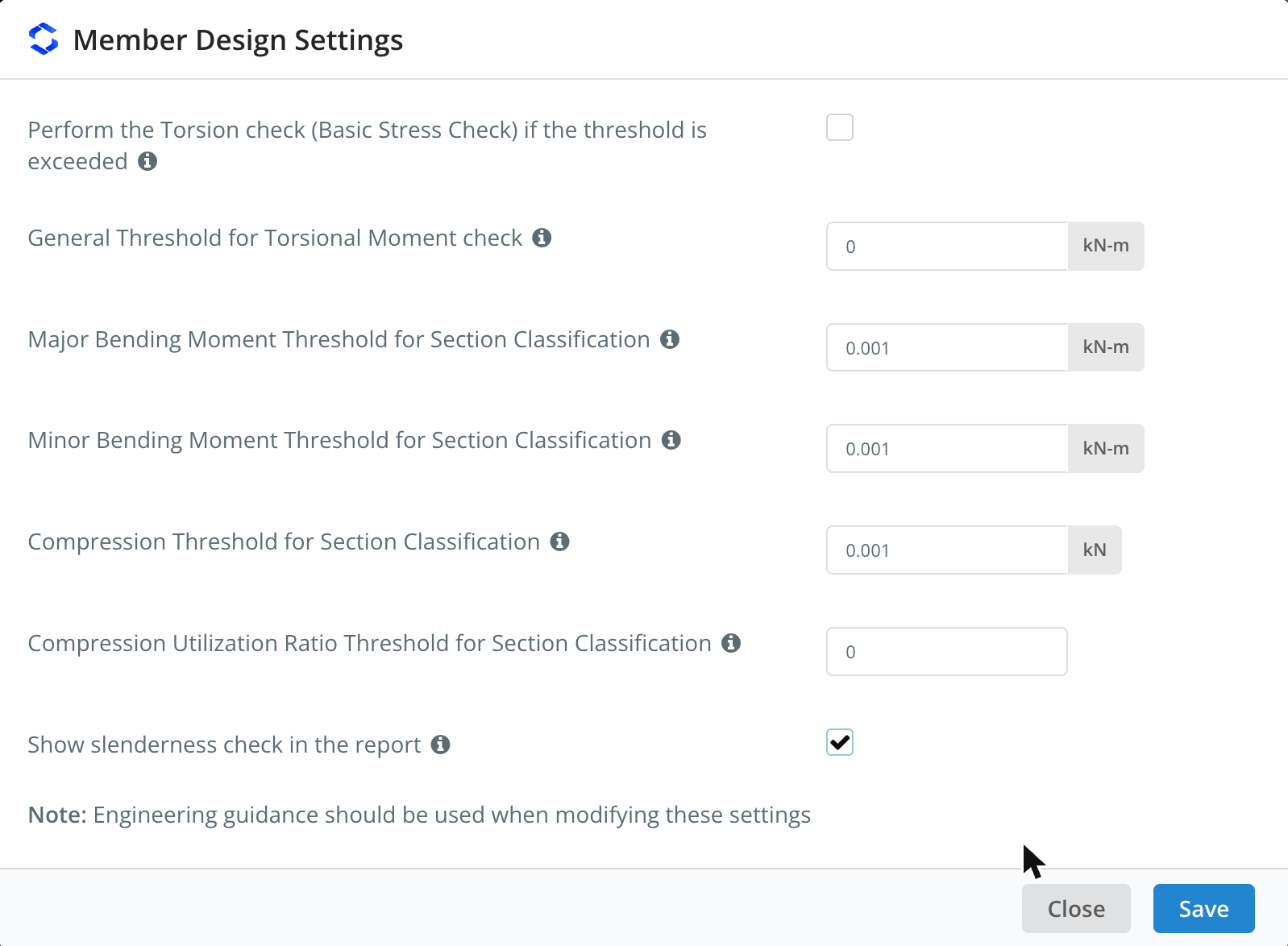
Impostazioni progettazione membro
Fare clic sul pulsante dell'ingranaggio per aprire Impostazioni progettazione membro. Passa il mouse sopra l'icona ℹ accanto a un'impostazione per visualizzarne la descrizione.
| Collocamento | La resistenza alla compressione sarà considerata come da AS4600 | Descrizione |
|---|---|---|
| Perform the Torsion check (Controllo dello stress di base) if the threshold is exceeded | Deselezionato | Runs the torsion check of I-shapes and rectangular hollow sections when the torsional moment exceeds the threshold. Quando deselezionato, the torsion check is skipped whatever the threshold |
| General Threshold for Torsional Moment check | 0 kN-m | The torsional moment (in absolute value) above which the torsion check is performed, for all members whose Tlimite è auto nel Membri tab |
| Major Bending Moment Threshold for Section Classification | 0.001 kN-m | Bending about the major axis is included in the overall section classification of a limit state only when the moment exceeds this value |
| Minor Bending Moment Threshold for Section Classification | 0.001 kN-m | Lo stesso, for bending about the minor axis |
| Compression Threshold for Section Classification | 0.001 kN | Compression is included in the overall section classification of a limit state only when the compression force exceeds this value |
| Compression Utilization Ratio Threshold for Section Classification | 0 | Compression is included in the overall section classification only when its utilization ratio exceeds this value. It applies to all the limit states other than compression |
| Show slenderness check in the report | Deselezionato | Adds the slenderness check to the detailed report of each member, vedere Slenderness Ratio Check sotto |
The classification thresholds keep very small forces from governing the class of a section: per esempio, a beam with a negligible axial force is not classified as if it were in pure compression. Come nota la finestra di dialogo, è necessario utilizzare le indicazioni tecniche quando si modificano queste impostazioni. Clic Salva applicare.
Dettagli
Sul Dettagli scheda è possibile inserire i dettagli del progetto (Azienda, Nome del progetto, progettista, ID progetto, Cliente e Note di progetto). Non è necessario compilarli, but anything you enter is shown in your reports. Unità di progetto spettacoli metrico e non può essere modificato qui.
Fattori
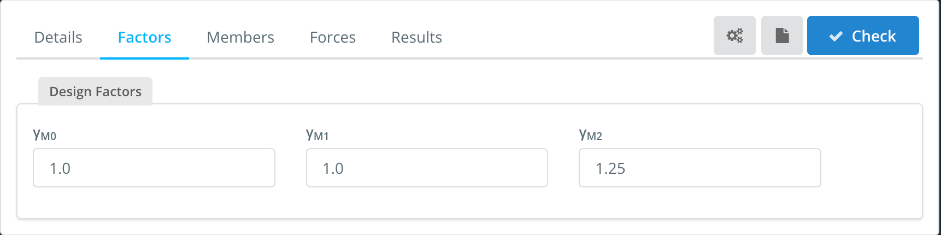
La Fattori tab shows the partial factors for resistance, which you can change:
| Fattore | Used for | La resistenza alla compressione sarà considerata come da AS4600 |
|---|---|---|
| cM0 | Resistance of cross-sections | 1.0 |
| cM1 | Resistance of members to instability (deformazione) | 1.0 |
| cEurocodice di design con piastra di base in acciaio | Resistance of cross-sections in tension to fracture (net section) | 1.25 |
Membri
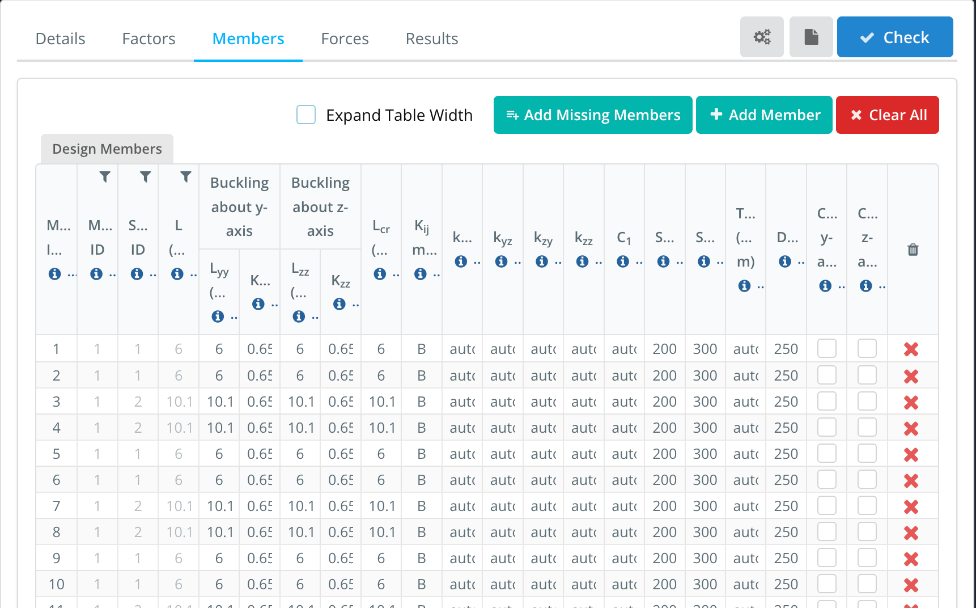
La Membri La scheda elenca i membri del progetto, with one row for each member of the model. ID membro(S), ID materiale, ID sezione e L come from the model. The buckling lengths and the other parameters are filled in with default values that you can change. Hover over the ℹ icon in a column header to see its description.
- Espandi larghezza tabella: shows the full column headers and values, with a horizontal scroll bar.
- Add Missing Members, Questi numeri provengono dall'American Standard AISC e Clear All: add the model members that are not in the table, add a design member, or remove all of them. Enter several member IDs, separati da virgole, pollici ID membro(S) to design them as a single design member.
| Colonna | Descrizione | La resistenza alla compressione sarà considerata come da AS4600 |
|---|---|---|
| Lyy, Kyy | Buckling length and effective length factor for flexural buckling about the y-y (major) asse, used to calculate Ncr | Lyy = member length, Kyy from the end fixity of the member |
| Lzz, Kzz | Lo stesso, about the z-z (minor) asse | Lzz = member length, Kzz from the end fixity of the member |
| Lcr | Buckling length for lateral-torsional buckling. Enter the member length, or comma-separated lengths, one for each segment between lateral restraints | Lunghezza del membro |
| Kij metodo | Method used to calculate the interaction factors: A (Annex A, alternative method 1) o B (Allegato B, alternative method 2) | B |
| Kyy, Kyz, Kzy, Kzz | Interaction factors for bending and axial compression (Eq. 6.61 e 6.62). Con auto, they are calculated with the method chosen in Kij metodo | auto |
| C1 | Moment modification factor for the elastic critical moment Mcr. Con auto, it is calculated from the bending moment diagram of each segment. Enter a single value for all the segments, or comma-separated values, one for each segment | auto |
| SRC, SRT | Slenderness limits in compression and in tension, vedere Slenderness Ratio Check sotto | 200, 300 |
| Tlimite | Torsional moment threshold for the torsion check of this member. Con auto, the general threshold of the settings is used. The torsion check must be ticked in the settings | auto |
| DefL | Rapporto limite di deflessione: the member passes when span/deflection is at least this value | 250 |
| Cantilever y-axis, Cantilever z-axis | Tick if the deflection check should consider the member as supported at one end only, for deflection along that axis | Deselezionato |
Per esempio, per un 10.1 m rafter with purlins every 2.02 m, accedere 2.02,2.02,2.02,2.02,2.02 pollici Lcr. The lengths must add up to the member length (entro 1%). Each segment is then checked for lateral-torsional buckling with its own length and C1. If you enter a single length that is different from the member length, C1 can’t be calculated automatically and must be entered as a number.
Forze
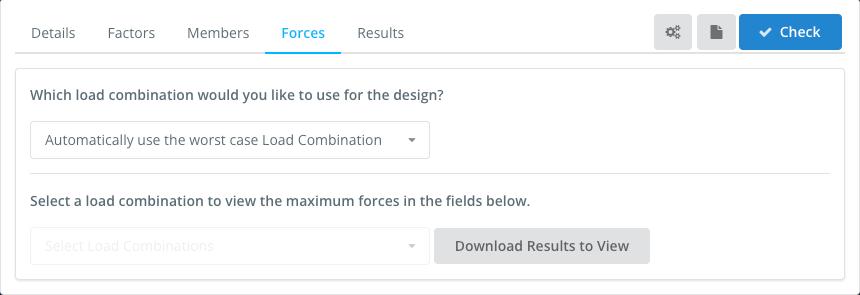
La Forze tab sets the load combination used in the design. Per impostazione predefinita, Automatically use the worst case Load Combination checks every strength load combination of the model and reports the worst one for each check. You can also select a single load combination. Serviceability combinations are not listed here: they are used for the deflection check.
To view the forces of a load combination, select it in Select a load combination to view the maximum forces in the fields below, e fare clic Download Results to View.
risultati
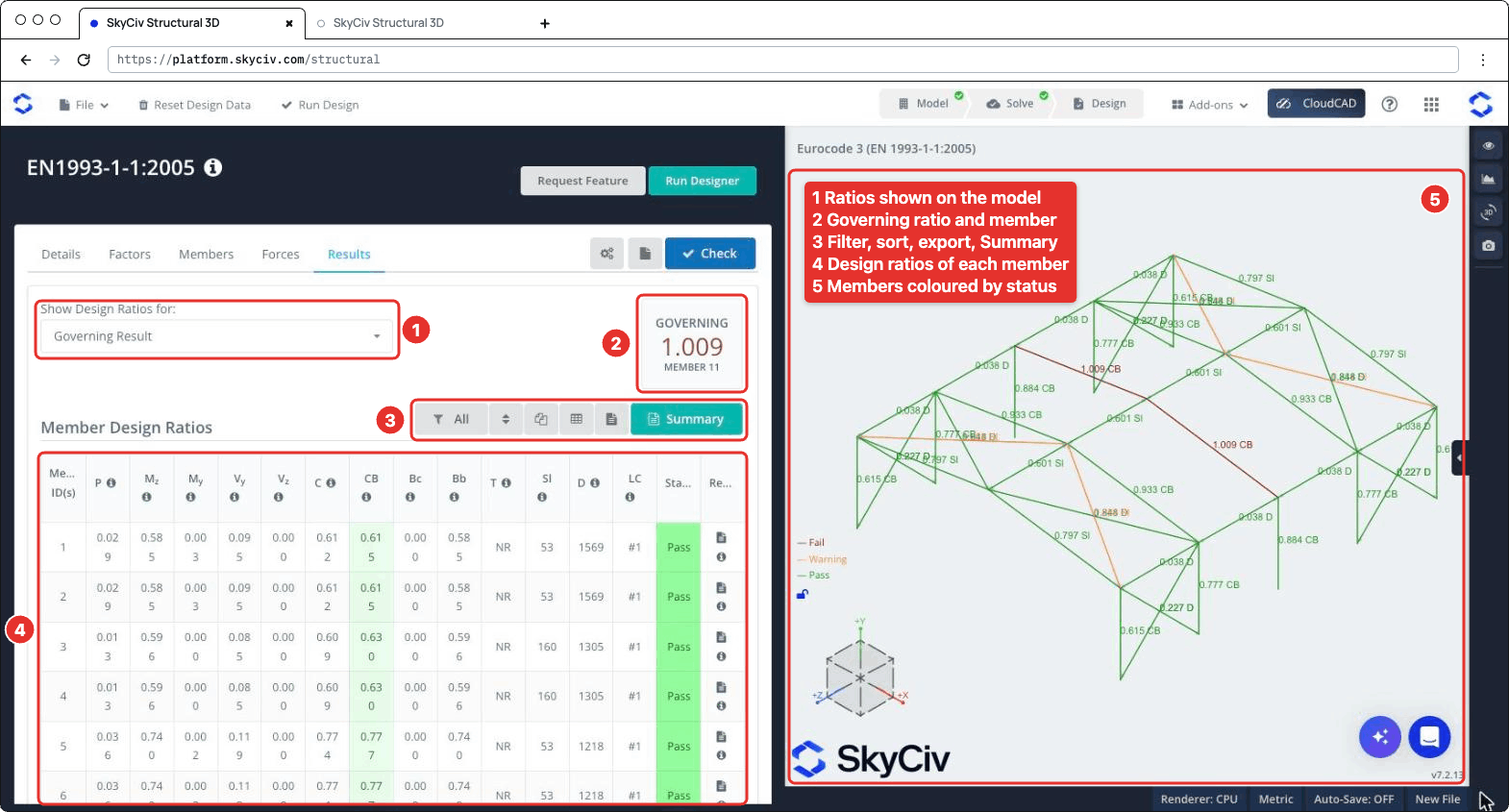
Clic Dai un'occhiata per eseguire la verifica del progetto. La risultati mostra la scheda (numbered as in the screenshot below):
- Mostra rapporti di progettazione per: chooses which ratios are shown on the 3D model, per esempio Risultato determinante, Membri falliti, a single check or the Worst Load Combination.
- GOVERNARE: il rapporto più alto e il suo membro.
- A toolbar to filter the members (Tutto, Failed, Passato o Avvertimento aste, or the members of a section), reset the sorting, copy the table, download it as CSV, download all the member reports as HTML, e aprire il Sommario parametri in SkyCiv Load Generator.
- La Rapporti di progettazione dei membri tavolo, con a Stato (Passaggio, Warn o Fallire) and the report icon of each member. Passa il mouse sopra l'icona ℹ nell'intestazione di una colonna per vedere la clausola a cui fa riferimento.
- The 3D view, where each member is coloured Fallire, Avvertimento o Passaggio and labelled with its governing ratio and check.
| Colonna | Dai un'occhiata | Clausola |
|---|---|---|
| P | Axial force, tensione o compressione | 6.2.3 o 6.2.4 |
| Mz | Bending about the major axis | 6.2.5 |
| My | Bending about the minor axis | 6.2.5 |
| V y, V z | cesoia | 6.2.6 |
| C | Azioni combinate, resistance of cross-sections | 6.2.1 |
| CB | Combined bending and axial compression, buckling resistance of members | 6.3.3 |
| Bc | Buckling resistance of compression members | 6.3.1 |
| Bb | Lateral-torsional buckling resistance | 6.3.2 |
| T | Torsione (basic stress check), NR when it is not performed | 6.2.7 |
| Sl | Governing slenderness λ of the member (not a ratio) | |
| D | Span/deflection of the member (not a ratio) | |
| LC | Load combination of the governing result |
A member fails when one of its strength ratios is above 1.0. The slenderness and deflection checks are not part of the governing ratio: when the slenderness exceeds its limit, or the span/deflection is below DefL, il Sl o D value is highlighted and the member status is Warn. Their ratios to the limits are shown on the 3D model (per esempio 0.797 Sl) e nel Sommario parametri in SkyCiv Load Generator.
Rapporti
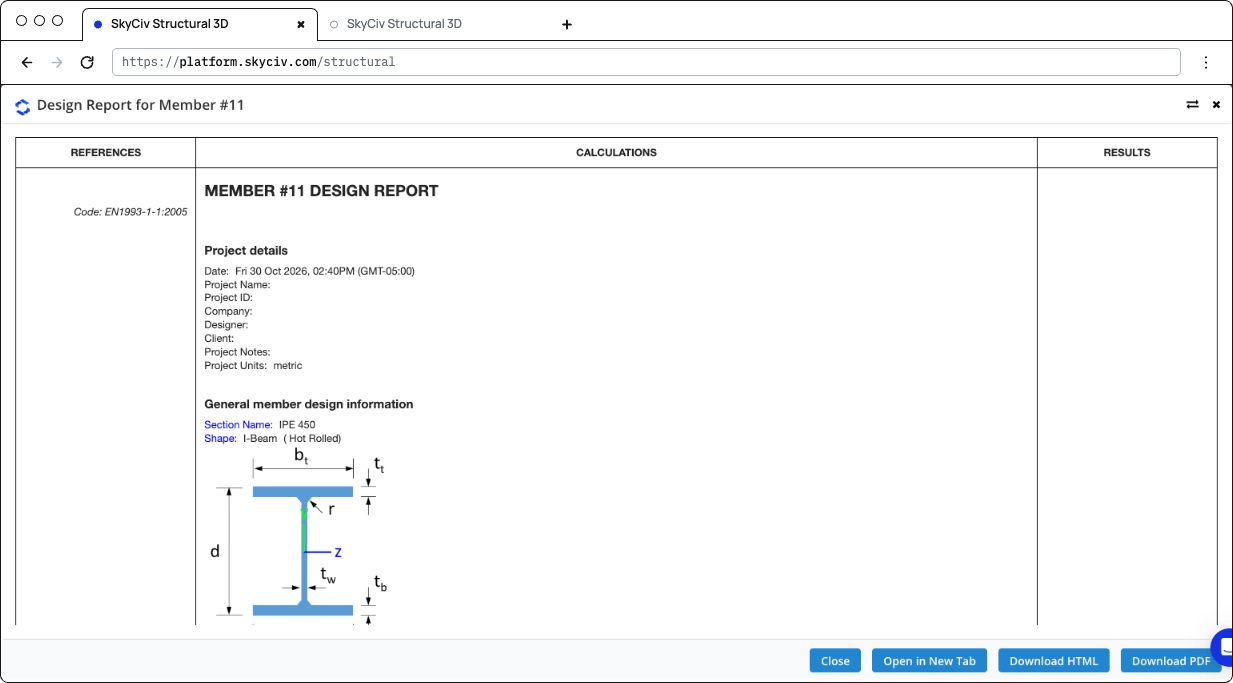
Click the report icon of a member to open its design report, in un Rapporto di progettazione per il membro n dialogare con Vicino, Apri in una nuova scheda, ScaricaHTML e Scarica PDF. The report shows the references (clauses), the calculations and the result (STATUS PASS o FALLIRE) of each check:
- Dettagli del progetto e General member design information: the section, its shape and fabrication (hot-rolled or welded), the material properties and the design parameters
- Design Internal Forces: the governing forces used for each check
- The checks of axial strength (tensione o compressione), axial buckling strength, flexural strength about the major and minor axes, lateral-torsional buckling resistance, interaction of combined resistance, interaction of combined buckling, shear strength along y and z and, when performed, torsione
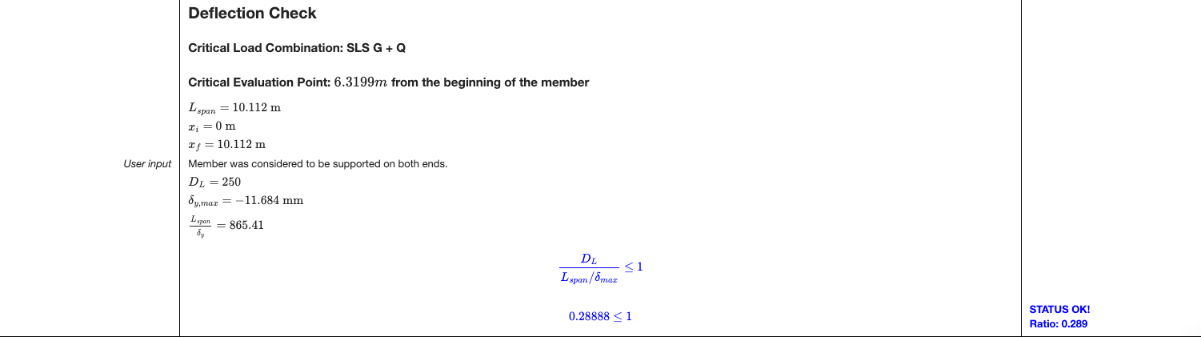
- Controllo della flessione: the critical serviceability load combination and position, the span, the maximum deflection and the ratio to the limit
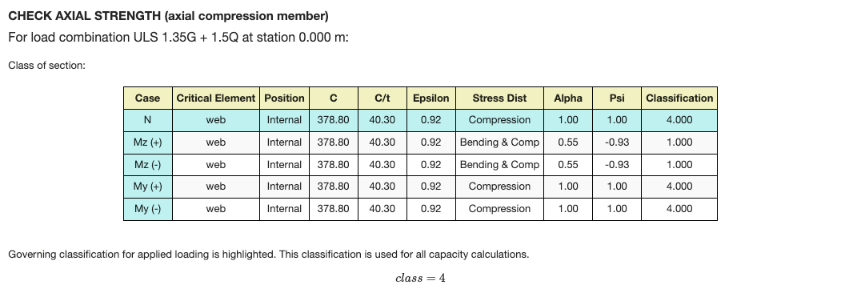
Each check gives the load combination and station that govern it, and the section classification table for that limit state: the class of each element (ragnatela, flange) for the axial force and for bending about each axis, with the governing class highlighted. For a Class 4 sezione, the effective properties are used. When the shear force is high (6.2.8), the reduced yield strength is used for the resistances.
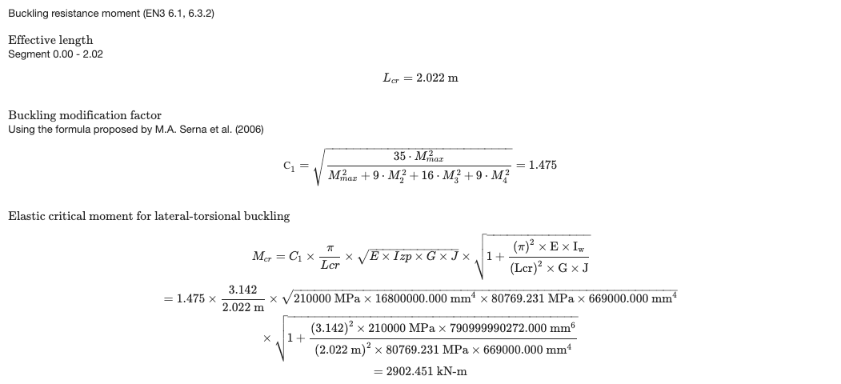
The lateral-torsional buckling check is calculated for the segment where the governing station is, with its Lcr e C1. When C1 è auto, it is calculated from the moments along the segment with the formula proposed by Serna et al. (2006). The report then gives Mcr, the non-dimensional slenderness, the buckling curve and the reduction factor χVerifica dell'ACI.
The deflection check is performed when the model has serviceability load combinations and DefL è più grande di 0. Otherwise the report says that the deflection check was skipped.
Clic Sommario on the Results tab to open the summary report. Elenca i dettagli del progetto (codice di progettazione, user name and unit system), the design factors, i materiali, the section dimensions and properties, the properties of each member (buckling lengths, Lcr, C1, Cm factors and limits), the results of all the members and the definitions of the symbols.
Controlli eseguiti
Here are the details of some of the checks performed by the module.
Slenderness Ratio Check
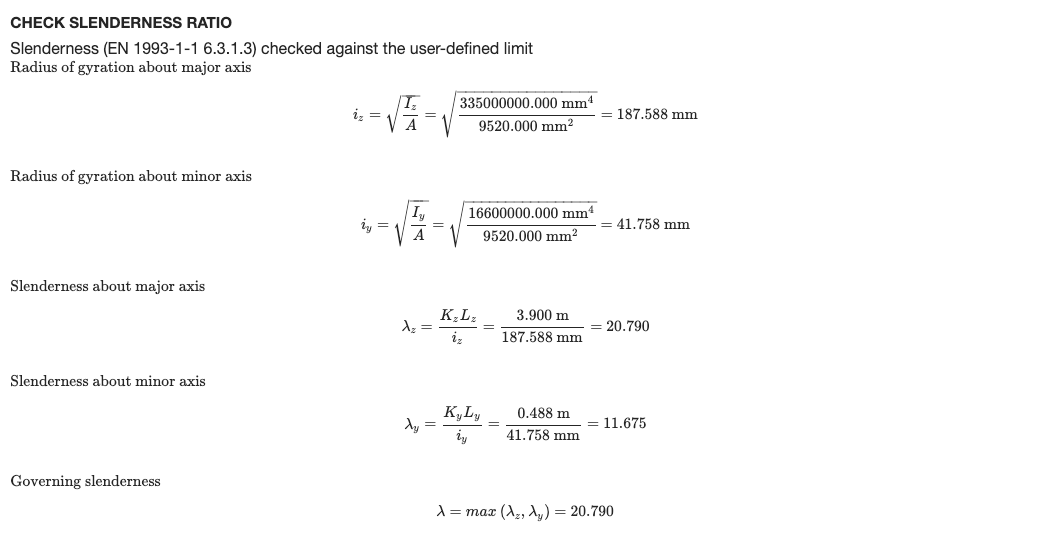
Each member is checked against the slenderness limits entered in the Membri tab: SRC for members in compression (200 per impostazione predefinita) e SRT for members in tension or without axial force (300 per impostazione predefinita). The slenderness is calculated about both axes from the effective length and the radius of gyration about the same axis:
- λz = KzLz / ioz about the major axis, with iz = √(Iz / A)
- λy = KyLy / ioy about the minor axis, with iy = √(Iy / A)
The governing slenderness λ = max(λz, λy) is divided by the limit, and the member passes when this ratio is 1.0 o meno. The slenderness check is listed in the Sl column of the Results tab.
To show this check in the detailed report of each member, open the settings (the gear button next to Dai un'occhiata) and tick Show slenderness check in the report. It’s off by default.
The report then has a Check Slenderness Ratio section after the buckling check, with the radii of gyration, the slenderness about each axis, the governing slenderness and its ratio to the compression and/or tension limit, with a PASS or FAIL status.