
Το SkyCiv Project Manager περιλαμβάνει μια ενσωματωμένη Διαχείριση Αναφορών που σας επιτρέπει να συνδυάζετε αναφορές που είναι αποθηκευμένες στα μοντέλα SkyCiv σας σε ένα ενιαίο PDF, ή να τα κατεβάσετε μεμονωμένα. Για να ξεκινήσετε, επισκεφθείτε την καρτέλα Αναφορές στο αριστερό μενού του Project Manager.
Χρήση του Εργαλείου δημιουργίας αναφορών
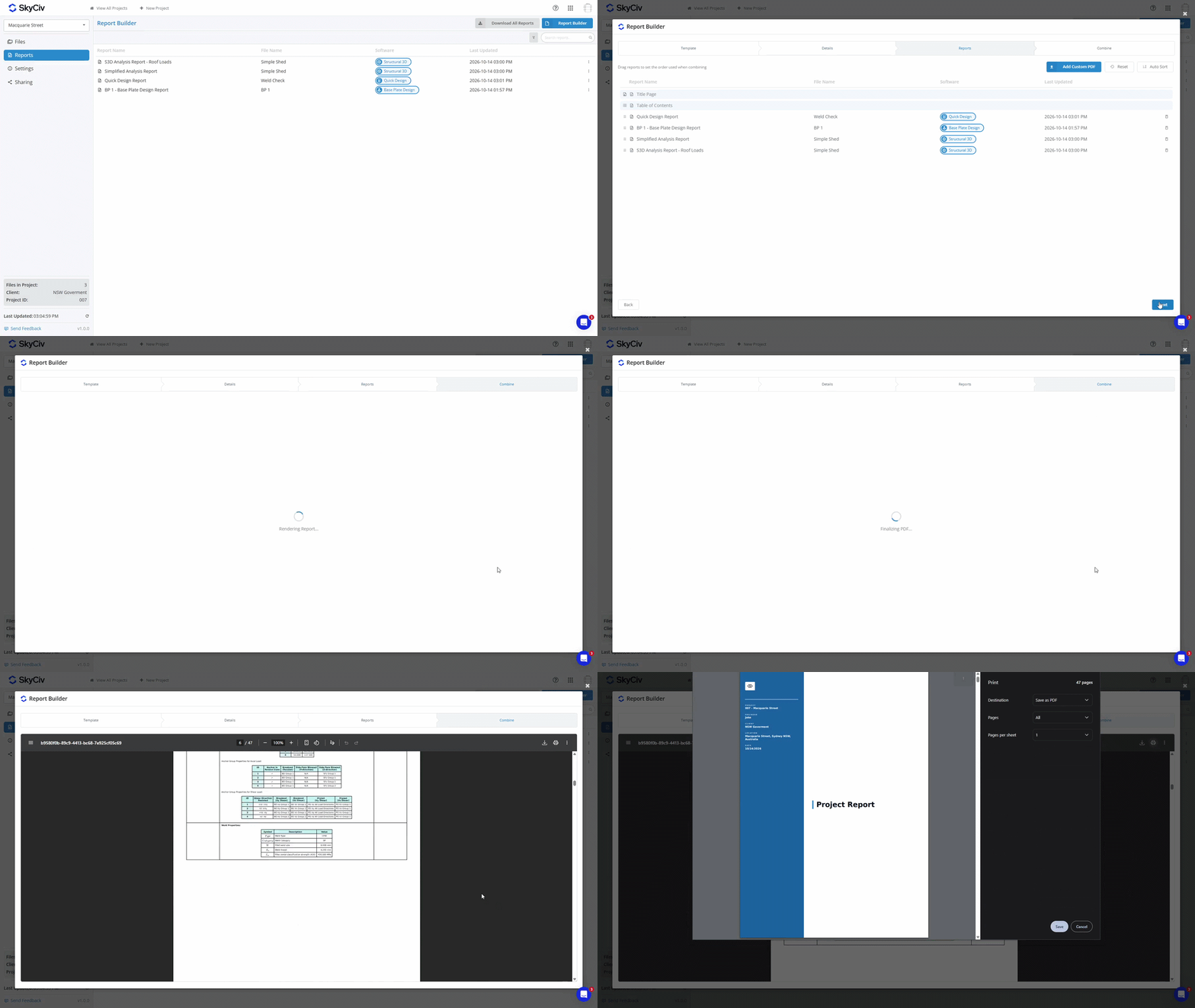
Το εργαλείο δημιουργίας αναφορών σάς επιτρέπει να δημιουργείτε αναφορές με σελίδα τίτλου και πίνακα περιεχομένων. Για να ξεκινήσετε, Φορτία ισοδύναμων επιφανειών Εργαλείο δημιουργίας αναφορών κουμπί στην επάνω δεξιά γωνία.
Βήμα 1: Επιλέξτε ένα πρότυπο
Επιλέξτε ένα πρότυπο για τη σελίδα τίτλου και τον πίνακα περιεχομένων χρησιμοποιώντας το ρυθμιστικό προτύπου; σύρετε αριστερά ή δεξιά για προεπισκόπηση προτύπων, και κάντε κλικ Επιλέγω για να επιλέξετε το πρότυπό σας. Υπάρχουν πέντε διαθέσιμα πρότυπα.
Βήμα 2: Συμπληρώστε Στοιχεία
Αυτό το βήμα σάς επιτρέπει να συμπληρώσετε τις λεπτομέρειες του έργου. Μπορείτε να παραλείψετε τη Σελίδα Τίτλου και τον Πίνακα Περιεχομένων εάν το επιθυμείτε σε αυτό το βήμα. Οι λεπτομέρειες ανασύρονται αυτόματα από τις Ρυθμίσεις Έργου; ωστόσο, εάν θέλετε να τα αλλάξετε για την αναφορά, μπορείτε να το κάνετε. Με αυτόν τον τρόπο δεν θα προσαρμόσετε τα αποθηκευμένα στοιχεία του έργου σας.
Βήμα 3: Παραγγελία αναφοράς
Επιλέξτε με ποια σειρά θα θέλατε να έχουν οι αναφορές σας αφού συνδυαστούν. Σύρετε αναφορές γύρω ή χρησιμοποιήστε το Αυτόματη ταξινόμηση επιλογές αυτόματης παραγγελίας αναφορών κατά όνομα αρχείου/αναφοράς, μονάδα λογισμικού, ή ώρα τελευταίας ενημέρωσης. Μπορείτε επίσης να ανεβάσετε προσαρμοσμένα έγγραφα PDF για να συμπεριληφθούν στην τελική αναφορά σε αυτό το βήμα.
Βήμα 4: Συνδυασμός
Κάντε κλικ στο Συνδυασμός καρτέλα για να δημιουργήσετε τη συνδυασμένη αναφορά PDF. Για λήψη, κάντε κλικ στο εικονίδιο λήψης στο επάνω αριστερό μέρος του παραθύρου προεπισκόπησης.
Λήψη όλων των Αναφορών
Αν, αντί αυτού, θέλετε να κάνετε λήψη όλων των αναφορών ως μεμονωμένα PDF μέσα σε ένα ZIP, μπορείτε να το πετύχετε χρησιμοποιώντας το Λήψη όλων των αναφορών κουμπί.

Προβολή Αναφορών
Κάντε διπλό κλικ σε μια αναφορά για να την προβάλετε σε μια νέα καρτέλα. Εναλλακτικά, μπορείτε να κάνετε δεξί κλικ σε μια αναφορά για να αντιγράψετε έναν σύνδεσμο προς την αναφορά ή να προβάλετε το αρχείο SkyCiv που σχετίζεται με την αναφορά.

