
İçindekiler
- Yeni Proje Oluşturma
- Dosya Ekleme
- Dosyaları Açma
- Klasör Oluşturma
- Raporları Kaydetme
- Proje Verilerini İndirme
- Projeleri Paylaşma
Yeni Proje Oluşturma
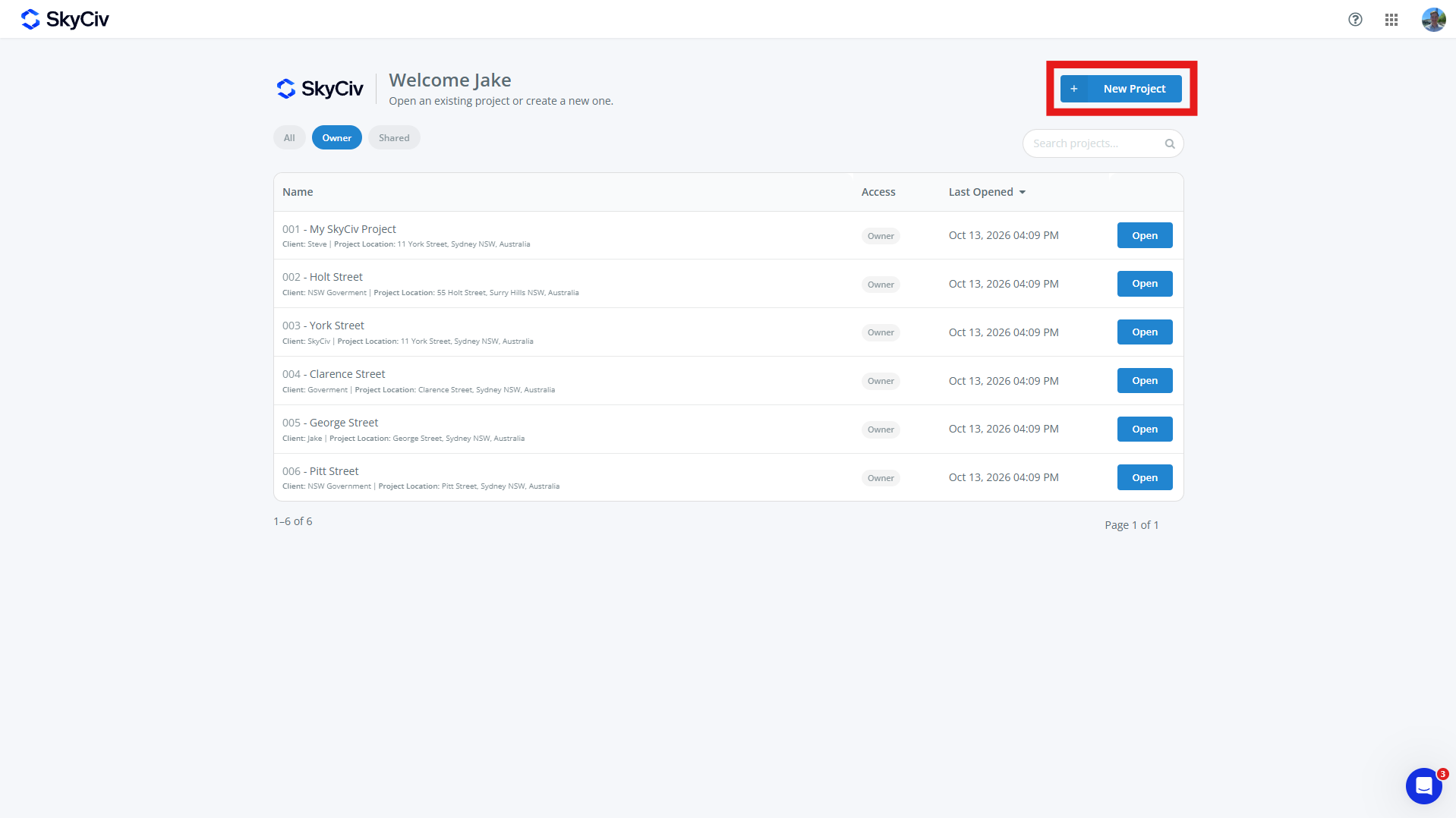
Yeni bir proje oluşturmak için, tıkla Yeni Proje SkyCiv Kontrol Paneli veya Projeler sayfasındaki düğme. SkyCiv Modülü içinden de yeni Projeler oluşturulabilir.
Açılan proje formunu doldurun. Bir proje olabilir:
-
- proje kimliği (isteğe bağlı)
- proje Adı (gereklidir)
- Proje bilgisi
- Mühendis (isteğe bağlı)
- Müşteri (isteğe bağlı)
- yer (isteğe bağlı)
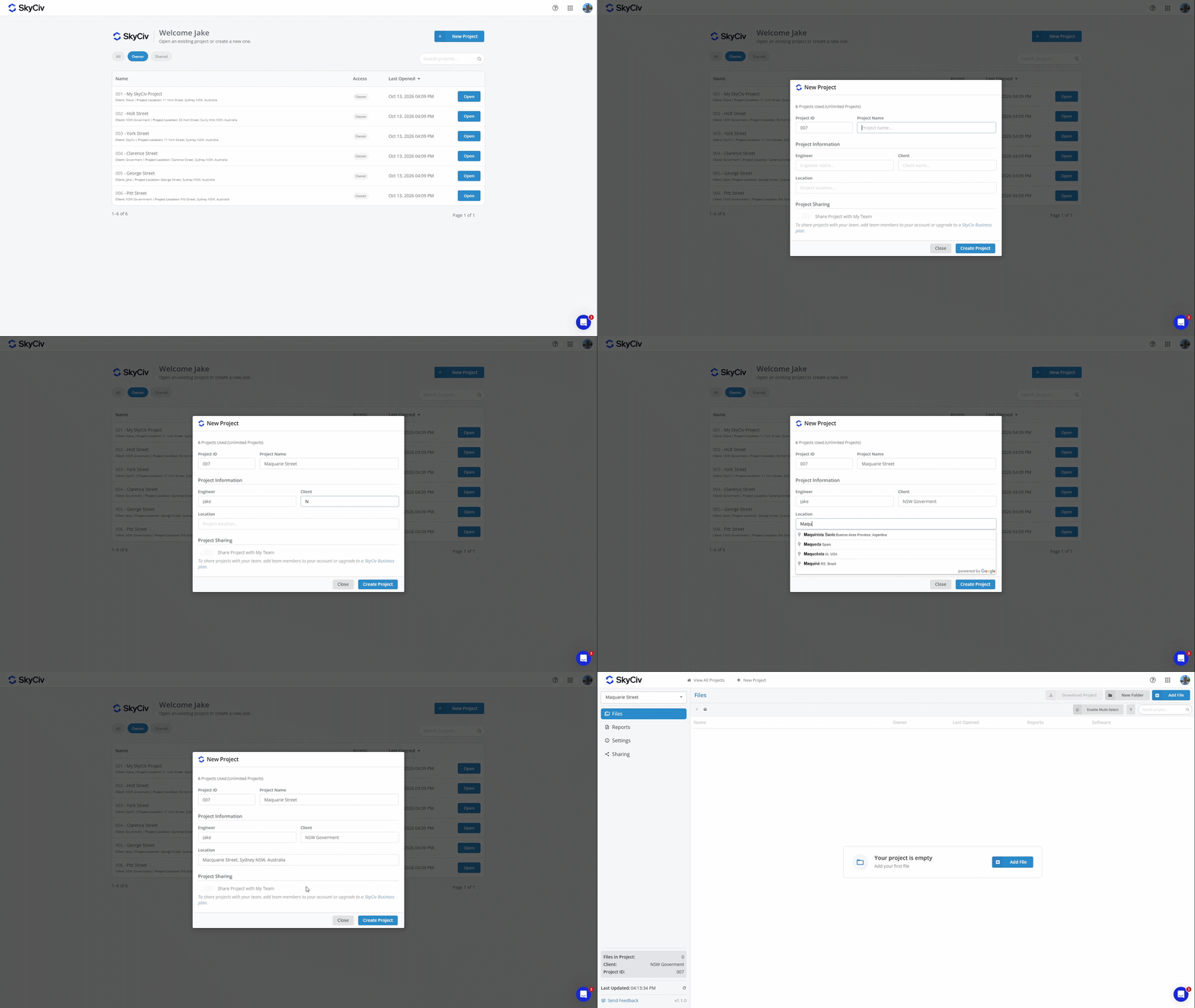
Yeni projeyi oluşturmak için “Proje Oluştur”a tıklayın. Projeniz artık dosya eklemeye hazır.
Not: Hesaplarda sınırlı sayıda proje var. Sınırsız Projeye yükseltmek için, Proje Yöneticisini şu adresteki aboneliğinize ekleyin: Çıkış yapmak veya bir satın alın Skyciv İş Hesabı
Dosya Ekleme
Mevcut bir dosya seçilerek veya yeni bir dosya oluşturularak bir projeye dosya eklenebilir. Her dosya aynı anda yalnızca bir projeye ait olabilir.
Proje İçinden Dosya Ekleme
Dosyalar bir proje içinden aşağıdakiler kullanılarak eklenebilir: Dosya Ekle ekranın sol üst köşesindeki düğme.
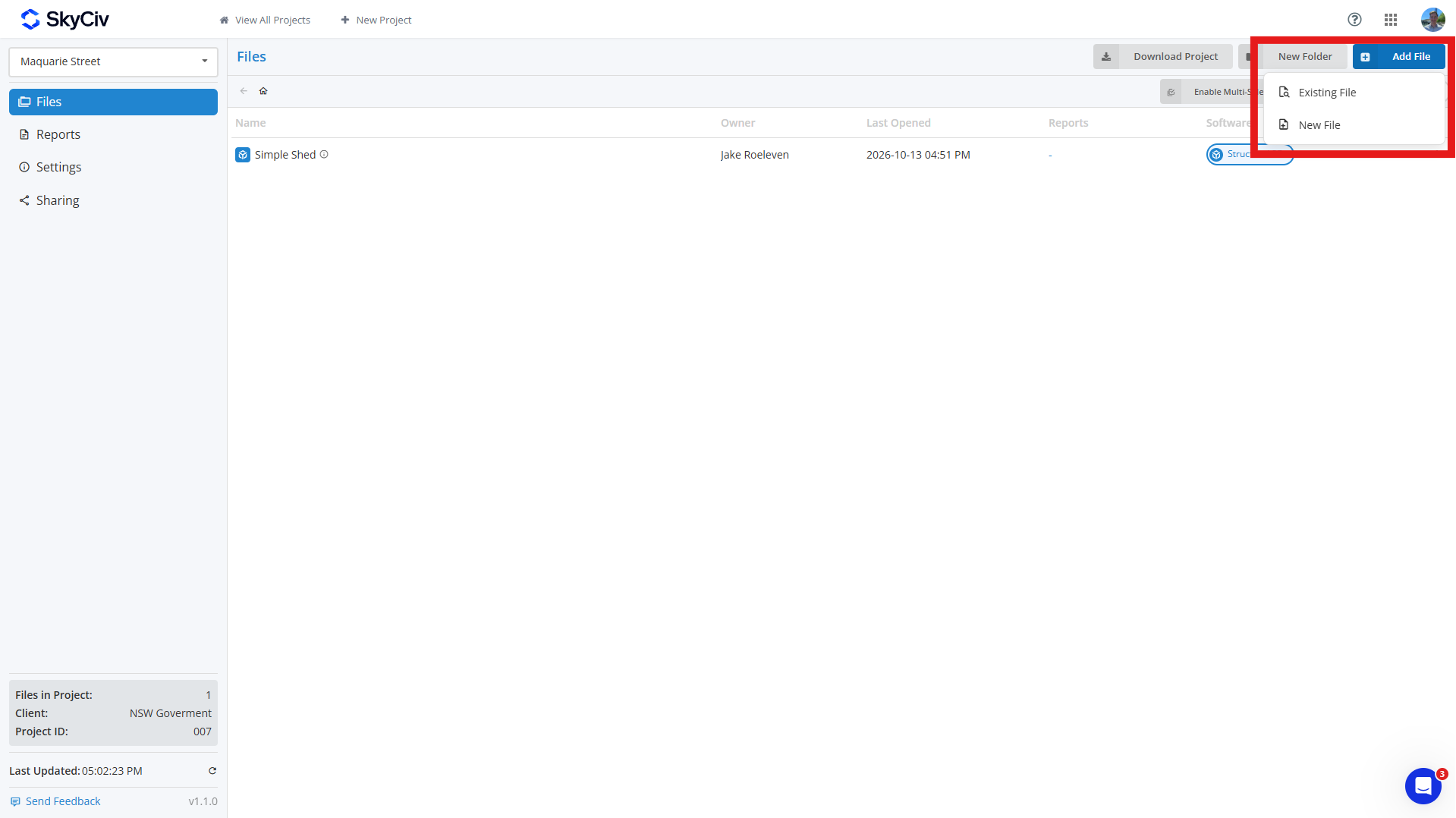
Eklemek için mevcut dosya, Tıklayın Mevcut Dosya ve dosyayı seçin(s) projenize eklemek istediğiniz. Dosyaları arayabilir ve açılır pencerenin sol üst köşesindeki SkyCiv modülüne göre filtreleyebilirsiniz..
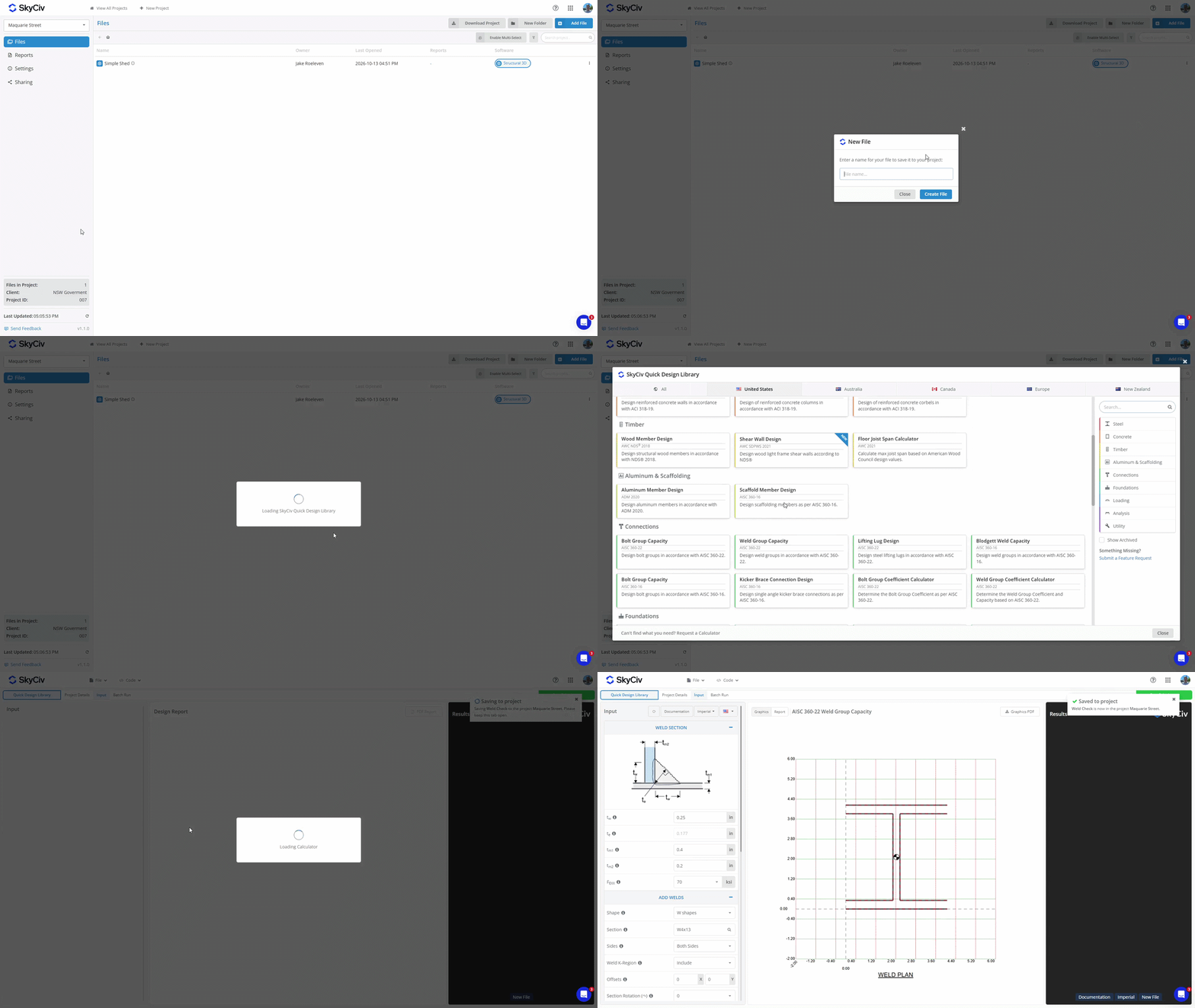
Bir oluşturmak için yeni dosya, Tıklayın Yeni Dosya ve kullanmak istediğiniz yazılım modülünü seçin. Dosya için bir ad girin, ve yeni bir sekme görünecek. Seçilen modül ek kurulum gerektiriyorsa, bir tasarım kodu veya konfigürasyon seçmek gibi, dosyayı kaydetmeden önce bunu tamamlayın. Dosya projeye kaydedildikten sonra, sağ üst köşede kaydedildiğini onaylayan bir açılır pencere görünecektir.
Yazılım Modülü İçerisinden Dosya Ekleme
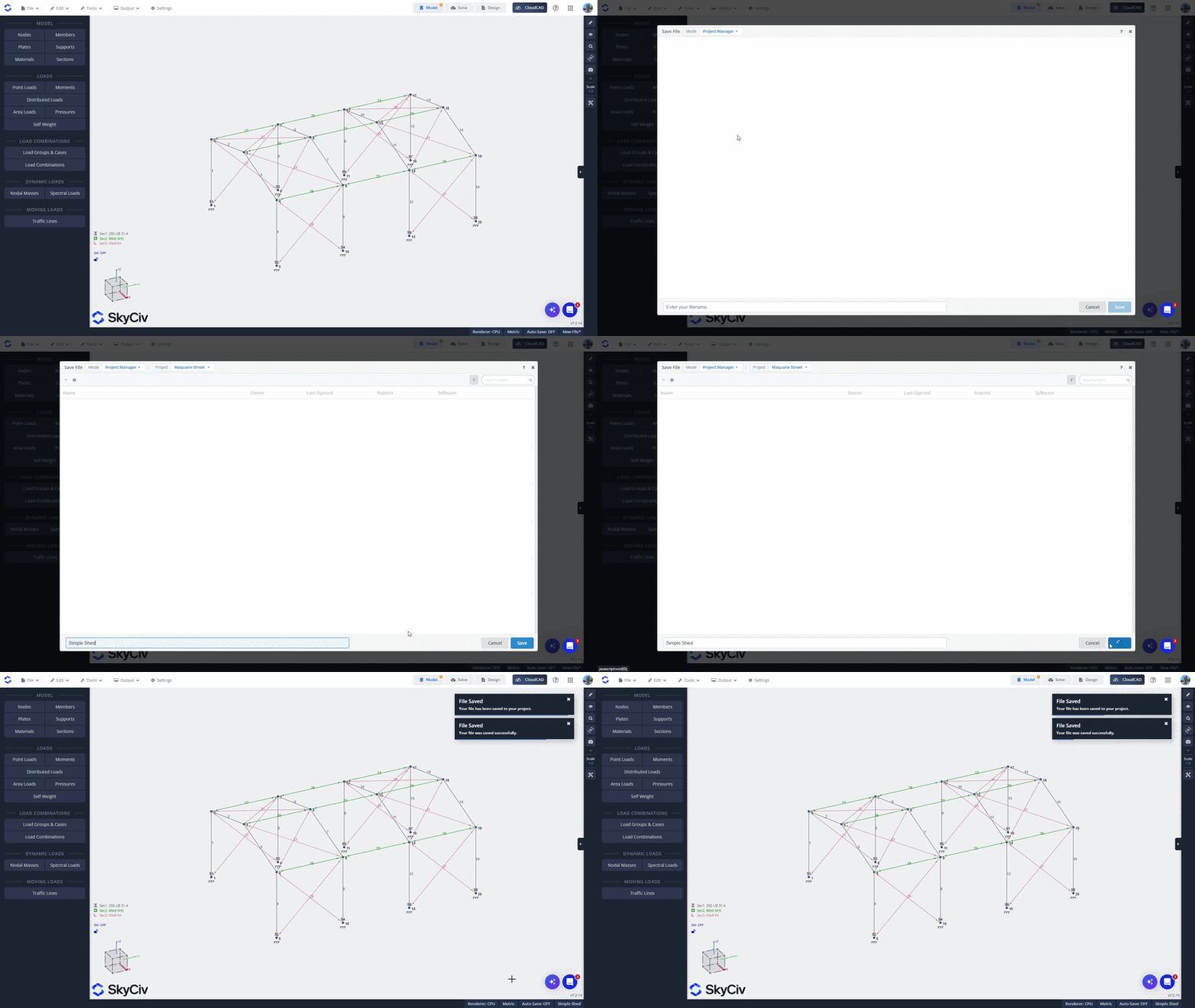
Doğrudan SkyCiv modülünü başlatarak bir dosya oluşturduysanız, modülün içinden bir projeye kaydedebilirsiniz. Aç Dosya menüyü seçin ve Kayıt etmek veya Farklı kaydet. Proje Yöneticisi modunda olduğunuzdan emin olun, açılır pencerenin sol üst köşesinde görüntülenir.
Listeden bir proje seçin veya yeni bir tane oluşturun. Dosya için bir ad girin ve tıklayın Kayıt etmek projeye kaydetmek için sol altta.
SkyCiv Dosya Yöneticisinden Dosya Ekleme
SkyCiv Dosya Yöneticisinden mevcut bir dosyayı eklemek için, dosyayı sağ tıklayın ve seçin Projeye Ekle. Eklemek istediğiniz projeyi seçin.
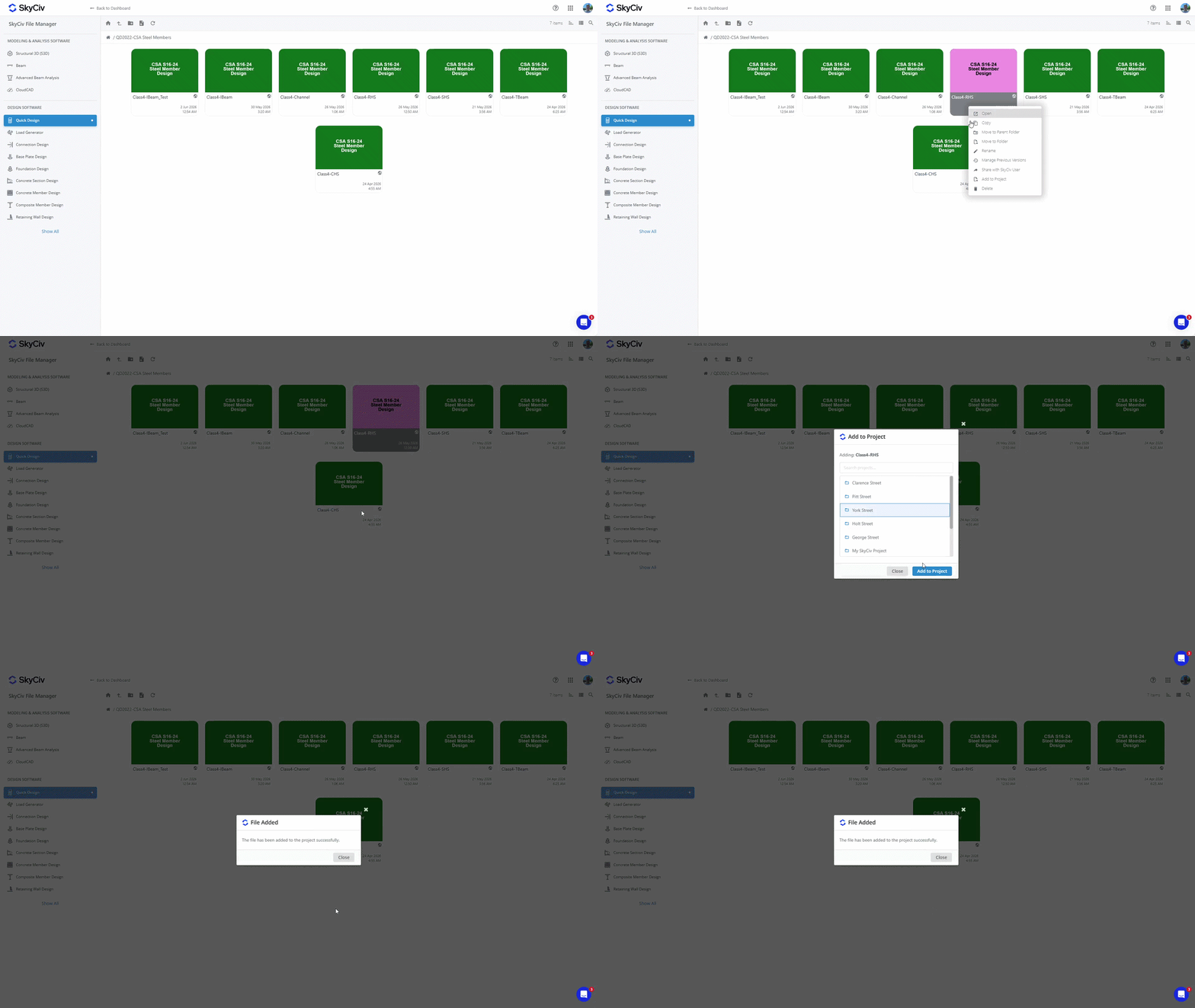
Not: Projelerinize kaydedilen dosyalara Dosya Yöneticisinden de erişilebilir. Bir projeye dosya eklemek, dosyanın Dosya Yöneticisindeki mevcut konumunu değiştirmez. Görmek Proje Dosyaları Nereye Kaydedilir?? içinde Başlarken daha fazla ayrıntı için.
Dosyaları Açma
Proje içinden bir dosya açma
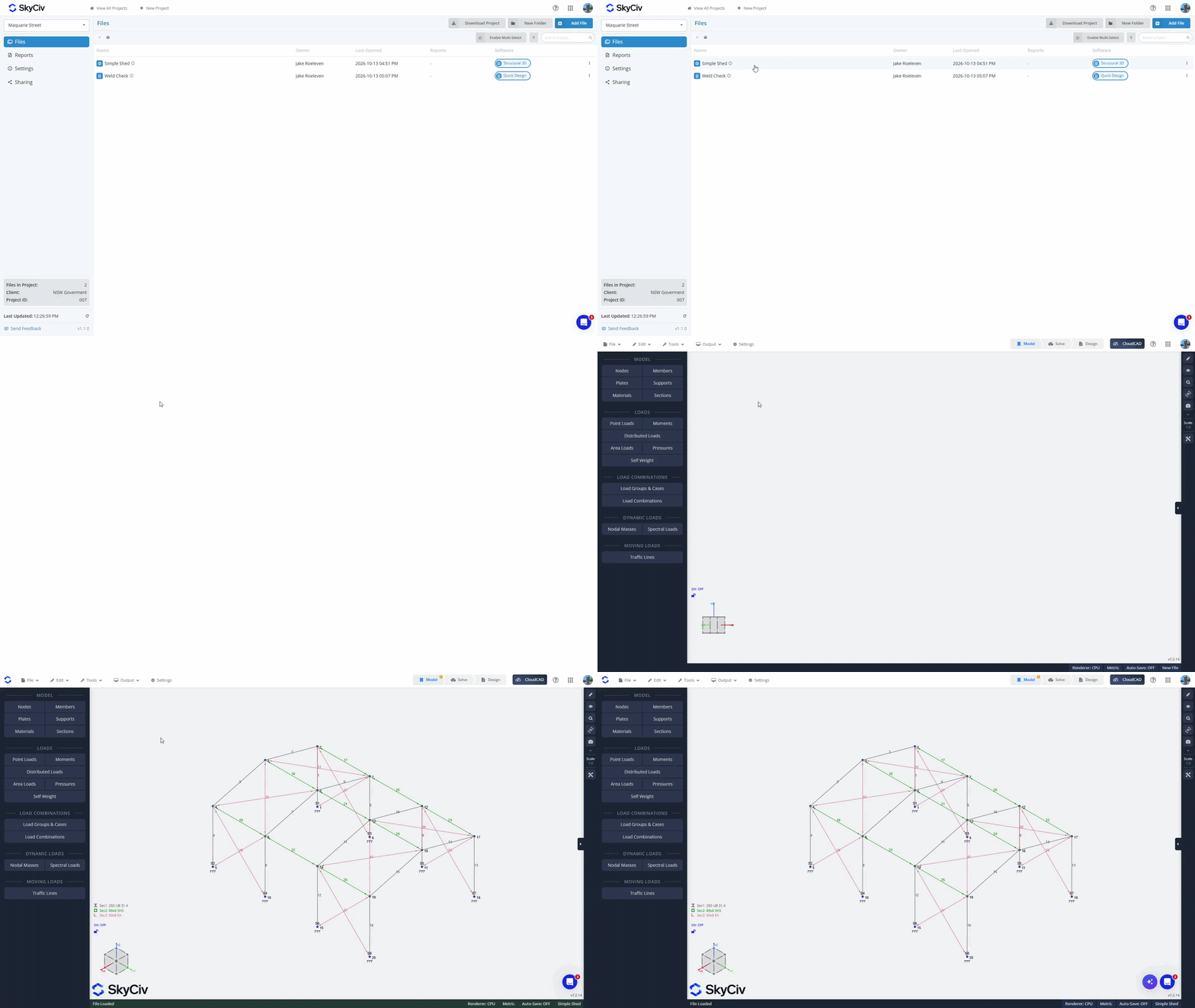
Bir dosyayı içeriden açmak için, yeni bir sekmede açmak için çift tıklayın. Alternatif olarak, Dosya menüsünü açmak için dosyaya sağ tıklayın ve “Aç” seçeneğini seçin.
Bir Yazılım Modülünün içinden bir dosyayı açma
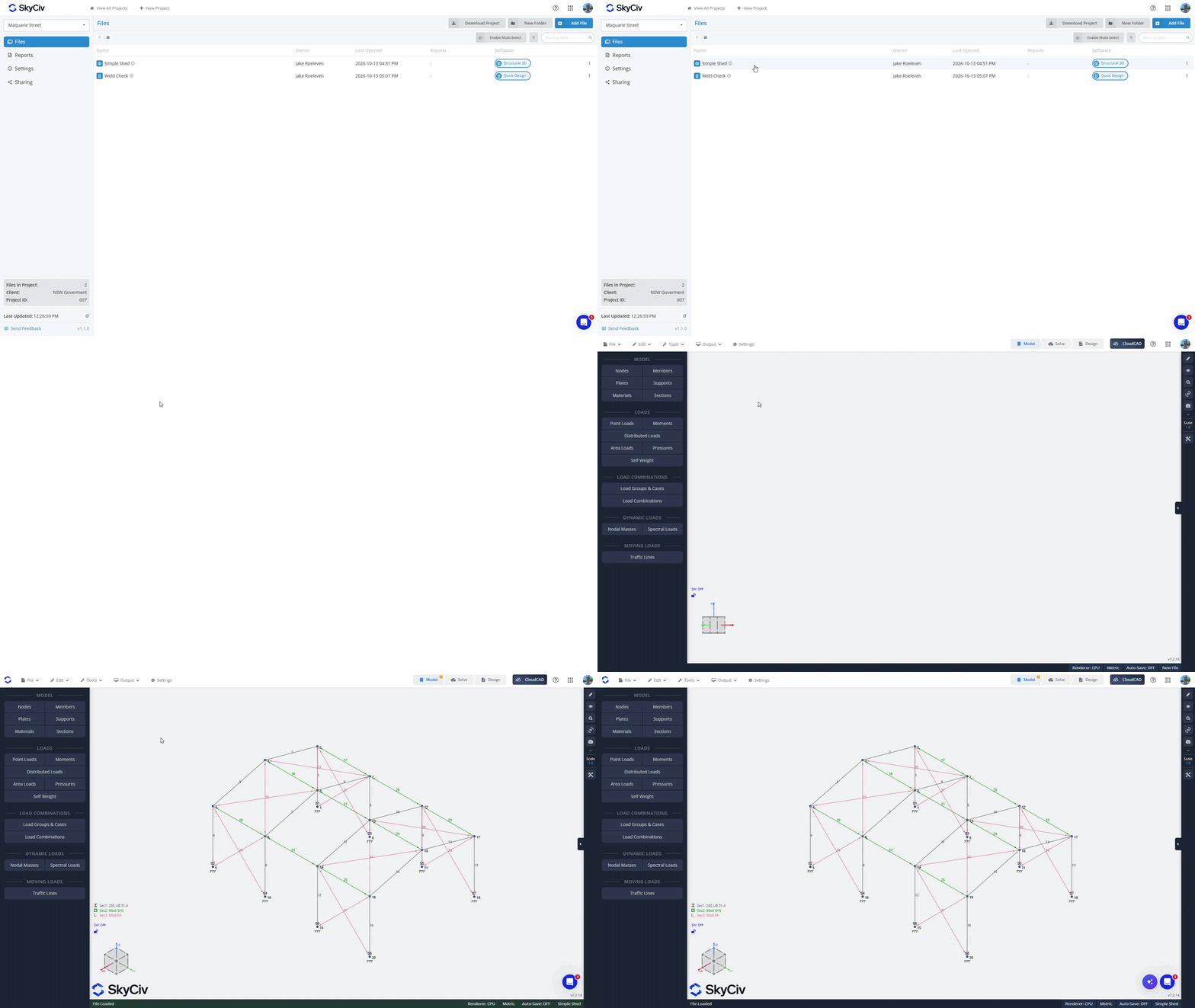
İtibaren Dosya Menü, tıklamak "Açık". Proje Yöneticisi modunda olduğunuzdan emin olun; bunu açılır pencerenin sol üst kısmından kontrol edebilirsin. Mevcut dosyaları yüklemek için projenizi seçin. Geçerli modüldeki dosyalar listenin en üstünde yüklenecek. Geçerli modülden bir dosya seçerseniz, mevcut sekmede açılacak. Diğer modüllerdeki dosyalar listenin en altında gri renkte gösterilir. Başka bir modülden dosya seçerseniz yeni bir sekmede yüklenecekler.
Klasör Oluşturma
“” seçeneğini kullanarak dosyalarınızı klasörler halinde düzenleyin.Yeni KlasörProje Yöneticisi içindeki ”düğmesi ve klasörünüz için bir ad oluşturma. Dosyaları taşımak için klasörlere sürükleyip bırakın, veya “Çoklu Seçimi Etkinleştir” dosyaları klasörlere toplu taşıma seçeneği.
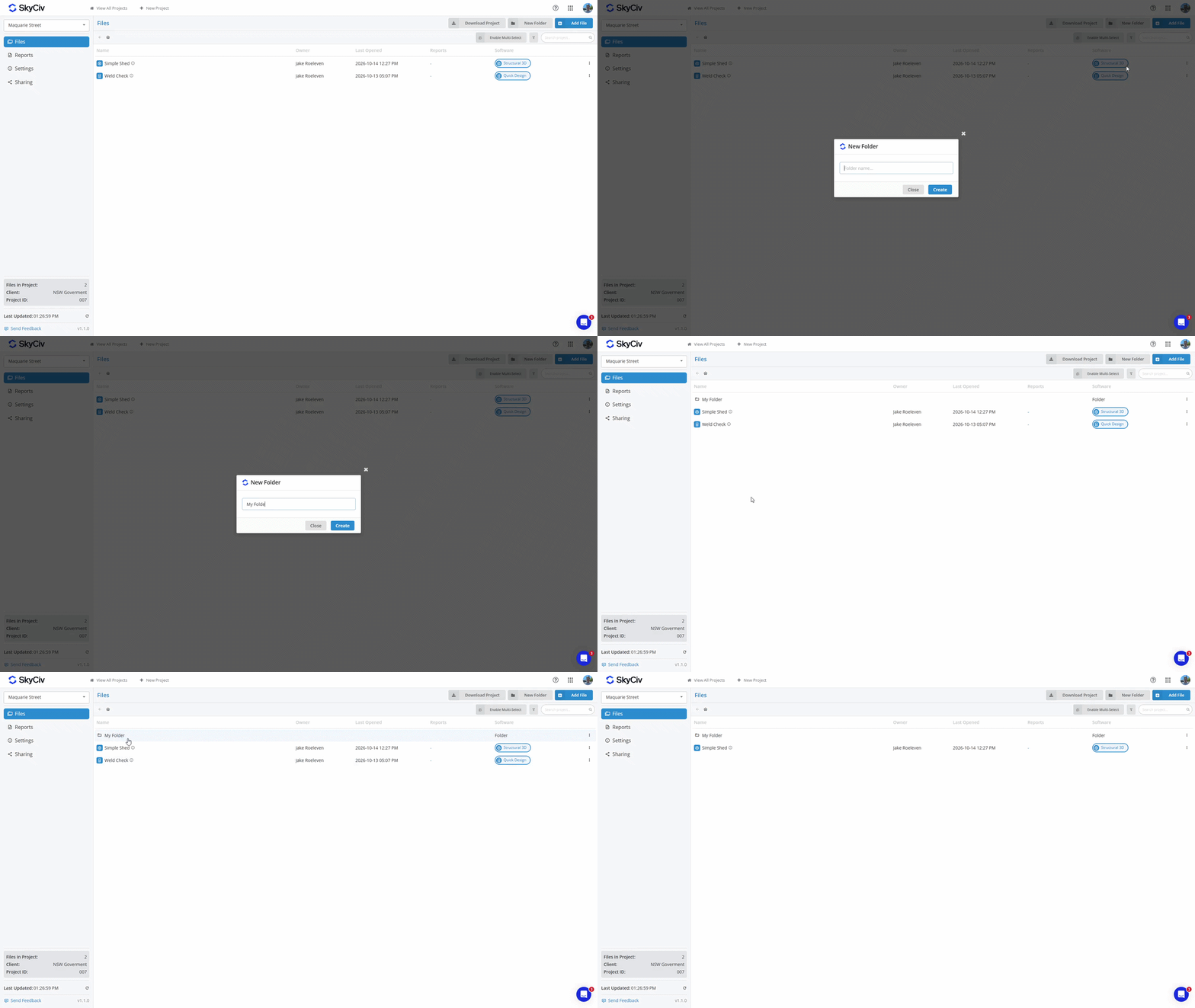
Bir dosyayı ana klasöre geri taşımak için, dosyaya sağ tıklayın ve Dosyayı Taşı seçeneğini seçin. Ana klasörü veya “Proje Kökü”Projenin en üst seviyesi için.
Raporları Kaydetme
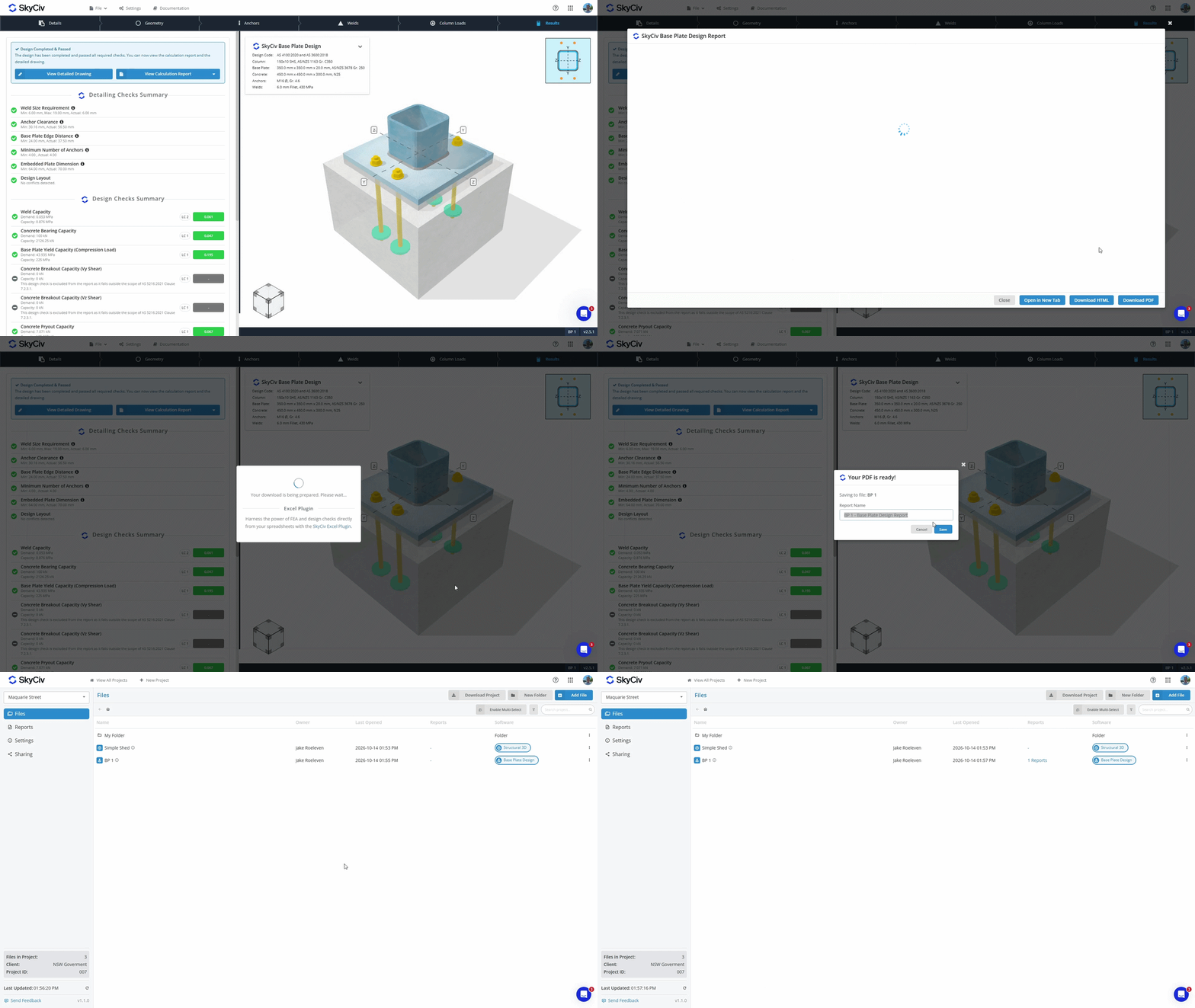
SkyCiv Modülünden PDF oluşturduğunuzda, artık ikisini de yapma seçeneğiniz var:
- İndirmek ve PDF'yi yerel cihazınızda saklayın.
- Kayıt etmek bulut depolama alanımızdaki dosyanızla birlikte.
Bulut depolama alanında Dosyanıza kaydedilen PDF'ler, Proje Yöneticisinin hem Dosyalar hem de Raporlar sekmelerinde görüntülenebilir. Daha fazla bilgi edinin Rapor Yöneticisi belgeleri.
Proje Verilerini İndirme
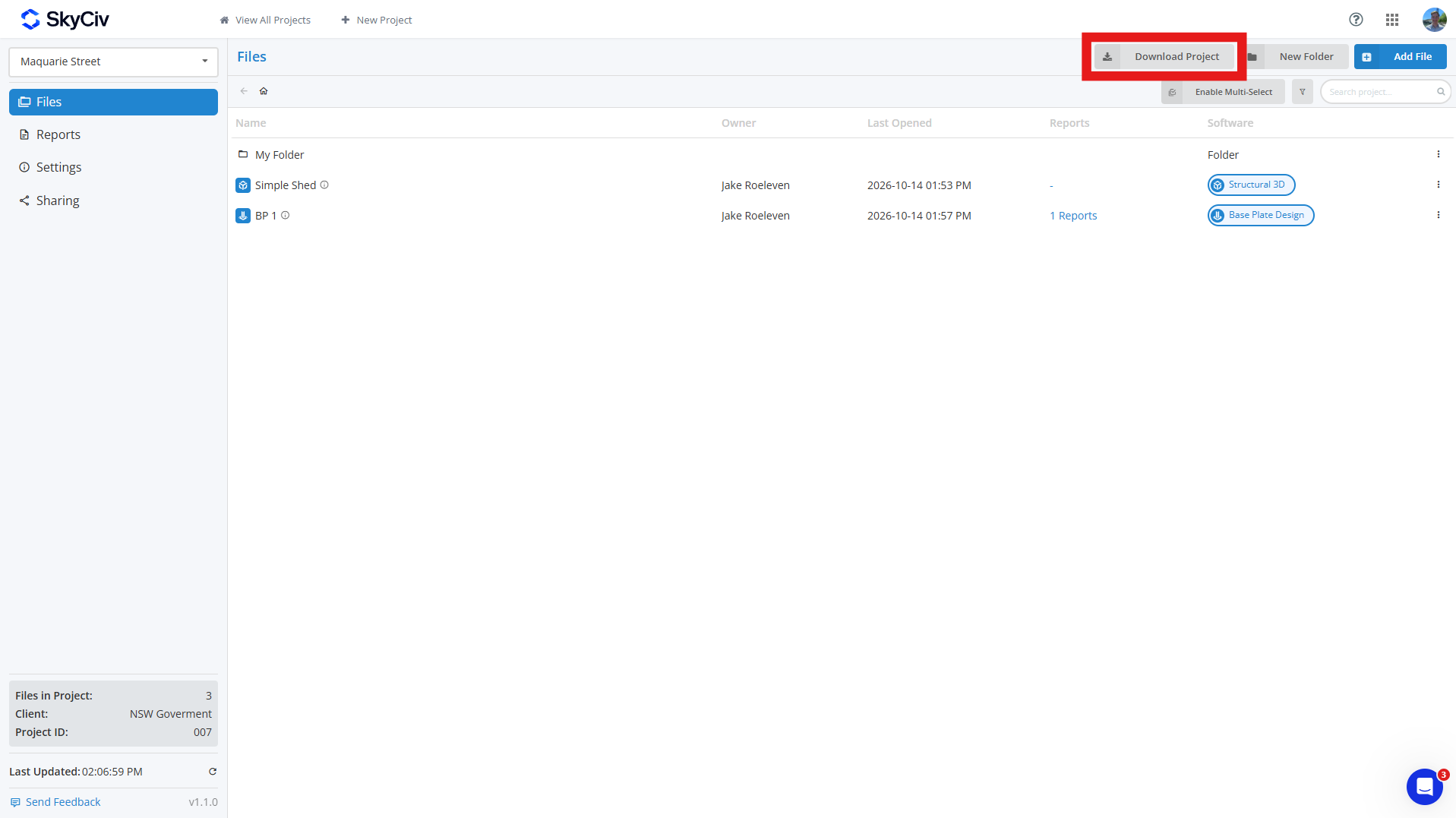
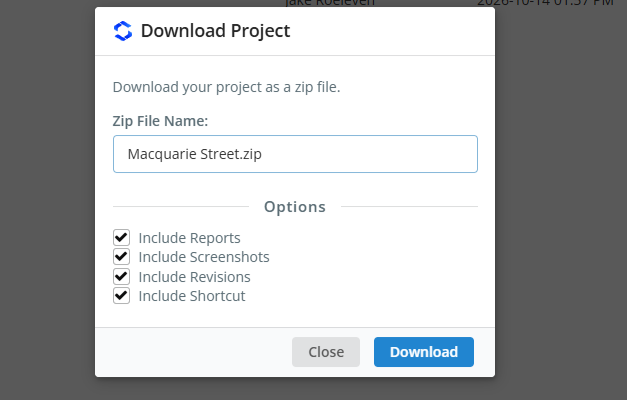
Proje verilerinizi şuradan indirebilirsiniz: Dosyalar projenizdeki sekmeyi tıklatarak Projeyi İndir buton. Bu, projenin ZIP dosyasını oluşturmanıza olanak tanır, dahil olmak üzere:
- Model Dosyası (JSON Dosyası)
- Revizyon Verileri (isteğe bağlı)
- Ekran görüntüleri (isteğe bağlı)
- Kaydedilen Raporlar (isteğe bağlı)
- Kısayol Bağlantısı (isteğe bağlı)
İsteğe bağlı alanları seçerseniz, o zaman ZIP'inizdeki her model, tüm bu verileri içeren kendi klasörü olacaktır; yalnızca modelleri dahil ederseniz, her model bir JSON dosyası olarak indirilecektir. Proje klasörleri ZIP'te çoğaltılacak, her klasör bir ile farklılaştırılmıştır [DOSYA] adının başına eklenen etiket.
Projeleri Paylaşma
Projelerinizi ekip arkadaşlarınızla paylaşabilirsiniz. Paylaşma Proje Yöneticisi araç çubuğunun sol tarafındaki seçenek. Paylaşıldığında, hesabınızın Ekibim bölümünde listelenen tüm ekip arkadaşları projeyi görecek. Bkz. Ekip Hesabı Kurulumu daha fazla öğrenmek için.
Not: yalnızca SkyCiv Ticari Hesapları paylaşım işlevine erişebilir.

