
The SkyCiv File Manager is where you organize, search, share and manage the files you save in SkyCiv’s cloud-based structural software, such as Structural 3D, Beam and the design modules. Pick the software your file was saved in on the left, then browse to the folder that holds it.
Opening the File Manager
From your SkyCiv Dashboard, tıklayın Dosya Yöneticisi altında Çalışma alanı in the panel on the right. You can also click Show All Files next to your Recent Files, ya da Dosyalar link on a software’s card to go straight to the files of that software.
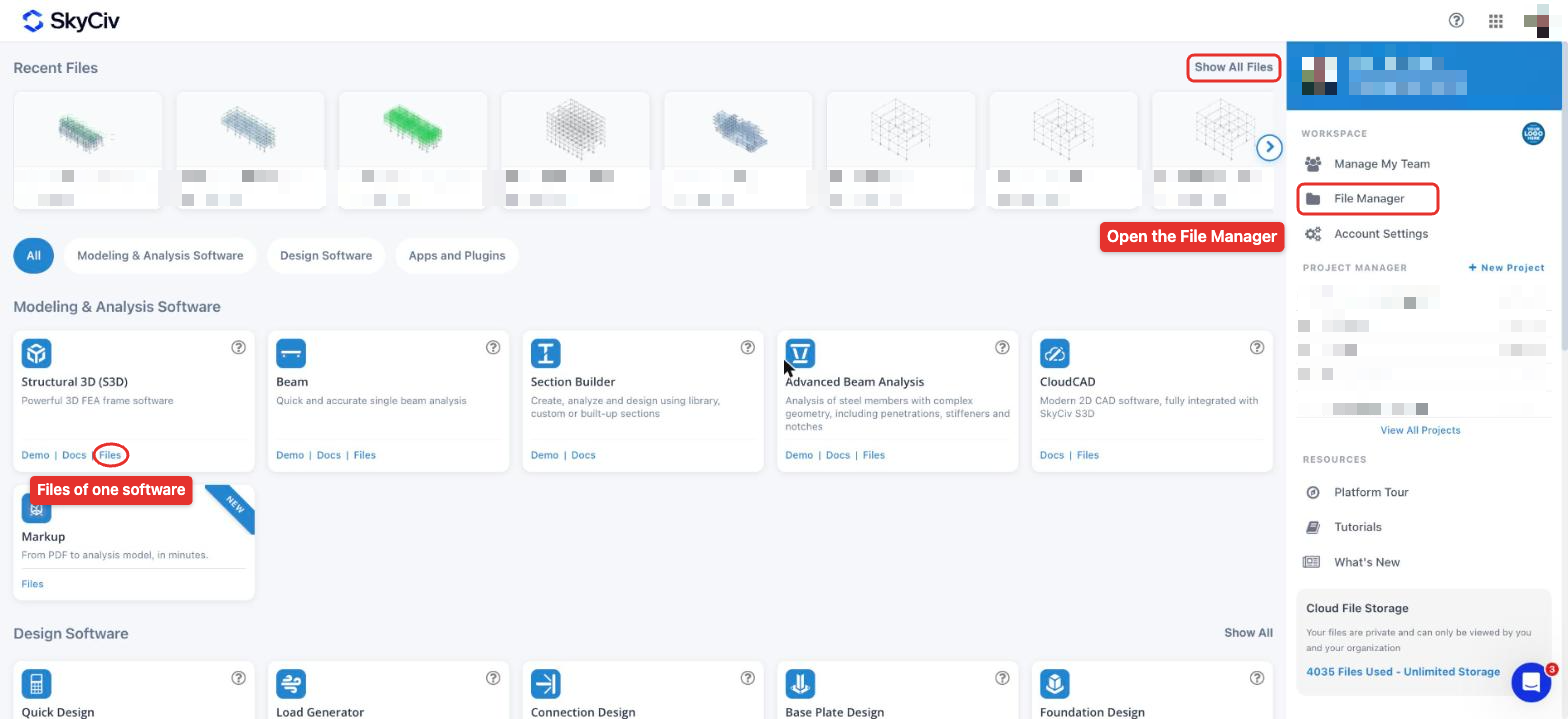
Ana Dosya Yöneticisi
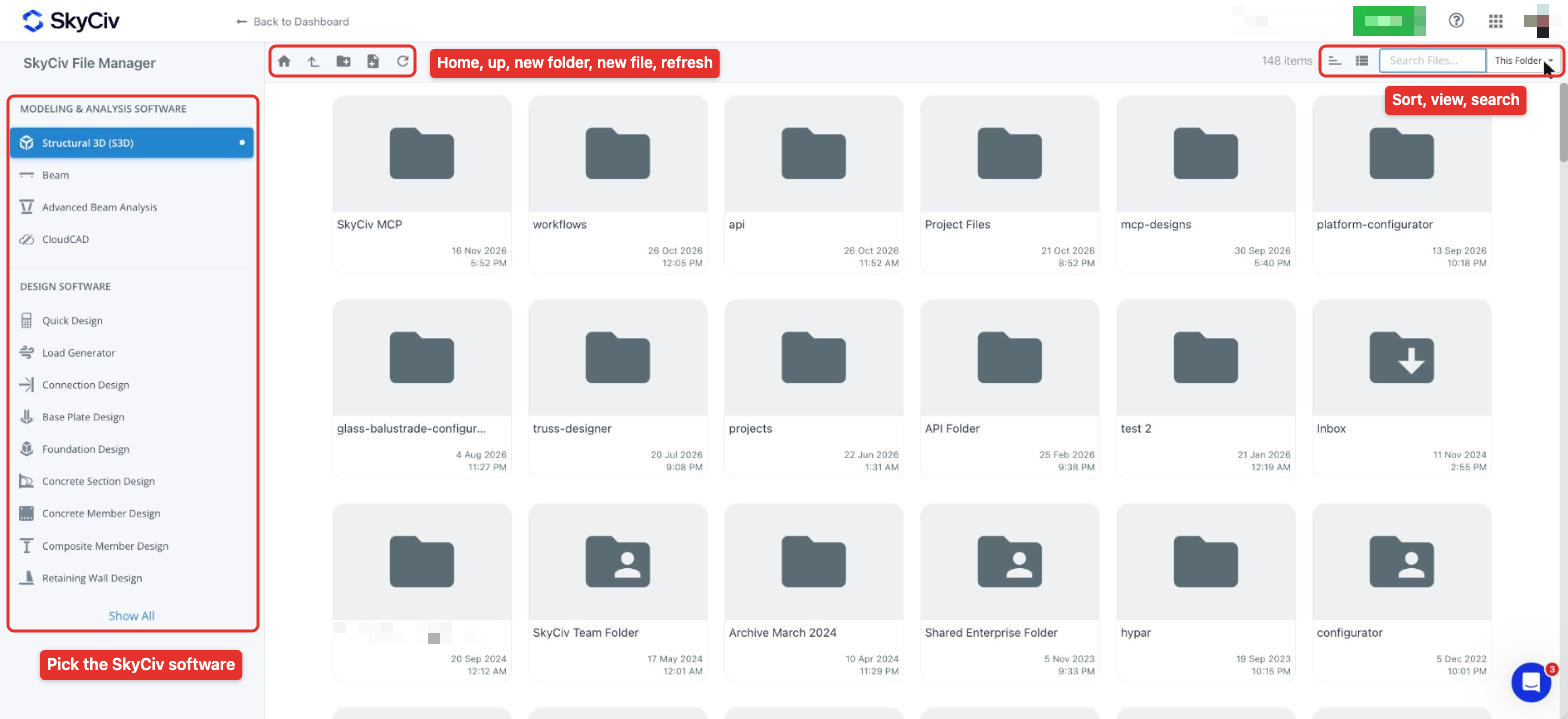
The left panel lists the SkyCiv software, grouped into Modelleme & Analiz Yazılımı ve Tasarım Yazılımı (tıklayın Hepsini Göster ↓ for the rest). Each software keeps its own files and folders. The toolbar above the files lets you go to the root folder, go up to the parent folder, create a new folder, start a new file in the selected software and refresh the folder contents. Sağda, you can sort the files (newest, oldest, names A-Z or Z-A), switch between the tile and list views, ve ara.
Structural 3D models show a preview of the model and a count of its nodes (N), elemanlar (M), levhalar (P) ve örgülü plakalar (MP), with the date of the last save.
Dosya Yöneticisi, kolay dosya yönetimi için aşağıdaki işlevlere sahiptir:
- Yeni klasörler ve alt klasörler oluşturun
- Modellerinizi hızlı bir şekilde bulmak için arama yapın
- Drag and drop to move files and folders
- Select multiple files using the Ctrl/Shift keys
- Rename and delete files
- Restore previous versions of models
- Share files and folders with other SkyCiv users
Right-click options
Right-click a file to see what you can do with it:
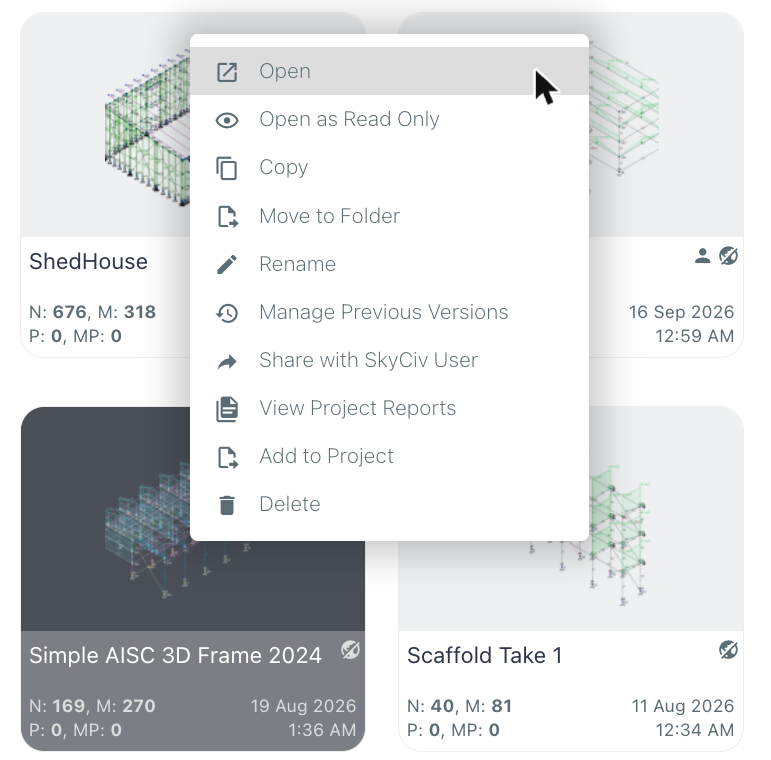
- Açık veya Open as Read Only
- Öğeleri bastırmak, üyeleri döndürmenin hızlı ve kolay bir yoludur, Move to Folder, Yeniden isimlendirmek ve Silmek
- Önceki Sürümleri Yönet, to review and restore earlier saves of the model
- SkyCiv Kullanıcısıyla Paylaşın
- View Project Reports ve Projeye Ekle, to work with the file in a SkyCiv project
Search options
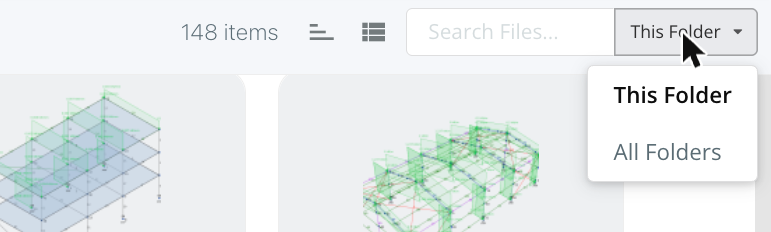
Click the search icon at the top right to open the search box. You can choose from two options to help you quickly find the file or files you need. İle SkyCiv'in Dosya Yöneticisi, çeşitli kaydedilmiş dosyalarınızı düzenlemenize ve bunlarla çalışmanıza olanak tanır, you only search the files in the current folder (files that match the search term in other folders are ignored). İle SkyCiv'in Dosya Yöneticisi, çeşitli kaydedilmiş dosyalarınızı düzenlemenize ve bunlarla çalışmanıza olanak tanır, the search returns all files that match your search term, whichever folder they are in. Her iki durumda da, the search only shows files of the software selected on the left-hand side.
Dosyaları Paylaşma
SkyCiv bulut tabanlı olduğundan, dosyaları diğer SkyCiv kullanıcılarıyla kolayca paylaşabilirsiniz. Right-click the model and click SkyCiv Kullanıcısıyla Paylaşın. Enter the emails of the SkyCiv users to share with, then choose between two options: Paylaş the model with them in real time (varsayılan), veya Send Copy so they get their own copy and can modify it without affecting your model. When sharing, you also choose whether they Can Edit ve Can Share the file.
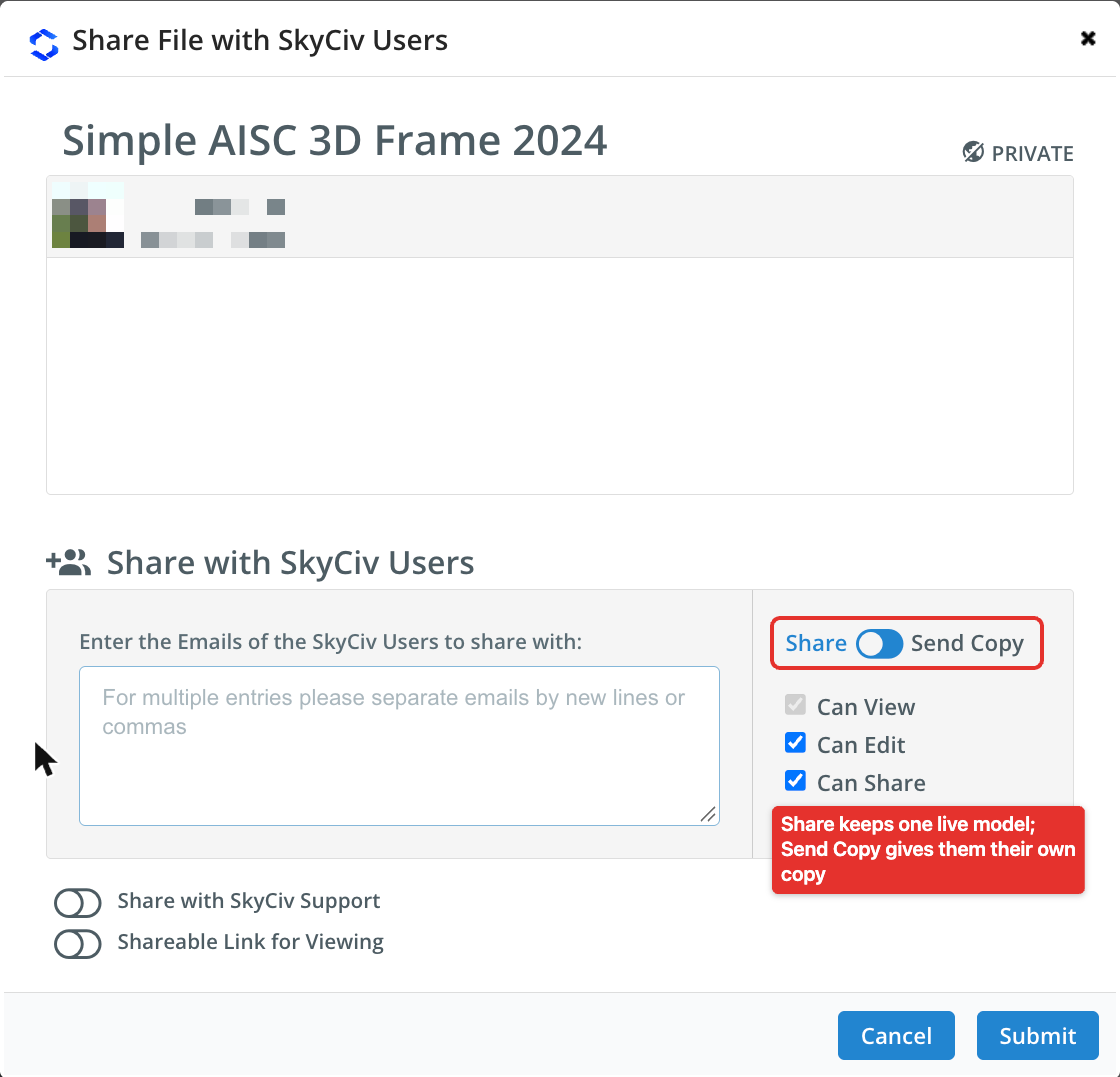
Files that have been shared with you automatically appear in your Sizinle paylaşılan dosyalar otomatik olarak kullanıcının Klasör. The people you share with also receive an email to let them know a model has been shared with them.
Learn more in sharing files in SkyCiv.
Revizyon denetimi
Tüm revizyonlarınız ve önceki kayıtlarınız tek bir modelde saklanır, böylece istediğiniz zaman önceki revizyonları gözden geçirebilir ve hatta geri alabilirsiniz. Sizinle paylaşılan dosyalar otomatik olarak kullanıcının: bir ekibin tüm üyeleri var Sizinle paylaşılan dosyalar otomatik olarak kullanıcının, and everyone can review and keep up to date with any changes to your model. Revision control can be reviewed from the File Manager (right-click a file and click Önceki Sürümleri Yönet) or within the model itself:

Hakkında daha fazla öğren revision control of your models.
Diğer ayarlar
Sizinle paylaşılan dosyalar otomatik olarak kullanıcının Hesap ayarları -> Sizinle paylaşılan dosyalar otomatik olarak kullanıcının. From here they can turn on autosaving, where your model saves itself every minute. This is designed so that you don’t need to think about saving your file to protect your progress against computer or browser crashes. Users can also control what appears in their File Manager (for instance the Public User Folder) and the view in which the File Manager is displayed (kiremitli görünüm veya liste görünümü).
Dosyalarım nerede saklanıyor?
Sizinle paylaşılan dosyalar otomatik olarak kullanıcının, Amerika Birleşik Devletleri, which is both SOC1 and SOC2 compliant. Business Accounts can integrate the file storage system with their own FTPs and servers.
Dosyalarım güvende mi??
SkyCiv stores our users’ güvenli sunucularımızdaki dosyalar, yalnızca kullanıcı ve SkyCiv Geliştiricileri tarafından erişilebilen. SkyCiv ayrıca, hesabınız altında oturum açmamış herhangi birinin bilgilerinize erişmesini önleyen sistemlere sahiptir..
Dosyalarım yedeklendi mi?
SkyCiv stores our users’ güvenli sunucularımızdaki dosyalar, halka açık erişimden gizlenmiş. Bu dosyalar, herhangi bir bilginin kaybolması durumunda her gün yedeklenir., bozuk, veya ihtiyacınız olan bir dosyayı yanlışlıkla silerseniz. Bize [email protected] adresinden e-posta gönderin, modelinizi sizin için bulup kurtaralım..
Dosyalarımı indirebilir miyim?
Evet, Sizinle paylaşılan dosyalar otomatik olarak kullanıcının Dosya – İhracat, bu, verileri CSV veya orijinal SkyCiv verileri olarak saklamanıza olanak tanır (JSON).
Dosyalarımı otomatik kaydedebilir miyim?
Evet, SkyCiv can automatically save your model (her dakika) sen çalışırken. This suits working in the cloud and ensures your work is always protected so you don’t lose any of your progress. Bunu açmak için, ziyaret etmek Hesap ayarları -> Sizinle paylaşılan dosyalar otomatik olarak kullanıcının.
