австралиец / Стандарт Новой Зеландии 4600 для холодногнутых стальных конструкций, 2018 Версия
АС/НЗС 4600:2018 модуль проверяет холодногнутые стальные элементы с помощью Метод прямой прочности. Он работает в SkyCiv Structural 3D и поддерживает настраиваемые ограничения вдоль каждого элемента..
Для 2005 версия, видеть AS4600 Член Дизайн.
С помощью этого модуля вы можете:
- Запустите проверку проекта в AS/NZS. 4600:2018 с помощью метода прямой прочности, включая:
- Предварительная квалификация участников
- Осевое напряжение
- Осевое сжатие: пропускная способность секции, и потенциал членов для глобального, местное и деформационное выпучивание
- Изгиб вокруг обеих осей: пропускная способность секции, и способность члена к поперечному скручиванию, местное и деформационное выпучивание
- Сдвиг по обеим осям
- Комбинированный изгиб и сдвиг
- Комбинированное сжатие и изгиб
- Комбинированное растяжение и изгиб
- Проектирование каналов, Z-разделы, секции шляпы, каналы «спина к спине» и коробки каналов с выступами, призматический или непризматический
- Определите пользовательские ограничения и псевдоограничения вдоль каждого элемента.
- Установите элементы, закрепленные вокруг своей малой оси. (например, путем листового проката), так они проверяются относительно геометрических осей
- Экспортируйте подробные пошаговые отчеты в формате PDF
- Контролируйте параметры и ввод для каждого члена (Запустить дизайнер) чтобы найти наиболее эффективный раздел
Поддержка текущей версии
Разделы
- канал
- Губчатый канал
- Сингл с губчатым каналом
- Z-секция
- Губы Z
- Американский институт чугуна и стали
- Комбинированные каналы
- Смежные губчатые каналы
- Коробка с выступающим каналом
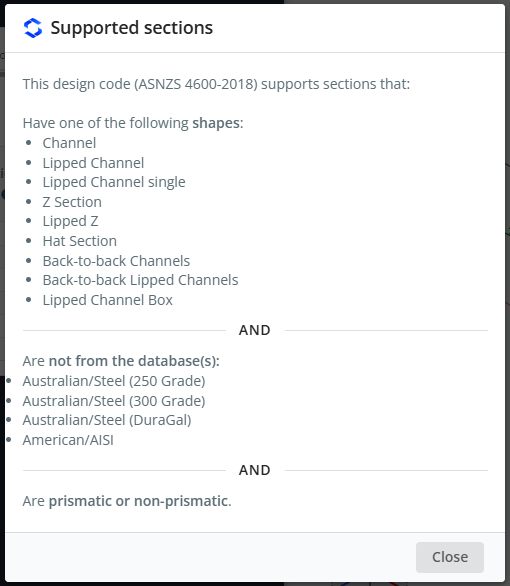
Каналы с параллельными выступами и блоки каналов с выступами поддерживаются только этим кодом.. Сечения могут быть призматическими и непризматическими., и материал должен быть стальной. Секции не должны поступать из Австралии/сталелитейной компании. (250 Оценка), Австралийский/Сталь (300 Оценка), Австралийский/Сталь (Дорогой) или американские/AISI базы данных.
Чтобы увидеть этот список в программе, откройте журнал и нажмите Просмотр поддерживаемых разделов.
Программное обеспечение
- SkyCiv Структурная 3D
AS / NZS 4600-2018 также указан в Код дизайна раскрывающийся список SkyCiv Beam. На этой странице описан модуль SkyCiv Structural 3D..
Заметка
Юниты должны находиться в метрический использовать этот модуль дизайна. В модели, открыто настройки (верхняя панель) > Единицы и установите систему единиц измерения на метрический.
Открытие модуля
- Решите модель.
- Нажмите дизайн в верхней панели.
- В Выберите модуль проектирования, выбирать Холоднокатаный стальной элемент.
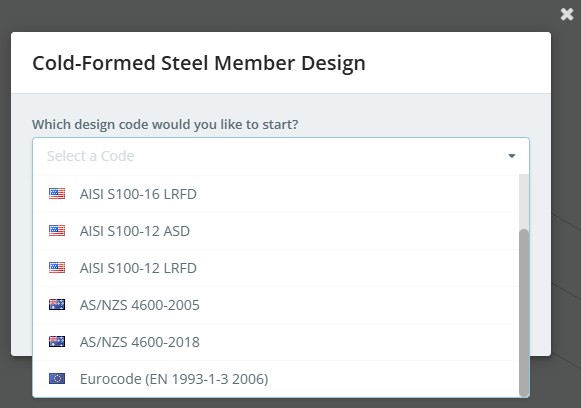
- В Какой дизайн-код вы хотели бы начать?, выбирать AS / NZS 4600-2018, затем нажмите Начинать.
Если модуль дизайна уже открыт, использовать Изменить модуль в дизайн меню для переключения кодов.
Панель дизайна открывается слева, с 3D-моделью справа. В заголовке указан код, плюс Запросить функцию и Запустить дизайнер. Справа от панели вкладок расположены три кнопки.:
- настройки (механизм) кнопка, который открывает Настройки дизайна элементов
- кнопка журнала, который открывает Журнал проектирования элементов
- Проверьте, который запускает проверку проекта
Когда модуль запускается, предупреждение может сообщить вам, что есть важные сообщения. Они показаны в Журнал проектирования элементов, for example "6 members were loaded with default values", или участники, которые не были импортированы, поскольку их раздел или материал не поддерживается.. В журнале есть Просмотр поддерживаемых разделов ссылка на сайт.
Вкладки подробности, факторы, материалы, Разделы, члены, Ограничения, Нагрузки и Полученные результаты.
Настройки дизайна элементов
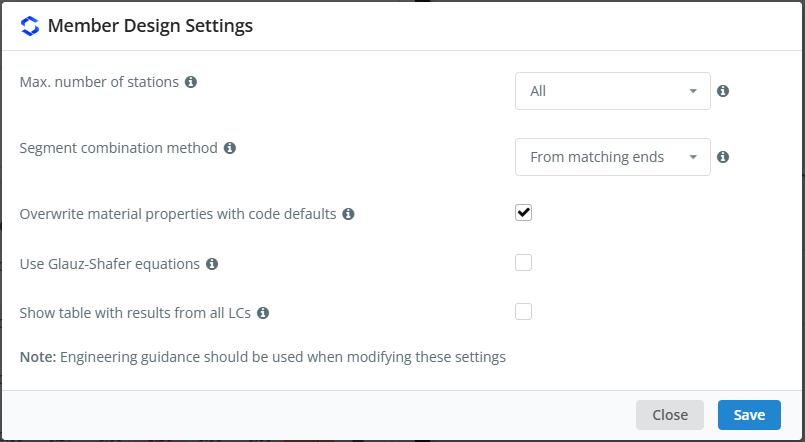
Нажмите кнопку шестеренки, чтобы открыть Настройки дизайна элементов. Наведите указатель мыши на значок ℹ рядом с настройкой, чтобы увидеть ее описание..
| Параметр | Выберите ось Z или Y | Описание |
|---|---|---|
| Максимум. количество станций | Все | Максимальное количество станций вдоль каждого члена, на которых проверяются результаты.: Все использует все доступные станции, или выберите до 3, 5, 7, 9, 11, 15 или 51 станций на участника |
| Метод объединения сегментов | От совпадающих концов | Как проверяются сегменты одиночного действия (сжатие и изгиб) объединяются для проверок комбинированных действий. От совпадающих концов объединяет отрезки, имеющие одинаковые концы. Из разных мест сочетает в себе, для каждого сочетания нагрузок, сегменты с самыми высокими коэффициентами полезности, даже если они находятся в разных местах элемента |
| Перезаписать свойства материала значениями кода по умолчанию. | отмечено галочкой | Использует модуль упругости E = 200000 МПа и модуль сдвига G = 80000 МПа вместо значений материала в модели. Когда флажок снят, E берется из модельного материала, а G рассчитывается на основе E и его коэффициента Пуассона. |
| Используйте уравнения Глауза-Шафера | Не отмечен галочкой | Использует уравнения Глауза & Шафер (2022), Прогноз прочности на изгиб холоднодеформированных стальных профилей, несимметричных относительно оси изгиба. Это влияет на способность сечения и элемента изгибать относительно несимметричной оси. |
| Показать таблицу с результатами всех LC | Не отмечен галочкой | Добавляет к проверкам отчетов участников, где доступно, таблица с результатами всех сочетаний нагрузок |
Нет настройки для запуска проверок геометрических осей для всех элементов.. Проверка элементов относительно геометрических осей, использовать Распорка малой оси в Ограничения вкладка (видеть Распорка малой оси под Ограничения ниже).
Как отмечает диалог, при изменении этих настроек следует использовать инженерное руководство.. Нажмите Сохранять применять.
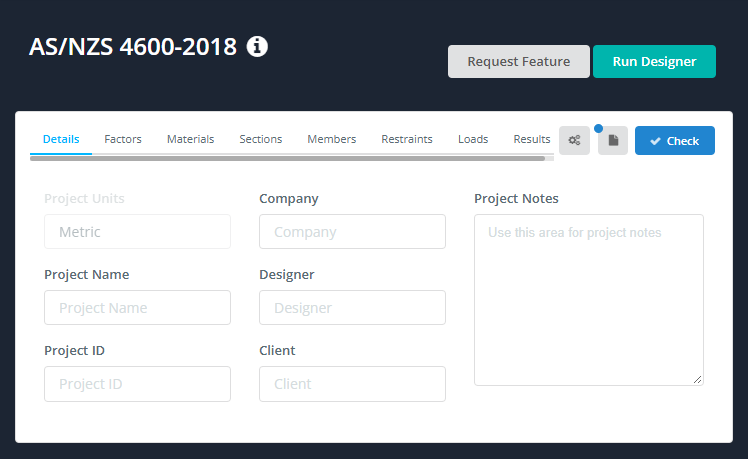
подробности
На подробности вкладка, вы можете ввести детали проекта. Вам не обязательно их заполнять, но все, что вы вводите, отображается в Детали проекта таблица ваших отчетов. Единицы проекта шоу метрический и здесь нельзя изменить.
факторы
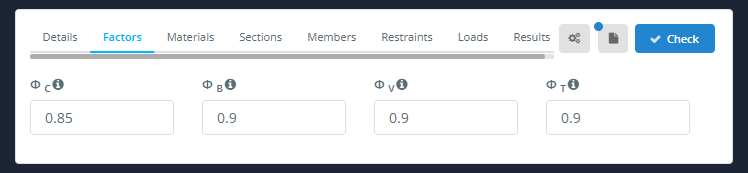
В факторы на вкладке показаны коэффициенты снижения мощности:
| Фактор | Описание | Выберите ось Z или Y |
|---|---|---|
| Ниже приведены различные способы определения коэффициентов давления грунта для расчета удельного сопротивления трения свай в песке.С | компрессия | 0.85 |
| Ниже приведены различные способы определения коэффициентов давления грунта для расчета удельного сопротивления трения свай в песке.В | Гибка | 0.9 |
| Ниже приведены различные способы определения коэффициентов давления грунта для расчета удельного сопротивления трения свай в песке.V | ножницы | 0.9 |
| Ниже приведены различные способы определения коэффициентов давления грунта для расчета удельного сопротивления трения свай в песке.T | напряжение | 0.9 |
Если участник не прошел предварительную квалификацию (Пункт 1.6.3(с)(я)), Ниже приведены различные способы определения коэффициентов давления грунта для расчета удельного сопротивления трения свай в песке.С, Ниже приведены различные способы определения коэффициентов давления грунта для расчета удельного сопротивления трения свай в песке.В и ΦV сводятся к 0.8. Факторы, использованные для каждого члена, перечислены в его отчете в разделе Факторы состояния предельной прочности, со ссылками на их статьи.
материалы
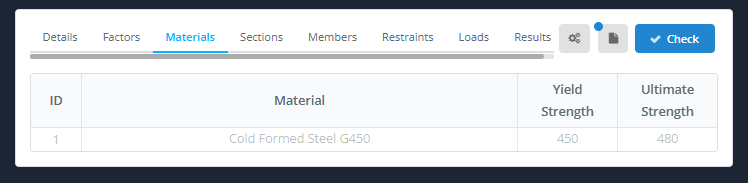
В материалы На вкладке перечислены материалы, используемые спроектированными элементами., со своими Предел текучести и Невероятная сила. Таблица заполняется из модели и здесь не подлежит изменению.. Чтобы изменить материал, вернуться к модели.
Разделы
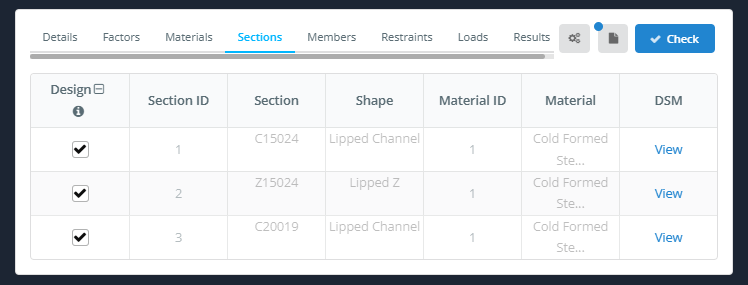
В Разделы на вкладке перечислены разделы, используемые созданными элементами.. Данные сечения берутся из модели и не могут быть изменены здесь..
- дизайн: установите флажок, чтобы создать участников, которые используют этот раздел. Значок в заголовке столбца переключает все строки.
- ID раздела, Раздел, Форма, Идентификатор материала и Материал: взято из модели.
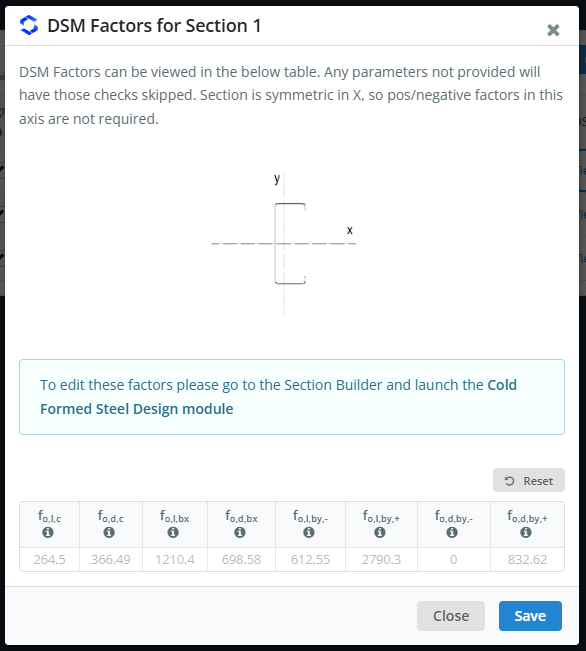
- ДСМ: щелкнуть Посмотреть чтобы увидеть факторы DSM раздела.
В Факторы DSM для раздела n в диалоговом окне отображается эскиз сечения с его осями, и упругие напряжения потери устойчивости (в МПа) используется методом прямой прочности:
| Символ | Выпуклое напряжение |
|---|---|
| еО,L,с | Местное коробление, сжатие |
| еО,d,с | Искажающее коробление, сжатие |
| еО,L,бх | Местное коробление, изгиб вокруг х |
| еО,d,бх | Искажающее коробление, изгиб вокруг х |
| еО,L,по,- и еО,L,по,+ | Местное коробление, наклоняюсь вокруг тебя (отрицательные и положительные) |
| еО,d,по,- и еО,d,по,+ | Искажающее коробление, наклоняюсь вокруг тебя (отрицательные и положительные) |
Для любого фактора, который не указан, проверка пропускается.. Для сечения, симметричного относительно оси, положительные и отрицательные факторы по этой оси не нужны.
Z-секции и Z-секции с кромками также имеют одинаковые коэффициенты в отношении геометрических осей., с грамм нижний индекс (например фО,L,с,грамм). Они используются только членами, стянутыми вокруг своей малой оси. (видеть Распорка малой оси под Ограничения ниже). Если коэффициент геометрических осей недоступен, вместо этого используется коэффициент главных осей: в Журнал проектирования элементов перечисляет разделы, в которых отсутствуют некоторые из них, и в отчетах затронутых участников об этом говорится. Значения здесь нельзя редактировать.: изменить их, перейти к Конструктор разделов и запустить Холоднокатаная стальная конструкция модуль.
члены
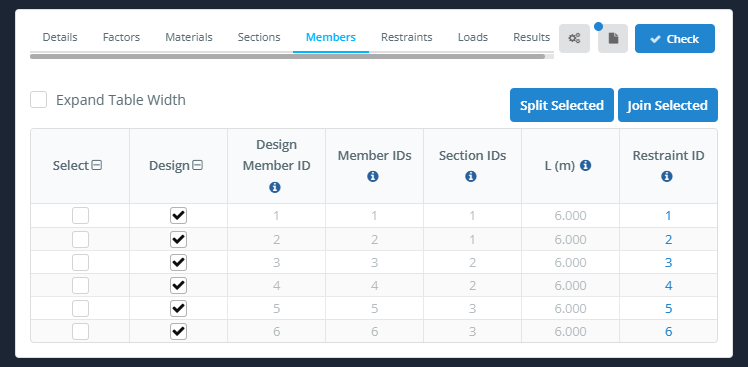
В члены на вкладке перечислены элементы дизайна. Каждый элемент дизайна состоит из одного или нескольких элементов модели..
- Увеличить ширину стола: расширяет стол.
- Разделить выбранное и Присоединяйтесь к избранным: разделить выбранные элементы дизайна, или объединить их в один элемент дизайна.
| Столбец | Описание |
|---|---|
| Выбрать | Отмечает строку, например, чтобы разделить или присоединиться к участникам |
| дизайн | Установите флажок, чтобы включить элемент в проверку конструкции., снимите галочку, чтобы не включать это |
| Идентификатор элемента дизайна | Идентификатор участника проекта |
| Непрямоугольные нагрузки аналогичны двухсторонним нагрузкам, поскольку действие предполагает, что нагрузка поддерживается всеми элементами системы. | Модельный член(s) которые составляют элемент дизайна |
| Идентификаторы раздела | Секция(s) члена проекта |
| L (м) | Длина конструктивного элемента |
| Идентификатор ограничения | Набор ограничителей, используемый участником. Нажмите на него, чтобы открыть это ограничение в Ограничения вкладка |
Идентификатор элемента дизайна, Непрямоугольные нагрузки аналогичны двухсторонним нагрузкам, поскольку действие предполагает, что нагрузка поддерживается всеми элементами системы., Идентификаторы раздела и L (м) взяты из модели и не могут быть изменены здесь. На этой вкладке не вводятся эффективные длины и коэффициенты K.: они происходят из Ограничения вкладка.
Ограничения
AS / NZS 4600:2018 поддерживает пользовательские ограничения, поэтому вы можете добавить свои собственные ограничения для использования в расчетах. Для полного описания, см. нашу документацию на членские ограничения.
- Авто Группа: дает похожим участникам одинаковый идентификатор ограничения.
- Идентификатор ограничения: выбирает идентификатор ограничения для просмотра или редактирования. Используйте стрелки вниз и вверх для перехода к следующему или предыдущему идентификатору..
- Назначить участнику(s): назначает текущий идентификатор ограничения участникам.
- Дублировать: копирует текущий идентификатор ограничения на новый идентификатор.
Таблица ограничений заполняется из опор и соединений модели.. Например, элемент, поддерживаемый на обоих концах, получает по строке на каждом конце.
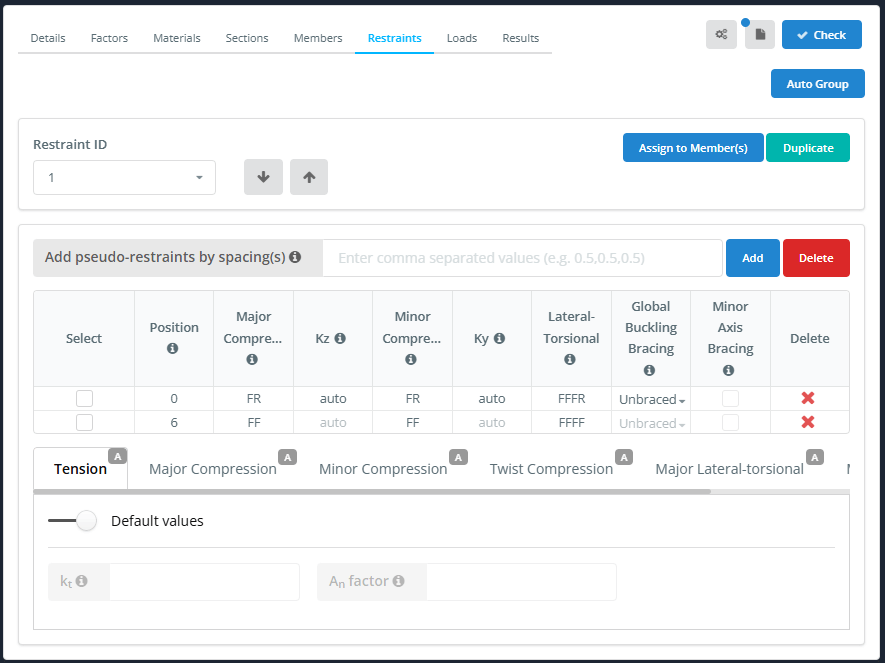
| Столбец | Описание |
|---|---|
| Выбрать | Отмечает строку, например, применить к нему стандартное ограничение |
| Позиция | Расстояние ограничения от начала элемента |
| Основное сжатие | 2-ключевой код ограничения (Ф или Р) для продольного изгиба |
| Kz | Эффективный коэффициент длины для главной оси (авто по умолчанию) |
| Незначительное сжатие | 2-ключевой код ограничения (Ф или Р) для потери устойчивости при изгибе по малой оси |
| Ky | Эффективный коэффициент длины для малой оси (авто по умолчанию) |
| Боковой-крутильный | 4-ключевой код ограничения (F, Р или С) для продольно-крутильного выпучивания |
| Глобальная фиксация устойчивости | без фиксации, Вершина, Нижний или Оба. Если ограничитель поперечного скручивания полностью удерживает фланец, общая проверка устойчивости пропускается в случаях, когда связь покрывает. Для получения подробной информации наведите курсор на значок ℹ. |
| Распорка малой оси | Отметьте, если элемент постоянно закреплен вокруг своей малой оси., например, путем листового проката. Это относится ко всему идентификатору удерживающего устройства., видеть Распорка малой оси ниже |
| Удалить | Удаляет ограничительный ряд |
Чтобы добавить псевдоограничения (ограничения, которые не моделируются), введите интервалы в Добавьте псевдоограничения через пробел(s) и нажмите Добавлять. Вы можете ввести список, разделенный запятыми. (Например 1.5,1.5,1.5), используйте оператор умножения (4*1.5), или используйте < оператору установить как можно больше ограничителей. Нажмите Удалить рядом с Добавлять убрать все псевдоограничения.
Псевдоограничения добавляются по мере их выпуска. (RR и р-р-р-р), поэтому они не действуют, пока вы не измените их коды. В примере ниже, 4*1.5 добавляет строки в 1.5, 3 и 4.5 м на 6 м член.
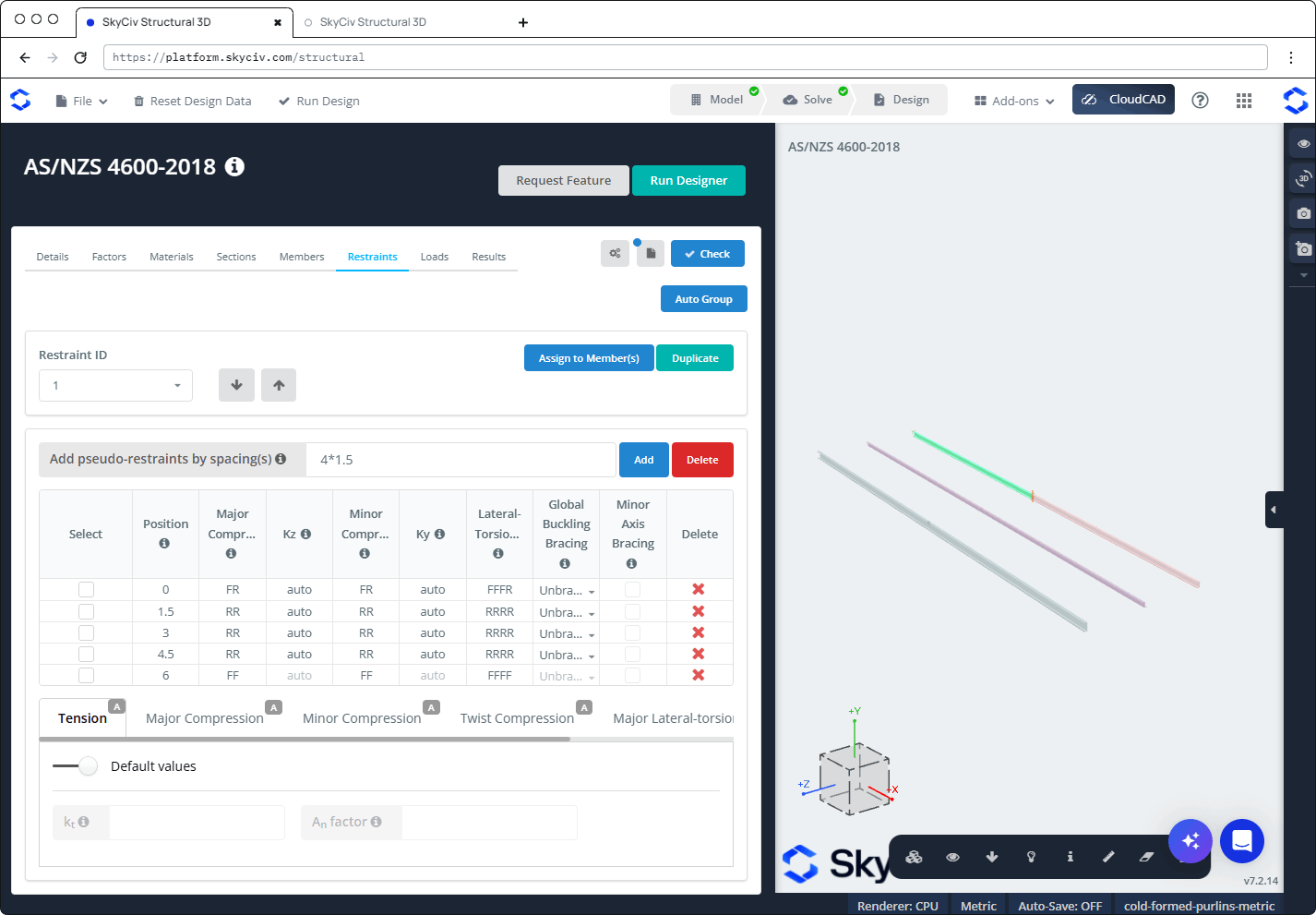
Под таблицей расположены подвкладки, каждый с А (автоматический) значок по умолчанию:
- напряжение: с участием Значения по умолчанию на, используются значения по умолчанию. Выключите его, чтобы ввести свой собственный:
- КT: поправочный коэффициент распределения сил в растянутом элементе. По умолчанию предполагается неравномерное распределение силы., согласно AS/NZS 4600:2018 Пункт 3.2.3.2.
- АN фактор: коэффициент, который уменьшает общую площадь до чистой площади. По умолчанию 0.85, который предполагает болтовое соединение.
- Основное сжатие (Lс участием, Кс участием), Незначительное сжатие (Lи, Ки), Поворотное сжатие (LИкс, КИкс), Основной латерально-крутильный (Lб, КLT, Сб) и Незначительный латерально-крутильный (Lб, КLT): по умолчанию, Определиться с ограничениями (как определено в таблице ограничений) включен. Выключите его, чтобы ввести собственные значения для всего элемента.. Под Стандартные ограничения, щелкните значок, чтобы применить стандартное ограничение к выбранным строкам.
Распорка малой оси
Галочка Распорка малой оси когда элемент постоянно закреплен вокруг своей малой оси, например, с помощью брезента, прикрепленного к прогону или поясу. затем:
- Изгибающий момент вокруг малой оси (Mи*) из анализа игнорируется, и принимается за ноль во всех сочетаниях нагрузок и проверках.
- Проверки проекта проводятся по геометрические оси сечения вместо его главных осей. Это изменяет результаты только тех сечений, главные оси которых повернуты., такие как Z-секции. Для Z-профилей и Z-профилей с кромкой, используются коэффициенты DSM относительно геометрических осей (видеть Разделы выше).
Настройка применяется ко всему члену: установка или снятие галочки в любой строке изменяет все позиции идентификатора ограничения., и поэтому все элементы проекта, которым назначен идентификатор ограничения. Элементы, которые используют тот же раздел, но не закреплены, проверяются как обычно., о главных осях.
Распорка малой оси можно отметить только в том случае, если ни один сегмент не без фиксации в Глобальная фиксация устойчивости колонка: первый ряд и каждый промежуточный ряд, код латерального кручения которого не начинается с RR должен быть установлен на Вершина, Нижний или Оба. В противном случае флажки отключены и сняты., и вернуть сегмент в без фиксации снимает галочку с них. Флажок последней строки всегда отключен, поскольку последняя позиция не начинает сегмент. Для получения подробной информации наведите указатель мыши на значок ℹ в заголовке столбца..
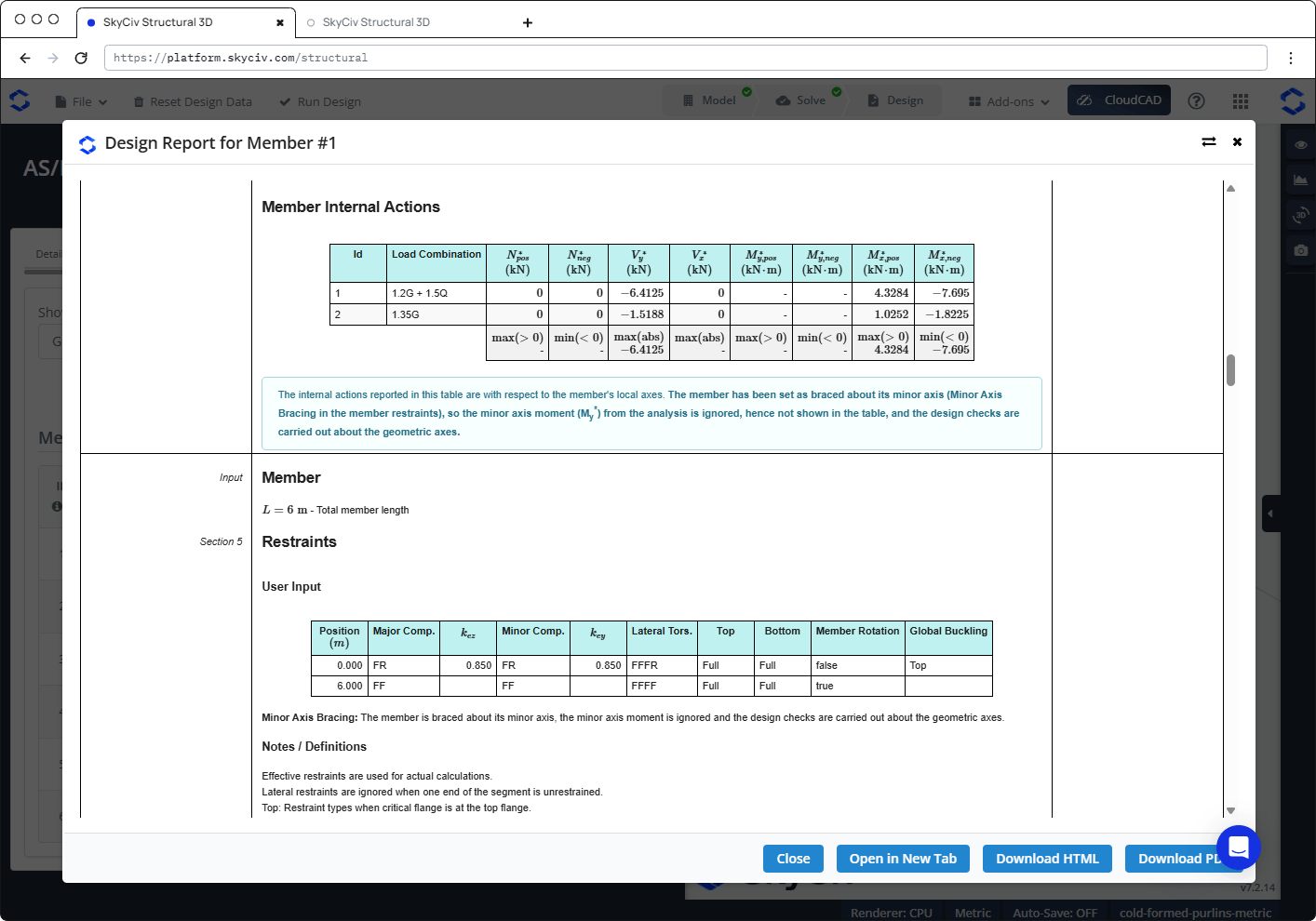
В отчете члена, зажатого вокруг своей малой оси:
- В Ограничения в разделе есть Распорка малой оси примечание под пользовательским вводом.
- В таблице внутренних действий указано Mи* as "-", с примечанием, что момент на малой оси игнорируется и проверки проводятся по геометрическим осям.
- Проверка изгиба по малой оси, и комбинированная проверка на сдвиг и изгиб по малой оси., сказать, что они не нужны, потому что элемент закреплен вокруг своей малой оси.
- На эскизе сечения показаны геометрические оси., и свойства раздела о них имеют грамм индекс вместо п (например Зхг и Схг). Для Z-секций, a DSM factor shown with "(значение геометрической оси недоступно, Используемое значение главных осей)" - фактор главных осей, и затронутые проверки показывают предупреждение о том, что вместо этого использовались коэффициенты DSM главных осей..
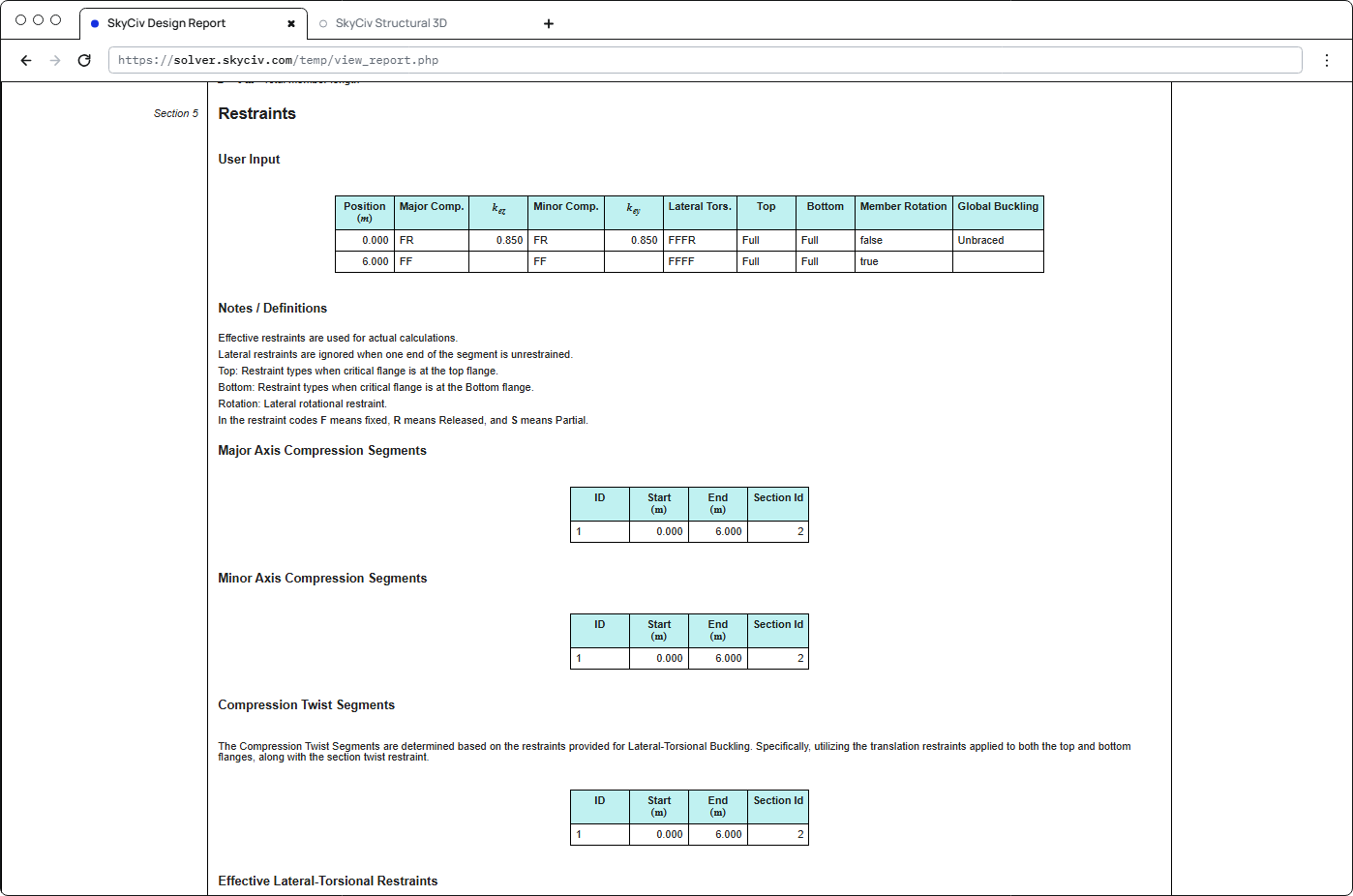
Ограничения в отчете
В Ограничения раздел отчета каждого участника показывает использованные ограничения: пользовательский ввод (позиция, коды сдерживания, Кнет и кэй, верхний и нижний фланцевый ограничитель, вращение стержня и глобальная фиксация потери устойчивости), сегменты сжатия по большой и малой оси, сегменты сжатия и скручивания, эффективные боковые торсионные ограничители и сегменты для каждого сочетания нагрузок.
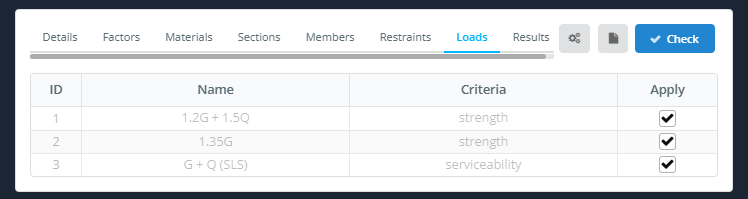
Нагрузки
В Нагрузки на вкладке перечислены сочетания нагрузок из модели., со своими название и Критерии. Галочка Подать заявление для каждого сочетания нагрузок, которое вы хотите включить. Комбинации работоспособности перечислены, и их можно отметить галочкой., но проверка работоспособности не производится.
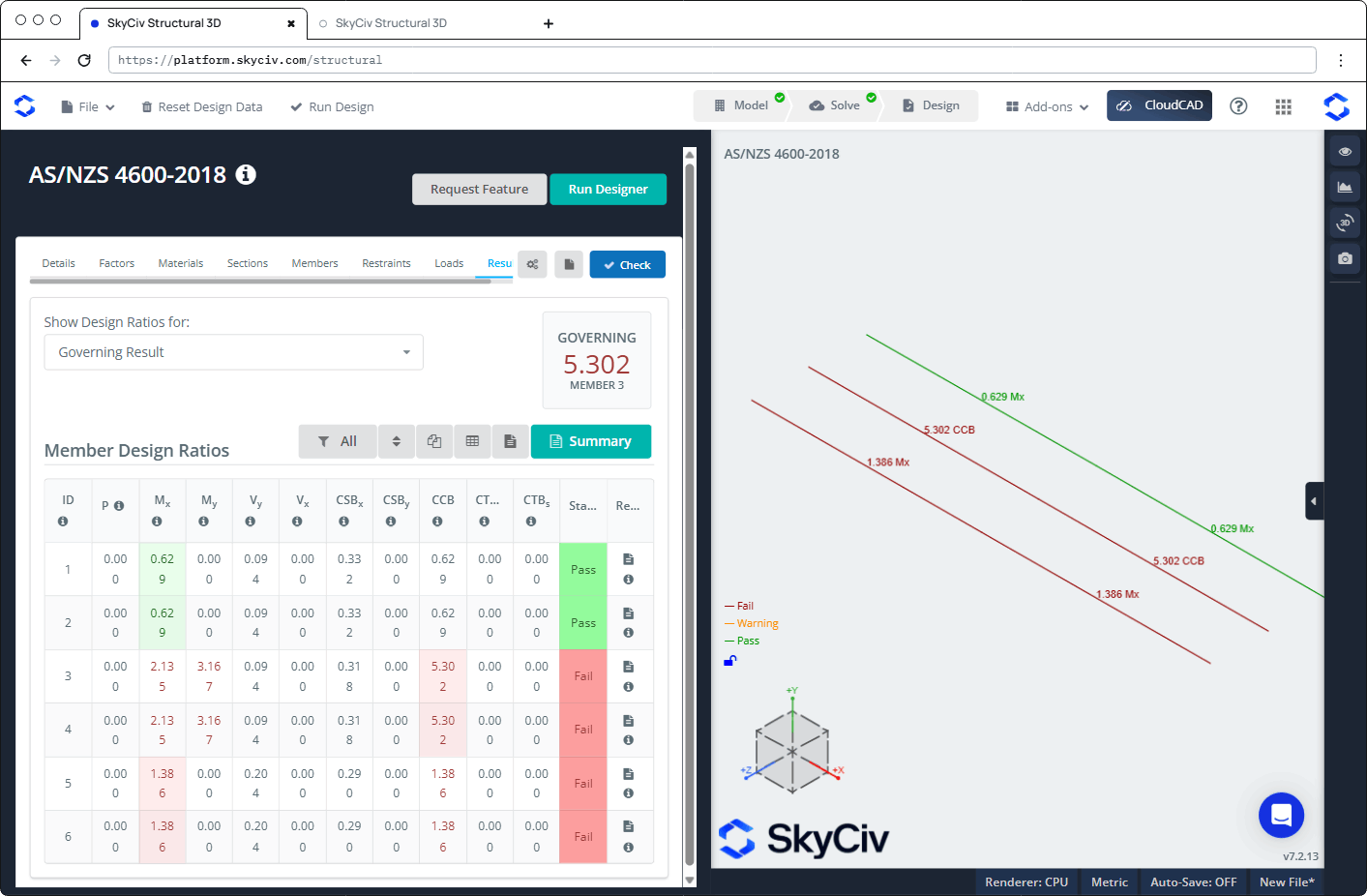
Полученные результаты
Нажмите Проверьте запустить проверку дизайна. В Полученные результаты вкладки показывают:
- Показать расчетные соотношения для: выбирает, какие соотношения показывать, Например Управляющий результат, Неудачные участники, или один чек.
- УПРАВЛЯЮЩИЙ: наивысшее соотношение и его член.
- Панель инструментов для фильтрации (Все), сортировать, Подавить элемент, покажи таблицу и открой отчет, больше имеет Резюме кнопка для сводного отчета.
- В Коэффициенты проектирования элементов Таблица, с Положение дел (Проходить или Потерпеть поражение) и отчет значок для каждого участника. Наведите указатель мыши на значок ℹ в заголовке столбца, чтобы увидеть пункт, к которому он относится..
| Столбец | Проверьте | Пункт |
|---|---|---|
| п | аксиальный (напряжение или сжатие) | 3.2 или 7.2.1 |
| MИкс | Изгиб около х | 7.2.2 |
| Mи | Сгибаясь вокруг y | 7.2.2 |
| Vи | Сдвиг вдоль оси y | 7.2.3 |
| VИкс | Сдвиг вдоль x | 7.2.3 |
| ЦСБИкс | Комбинированный сдвиг и изгиб, около х | 7.2.3 |
| ЦСБи | Комбинированный сдвиг и изгиб, о тебе | 7.2.3 |
| ЦКБ | Комбинированное сжатие и изгиб | 7.2.4 |
| СТВм | Комбинированное растяжение и изгиб, членская вместимость | 7.2.5(1) |
| СТВs | Комбинированное растяжение и изгиб, пропускная способность секции | 7.2.5(2) |
В 3D виде, каждый участник окрашен в цвет Потерпеть поражение, Предупреждение или Проходить и помечено его определяющим соотношением.
Проверок выполнено
| Проверьте | AS / NZS 4600:2018 Справка |
|---|---|
| Предварительная квалификация участников (устанавливает Φ) | Пункт 1.6.3 |
| Осевое напряжение, пропускная способность секции | Раздел 3.2 |
| Осевое сжатие, пропускная способность секции | Раздел 7.2.1.3 |
| Осевое сжатие, членская вместимость (Глобальный, местное и деформационное выпучивание) | Раздел 7.2.1 |
| Изгиб вокруг x и y, пропускная способность секции | Раздел 7.2.2.3.2 |
| Изгиб вокруг x и y, членская вместимость (поперечно-крутильный, местное и деформационное выпучивание), включая положительный и отрицательный изгиб вокруг y для одиночных симметричных сечений | Раздел 7.2.2.1 |
| Сдвиг вдоль оси y (сеть) и вдоль х (Вы можете заметить, что основное отличие заключается в соединении полок балки с опорной колонной.) | Раздел 7.2.3 |
| Комбинированный изгиб и сдвиг, относительно обеих осей | уравнение. 7.2.3(9) |
| Комбинированное осевое сжатие и изгиб. | уравнение. 7.2.4 |
| Комбинированное осевое растяжение и способность к изгибу профиля | уравнение. 7.2.5(2) |
| Комбинированное осевое растяжение и способность к изгибу стержня | уравнение. 7.2.5(1) |
Модуль не проверяет пределы гибкости., отклонение (работоспособность), повреждение или перекручивание сети.
Отчеты
Нажмите значок отчета в личном кабинете участника. отчет столбец, чтобы открыть отчет о проекте. Он открывается в Отчет о проектировании для элемента № n диалог с Закрывать, Открыть в новой вкладке, Скачать HTML и Скачать PDF кнопки. The report is titled "AS/NZS 4600-2018 – Direct Strength Method", и содержит:
- Детали проекта
- Утилита: каждый чек со своей ссылкой, символ, описание, соотношение и статус
- Разделы: размеры и свойства сечения
- Предельные предельные состояния: Предварительная квалификация участников, Факторы состояния предельной прочности, Внутренние действия участников, Член и ограничения, с последующей каждой проверкой шаг за шагом
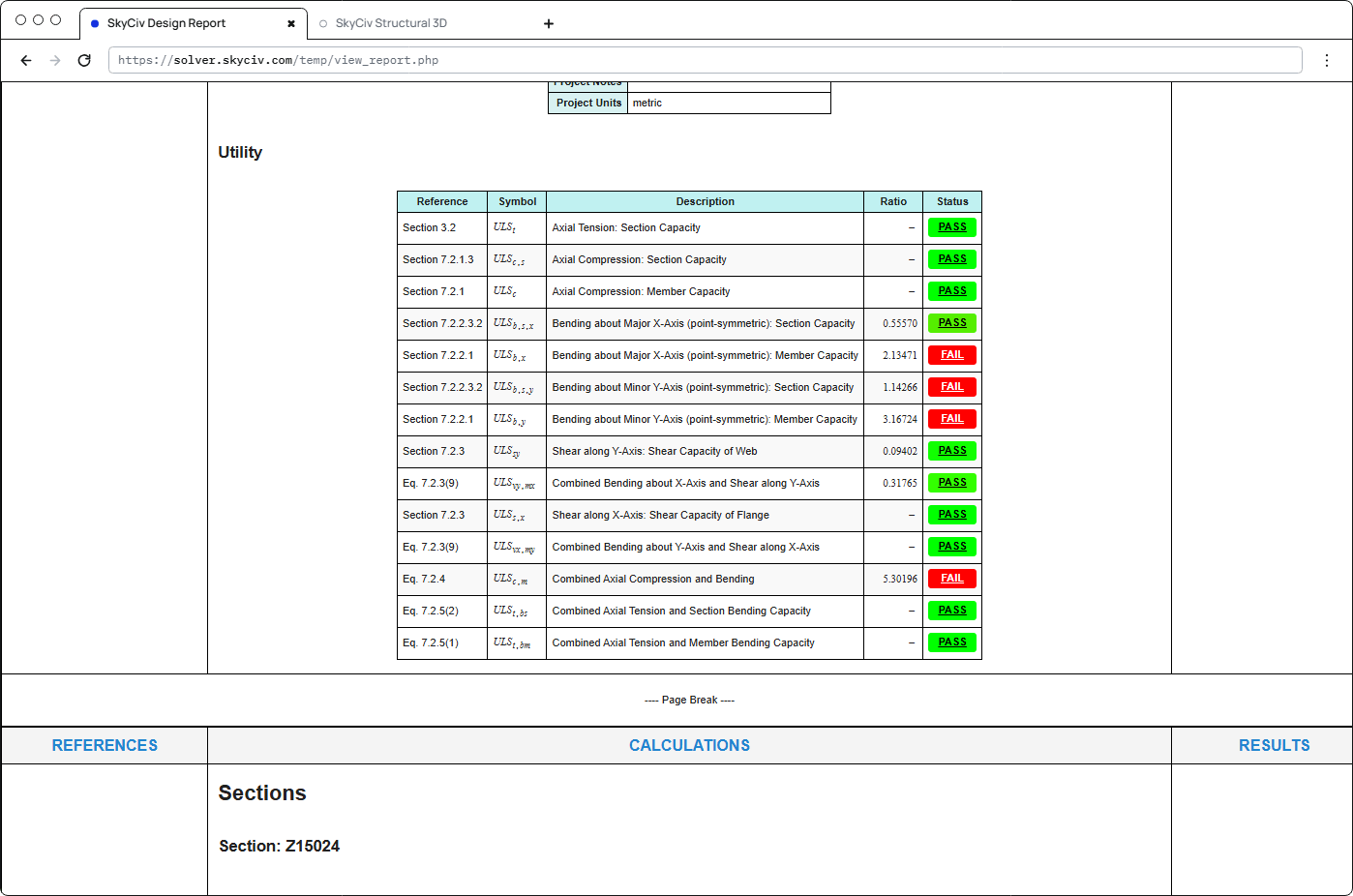
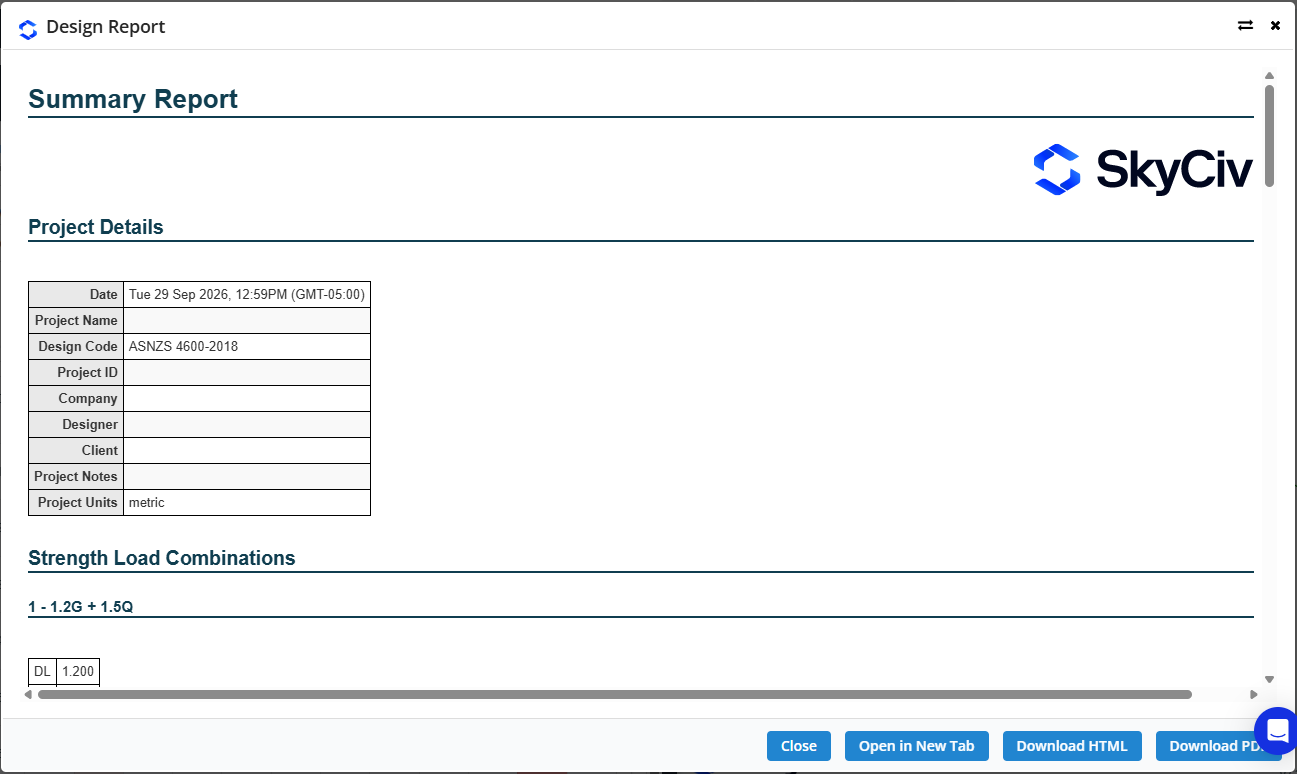
Нажмите Резюме на вкладке Результаты, чтобы открыть Отчет. В нем перечислены детали проекта (включая дизайн-код), сочетания силовых нагрузок с их коэффициентами, и результаты для всех участников.