
Tepkileri yorumlama, bükülme anı, kesme, sapma ve gerilmeler şunlardan kaynaklanır: SkyCiv Beam
Modelinizi oluşturmayı bitirdiğinizde, modelinizin sağ üst köşesinde bulunan yeşil 'Çöz' düğmesine tıklayarak çeşitli sonuçlar için çözebilirsiniz.. Aşağıdaki model önceki bölümlerdeki örneği devam ettirmektedir..
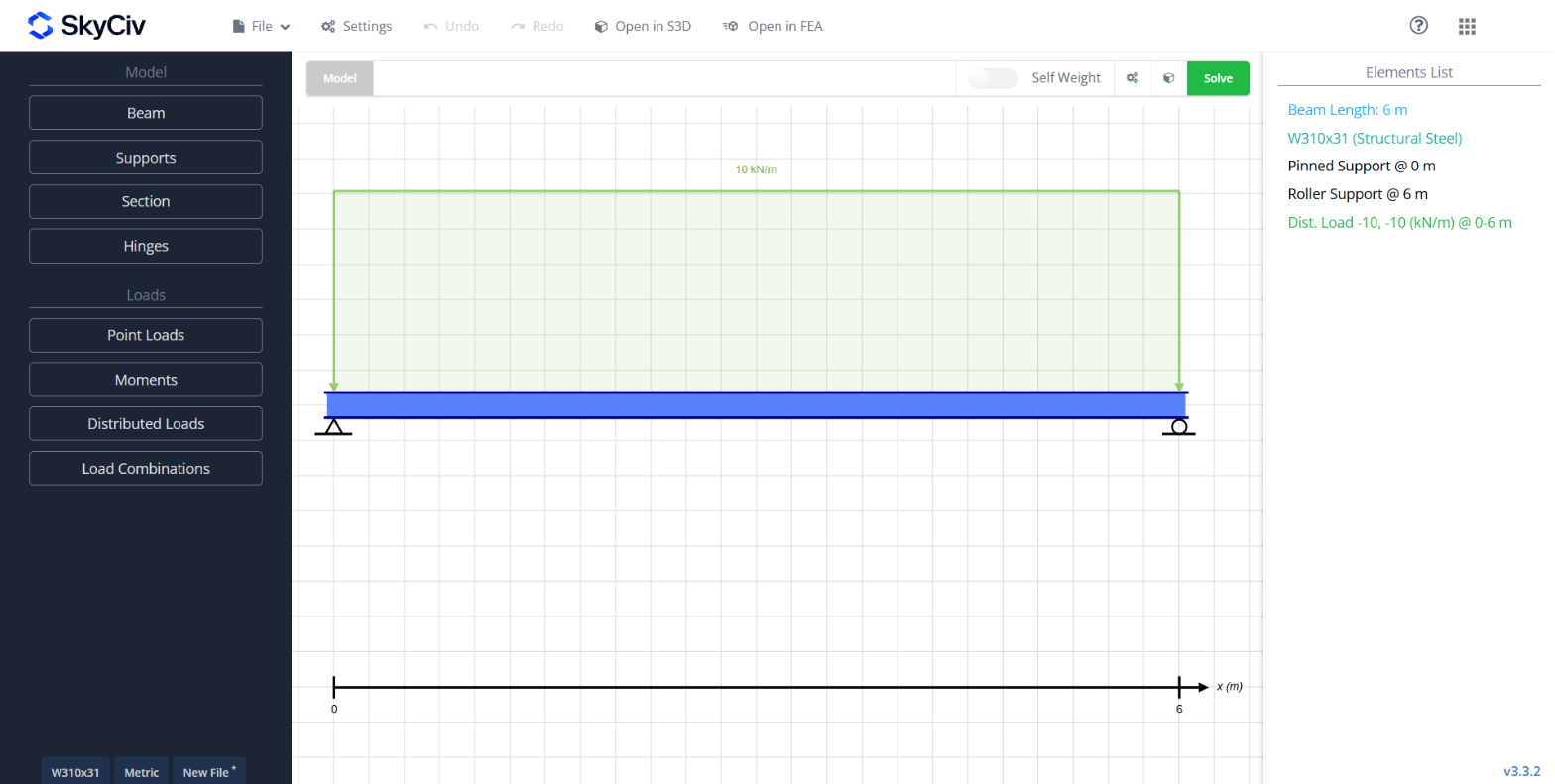
Çöz düğmesine tıklamak sizi analiz sonuçlarına erişebileceğiniz sonuçlar sayfasına götürecektir.. The top menu allows you to toggle between individual results or return to your model with the ‘Model’ buton. Using the top menu, gibi sonuçlara ulaşabilirsiniz.:
- Herşey (every result on one page)
- Tepkiler (Desteklerdeki Tepkiler / Serbest cisim diyagramı)
- BMD (Eğilme Momenti Diyagramı)
- SFD (Kesme Kuvveti Şeması)
- Sehim
- Stres (eğilme, burulma, shear and axial stress)
- Kesit (Kiriş Bölümü)
- Oluşturucu (3D oluşturma)
Ayrıca, using the right-side Analysis tab you can access detailed results such as
- Özet (Sehim, Zarf maksimum kaymamız şu şekilde gösterilir:, Material Yield and Material Strength)
- Select Load Combination
- Reaction values (Rx, Ry and M) her destekte
- Aşırı Kuvvetler
- Aşırı Stres
- Points of Interest table
Not: To access all results including those related to stress and 3D rendering, kiriş modelinize bölüm oluşturucudan bir bölüm eklenmesi gerekiyor. Deflection results are still shown without a section, but they use a default section and material, so they are not accurate.
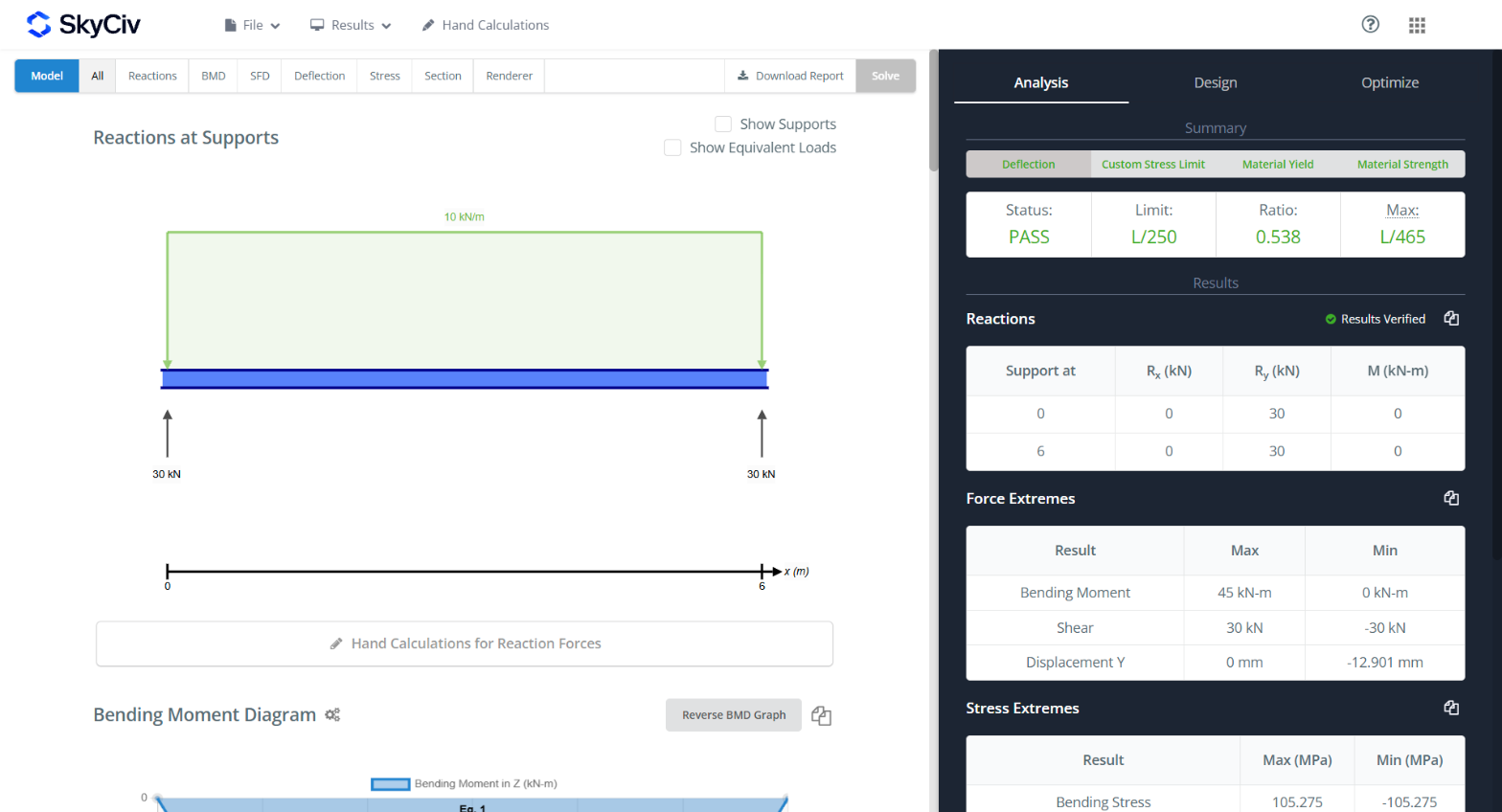
Serbest cisim diyagramı (FBD)
görüntülemek için ücretsiz bir gövde diyagramı mevcuttur. desteklerdeki tepkiler modelin. The ‘Show Supports’ and ‘Show Equivalent Loads’ checkboxes above the diagram toggle the supports and the equivalent loads. Ayrıca reaksiyon sonuçlarının adım adım nasıl hesaplandığını göstermek için el hesaplamaları da sağlıyoruz.. El Hesaplamaları hakkında daha fazla ayrıntı kendi bölümünde verilmektedir..
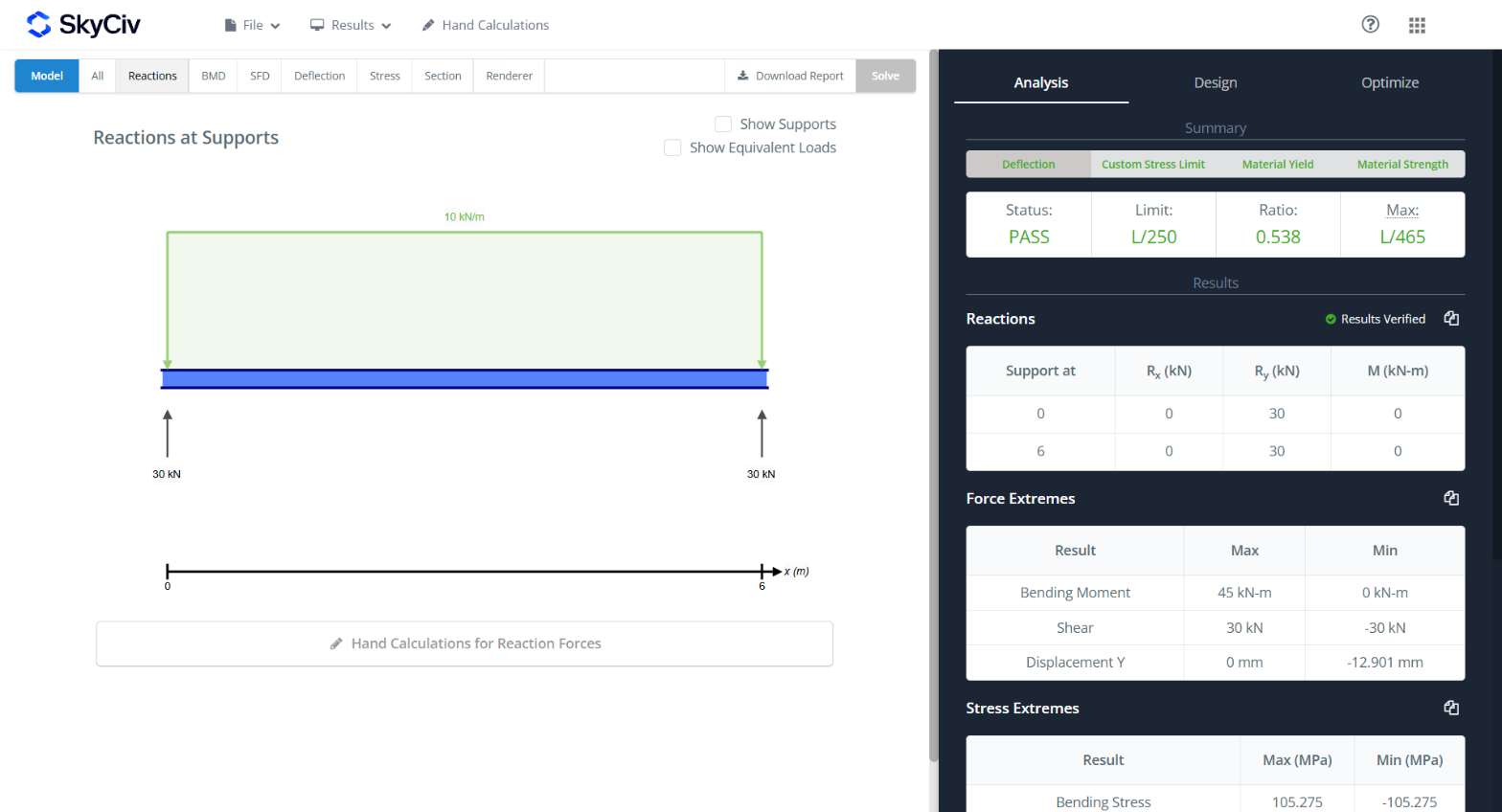
Kiriş Bölümü
Kiriş için kullanılan bölümün bir özeti sonuçlarla birlikte sunulur. Kirişin geometrisi, boyutlarıyla birlikte solda görüntülenir.. Sağa, geometrik göstermek için tablolar sunulmaktadır., eğilme, kesme, ve burulma özellikleri. Altta, malzeme özellikleri tabloda özetlenmiştir.
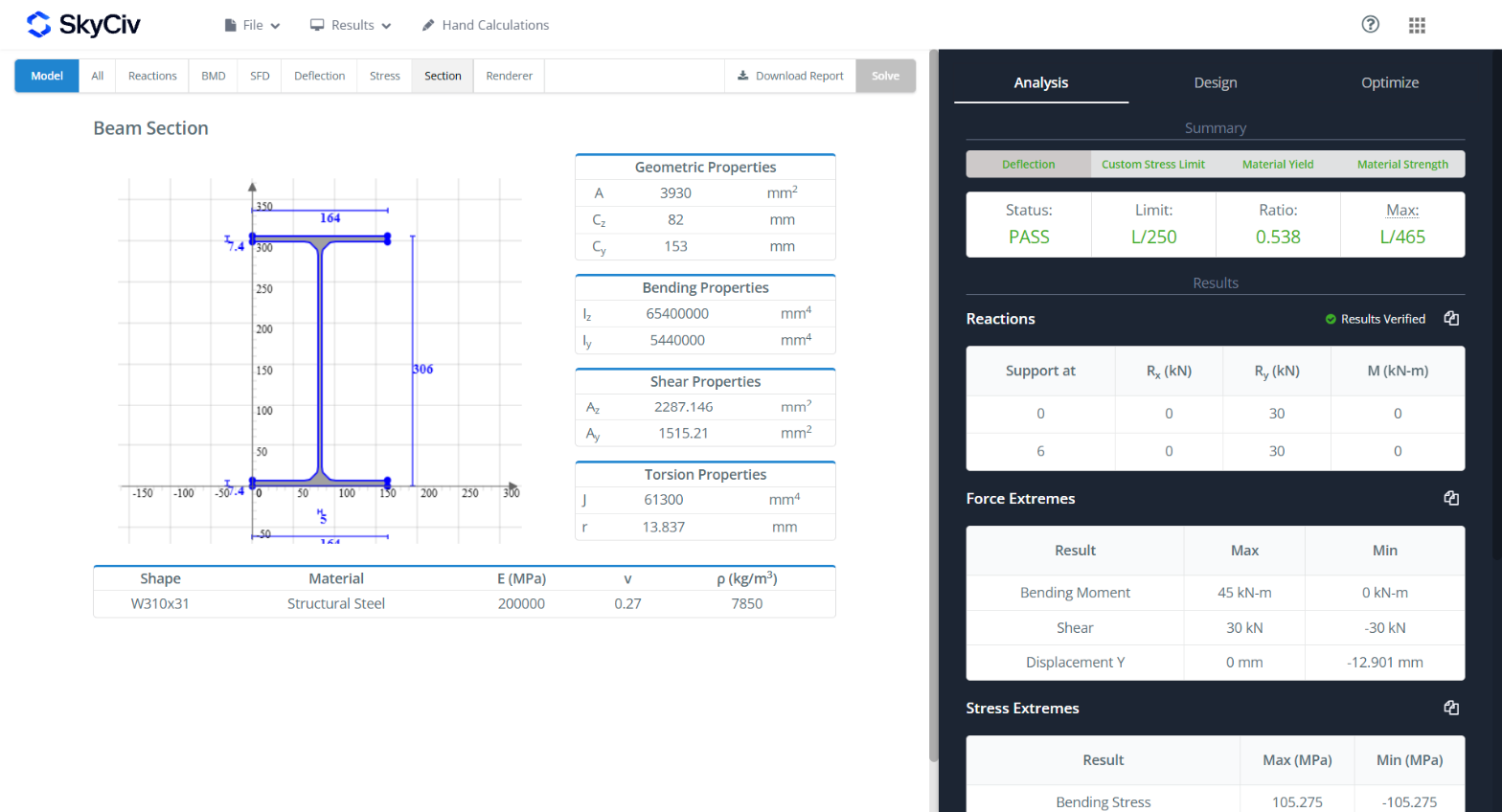
Kesme Kuvveti Şeması (SFD)
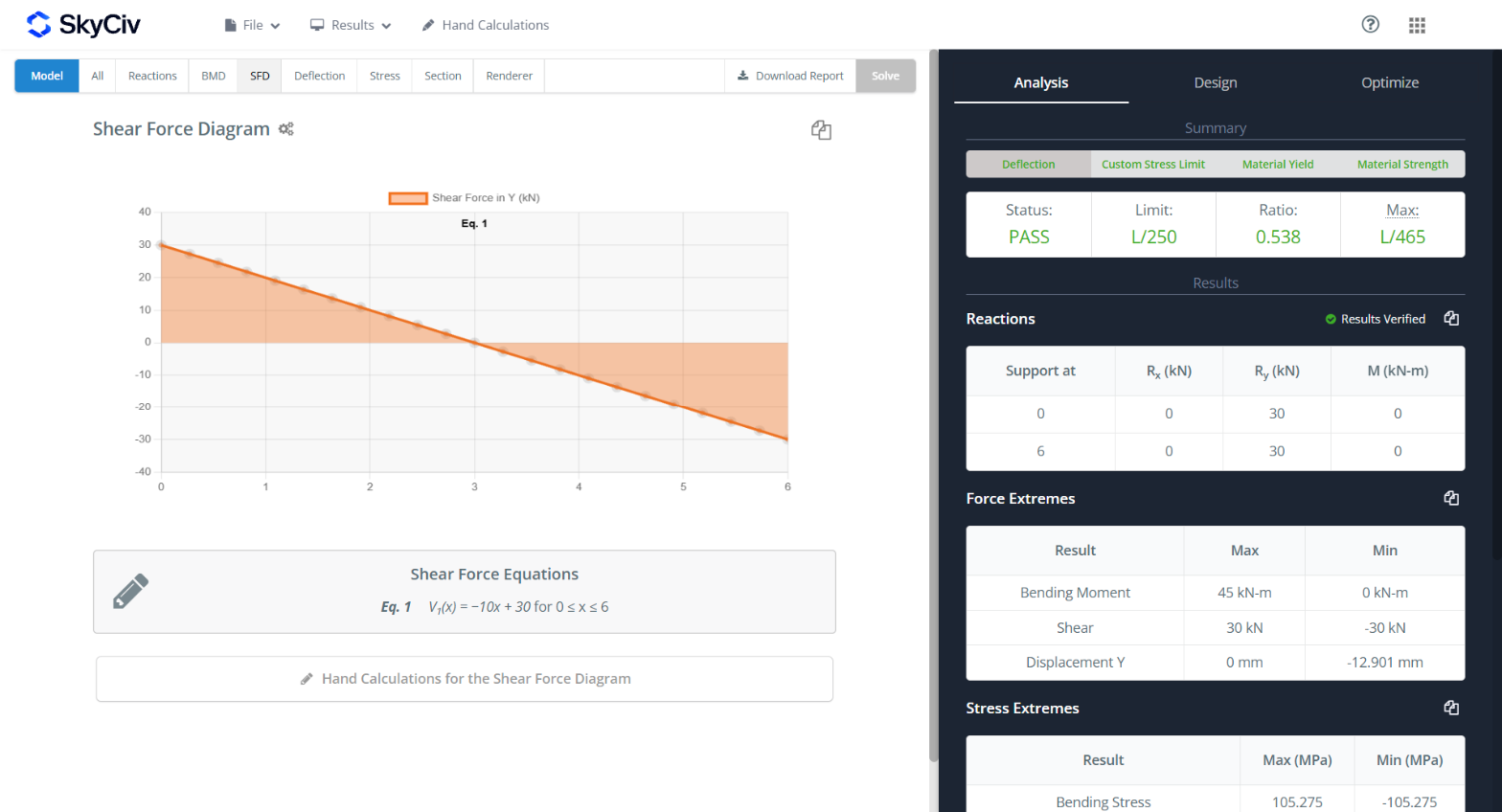
Kesme Kuvveti Diyagramı (SFD) modelinizin sonuçlarıyla birlikte sunulur. Beklenildiği gibi, kirişin uzunluğuna karşı kesme kuvveti değerlerini çizer.
A dropdown above the graph switches between the Vertical (Y ekseni) and Horizontal (Z ekseni) kesme kuvveti.
Below the SFD, Kesme Kuvveti Denklemleri her süreksizlikte sunulur (for the vertical shear force, with Hand Calculations available on your account). Denklemi grafikteki süreksizliğiyle eşleştirmek için denklemden sonraki aralığı kullanın.
SFD üzerinde belirli bir noktadaki değeri bulmak için, use the Points of Interest table in the right-side Analysis tab or hover over the graph to get an exact value at that point.
Kesme Kuvveti Denklemlerinin nasıl türetildiğini göstermek için SFD için el hesaplamaları da mevcuttur.. El Hesaplamaları hakkında daha fazla ayrıntı kendi bölümünde verilmektedir..
Eğilme Momenti Diyagramı (BMD)
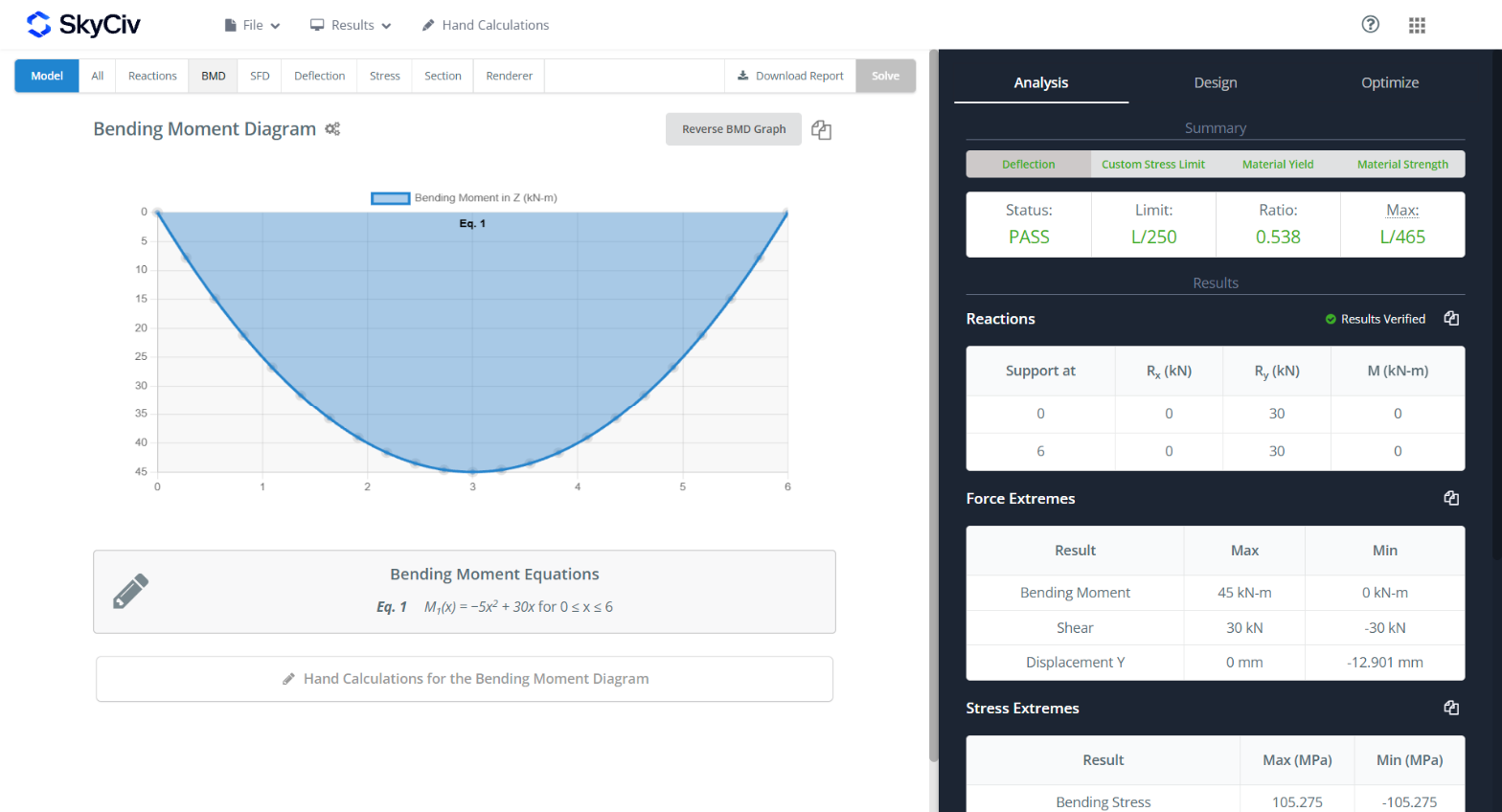
Eğilme Momenti Diyagramı (BMD) modelinizin sonuçlarıyla birlikte sunulur. Beklenildiği gibi, kirişin uzunluğuna karşı eğilme momenti değerlerini çizer.
BMD işareti kuralını tersine çevirmek için bir seçenek mevcuttur. Bu, olumlu olarak kabul edilenlerin şimdi olumsuz olarak kabul edileceği ve bunun tersi anlamına gelir.. Click the ‘Reverse BMD Graph’ button to toggle this option. A dropdown above the graph switches between the Horizontal (Z ekseni) and Vertical (Y ekseni) bükülme anı.
Below the BMD, Eğilme Momenti Denklemleri her süreksizlikte sunulur (for the Horizontal (Z ekseni) bükülme anı, with Hand Calculations available on your account). Denklemi grafikteki süreksizliğiyle eşleştirmek için denklemden sonraki aralığı kullanın.
BMD üzerinde belirli bir noktadaki değeri bulmak için, use the Points of Interest table in the right-side Analysis tab or hover over the graph to get an exact value at that point.
BMD için Bükülme Momenti Denklemlerinin nasıl türetildiğini göstermek için el hesaplamaları da mevcuttur.. El Hesaplamaları hakkında daha fazla ayrıntı kendi bölümünde verilmektedir..
Dikey Sapma ve Elastik Eğri
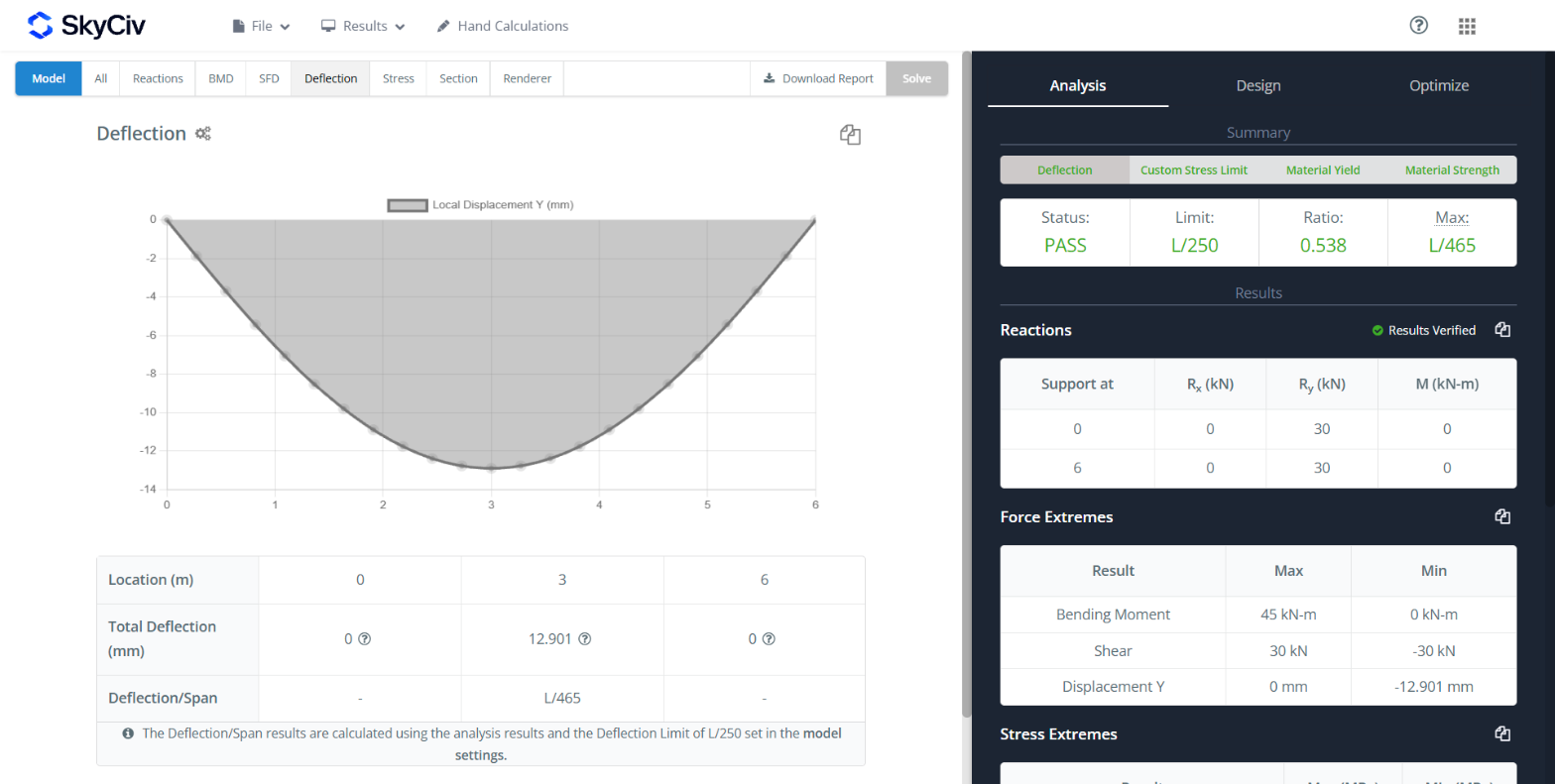
Modelinizin dikey sapması sonuçlarla birlikte sunulur. Kirişin elastik bir eğrisini veya sapmasını gösteren bir diyagram sağlanır, with a dropdown to switch between the Vertical (Y ekseni) and Horizontal (Z ekseni) sehim. diyagramın altında, a table lists the Location, the Total Deflection and the Deflection/Span ratio at the points of zero deflection and of peak deflection along the beam. The Deflection/Span ratio is highlighted when it exceeds the Deflection Limit set in the model settings. Sapmanın nasıl elde edildiğini göstermek için Eğim ve Sapma için el hesaplamaları da mevcuttur. El Hesaplamaları hakkında daha fazla ayrıntı kendi bölümünde verilmektedir..
Stres Sonuçları
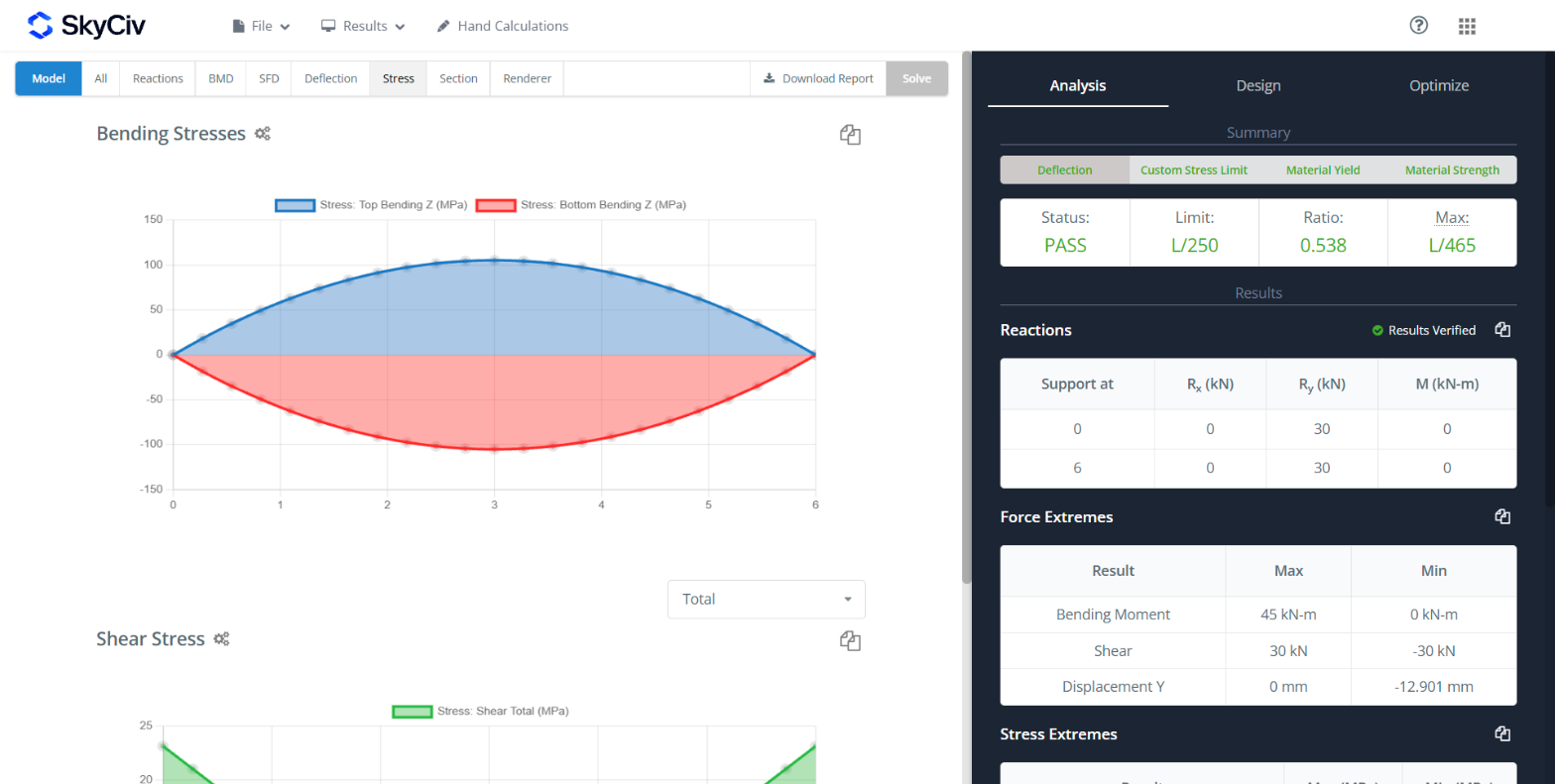
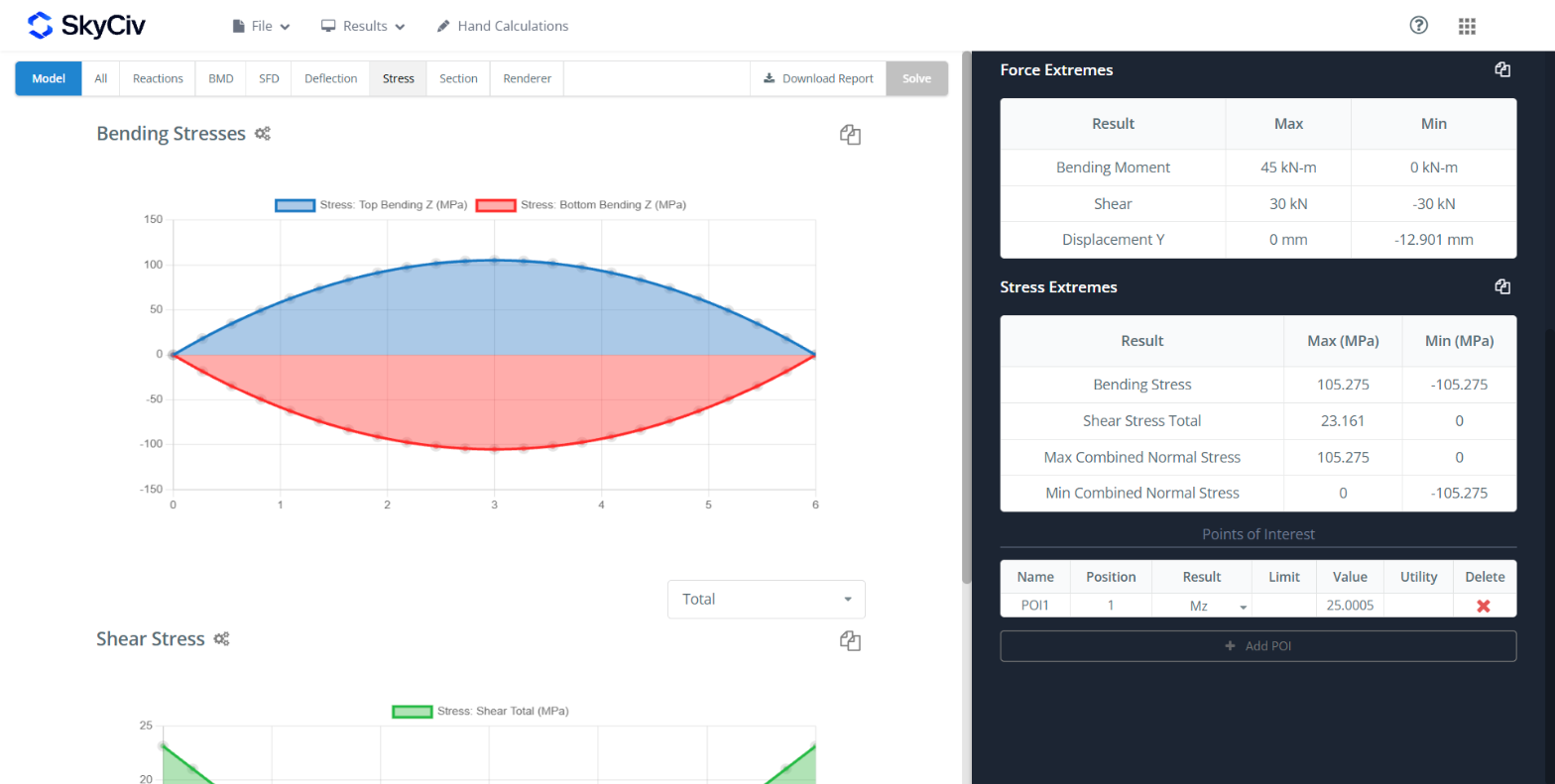
The stress results of your model are presented under the Stress menu, which requires a section. Two diagrams are shown. The first plots the bending stress, with a dropdown to choose Horizontal (Z ekseni), Dikey (Y ekseni) veya burulma (X-Axis). The second plots the shear stress, with a dropdown to choose Total, Dikey (Y ekseni), Yatay (Z ekseni) or Axial (X-Axis).
Analiz Özeti
The Analysis tab on the right aims to provide a quick summary of the critical results from your beam model. The Summary section provides an overview of the deflection, üye stresi, malzeme verimi, ve kirişin malzeme mukavemeti, shown as Pass or Fail.
Underneath, the Reactions, Aşırı Kuvvetler, ve Stress Extremes, kirişinizin kritik sonuçlarına hızlı bir genel bakış sağlamak için tablo formatında listelenmiştir.. Use ‘Select Load Combination’ above them to see the results of a different load combination.
Ücretsiz Kiriş Hesaplayıcı
SkyCiv Beam Yazılımını Free Beam Aracımızla test edin. kesme kuvveti diyagramı hesap makinesi, eğilme momenti hesaplayıcısı, ışın sapması hesaplayıcı, ve daha fazlası! Artık daha fazla işlev ve daha şık bir kullanıcı arayüzüyle sunuluyor, o zaman bugün bir dene!
