
Revit モデルをインポートする方法
SkyCiv 3D構造分析 モデルのインポートが簡単になりました, Revitさえ必要なくなるほど! .rvt ファイルをユーザー インターフェイスにドラッグ アンド ドロップするだけです。:
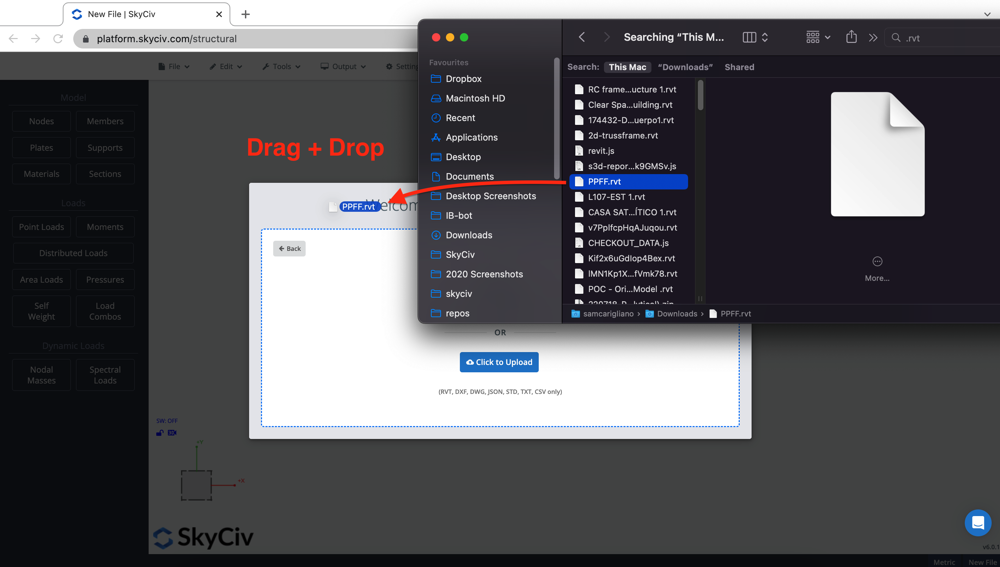
あるいは, あなたが訪問することができます ファイル – インポート – Revit ファイル エクスプローラーからファイルを選択するには. アップロードしたら, Revit モデルが同じウィンドウでプレビューされます. 注意, これにより、構造要素だけでなく建築要素も表示されます – つまり、実際にはインポートされない壁や建築部材が表示される可能性があります。:
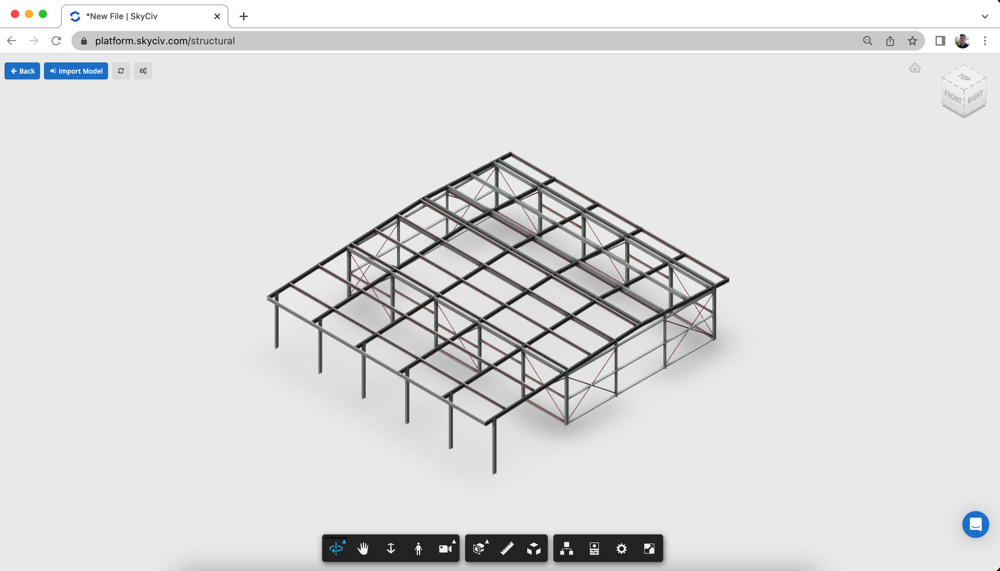
Revit モデル
The quality of your Revit Model will directly impact how much time is required repairing the model in Structural 3D. A well-setup model in Revit will import cleanly, with no post processing necessary. Some recommendations we have is to:
- Make sure your Revit Model has an analytical model
- Check your Sections/Materials and that all the required structural information is included
- Check your members are connected in the analytical model. In Revit, they might seem to be touching or connected, but this may not be the case
- Only Structural Elements will be imported from your Revit model, architectural only elements are ignored
- サポート, loads and load combinations can also be defined on Revit side if this is a preferred workflow.
We recommend cleaning your model on Revit’s side to ensure you have a single source of truth and save yourself cleaning up the model on S3D’s side each time.
モデルを修復する
SkyCiv has an inbuilt Repair Model Function that will identify issues with your model, including overlapping members, merge close nodes and unused nodes. These are sometimes hard to identify and clean, so SkyCiv has added an automated tool to help you repair these issues.
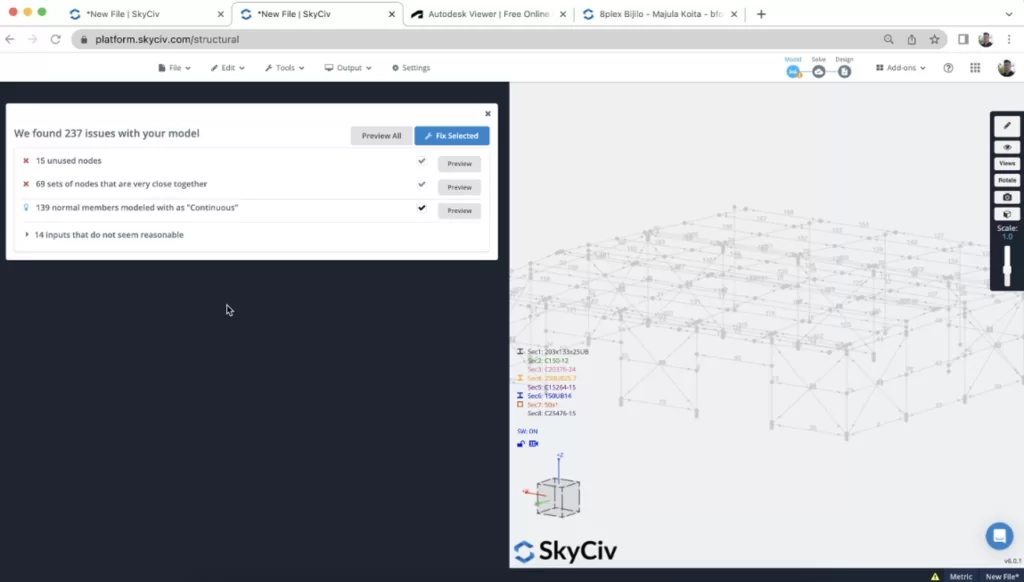
加えて, users are recommended to review the member connectivity as this can often be problem with Revit imported models. Members need to be joined by nodes in order for them to be correctly connected.
ソルブの実行
Running a solve is generally the next step for the engineer. This step in the process will also identify any other issues in your model. 例えば, missing section properties, no loads being applied or insufficient restraints or supports in your model.
It’s often useful to scale and animate the deflection result (S + スクロール マウス), this will help identify any connectivity issues in your model:
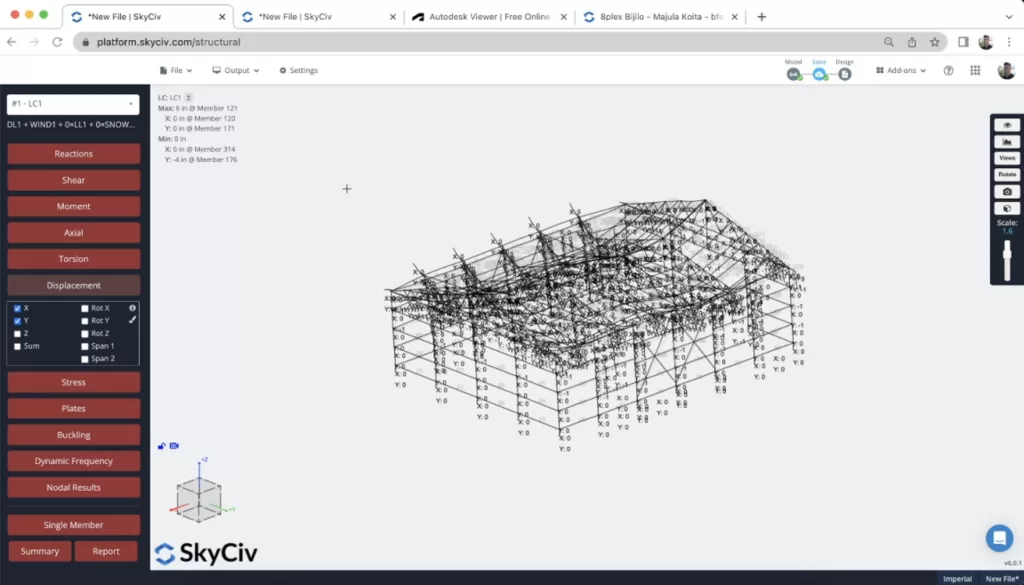
If loads combinations have been defined, you can also review the results from these combinations.
よくある質問
- If your model did not show anything, please check your Revit model has an analytical model.
- Sometimes there can also be minor connectivity issues on Revit’s API which can cause the importing to fail.
- 経験則として, the importing should take less than 5 分. If you’re waiting longer than 5 minutes please cancel the import and try again.
絶対に. SkyCiv には、モデルを Revit から S3D に直接エクスポートできる Revit プラグインもあります. 一般に, これはより高速に実行され、Revit ファイルをインポートする場合に推奨される方法です。.
ここをクリックしてダウンロードしてください SkyCiv-Revit プラグイン.
はい, SkyCiv は SkyCiv と Revit 間の双方向のデータ移行をサポートします. エクスポートの準備ができたら, クリックするだけです ファイル – 書き出す – Revit すべての変更を含む Revit ファイルをダウンロードできます.


